

How to create smart scenes between the Mijia Air Conditioner Pro Eco A+++ 12K and other devices?
The Mijia Air Conditioner Pro Eco A+++ 12K supports creating smart scenes that enable seamless interaction and automation with other compatible devices. By setting up these scenes, you can customize your home environment for greater convenience and energy efficiency.
To create a smart scene, please refer to the following steps:
1. Open the Mi Home/Xiaomi Home APP;
2. Tap the three-dot icon at the upper right corner, and then select [Automation];
3. Tap the [+] icon in the top right to start configuring a new automation;
4. According to your needs, you can set trigger conditions and actions to enable device linkage and automatic control.
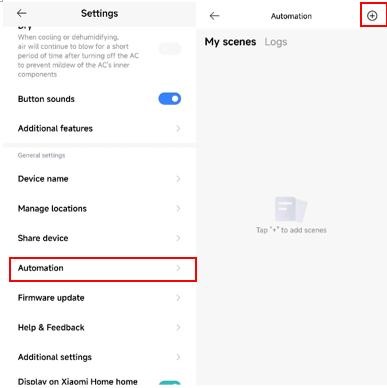
To create a smart scene, please refer to the following steps:
1. Open the Mi Home/Xiaomi Home APP;
2. Tap the three-dot icon at the upper right corner, and then select [Automation];
3. Tap the [+] icon in the top right to start configuring a new automation;
4. According to your needs, you can set trigger conditions and actions to enable device linkage and automatic control.
Does it help?
Yes
No