

How to connect the Mijia Air Conditioner Pro Eco A+++ 12K to the Mi Home/Xiaomi Home APP?
To connect your Mijia Air Conditioner Pro Eco A+++ 12K to the Mi Home/Xiaomi Home APP, please install the APP and log in to your account. Then follow the steps below for configuration:
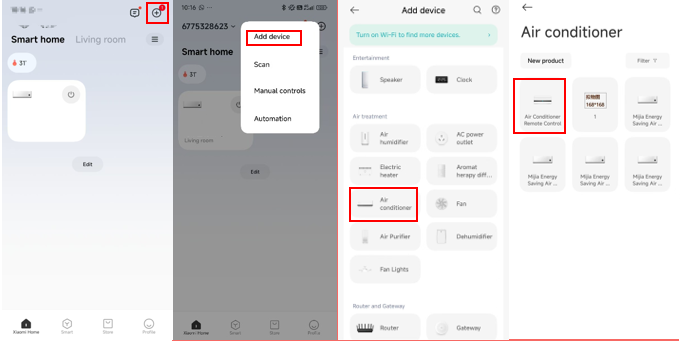
1. First, connect your phone to your home Wi-Fi network. Then, open the Mi Home/Xiaomi Home APP and tap the [+] icon in the upper right corner to enter the [Add device] interface. Tap the detected device name to enter the Wi-Fi configuration interface. Please refer to the illustrated instructions for guidance;
2. Follow the on-screen prompts step by step until the message [Device added successfully] appears.
Note:
1. On Android devices, the Mi Home/Xiaomi Home APP allows you to add the air conditioner via either nearby devices or manual addition. On iOS devices, after tapping the [+] icon on the home interface, you can either manually select the air conditioner or tap on the nearby devices detected automatically via Bluetooth;
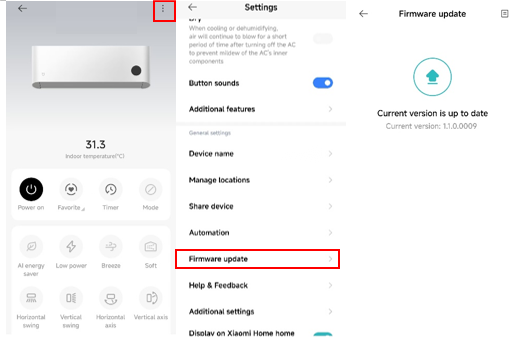
2. The firmware update is supported for both the indoor and outdoor units.
1. First, connect your phone to your home Wi-Fi network. Then, open the Mi Home/Xiaomi Home APP and tap the [+] icon in the upper right corner to enter the [Add device] interface. Tap the detected device name to enter the Wi-Fi configuration interface. Please refer to the illustrated instructions for guidance;
2. Follow the on-screen prompts step by step until the message [Device added successfully] appears.
Note:
1. On Android devices, the Mi Home/Xiaomi Home APP allows you to add the air conditioner via either nearby devices or manual addition. On iOS devices, after tapping the [+] icon on the home interface, you can either manually select the air conditioner or tap on the nearby devices detected automatically via Bluetooth;
2. The firmware update is supported for both the indoor and outdoor units.
Does it help?
Yes
No