

How to set the turn-on/off timer for the Mijia Air Conditioner Pro Eco 3.5 kW?
You can use the remote control to set the turn-on/off timer on the Mijia Air Conditioner Pro Eco 3.5 kW. When the air conditioner is on, you can set an auto turn-off timer, and when it is off, you can set an auto turn-on timer. Press the [Timer] button to enter timer mode, and press [+] or [−] to adjust the time. The setting will be automatically confirmed after 2 seconds of inactivity.
Note:
The turn-on timer defaults to the mode, temperature, fan speed, and swing modes used before the last shutdown. If you would like to use the functions during the next turn-on, you can set the mode, temperature, fan speed, and swing modes as needed when the air conditioner is running, and then turn off the air conditioner and set the turn-on timer.
In addition, the Mi Home/Xiaomi Home APP offers three ways to schedule turn-on/off timer functions for the air conditioner, as described below:
1. You can set a turn-on time for the air conditioner by using the [Timer] function on the device interface and selecting [Power on timer];
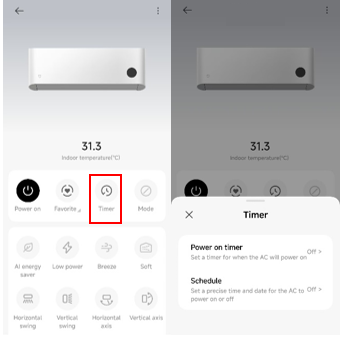
2. You can also use the [Schedule] option under the [Timer] function to set both a start time and an end time. The air conditioner will automatically turn on at the beginning of the specified period and turn off at the end;
Note:
This method allows you to schedule both turn-on and turn-off times within a specific time range.
3. Another method is to create a custom smart scene in the [Automation] section of the Mi Home/Xiaomi Home APP. This allows you to schedule the air conditioner to turn on or off at specific times based on preset conditions.
Note:
The turn-on timer defaults to the mode, temperature, fan speed, and swing modes used before the last shutdown. If you would like to use the functions during the next turn-on, you can set the mode, temperature, fan speed, and swing modes as needed when the air conditioner is running, and then turn off the air conditioner and set the turn-on timer.
In addition, the Mi Home/Xiaomi Home APP offers three ways to schedule turn-on/off timer functions for the air conditioner, as described below:
1. You can set a turn-on time for the air conditioner by using the [Timer] function on the device interface and selecting [Power on timer];
2. You can also use the [Schedule] option under the [Timer] function to set both a start time and an end time. The air conditioner will automatically turn on at the beginning of the specified period and turn off at the end;
Note:
This method allows you to schedule both turn-on and turn-off times within a specific time range.
3. Another method is to create a custom smart scene in the [Automation] section of the Mi Home/Xiaomi Home APP. This allows you to schedule the air conditioner to turn on or off at specific times based on preset conditions.
Does it help?
Yes
No