

Xiaomi Robot Vacuum S40 FAQ
Summary
1. Q: What is the Xiaomi Robot Vacuum S40?
A: The Xiaomi Robot Vacuum S40 is an intelligent, integrated cleaning, sweeping, and mopping robot. It can complete the cleaning and mopping tasks independently at home, and return to the charging dock for charging after cleaning, greatly reducing the workload of floor cleaning.
2. Q: What are the features of the Xiaomi Robot Vacuum S40?
A: The following are the features of the Xiaomi Robot Vacuum S40:
1. The Xiaomi Robot Vacuum S40 features a 5200mAh large capacity battery;
2. It has a strong suction power of 10kPa and can be intelligently controlled through the Mi Home/Xiaomi Home APP. The strong suction power brings a deeper and more efficient cleaning experience.
3. Q: How to use the power button of the Xiaomi Robot Vacuum S40?
A: To use the power button of the Xiaomi Robot Vacuum S40, please refer to the following steps:
1. Press and hold it for three seconds to turn on or off;
2. Press to clean or pause while turned on.
4. Q: How to use the recharging button of the Xiaomi Robot Vacuum S40?
A: The following are the recharging button functions on the Xiaomi Robot Vacuum S40:
1. Press the recharging button while the robot vacuum is running to pause the cleaning task;
2. Press the recharging button again while the robot vacuum is paused to send it back to the charging dock for charging;
3. Press the recharging button while the robot vacuum is returning to the charging dock to stop the docking process;
4. Press and hold the recharging button for three seconds to enable or disable the child lock function.
5. Q: What does the indicator on the Xiaomi Robot Vacuum S40 mean?
A: The following are the indicator statuses on the Xiaomi Robot Vacuum S40:
1. White: The robot vacuum is operating normally, cleaning, or is fully charged;
2. Breathing in white: The robot vacuum is charging with a medium to high battery level;
3. Blinking in white: The robot vacuum is returning to the charging dock, repositioning, or updating firmware;
4. Yellow: The robot vacuum is disconnected from Wi-Fi;
5. Blinking in yellow: The robot vacuum is experiencing an error, awaiting connection, or running low battery;
6. Breathing in yellow: The robot vacuum is charging with a low battery level;
7. Blue: The robot vacuum is successfully connected to Wi-Fi;
8. Blinking in blue: The robot vacuum is connecting to Wi-Fi or undergoing a firmware upgrade;
9. No Light: The robot vacuum is powered off or in sleep mode.
Product Introduction
1. Q: What are the accessories of the Xiaomi Robot Vacuum S40?
A: The accessories installed on the main unit include: main brush, main brush cover, dust compartment, other accessories include mop pad and water tank assembly, side brush, power supply, and charging dock.
After unpacking, it is recommended to check according to the instructions in the list of accessories in the manual. If there is any missing item, please fully unfold the lining of the package to confirm whether it is missing, and contact the after-sales service for consultation.
2. Q: What are the main functional components of the Xiaomi Robot Vacuum S40?
A: The following are the main functional components of the Xiaomi Robot Vacuum S40:
1. Power button:
(1). Press and hold it for three seconds to turn on or off;
(2). Press to clean or pause while turned on.
2. Recharging button:
(1). Press to pause while running;
(2). Press to start docking when it is paused;
(3). Press to stop docking when it returns to dock;
(4). Press and hold the recharging button for three seconds to enable or disable the child lock.
3. Indicator:
(1). White: The robot vacuum is operating normally, cleaning, or is fully charged;
(2). Breathing in white: The robot vacuum is charging with a medium to high battery level;
(3). Blinking in white: The robot vacuum is returning to the charging dock, repositioning, or updating firmware;
(4). Yellow: The robot vacuum is disconnected from Wi-Fi;
(5). Blinking in yellow: The robot vacuum is experiencing an error, awaiting connection, or running low battery;
(6). Breathing in yellow: The robot vacuum is charging with a low battery level;
(7). Blue: The robot vacuum is successfully connected to Wi-Fi;
(8). Blinking in blue: The robot vacuum is connecting to Wi-Fi or undergoing a firmware upgrade;
(9). No Light: The robot vacuum is powered off or in sleep mode.
3. Q: How to check the SN on the Xiaomi Robot Vacuum S40?
A: You can check the SN by looking at the label at the bottom of the main unit.
4. Q: Can the Xiaomi Robot Vacuum S40 be used directly after unpacking?
A: You can use the Xiaomi Robot Vacuum S40 directly after unpacking. It is recommended to check whether there are missing parts after unpacking, and then open the Xiaomi Robot Vacuum S40 and use it according to the instructions.
When used for the first time, please manually place the main unit on the charging dock and align it with the charging spring. Let the Xiaomi Robot Vacuum S40 be fully charged before using.
5. Q: What cleaning mode is recommended when using the Xiaomi Robot Vacuum S40 for the first time?
A: Please refer to the following information to select the cleaning mode when you use it for the first time:
In a scene with a lot of dust and debris at home, it is recommended not to use the mopping function for the first time. After installing the mopping component, choose the Vacuuming & Mopping mode.
6. Q: Why does the Xiaomi Robot Vacuum S40 need to be cleaned regularly?
A: The Xiaomi Robot Vacuum S40 has cleaning functions, such as sweeping, mopping and collecting garbage. Regular dumping of garbage, cleaning the roller brush and side brush can restore the cleaning ability of the robot vacuum.
7. Q: How does the Xiaomi Robot Vacuum S40 enter standby mode after completing the task?
A: After completing the task, it is recommended to return the Xiaomi Robot Vacuum S40 to its charging dock for charging and enter standby mode to ensure that the device's battery has sufficient power. If the device is not on the charging dock, you can manually press the power button to turn off the device to avoid wasting power. (When the device is in standby mode for a long time, it will automatically shut down, which is normal).
8. Q: What to do if the side brush of the Xiaomi Robot Vacuum S40 is tangled?
A: When the side brush of the Xiaomi Robot Vacuum S40 is entangled with the object, please clean the side brush in time and check whether the bristles of the side brush have fallen off or been damaged. When cleaning again, you can first clean the items that are easy to entangle on the ground, such as wool, rope, etc.
9. Q: What to do if the Xiaomi Robot Vacuum S40 can't shut down on the charging dock?
A: The Xiaomi Robot Vacuum S40 is always in standby mode when charging on the charging dock. If you need to turn off the device, you need to let the device leave the charging dock. Press and hold the power button for 3 seconds to turn off the device.
10. Q: What environments can the Xiaomi Robot Vacuum S40 be used in?
A: The Xiaomi Robot Vacuum S40 is only used for floor cleaning in the home environment. Do not use it outdoors, off-site, in commercial or industrial environments. It will cause equipment failure, loss, and other consequences.
11. Q: How to use the Do Not Disturb mode of the Xiaomi Robot Vacuum S40?
A: Do Not Disturb mode is enabled by default from 10PM to 8AM. You can use the Mi Home/Xiaomi Home APP to turn off the Do Not Disturb mode or modify the period of Do Not Disturb mode. During the Do Not Disturb mode, the main unit will not automatically continue cleaning or provide voice prompts. The APP will display a notification and the main unit will turn off the indicator.
12. Q: How to use the Scheduled cleanup function of the Xiaomi Robot Vacuum S40?
A: Set the scheduled cleaning time in the Mi Home/Xiaomi Home APP, and the main unit will automatically start cleaning at the specified time, and then automatically return to the charging dock for charging.
13. Q: How to save a complete map on the Xiaomi Robot Vacuum S40?
A: Press the power button to start cleaning, or tap [Start cleanup]
on the Mi Home/Xiaomi Home APP. The main unit starts from the charging dock and saves a temporary map before completing the cleaning. It automatically returns to the charging dock and establishes a complete map (When cleaning, please open the door of the cleaning area to ensure the integrity of the map).
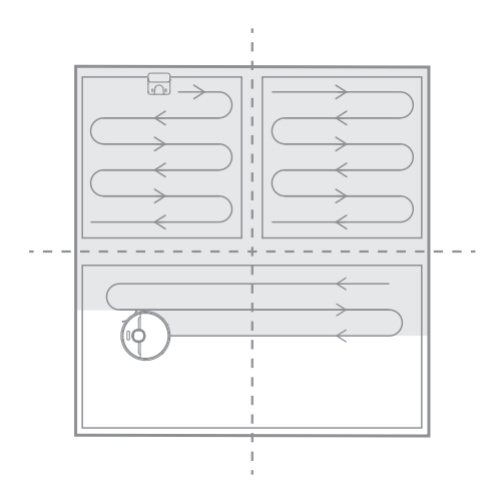
14. Q: How does the Xiaomi Robot Vacuum S40 clean the whole house?
A: After the first start-up, the robot vacuum first cleans in an arc according to the 4.5×4.5m area until all areas are covered.
After the map building is constructed, the robot vacuum performs room-by-room cleaning. First, it cleans along the edge and then in an arc. The room will be cleaned in sequence, orderly and efficiently, covering all areas without omission. After the cleaning is completed, the robot vacuum will automatically return to the charging dock.
15. Q: Can the Xiaomi Robot Vacuum S40 always be charged?
A: The Xiaomi Robot Vacuum S40 supports overcharge protection. After the battery is fully charged, it will automatically adjust to low current charging.
16. Q: Does the Xiaomi Robot Vacuum S40 have motor overload protection function?
A: All motors on the Xiaomi Robot Vacuum S40 have overload protection function, including the main brush motor, side brush motor and wheel motor. When foreign matter enters or is severely blocked, leading to overload, the protection will automatically start.
17. Q: What consumables of the Xiaomi Robot Vacuum S40 need to be replaced regularly?
A: The Xiaomi Robot Vacuum S40 consumables include the main brush, side brush, main brush cover, filter, mop pad, etc., which need to be replaced regularly to ensure the normal function and cleaning ability.
Maintenance suggestions:
1. Main brush: It is recommended to clean once a week and replace the brush every 6-12 months to ensure the cleaning effect;
2. Filter: It is recommended to clean once a week and replace the filter every 3-6 months to ensure the cleaning effect;
3. Side brush: It is recommended to clean once every two weeks and replace the side brush every 3-6 months to ensure the cleaning effect;
4. Mop pad: It is recommended to clean once after each use and replace the mop pad every 3-6 months to ensure the cleaning effect.
18. Q: How to use the charging dock of the Xiaomi Robot Vacuum S40?
A: Place the charging dock against the wall on a horizontal surface, ensure that the space on both sides of the charging dock is more than 0.5m, and connect the plug to the power socket. In order to get better use experience, please place the charging dock within the range of Wi-Fi coverage.
Please refer to the following steps:
1. Remove the protective film from the charging dock;
2. Place the charging dock against the wall and connect it to the power supply;
3. Connect the power adapter to the charging dock.
Note:
1. Do not expose the charging dock to direct sunlight;
2. Do not place any objects within 0.5m on either side of the charging dock and 1.5m in front of the charging dock;
3. Before use, place the main unit on the charging dock, and the main unit will automatically start charging;
4. When charging the device for the first time, please use it after full charge to protect the battery;
5. When the battery of the device is low, it will not be able to use. Please put the main unit on the charging dock for charging;
6. When the main unit is connected to the charging dock, the main unit will automatically start up and cannot be shut down during the charging process.
19. Q: How to charge the Xiaomi Robot Vacuum S40?
A: Press and hold the power button, wait for the power indicator to light up, and then place the main unit on the charging dock to charge.
Note:
The device will not be able to open when the battery is low. Place the main unit directly on the charging dock.
20. Q: How to clean the mop pad of the Xiaomi Robot Vacuum S40?
A: To clean the mop pad of the Xiaomi Robot Vacuum S40, please refer to the following steps:
1. Remove the mop pad and water tank assembly from the Xiaomi Robot Vacuum S40;
2. Remove the mop from the mop pad;
3. Clean the mop pad;
4. Dry the mop pad.
21. Q: How to fill the water tank of the Xiaomi Robot Vacuum S40?
A: To fill the water tank of the Xiaomi Robot Vacuum S40, please refer to the following steps:
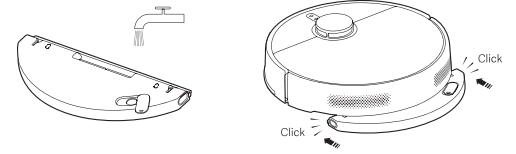
1. Open the tank plug, inject tap water, and tighten the tank plug after completion;
2. Install the water tank in the direction shown in the diagram. When you hear a "click", it is installed in place.
22. Q: How to start the cleaning function of the Xiaomi Robot Vacuum S40?
A: Press the power button to start cleaning. Press any button to pause cleaning.
Note:
1. Before cleaning, please fully charge and start the main unit from the charging dock. During the cleaning process, do not move the charging dock at will;
2. If the battery of the device is low, the cleaning cannot be started. Please charge first, then start cleaning.
23. Q: How to return the Xiaomi Robot Vacuum S40 to the charging dock for charging?
A: After cleaning, the main unit will automatically return to the charging dock for charging. In the suspended state, press the recharging button to start recharging. When the main unit is charging, the power button breathing light flashes.
Note:
If the main unit does not find the charging dock, it will automatically return to the starting point of cleaning. Please manually put the main unit back into the charging dock for charging.
24. Q: How to maintain the main brush and side brush of the Xiaomi Robot Vacuum S40?
A: To maintain the main brush and side brush of the Xiaomi Robot Vacuum S40, please refer to the following steps:
1. Pull up the side brush;
2. Grab the two main brush cover release buttons, remove the main brush cover, and take out the main brush;
3. Clean the main brush and side brush;
4. After cleaning, install the main brush, main brush cover and side brush in turn.
25. Q: How to maintain the dust compartment and filter of the Xiaomi Robot Vacuum S40?
A: To maintain the dust compartment and filter of the Xiaomi Robot Vacuum S40, please refer to the following steps:
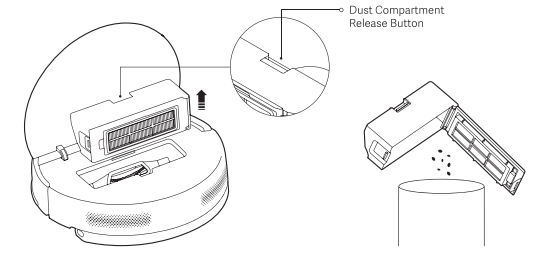
1. Lift the cover of the main unit, press the dust compartment release button, and remove the dust compartment upward;
2. Open the dust compartment and dump out the garbage;
3. Open the filter clip at the arrow position of the dust compartment and remove the filter.
26. Q: Will the yellowing of the charging contact of the Xiaomi Robot Vacuum S40 affect its use?
A: The charging contact of the Xiaomi Robot Vacuum S40 is exposed to the environment. With the increase of use time, oxidation and yellowing will occur to varying degrees, which is a normal phenomenon. This will not affect the charging function, but it needs to be wiped regularly with a dry cloth.
27. Q: How to maintain the battery of the Xiaomi Robot Vacuum S40?
A: The Xiaomi Robot Vacuum S40 has a set of built-in high-performance lithium ion rechargeable batteries. To maintain the battery performance, please keep the main unit charged during daily use.
Note:
If you have not used the device for a long time, please turn off the power. Charge the device at least once every three months to avoid battery damage due to over-discharge.
28. Q: Does the Xiaomi Robot Vacuum S40 support child lock?
A: Yes. Press and hold the recharging button for 3 seconds to open or close the child lock.
29. Q: Does the Xiaomi Robot Vacuum S40 support ultraviolet light?
A: The Xiaomi Robot Vacuum S40 does not support ultraviolet light.
30. Q: Does the Xiaomi Robot Vacuum S40 support electrolysis?
A: The Xiaomi Robot Vacuum S40 does not support electrolysis.
31. Q: How to reset the Xiaomi Robot Vacuum S40?
A: Press and hold the reset button for 3 seconds to reset the main unit.
When you hear the beep, the robot vacuum will automatically restart and related settings, such as scheduled cleaning and Wi-Fi, will revert to factory settings.
32. Q: Does the Xiaomi Robot Vacuum S40 have a water shortage reminder and a dust compartment full reminder?
A: The Xiaomi Robot Vacuum S40 does not have a water shortage reminder or a dust compartment full reminder.
33. Q: Can stickers be used on the Xiaomi Robot Vacuum S40?
A: It is recommended not to use stickers. When using stickers on the Xiaomi Robot Vacuum S40, they can cover the lidar above the device and the infrared sensor in front of the collision panel, affecting the operation of the device.
34. Q: How to create a map with the Xiaomi Robot Vacuum S40?
A: Press the power button to start cleaning, or tap [Start cleanup] on the Mi Home/Xiaomi Home APP. The main unit starts from the charging dock and saves a temporary map before completing the cleaning. It automatically returns to the charging dock and establishes a complete map (When cleaning, please open the door of the cleaning area to ensure the integrity of the map).
35. Q: Is the Xiaomi Robot Vacuum S40 washable when it gets dirty?
A: The Xiaomi Robot Vacuum S40 is not washable when it gets dirty.
If you wash the Xiaomi Robot Vacuum S40 directly with water, the water will enter the device and damage its internal electronic components. It is recommended to remove the brush cover, main brush, side brush, dust compartment, mop pad, and other accessories after the device is dirty, clean them separately, and dry them before using them again.
36. Q: How to clean stubborn stains with the Xiaomi Robot Vacuum S40?
A: It is recommended to add water in advance to soften stubborn stains before using the device.
37. Q: What small objects can the Xiaomi Robot Vacuum S40 recognize?
A: The Xiaomi Robot Vacuum S40 can not recognize small objects.
38. Q: What are the precautions when using the Xiaomi Robot Vacuum S40 for the first time?
A: The following are the precautions when using the Xiaomi Robot Vacuum S40 for the first time:
1. The Xiaomi Robot Vacuum S40 is equipped with a 5200mAh battery. The device has about 30% power before leaving the factory. It is recommended to fully charge it after opening the box for the first time;
2. Fill the tank with water;
3. Connect to the Mi Home/Xiaomi Home APP, put the main unit on the charging dock, and start cleaning.
39. Q: Will the Xiaomi Robot Vacuum S40 navigate around table and chair legs during cleaning?
A: The Xiaomi Robot Vacuum S40 will clean along the edges of table and chair legs when it encounters them.
40. Q: How long does it take for the Xiaomi Robot Vacuum S40
to clean a room?
A: In order to ensure the cleaning ability of the robot vacuum, the walking speed of the Xiaomi Robot Vacuum S40 is 0.3m/s. The cleaning time will fluctuate according to the complexity of the home environment.
41. Q: Why can't the Xiaomi Robot Vacuum S40 avoid bumping into a scale or building blocks?
A: The Xiaomi Robot Vacuum S40 navigates and avoids obstacles through a mechanical collision plate + LDS laser navigation. If the object is less than 3cm, it is recommended to put away items such as scales and sockets before cleaning.
42. Q: Is it normal for the water tank to have water when the Xiaomi Robot Vacuum S40 is opened for the first time?
A: If the water tank has water when the Xiaomi Robot Vacuum S40 is opened for the first time, please refer to the following methods/steps:
1. The Xiaomi Robot Vacuum S40 undergoes random inspections before leaving the factory, including a water tank inspection in which clean water is added to the tank for verification;
2. After the tank inspection is completed, the water is drained. It is normal to find residual water stains in the tank.
43. Q: Does the Xiaomi Robot Vacuum S40 support carpet recognition?
A: The Xiaomi Robot Vacuum S40 does not support carpet recognition.
44. Q: Can the Xiaomi Robot Vacuum S40 automatically clean the mop pad?
A: The Xiaomi Robot Vacuum S40 does not support automatic cleaning of the mop pad. The mop pad needs to be manually disassembled and cleaned. It is recommended to clean the mop pad after each task is completed.
45. Q: Can water be added during the cleaning process of the Xiaomi Robot Vacuum S40?
A: If the main unit needs to add water during the cleaning process, you can pause by pressing any button, remove the tank, put it back after filling up, and press the power button to continue working. The mop pad needs to be cleaned manually.
46. Q: Why does the Xiaomi Robot Vacuum S40 recharge and continue to clean halfway through?
A: When the battery of the device is low during cleaning, the main unit will return to the charging dock for charging. When the device is fully charged, it will leave the charging dock and continue the unfinished task.
APP Related
1. Q: How to connect the Xiaomi Robot Vacuum S40 to the Mi Home/Xiaomi Home APP?
A: This device is connected to the Mi Home/Xiaomi Home APP and can be controlled through the Mi Home/Xiaomi Home APP.
To connect the Xiaomi Robot Vacuum S40 to the Mi Home/Xiaomi Home APP, please refer to the following steps:
1. Download and install the Mi Home/Xiaomi Home APP. If you have already installed the Mi Home/Xiaomi Home APP, you will go directly to the device connection interface. Alternatively, you can search for "Mi Home/Xiaomi Home" in the Google Play Store, download and install the Mi Home/Xiaomi Home APP;
2. Open the [Mi Home/Xiaomi Home] APP, tap the [+] in the upper right corner of the screen, and add the Xiaomi Robot Vacuum S40 according to the prompt of the Mi Home/Xiaomi Home APP.
Note:
Due to the update of the Mi Home/Xiaomi Home APP, the actual operation can be slightly different from the above description. Please follow the current instructions in the Mi Home/Xiaomi Home APP.
2. Q: How to reset the Wi-Fi on the Xiaomi Robot Vacuum S40?
A: If the router cannot connect to the main unit due to configuration changes, forgotten password, or other reasons, please open the top cover and check the indicator, and press the power button and recharging button (7 seconds) at the same time until you hear the voice prompt. Wait for the indicator to start flashing again to indicate that the reset is successful.
3. Q: How to upgrade the firmware of the Xiaomi Robot Vacuum S40?
A: You can use the Mi Home/Xiaomi Home APP to upgrade the firmware. Before upgrading, please ensure that the robot vacuum is is on the charging dock and the battery of the Xiaomi Robot Vacuum S40 is more than 15%.
4. Q: How to make the Xiaomi Robot Vacuum S40 quickly build a map?
A: Press the power button to start cleaning, or tap [Start cleanup] on the Mi Home/Xiaomi Home APP. The main unit starts from the charging dock and saves a temporary map before completing the cleaning. It automatically returns to the charging dock and establishes a complete map (When cleaning, please open the door of the cleaning area to ensure the integrity of the map).
5. Q: What is the Do Not Disturb function of the Xiaomi Robot Vacuum S40?
A: During the Do Not Disturb mode, the main unit will not respond to continuous cleaning, regular cleaning or provide voice prompts. Do Not Disturb mode is enabled by default at 10PM to 8AM. Do Not Disturb mode can be turned off through the Mi Home/Xiaomi Home APP.
6. Q: What is the map function of the Xiaomi Robot Vacuum S40?
A: For the first cleaning, the Xiaomi Robot Vacuum S40 needs to start from the charging dock. After cleaning is complete, it will automatically return to the charging dock. Only after a full cleaning can your home map be saved. If you manually terminate the cleaning process or move back to the charging dock, the map will not be saved. Once the map is successfully drawn, you can divide, merge areas, or customize room names in the Mi Home/Xiaomi Home APP.
7. Q: What is the Scheduled cleanup function of the Xiaomi Robot Vacuum S40?
A: You can set the scheduled cleaning time through the Mi Home/Xiaomi Home APP. The main unit will automatically start cleaning at the specified time and return to the charging dock after the cleaning is completed.
8. Q: What is the virtual wall function of the Xiaomi Robot Vacuum S40?
A: You can set up a virtual wall in the Mi Home/Xiaomi Home APP to prevent the main unit from entering areas that do not need to be cleaned.
9. Q: How to edit the area on the Xiaomi Robot Vacuum S40?
A: Merge area: In the [Mi Home/Xiaomi Home] APP and choose the [Xiaomi Robot Vacuum S40] card >> tap the three dots in the upper right corner >> choose [Area editor] to merge.
Split area: In the [Mi Home/Xiaomi Home] APP and choose the [Xiaomi Robot Vacuum S40] card >> tap the three dots in the upper right corner >> choose [Area editor] to split.
10. Q: How to reset the map of the Xiaomi Robot Vacuum S40?
A: In the [Mi Home/Xiaomi Home] APP and choose the [Xiaomi Robot Vacuum S40] card >> tap the three dots in the upper right corner >> choose [Reset map], the map will be reset and disappear, and the map needs to be rebuilt.
11. Q: How to rename the map of the Xiaomi Robot Vacuum S40?
A: In the [Mi Home/Xiaomi Home] APP and choose the [Xiaomi Robot Vacuum S40] card >> tap the three dots in the upper right corner >> choose [Map management] >> select the map and rename it.
FAQs
1. Q: What to do if the Xiaomi Robot Vacuum S40 cannot connect to the network?
A: If the Xiaomi Robot Vacuum S40 cannot connect to the network, please refer to the following steps:
1. Ensure that the Wi-Fi password entered is correct. Wi-Fi usernames should not include Chinese characters or special symbols such as @, ¥, %, etc. If so, reset them to English or alphanumeric formats and try again;
2. Check if the router's external network connection is normal by opening a webpage on your phone or a computer connected to the Wi-Fi;
3. Ensure that the router and robot are within a reasonable distance (within 5 meters, without walls in between). Try moving the robot within 1-2 meters of the router to reconnect;
4. Try connecting via a mobile phone's hotspot;
5. Check if the router is overloaded with too many smart devices causing network slowdowns or non-responsiveness. Restart the router and try again;
6. The device does not support EAP802.1x authenticated networks, 5G networks, or public Wi-Fi networks requiring web authentication;
7. Check if your phone has restricted the APP's permissions, such as network access or location. Grant these permissions and try again;
8. Connection issues also can be related to the phone model. Try connecting with a different phone model;
9. Re-enter pairing mode and attempt to pair again.
2. Q: What to do if the charging of the Xiaomi Robot Vacuum S40 is abnormal?
A: Please check whether there is dust on the charging dock and charging contact of the main unit. Please wipe it clean before use.
3. Q: What to do if the Xiaomi Robot Vacuum S40 does not drain water?
A: If the Xiaomi Robot Vacuum S40 does not drain water, please refer to the following steps:
1. Confirm that water is added to the tank to the lowest water level;
2. Confirm that the water tank is installed in place;
3. Confirm that the fault is not eliminated after reboot. If there is any damage, please contact the after-sales service.
4. Q: What to do before using the Xiaomi Robot Vacuum S40 for cleaning?
A: Make sure the main unit is fully charged before starting the cleaning. Before cleaning, clean your home environment in advance and remove fragile items and debris from your home floor.
5. Q: Will the cleaning efficiency of the Xiaomi Robot Vacuum S40 be reduced in complex environments?
A: In order to ensure the coverage of cleaning, the main unit will clean all corners. In a complex environment, the movement of turning will increase and the cleaning efficiency will be reduced.
6. Q: Why does the sound of the Xiaomi Robot Vacuum S40 get louder when cleaning?
A: If the sound of the Xiaomi Robot Vacuum S40 get louder when cleaning, please refer to the following steps:
1. It is necessary to confirm whether the brush is entangled with foreign matter and whether abnormal noise is generated. The main brush needs to be cleaned in time, otherwise it will be damaged;
2. In order to ensure the cleaning effect, the main unit adopts a fan with large suction force, which has strong dust collection effect and loud sound. If you want to reduce the noise, you can reduce the suction level to reduce the noise.
7. Q: Why does the Xiaomi Robot Vacuum S40 make abnormal sound when cleaning?
A: When the robot vacuum operates on smooth tile floors and wooden floors, there will be a slight sound when the bottom scraper rubs against the floor. As the robot vacuum passes through the joints between the tiles and the floor, it contacts and cleans these gaps, which can also produce a slight noise. The above sounds do not affect the normal operation of the device.
8. Q: What to do if the Xiaomi Robot Vacuum S40 gets stuck while cleaning?
A: When the device is cleaning, if there are slippers, plastic bags and other debris, the device will get stuck. After the problem is solved, try to place the main unit in a nearby cleaning area and continue cleaning.
Please clear the clutter in your home before cleaning to avoid getting stuck during cleaning.
9. Q: Why does the Xiaomi Robot Vacuum S40 collide with the wall when cleaning the edge?
A: When it's cleaning along the edge, it keeps a certain distance from the wall, and it is normal for occasional collisions.
10. Q: What to do if the Xiaomi Robot Vacuum S40 can't be turned on?
A: The battery of the device is insufficient. Please charge it on the charging dock before use. If the ambient temperature is too low (below 0℃) or too high (above 40℃), please use it in an ambient temperature of 0-40℃.
11. Q: What to do if the Xiaomi Robot Vacuum S40 can't be charged?
A: The charging dock is not powered on. Please confirm whether the power cord of the charging dock is inserted at both ends. If the contact is bad, please clean the charging dock spring and the charging contact of the main unit.
12. Q: Why the Xiaomi Robot Vacuum S40 can't recharge?
A: If the Xiaomi Robot Vacuum S40 can't recharge, please refer to the following steps:
1. It can be the charging pad is placed on the carpet. Please use the charging pad on the floor;
2. Ensure that there is no dust or obstruction on the surface of the charging spring of the charging dock;
3. It can be that the power cord is not plugged in properly at both ends;
4. Make sure there is enough space around the charging dock.
13. Q: What to do if the Xiaomi Robot Vacuum S40 can't remove stubborn stains when mopping?
A: When mopping the floor, some stubborn stains cannot be removed and need to be cleaned manually.
14. Q: What to do if the Xiaomi Robot Vacuum S40 gets dirtier when it is mopping?
A: Please clean the brush and mop pad regularly.
15. Q: What to do if the Xiaomi Robot Vacuum S40 moves backward?
A: If the Xiaomi Robot Vacuum S40 moves backward, please refer to the following steps:
1. Check whether there is any foreign matter wrapped in the drive wheel;
2. Confirm whether the LDS is normal;
3. Check the rotating part of LDS for foreign matter or hair that causes slow rotation or stagnation. If so, try to remove it;
4. Please check whether there are any uneven or twisted stickers or large objects on the bumper and device surface;
5. Please try to press the bumper and confirm that it is in a bounce state;
6. Try to restart the main unit and then retry.
16. Q: What to do if the Xiaomi Robot Vacuum S40 reports abnormal collision?
A: If the Xiaomi Robot Vacuum S40 reports abnormal collision, please refer to the following steps:
1. Please try to press the bumper to confirm that the bumper is in a reboundable state;
2. Try to restart the main unit and then retry.
17. Q: What to do if the Xiaomi Robot Vacuum S40 reports abnormal side brushing?
A: If the Xiaomi Robot Vacuum S40 reports abnormal side brushing, please refer to the following steps:
1. Please try to remove the side brush and confirm whether there is any foreign matter or hair entangled in the side brush and its parts;
2. Try to restart the main unit and then retry.
18. Q: Does the Xiaomi Robot Vacuum S40 support multiple connections?
A: Not support. However, the device can be shared with others. You can share it in the [Mi Home/Xiaomi Home] APP and choose the [Xiaomi Robot Vacuum S40] card >> tap the three dots in the upper right corner >> choose [Share device]. Shared one can perform basic device operations and settings (start, pause, end cleaning, adjust suction and water volume) on the device.
19. Q: Why is the Xiaomi Robot Vacuum S40 offline?
A: If the Xiaomi Robot Vacuum S40 is offline, please refer to the following steps:
1.Wi-Fi signal is not good. Please make sure that the main unit is in a good Wi-Fi signal coverage area;
2. The Wi-Fi connection is abnormal. Reset the Wi-Fi, download the latest Mi Home/Xiaomi Home APP, and try to connect again;
3. Make sure the main unit is powered on. After it is turned off, it is in offline mode.
20. Q: What to do if the Xiaomi Robot Vacuum S40 reports abnormal drive wheels?
A: If the Xiaomi Robot Vacuum S40 reports abnormal drive wheels, please refer to the following steps:
1. Check whether there is any foreign matter in the drive wheel, and confirm whether there is any foreign matter or hair entangled in the drive wheel and its parts;
2. The drive wheel is too dirty, affecting the grip. Clean the drive wheel with a brush;
3. Try restarting the main unit and retry.
21. Q: What to do if the brush of the Xiaomi Robot Vacuum S40 is wrapped around the hair?
A: 1. When the hair is wound on the brush, you can pull out the brush and clean the wound hair;
2. After cleaning, install the brush cover on the brush, and install the brush on the device and close the cover and then you can use it normally.
22. Q: What to do if the Xiaomi Robot Vacuum S40 cannot reach the designated area?
A: You can check the list of maps and delete similar maps to avoid the device repositioning to another map.
23. Q: What to do if the Xiaomi Robot Vacuum S40 cannot return to the charging dock to charge normally?
A: Please check whether the power cord of the charging dock is plugged in and check whether the charging spring is dirty. If the charging spring is dirty, please wipe it clean and try again.
24. Q: Why can't the Xiaomi Robot Vacuum S40 climb slopes it used to?
A: After a period of use, the drive wheel will be covered with a lot of dust and dirt, which will affect the obstacle crossing and climbing ability of the device. It is recommended to clean the dust and dirt on the surface of the drive wheel with a brush after one week of use.
25. Q: What to do if the water tank of the Xiaomi Robot Vacuum S40 falls off?
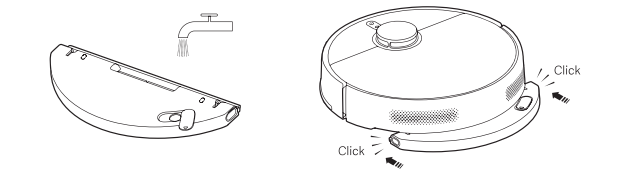
A: If the water tank of the Xiaomi Robot Vacuum S40 falls off, it can be due to improper installation. When installing the water tank, please ensure it is securely seated.
The installation method of the water tank is as follows:
Install the water tank assembly according to the direction shown in the figure until you hear a "click" sound to ensure it is installed in place.
1. Q: What is the Xiaomi Robot Vacuum S40?
A: The Xiaomi Robot Vacuum S40 is an intelligent, integrated cleaning, sweeping, and mopping robot. It can complete the cleaning and mopping tasks independently at home, and return to the charging dock for charging after cleaning, greatly reducing the workload of floor cleaning.
2. Q: What are the features of the Xiaomi Robot Vacuum S40?
A: The following are the features of the Xiaomi Robot Vacuum S40:
1. The Xiaomi Robot Vacuum S40 features a 5200mAh large capacity battery;
2. It has a strong suction power of 10kPa and can be intelligently controlled through the Mi Home/Xiaomi Home APP. The strong suction power brings a deeper and more efficient cleaning experience.
3. Q: How to use the power button of the Xiaomi Robot Vacuum S40?
A: To use the power button of the Xiaomi Robot Vacuum S40, please refer to the following steps:
1. Press and hold it for three seconds to turn on or off;
2. Press to clean or pause while turned on.
4. Q: How to use the recharging button of the Xiaomi Robot Vacuum S40?
A: The following are the recharging button functions on the Xiaomi Robot Vacuum S40:
1. Press the recharging button while the robot vacuum is running to pause the cleaning task;
2. Press the recharging button again while the robot vacuum is paused to send it back to the charging dock for charging;
3. Press the recharging button while the robot vacuum is returning to the charging dock to stop the docking process;
4. Press and hold the recharging button for three seconds to enable or disable the child lock function.
5. Q: What does the indicator on the Xiaomi Robot Vacuum S40 mean?
A: The following are the indicator statuses on the Xiaomi Robot Vacuum S40:
1. White: The robot vacuum is operating normally, cleaning, or is fully charged;
2. Breathing in white: The robot vacuum is charging with a medium to high battery level;
3. Blinking in white: The robot vacuum is returning to the charging dock, repositioning, or updating firmware;
4. Yellow: The robot vacuum is disconnected from Wi-Fi;
5. Blinking in yellow: The robot vacuum is experiencing an error, awaiting connection, or running low battery;
6. Breathing in yellow: The robot vacuum is charging with a low battery level;
7. Blue: The robot vacuum is successfully connected to Wi-Fi;
8. Blinking in blue: The robot vacuum is connecting to Wi-Fi or undergoing a firmware upgrade;
9. No Light: The robot vacuum is powered off or in sleep mode.
Product Introduction
1. Q: What are the accessories of the Xiaomi Robot Vacuum S40?
A: The accessories installed on the main unit include: main brush, main brush cover, dust compartment, other accessories include mop pad and water tank assembly, side brush, power supply, and charging dock.
After unpacking, it is recommended to check according to the instructions in the list of accessories in the manual. If there is any missing item, please fully unfold the lining of the package to confirm whether it is missing, and contact the after-sales service for consultation.
2. Q: What are the main functional components of the Xiaomi Robot Vacuum S40?
A: The following are the main functional components of the Xiaomi Robot Vacuum S40:
1. Power button:
(1). Press and hold it for three seconds to turn on or off;
(2). Press to clean or pause while turned on.
2. Recharging button:
(1). Press to pause while running;
(2). Press to start docking when it is paused;
(3). Press to stop docking when it returns to dock;
(4). Press and hold the recharging button for three seconds to enable or disable the child lock.
3. Indicator:
(1). White: The robot vacuum is operating normally, cleaning, or is fully charged;
(2). Breathing in white: The robot vacuum is charging with a medium to high battery level;
(3). Blinking in white: The robot vacuum is returning to the charging dock, repositioning, or updating firmware;
(4). Yellow: The robot vacuum is disconnected from Wi-Fi;
(5). Blinking in yellow: The robot vacuum is experiencing an error, awaiting connection, or running low battery;
(6). Breathing in yellow: The robot vacuum is charging with a low battery level;
(7). Blue: The robot vacuum is successfully connected to Wi-Fi;
(8). Blinking in blue: The robot vacuum is connecting to Wi-Fi or undergoing a firmware upgrade;
(9). No Light: The robot vacuum is powered off or in sleep mode.
3. Q: How to check the SN on the Xiaomi Robot Vacuum S40?
A: You can check the SN by looking at the label at the bottom of the main unit.
4. Q: Can the Xiaomi Robot Vacuum S40 be used directly after unpacking?
A: You can use the Xiaomi Robot Vacuum S40 directly after unpacking. It is recommended to check whether there are missing parts after unpacking, and then open the Xiaomi Robot Vacuum S40 and use it according to the instructions.
When used for the first time, please manually place the main unit on the charging dock and align it with the charging spring. Let the Xiaomi Robot Vacuum S40 be fully charged before using.
5. Q: What cleaning mode is recommended when using the Xiaomi Robot Vacuum S40 for the first time?
A: Please refer to the following information to select the cleaning mode when you use it for the first time:
In a scene with a lot of dust and debris at home, it is recommended not to use the mopping function for the first time. After installing the mopping component, choose the Vacuuming & Mopping mode.
6. Q: Why does the Xiaomi Robot Vacuum S40 need to be cleaned regularly?
A: The Xiaomi Robot Vacuum S40 has cleaning functions, such as sweeping, mopping and collecting garbage. Regular dumping of garbage, cleaning the roller brush and side brush can restore the cleaning ability of the robot vacuum.
7. Q: How does the Xiaomi Robot Vacuum S40 enter standby mode after completing the task?
A: After completing the task, it is recommended to return the Xiaomi Robot Vacuum S40 to its charging dock for charging and enter standby mode to ensure that the device's battery has sufficient power. If the device is not on the charging dock, you can manually press the power button to turn off the device to avoid wasting power. (When the device is in standby mode for a long time, it will automatically shut down, which is normal).
8. Q: What to do if the side brush of the Xiaomi Robot Vacuum S40 is tangled?
A: When the side brush of the Xiaomi Robot Vacuum S40 is entangled with the object, please clean the side brush in time and check whether the bristles of the side brush have fallen off or been damaged. When cleaning again, you can first clean the items that are easy to entangle on the ground, such as wool, rope, etc.
9. Q: What to do if the Xiaomi Robot Vacuum S40 can't shut down on the charging dock?
A: The Xiaomi Robot Vacuum S40 is always in standby mode when charging on the charging dock. If you need to turn off the device, you need to let the device leave the charging dock. Press and hold the power button for 3 seconds to turn off the device.
10. Q: What environments can the Xiaomi Robot Vacuum S40 be used in?
A: The Xiaomi Robot Vacuum S40 is only used for floor cleaning in the home environment. Do not use it outdoors, off-site, in commercial or industrial environments. It will cause equipment failure, loss, and other consequences.
11. Q: How to use the Do Not Disturb mode of the Xiaomi Robot Vacuum S40?
A: Do Not Disturb mode is enabled by default from 10PM to 8AM. You can use the Mi Home/Xiaomi Home APP to turn off the Do Not Disturb mode or modify the period of Do Not Disturb mode. During the Do Not Disturb mode, the main unit will not automatically continue cleaning or provide voice prompts. The APP will display a notification and the main unit will turn off the indicator.
12. Q: How to use the Scheduled cleanup function of the Xiaomi Robot Vacuum S40?
A: Set the scheduled cleaning time in the Mi Home/Xiaomi Home APP, and the main unit will automatically start cleaning at the specified time, and then automatically return to the charging dock for charging.
13. Q: How to save a complete map on the Xiaomi Robot Vacuum S40?
A: Press the power button to start cleaning, or tap [Start cleanup]
on the Mi Home/Xiaomi Home APP. The main unit starts from the charging dock and saves a temporary map before completing the cleaning. It automatically returns to the charging dock and establishes a complete map (When cleaning, please open the door of the cleaning area to ensure the integrity of the map).
14. Q: How does the Xiaomi Robot Vacuum S40 clean the whole house?
A: After the first start-up, the robot vacuum first cleans in an arc according to the 4.5×4.5m area until all areas are covered.
After the map building is constructed, the robot vacuum performs room-by-room cleaning. First, it cleans along the edge and then in an arc. The room will be cleaned in sequence, orderly and efficiently, covering all areas without omission. After the cleaning is completed, the robot vacuum will automatically return to the charging dock.
15. Q: Can the Xiaomi Robot Vacuum S40 always be charged?
A: The Xiaomi Robot Vacuum S40 supports overcharge protection. After the battery is fully charged, it will automatically adjust to low current charging.
16. Q: Does the Xiaomi Robot Vacuum S40 have motor overload protection function?
A: All motors on the Xiaomi Robot Vacuum S40 have overload protection function, including the main brush motor, side brush motor and wheel motor. When foreign matter enters or is severely blocked, leading to overload, the protection will automatically start.
17. Q: What consumables of the Xiaomi Robot Vacuum S40 need to be replaced regularly?
A: The Xiaomi Robot Vacuum S40 consumables include the main brush, side brush, main brush cover, filter, mop pad, etc., which need to be replaced regularly to ensure the normal function and cleaning ability.
Maintenance suggestions:
1. Main brush: It is recommended to clean once a week and replace the brush every 6-12 months to ensure the cleaning effect;
2. Filter: It is recommended to clean once a week and replace the filter every 3-6 months to ensure the cleaning effect;
3. Side brush: It is recommended to clean once every two weeks and replace the side brush every 3-6 months to ensure the cleaning effect;
4. Mop pad: It is recommended to clean once after each use and replace the mop pad every 3-6 months to ensure the cleaning effect.
18. Q: How to use the charging dock of the Xiaomi Robot Vacuum S40?
A: Place the charging dock against the wall on a horizontal surface, ensure that the space on both sides of the charging dock is more than 0.5m, and connect the plug to the power socket. In order to get better use experience, please place the charging dock within the range of Wi-Fi coverage.
Please refer to the following steps:
1. Remove the protective film from the charging dock;
2. Place the charging dock against the wall and connect it to the power supply;
3. Connect the power adapter to the charging dock.
Note:
1. Do not expose the charging dock to direct sunlight;
2. Do not place any objects within 0.5m on either side of the charging dock and 1.5m in front of the charging dock;
3. Before use, place the main unit on the charging dock, and the main unit will automatically start charging;
4. When charging the device for the first time, please use it after full charge to protect the battery;
5. When the battery of the device is low, it will not be able to use. Please put the main unit on the charging dock for charging;
6. When the main unit is connected to the charging dock, the main unit will automatically start up and cannot be shut down during the charging process.
19. Q: How to charge the Xiaomi Robot Vacuum S40?
A: Press and hold the power button, wait for the power indicator to light up, and then place the main unit on the charging dock to charge.
Note:
The device will not be able to open when the battery is low. Place the main unit directly on the charging dock.
20. Q: How to clean the mop pad of the Xiaomi Robot Vacuum S40?
A: To clean the mop pad of the Xiaomi Robot Vacuum S40, please refer to the following steps:
1. Remove the mop pad and water tank assembly from the Xiaomi Robot Vacuum S40;
2. Remove the mop from the mop pad;
3. Clean the mop pad;
4. Dry the mop pad.
21. Q: How to fill the water tank of the Xiaomi Robot Vacuum S40?
A: To fill the water tank of the Xiaomi Robot Vacuum S40, please refer to the following steps:
1. Open the tank plug, inject tap water, and tighten the tank plug after completion;
2. Install the water tank in the direction shown in the diagram. When you hear a "click", it is installed in place.
22. Q: How to start the cleaning function of the Xiaomi Robot Vacuum S40?
A: Press the power button to start cleaning. Press any button to pause cleaning.
Note:
1. Before cleaning, please fully charge and start the main unit from the charging dock. During the cleaning process, do not move the charging dock at will;
2. If the battery of the device is low, the cleaning cannot be started. Please charge first, then start cleaning.
23. Q: How to return the Xiaomi Robot Vacuum S40 to the charging dock for charging?
A: After cleaning, the main unit will automatically return to the charging dock for charging. In the suspended state, press the recharging button to start recharging. When the main unit is charging, the power button breathing light flashes.
Note:
If the main unit does not find the charging dock, it will automatically return to the starting point of cleaning. Please manually put the main unit back into the charging dock for charging.
24. Q: How to maintain the main brush and side brush of the Xiaomi Robot Vacuum S40?
A: To maintain the main brush and side brush of the Xiaomi Robot Vacuum S40, please refer to the following steps:
1. Pull up the side brush;
2. Grab the two main brush cover release buttons, remove the main brush cover, and take out the main brush;
3. Clean the main brush and side brush;
4. After cleaning, install the main brush, main brush cover and side brush in turn.
25. Q: How to maintain the dust compartment and filter of the Xiaomi Robot Vacuum S40?
A: To maintain the dust compartment and filter of the Xiaomi Robot Vacuum S40, please refer to the following steps:
1. Lift the cover of the main unit, press the dust compartment release button, and remove the dust compartment upward;
2. Open the dust compartment and dump out the garbage;
3. Open the filter clip at the arrow position of the dust compartment and remove the filter.
26. Q: Will the yellowing of the charging contact of the Xiaomi Robot Vacuum S40 affect its use?
A: The charging contact of the Xiaomi Robot Vacuum S40 is exposed to the environment. With the increase of use time, oxidation and yellowing will occur to varying degrees, which is a normal phenomenon. This will not affect the charging function, but it needs to be wiped regularly with a dry cloth.
27. Q: How to maintain the battery of the Xiaomi Robot Vacuum S40?
A: The Xiaomi Robot Vacuum S40 has a set of built-in high-performance lithium ion rechargeable batteries. To maintain the battery performance, please keep the main unit charged during daily use.
Note:
If you have not used the device for a long time, please turn off the power. Charge the device at least once every three months to avoid battery damage due to over-discharge.
28. Q: Does the Xiaomi Robot Vacuum S40 support child lock?
A: Yes. Press and hold the recharging button for 3 seconds to open or close the child lock.
29. Q: Does the Xiaomi Robot Vacuum S40 support ultraviolet light?
A: The Xiaomi Robot Vacuum S40 does not support ultraviolet light.
30. Q: Does the Xiaomi Robot Vacuum S40 support electrolysis?
A: The Xiaomi Robot Vacuum S40 does not support electrolysis.
31. Q: How to reset the Xiaomi Robot Vacuum S40?
A: Press and hold the reset button for 3 seconds to reset the main unit.
When you hear the beep, the robot vacuum will automatically restart and related settings, such as scheduled cleaning and Wi-Fi, will revert to factory settings.
32. Q: Does the Xiaomi Robot Vacuum S40 have a water shortage reminder and a dust compartment full reminder?
A: The Xiaomi Robot Vacuum S40 does not have a water shortage reminder or a dust compartment full reminder.
33. Q: Can stickers be used on the Xiaomi Robot Vacuum S40?
A: It is recommended not to use stickers. When using stickers on the Xiaomi Robot Vacuum S40, they can cover the lidar above the device and the infrared sensor in front of the collision panel, affecting the operation of the device.
34. Q: How to create a map with the Xiaomi Robot Vacuum S40?
A: Press the power button to start cleaning, or tap [Start cleanup] on the Mi Home/Xiaomi Home APP. The main unit starts from the charging dock and saves a temporary map before completing the cleaning. It automatically returns to the charging dock and establishes a complete map (When cleaning, please open the door of the cleaning area to ensure the integrity of the map).
35. Q: Is the Xiaomi Robot Vacuum S40 washable when it gets dirty?
A: The Xiaomi Robot Vacuum S40 is not washable when it gets dirty.
If you wash the Xiaomi Robot Vacuum S40 directly with water, the water will enter the device and damage its internal electronic components. It is recommended to remove the brush cover, main brush, side brush, dust compartment, mop pad, and other accessories after the device is dirty, clean them separately, and dry them before using them again.
36. Q: How to clean stubborn stains with the Xiaomi Robot Vacuum S40?
A: It is recommended to add water in advance to soften stubborn stains before using the device.
37. Q: What small objects can the Xiaomi Robot Vacuum S40 recognize?
A: The Xiaomi Robot Vacuum S40 can not recognize small objects.
38. Q: What are the precautions when using the Xiaomi Robot Vacuum S40 for the first time?
A: The following are the precautions when using the Xiaomi Robot Vacuum S40 for the first time:
1. The Xiaomi Robot Vacuum S40 is equipped with a 5200mAh battery. The device has about 30% power before leaving the factory. It is recommended to fully charge it after opening the box for the first time;
2. Fill the tank with water;
3. Connect to the Mi Home/Xiaomi Home APP, put the main unit on the charging dock, and start cleaning.
39. Q: Will the Xiaomi Robot Vacuum S40 navigate around table and chair legs during cleaning?
A: The Xiaomi Robot Vacuum S40 will clean along the edges of table and chair legs when it encounters them.
40. Q: How long does it take for the Xiaomi Robot Vacuum S40
to clean a room?
A: In order to ensure the cleaning ability of the robot vacuum, the walking speed of the Xiaomi Robot Vacuum S40 is 0.3m/s. The cleaning time will fluctuate according to the complexity of the home environment.
41. Q: Why can't the Xiaomi Robot Vacuum S40 avoid bumping into a scale or building blocks?
A: The Xiaomi Robot Vacuum S40 navigates and avoids obstacles through a mechanical collision plate + LDS laser navigation. If the object is less than 3cm, it is recommended to put away items such as scales and sockets before cleaning.
42. Q: Is it normal for the water tank to have water when the Xiaomi Robot Vacuum S40 is opened for the first time?
A: If the water tank has water when the Xiaomi Robot Vacuum S40 is opened for the first time, please refer to the following methods/steps:
1. The Xiaomi Robot Vacuum S40 undergoes random inspections before leaving the factory, including a water tank inspection in which clean water is added to the tank for verification;
2. After the tank inspection is completed, the water is drained. It is normal to find residual water stains in the tank.
43. Q: Does the Xiaomi Robot Vacuum S40 support carpet recognition?
A: The Xiaomi Robot Vacuum S40 does not support carpet recognition.
44. Q: Can the Xiaomi Robot Vacuum S40 automatically clean the mop pad?
A: The Xiaomi Robot Vacuum S40 does not support automatic cleaning of the mop pad. The mop pad needs to be manually disassembled and cleaned. It is recommended to clean the mop pad after each task is completed.
45. Q: Can water be added during the cleaning process of the Xiaomi Robot Vacuum S40?
A: If the main unit needs to add water during the cleaning process, you can pause by pressing any button, remove the tank, put it back after filling up, and press the power button to continue working. The mop pad needs to be cleaned manually.
46. Q: Why does the Xiaomi Robot Vacuum S40 recharge and continue to clean halfway through?
A: When the battery of the device is low during cleaning, the main unit will return to the charging dock for charging. When the device is fully charged, it will leave the charging dock and continue the unfinished task.
APP Related
1. Q: How to connect the Xiaomi Robot Vacuum S40 to the Mi Home/Xiaomi Home APP?
A: This device is connected to the Mi Home/Xiaomi Home APP and can be controlled through the Mi Home/Xiaomi Home APP.
To connect the Xiaomi Robot Vacuum S40 to the Mi Home/Xiaomi Home APP, please refer to the following steps:
1. Download and install the Mi Home/Xiaomi Home APP. If you have already installed the Mi Home/Xiaomi Home APP, you will go directly to the device connection interface. Alternatively, you can search for "Mi Home/Xiaomi Home" in the Google Play Store, download and install the Mi Home/Xiaomi Home APP;
2. Open the [Mi Home/Xiaomi Home] APP, tap the [+] in the upper right corner of the screen, and add the Xiaomi Robot Vacuum S40 according to the prompt of the Mi Home/Xiaomi Home APP.
Note:
Due to the update of the Mi Home/Xiaomi Home APP, the actual operation can be slightly different from the above description. Please follow the current instructions in the Mi Home/Xiaomi Home APP.
2. Q: How to reset the Wi-Fi on the Xiaomi Robot Vacuum S40?
A: If the router cannot connect to the main unit due to configuration changes, forgotten password, or other reasons, please open the top cover and check the indicator, and press the power button and recharging button (7 seconds) at the same time until you hear the voice prompt. Wait for the indicator to start flashing again to indicate that the reset is successful.
3. Q: How to upgrade the firmware of the Xiaomi Robot Vacuum S40?
A: You can use the Mi Home/Xiaomi Home APP to upgrade the firmware. Before upgrading, please ensure that the robot vacuum is is on the charging dock and the battery of the Xiaomi Robot Vacuum S40 is more than 15%.
4. Q: How to make the Xiaomi Robot Vacuum S40 quickly build a map?
A: Press the power button to start cleaning, or tap [Start cleanup] on the Mi Home/Xiaomi Home APP. The main unit starts from the charging dock and saves a temporary map before completing the cleaning. It automatically returns to the charging dock and establishes a complete map (When cleaning, please open the door of the cleaning area to ensure the integrity of the map).
5. Q: What is the Do Not Disturb function of the Xiaomi Robot Vacuum S40?
A: During the Do Not Disturb mode, the main unit will not respond to continuous cleaning, regular cleaning or provide voice prompts. Do Not Disturb mode is enabled by default at 10PM to 8AM. Do Not Disturb mode can be turned off through the Mi Home/Xiaomi Home APP.
6. Q: What is the map function of the Xiaomi Robot Vacuum S40?
A: For the first cleaning, the Xiaomi Robot Vacuum S40 needs to start from the charging dock. After cleaning is complete, it will automatically return to the charging dock. Only after a full cleaning can your home map be saved. If you manually terminate the cleaning process or move back to the charging dock, the map will not be saved. Once the map is successfully drawn, you can divide, merge areas, or customize room names in the Mi Home/Xiaomi Home APP.
7. Q: What is the Scheduled cleanup function of the Xiaomi Robot Vacuum S40?
A: You can set the scheduled cleaning time through the Mi Home/Xiaomi Home APP. The main unit will automatically start cleaning at the specified time and return to the charging dock after the cleaning is completed.
8. Q: What is the virtual wall function of the Xiaomi Robot Vacuum S40?
A: You can set up a virtual wall in the Mi Home/Xiaomi Home APP to prevent the main unit from entering areas that do not need to be cleaned.
9. Q: How to edit the area on the Xiaomi Robot Vacuum S40?
A: Merge area: In the [Mi Home/Xiaomi Home] APP and choose the [Xiaomi Robot Vacuum S40] card >> tap the three dots in the upper right corner >> choose [Area editor] to merge.
Split area: In the [Mi Home/Xiaomi Home] APP and choose the [Xiaomi Robot Vacuum S40] card >> tap the three dots in the upper right corner >> choose [Area editor] to split.
10. Q: How to reset the map of the Xiaomi Robot Vacuum S40?
A: In the [Mi Home/Xiaomi Home] APP and choose the [Xiaomi Robot Vacuum S40] card >> tap the three dots in the upper right corner >> choose [Reset map], the map will be reset and disappear, and the map needs to be rebuilt.
11. Q: How to rename the map of the Xiaomi Robot Vacuum S40?
A: In the [Mi Home/Xiaomi Home] APP and choose the [Xiaomi Robot Vacuum S40] card >> tap the three dots in the upper right corner >> choose [Map management] >> select the map and rename it.
FAQs
1. Q: What to do if the Xiaomi Robot Vacuum S40 cannot connect to the network?
A: If the Xiaomi Robot Vacuum S40 cannot connect to the network, please refer to the following steps:
1. Ensure that the Wi-Fi password entered is correct. Wi-Fi usernames should not include Chinese characters or special symbols such as @, ¥, %, etc. If so, reset them to English or alphanumeric formats and try again;
2. Check if the router's external network connection is normal by opening a webpage on your phone or a computer connected to the Wi-Fi;
3. Ensure that the router and robot are within a reasonable distance (within 5 meters, without walls in between). Try moving the robot within 1-2 meters of the router to reconnect;
4. Try connecting via a mobile phone's hotspot;
5. Check if the router is overloaded with too many smart devices causing network slowdowns or non-responsiveness. Restart the router and try again;
6. The device does not support EAP802.1x authenticated networks, 5G networks, or public Wi-Fi networks requiring web authentication;
7. Check if your phone has restricted the APP's permissions, such as network access or location. Grant these permissions and try again;
8. Connection issues also can be related to the phone model. Try connecting with a different phone model;
9. Re-enter pairing mode and attempt to pair again.
2. Q: What to do if the charging of the Xiaomi Robot Vacuum S40 is abnormal?
A: Please check whether there is dust on the charging dock and charging contact of the main unit. Please wipe it clean before use.
3. Q: What to do if the Xiaomi Robot Vacuum S40 does not drain water?
A: If the Xiaomi Robot Vacuum S40 does not drain water, please refer to the following steps:
1. Confirm that water is added to the tank to the lowest water level;
2. Confirm that the water tank is installed in place;
3. Confirm that the fault is not eliminated after reboot. If there is any damage, please contact the after-sales service.
4. Q: What to do before using the Xiaomi Robot Vacuum S40 for cleaning?
A: Make sure the main unit is fully charged before starting the cleaning. Before cleaning, clean your home environment in advance and remove fragile items and debris from your home floor.
5. Q: Will the cleaning efficiency of the Xiaomi Robot Vacuum S40 be reduced in complex environments?
A: In order to ensure the coverage of cleaning, the main unit will clean all corners. In a complex environment, the movement of turning will increase and the cleaning efficiency will be reduced.
6. Q: Why does the sound of the Xiaomi Robot Vacuum S40 get louder when cleaning?
A: If the sound of the Xiaomi Robot Vacuum S40 get louder when cleaning, please refer to the following steps:
1. It is necessary to confirm whether the brush is entangled with foreign matter and whether abnormal noise is generated. The main brush needs to be cleaned in time, otherwise it will be damaged;
2. In order to ensure the cleaning effect, the main unit adopts a fan with large suction force, which has strong dust collection effect and loud sound. If you want to reduce the noise, you can reduce the suction level to reduce the noise.
7. Q: Why does the Xiaomi Robot Vacuum S40 make abnormal sound when cleaning?
A: When the robot vacuum operates on smooth tile floors and wooden floors, there will be a slight sound when the bottom scraper rubs against the floor. As the robot vacuum passes through the joints between the tiles and the floor, it contacts and cleans these gaps, which can also produce a slight noise. The above sounds do not affect the normal operation of the device.
8. Q: What to do if the Xiaomi Robot Vacuum S40 gets stuck while cleaning?
A: When the device is cleaning, if there are slippers, plastic bags and other debris, the device will get stuck. After the problem is solved, try to place the main unit in a nearby cleaning area and continue cleaning.
Please clear the clutter in your home before cleaning to avoid getting stuck during cleaning.
9. Q: Why does the Xiaomi Robot Vacuum S40 collide with the wall when cleaning the edge?
A: When it's cleaning along the edge, it keeps a certain distance from the wall, and it is normal for occasional collisions.
10. Q: What to do if the Xiaomi Robot Vacuum S40 can't be turned on?
A: The battery of the device is insufficient. Please charge it on the charging dock before use. If the ambient temperature is too low (below 0℃) or too high (above 40℃), please use it in an ambient temperature of 0-40℃.
11. Q: What to do if the Xiaomi Robot Vacuum S40 can't be charged?
A: The charging dock is not powered on. Please confirm whether the power cord of the charging dock is inserted at both ends. If the contact is bad, please clean the charging dock spring and the charging contact of the main unit.
12. Q: Why the Xiaomi Robot Vacuum S40 can't recharge?
A: If the Xiaomi Robot Vacuum S40 can't recharge, please refer to the following steps:
1. It can be the charging pad is placed on the carpet. Please use the charging pad on the floor;
2. Ensure that there is no dust or obstruction on the surface of the charging spring of the charging dock;
3. It can be that the power cord is not plugged in properly at both ends;
4. Make sure there is enough space around the charging dock.
13. Q: What to do if the Xiaomi Robot Vacuum S40 can't remove stubborn stains when mopping?
A: When mopping the floor, some stubborn stains cannot be removed and need to be cleaned manually.
14. Q: What to do if the Xiaomi Robot Vacuum S40 gets dirtier when it is mopping?
A: Please clean the brush and mop pad regularly.
15. Q: What to do if the Xiaomi Robot Vacuum S40 moves backward?
A: If the Xiaomi Robot Vacuum S40 moves backward, please refer to the following steps:
1. Check whether there is any foreign matter wrapped in the drive wheel;
2. Confirm whether the LDS is normal;
3. Check the rotating part of LDS for foreign matter or hair that causes slow rotation or stagnation. If so, try to remove it;
4. Please check whether there are any uneven or twisted stickers or large objects on the bumper and device surface;
5. Please try to press the bumper and confirm that it is in a bounce state;
6. Try to restart the main unit and then retry.
16. Q: What to do if the Xiaomi Robot Vacuum S40 reports abnormal collision?
A: If the Xiaomi Robot Vacuum S40 reports abnormal collision, please refer to the following steps:
1. Please try to press the bumper to confirm that the bumper is in a reboundable state;
2. Try to restart the main unit and then retry.
17. Q: What to do if the Xiaomi Robot Vacuum S40 reports abnormal side brushing?
A: If the Xiaomi Robot Vacuum S40 reports abnormal side brushing, please refer to the following steps:
1. Please try to remove the side brush and confirm whether there is any foreign matter or hair entangled in the side brush and its parts;
2. Try to restart the main unit and then retry.
18. Q: Does the Xiaomi Robot Vacuum S40 support multiple connections?
A: Not support. However, the device can be shared with others. You can share it in the [Mi Home/Xiaomi Home] APP and choose the [Xiaomi Robot Vacuum S40] card >> tap the three dots in the upper right corner >> choose [Share device]. Shared one can perform basic device operations and settings (start, pause, end cleaning, adjust suction and water volume) on the device.
19. Q: Why is the Xiaomi Robot Vacuum S40 offline?
A: If the Xiaomi Robot Vacuum S40 is offline, please refer to the following steps:
1.Wi-Fi signal is not good. Please make sure that the main unit is in a good Wi-Fi signal coverage area;
2. The Wi-Fi connection is abnormal. Reset the Wi-Fi, download the latest Mi Home/Xiaomi Home APP, and try to connect again;
3. Make sure the main unit is powered on. After it is turned off, it is in offline mode.
20. Q: What to do if the Xiaomi Robot Vacuum S40 reports abnormal drive wheels?
A: If the Xiaomi Robot Vacuum S40 reports abnormal drive wheels, please refer to the following steps:
1. Check whether there is any foreign matter in the drive wheel, and confirm whether there is any foreign matter or hair entangled in the drive wheel and its parts;
2. The drive wheel is too dirty, affecting the grip. Clean the drive wheel with a brush;
3. Try restarting the main unit and retry.
21. Q: What to do if the brush of the Xiaomi Robot Vacuum S40 is wrapped around the hair?
A: 1. When the hair is wound on the brush, you can pull out the brush and clean the wound hair;
2. After cleaning, install the brush cover on the brush, and install the brush on the device and close the cover and then you can use it normally.
22. Q: What to do if the Xiaomi Robot Vacuum S40 cannot reach the designated area?
A: You can check the list of maps and delete similar maps to avoid the device repositioning to another map.
23. Q: What to do if the Xiaomi Robot Vacuum S40 cannot return to the charging dock to charge normally?
A: Please check whether the power cord of the charging dock is plugged in and check whether the charging spring is dirty. If the charging spring is dirty, please wipe it clean and try again.
24. Q: Why can't the Xiaomi Robot Vacuum S40 climb slopes it used to?
A: After a period of use, the drive wheel will be covered with a lot of dust and dirt, which will affect the obstacle crossing and climbing ability of the device. It is recommended to clean the dust and dirt on the surface of the drive wheel with a brush after one week of use.
25. Q: What to do if the water tank of the Xiaomi Robot Vacuum S40 falls off?
A: If the water tank of the Xiaomi Robot Vacuum S40 falls off, it can be due to improper installation. When installing the water tank, please ensure it is securely seated.
The installation method of the water tank is as follows:
Install the water tank assembly according to the direction shown in the figure until you hear a "click" sound to ensure it is installed in place.
Does it help?
Yes
No