

Mijia Air Conditioner Pro Eco 2.6 kW FAQ
Specifications configuration
1. Q: What are the selling points of the Mijia Air Conditioner Pro Eco 2.6 kW?
A: 1. The Mijia Air Conditioner Pro Eco 2.6 kW delivers outstanding power efficiency for energy-conscious performance;
2. With Mijia AI Energy Saving mode, it offers intelligent power-saving capabilities;
3. Smart control is available through the Mi Home/Xiaomi Home APP for convenient remote management;
4. It provides quick cooling in just 30 seconds and rapid heating within 60 seconds;
5. The micro-hole air flaps ensure a gentle and comfortable airflow;
6. It operates at a low noise level, making it ideal for optimized performance during nighttime use.
2. Q: What does the standard configuration of the Mijia Air Conditioner Pro Eco 2.6 kW include?
A: The standard configuration of the Mijia Air Conditioner Pro Eco 2.6 kW includes the following:
1. Indoor unit and accessories include 1 indoor unit, 1 remote control, 1 user manual, 1 screw pack, 2 AAA batteries and 1 warranty notice;
2. Outdoor unit and accessories include 1 outdoor unit, 4 connecting nuts, 1 drain port and 1 drainage hose.
3. Q: What is the appearance of the Mijia Air Conditioner Pro Eco 2.6 kW?
A: The appearance information of the Mijia Air Conditioner Pro Eco 2.6 kW is as follows:
1. Geometric shapes are used, avoiding excessive decorative lines, maintaining a minimalist design language;
2. The shape is smooth and friendly, offering a strong homey feel;
3. It is equipped with an LED small black screen, maintaining the classic Mi look, ensuring the product has a cohesive and recognizable design.
4. Q: What color is the Mijia Air Conditioner Pro Eco 2.6 kW?
A: The Mijia Air Conditioner Pro Eco 2.6 kW features a white and gray color scheme.
The advantages are as follows:
1. This versatile color scheme fits various home styles;
2. A neutral color palette is used to avoid color preferences from influencing the purchasing decision;
3. The white and gray color matches the brand tone.
5. Q: What are the packaging dimensions of the Mijia Air Conditioner Pro Eco 2.6 kW?
A: The packaging dimensions of the Mijia Air Conditioner Pro Eco 2.6 kW are 915×292×382mm (W×H×D) for the indoor unit and 925×625×389mm (W×H×D) for the outdoor unit.
6. Q: What are the dimensions of the indoor and outdoor units of the Mijia Air Conditioner Pro Eco 2.6 kW?
A: The indoor unit of the Mijia Air Conditioner Pro Eco 2.6 kW measures 840×200×311mm (W×H×D), while the outdoor unit measures 860×551×331mm (W×H×D).
7. Q: Is the Mijia Air Conditioner Pro Eco 2.6 kW an inverter air conditioner?
A: Yes, the Mijia Air Conditioner Pro Eco 2.6 kW intelligently adjusts the compressor's operating frequency based on the actual environment, set temperature, and fan speed.
8. Q: What is the net weight of the Mijia Air Conditioner Pro Eco 2.6 kW?
A: The net weight of the Mijia Air Conditioner Pro Eco 2.6 kW’s indoor unit is 9.8kg. And the net weight of the air conditioner’s outdoor unit is 25.5kg.
9. Q: What is the gross weight of the Mijia Air Conditioner Pro Eco 2.6 kW (including net weight, packaging and accessories)?
A: The gross weight of the Mijia Air Conditioner Pro Eco 2.6 kW’s indoor unit is 11.8kg. And the gross weight of the air conditioner’s outdoor unit is 28.9kg.
10. Q: Which APP does the Mijia Air Conditioner Pro Eco 2.6 kW connect to?
A: The Mijia Air Conditioner Pro Eco 2.6 kW supports connectivity through the Mi Home/Xiaomi Home APP.
11. Q: What is the networking method of the Mijia Air Conditioner Pro Eco 2.6 kW?
A: The Mijia Air Conditioner Pro Eco 2.6 kW uses a 2.4GHz Wi-Fi connection.
12. Q: Does the Mijia Air Conditioner Pro Eco 2.6 kW support firmware upgrades?
A: The Mijia Air Conditioner Pro Eco 2.6 kW supports firmware upgrades. It features full-link OTA technology, ensuring continuous product upgrades and providing a fresh experience every time.
Note:
During an OTA upgrade, the indoor unit display lights up as shown in the figure below. Do not power off or perform any operation, otherwise the upgrade can fail. During the upgrade, the air conditioner restarts, stops, and no indicator is displayed. After the upgrade is complete, the air conditioner returns to normal. The whole upgrade process takes 2-15 minutes, please wait patiently.

13. Q: What is the rated voltage of the Mijia Air Conditioner Pro Eco 2.6 kW?
A: The rated voltage of the Mijia Air Conditioner Pro Eco 2.6 kW is 220-240V~/1 Phase/50Hz.
14. Q: What is the voltage fluctuation range for the Mijia Air Conditioner Pro Eco 2.6 kW?
A: The Mijia Air Conditioner Pro Eco 2.6 kW can tolerate a voltage fluctuation range of 220-240V. In extreme conditions, it can operate within a wide voltage range of 130-265V. However, this affects the air conditioner's service life.
15. Q: What is the rated current of the Mijia Air Conditioner Pro Eco 2.6 kW?
A: The rated current of the Mijia Air Conditioner Pro Eco 2.6 kW is not specified. The maximum operating current is 7.1A.
16. Q: What is the power plug specification for the Mijia Air Conditioner Pro Eco 2.6 kW?
A: The Mijia Air Conditioner Pro Eco 2.6 kW does not come with a power cord for the indoor unit.
17. Q: What is the cooling power of the Mijia Air Conditioner Pro Eco 2.6 kW?
A: The rated cooling power of the Mijia Air Conditioner Pro Eco 2.6 kW is 650W.
18. Q: What is the operating temperature range of the Mijia Air Conditioner Pro Eco 2.6 kW?
A: The Mijia Air Conditioner Pro Eco 2.6 kW’s normal operating temperature for cooling is 18°C to 43°C, and for heating is -20°C to 24°C.
19. Q: Is the Mijia Air Conditioner Pro Eco 2.6 kW waterproof? What is its waterproof rating?
A: The outdoor unit of the Mijia Air Conditioner Pro Eco 2.6 kW is waterproof (resistant to rain), with a waterproof rating of IPX4.
20. Q: What certification does the Mijia Air Conditioner Pro Eco 2.6 kW have?
A: The Mijia Air Conditioner Pro Eco 2.6 kW has Safety Certification (CE), Energy Efficiency Certification (ERP), Wireless Certification (CE-RED), and Environmental Certification(REACH/RoHS).
21. Q: What is the cooling capacity of the Mijia Air Conditioner Pro Eco 2.6 kW?
A: The cooling capacity of the Mijia Air Conditioner Pro Eco 2.6 kW is 2600W.
22. Q: What is the recommended room size for the Mijia Air Conditioner Pro Eco 2.6 kW?
A: The recommended room size for the Mijia Air Conditioner Pro Eco 2.6 kW is 10-20㎡.
23. Q: What is the energy efficiency rating of the Mijia Air Conditioner Pro Eco 2.6 kW?
A: The energy efficiency rating of the Mijia Air Conditioner Pro Eco 2.6 kW is A+++ for cooling, and A++ (average climate)/A+++ (warmer climate) for heating.
24. Q: What type of refrigerant does the Mijia Air Conditioner Pro Eco 2.6 kW use?
A: The Mijia Air Conditioner Pro Eco 2.6 kW uses R32 refrigerant.
25. Q: What is the normal noise level for the Mijia Air Conditioner Pro Eco 2.6 kW?
A: The Mijia Air Conditioner Pro Eco 2.6 kW’s indoor unit normal noise level is 53 dB(A), and its outdoor unit noise level is 59 dB(A). The actual measured noise level will increase when combined with ambient noise.
Note:
The minimum indoor unit noise is 23 dB, which is the lowest noise level when the indoor unit is delivering air.
26. Q: Does the Mijia Air Conditioner Pro Eco 2.6 kW use a DC motor?
A: The Mijia Air Conditioner Pro Eco 2.6 kW uses DC motors for both the indoor unit (model RD20HR) and the outdoor unit (model ZKFN-37-10-1).
27. Q: Is the compressor of the Mijia Air Conditioner Pro Eco 2.6 kW inverter-based?
A: Yes, the Mijia Air Conditioner Pro Eco 2.6 kW uses a full DC inverter compressor (model GSX098BKSF6JV9).
28. Q: What brand is the compressor used in the Mijia Air Conditioner Pro Eco 2.6 kW?
A: The Mijia Air Conditioner Pro Eco 2.6 kW uses a compressor from the Highly manufacturer.
29. Q: How many rows of condenser and evaporator does the Mijia Air Conditioner Pro Eco 2.6 kW have?
A: The Mijia Air Conditioner Pro Eco 2.6 kW uses a single-row condenser and a dual-row evaporator.
30. Q: How many filters does the Mijia Air Conditioner Pro Eco 2.6 kW have, and what type are they?
A: The Mijia Air Conditioner Pro Eco 2.6 kW has one filter located at the top of the indoor unit. It is a PETK anti-mold and antibacterial filter.
31. Q: Is the filter of the Mijia Air Conditioner Pro Eco 2.6 kW antibacterial and anti-mold?
A: Yes, the filter of the Mijia Air Conditioner Pro Eco 2.6 kW is both antibacterial and anti-mold.
32. Q: What are the length, diameter, and material of the drainage hose for the Mijia Air Conditioner Pro Eco 2.6 kW?
A: The drainage hose for the Mijia Air Conditioner Pro Eco 2.6 kW is 2 meters long, with a diameter of Φ18mm. It is made of LDPE, EVA, and includes anti-aging and antioxidant agents.
33. Q: What is the length of the high-pressure and low-pressure pipes included in the packaging of the Mijia Air Conditioner Pro Eco 2.6 kW?
A: The packaging of the Mijia Air Conditioner Pro Eco 2.6 kW does not include connecting pipes.
34. Q: What materials are the connecting pipes of the Mijia Air Conditioner Pro Eco 2.6 kW made of?
A: The packaging of the Mijia Air Conditioner Pro Eco 2.6 kW does not include connecting pipes.
35. Q: What type of throttling method does the Mijia Air Conditioner Pro Eco 2.6 kW use?
A: The Mijia Air Conditioner Pro Eco 2.6 kW uses an electronic expansion valve for throttling.
36. Q: What is the air circulation volume of the Mijia Air Conditioner Pro Eco 2.6 kW?
A: The air circulation volume of the Mijia Air Conditioner Pro Eco 2.6 kW is 600m³/h.
37. Q: What is the maximum current of the Mijia Air Conditioner Pro Eco 2.6 kW?
A: The maximum operating current of the Mijia Air Conditioner Pro Eco 2.6 kW is 7.1A.
38. Q: What swing modes does the Mijia Air Conditioner Pro Eco 2.6 kW support?
A: The Mijia Air Conditioner Pro Eco 2.6 kW supports both left/right swing and up/down swing modes.
39. Q: Does the Mijia Air Conditioner Pro Eco 2.6 kW support automatic defrosting?
A: The Mijia Air Conditioner Pro Eco 2.6 kW supports automatic defrosting.
40. Q: Does the Mijia Air Conditioner Pro Eco 2.6 kW support intelligent dry mode?
A: The Mijia Air Conditioner Pro Eco 2.6 kW only supports regular dry mode. Please follow OTA update notifications, as intelligent dry mode will be available after an update.
41. Q: Does the Mijia Air Conditioner Pro Eco 2.6 kW support battery usage statistics?
A: Yes, the Mijia Air Conditioner Pro Eco 2.6 kW supports battery consumption statistics. You can view the details in the Mi Home/Xiaomi Home APP by selecting the air conditioner and scrolling down to see battery usage statistics.
42. Q: Does the Mijia Air Conditioner Pro Eco 2.6 kW support anti-direct blowing?
A: The Mijia Air Conditioner Pro Eco 2.6 kW comes with a soft air guide blade and allows you to switch between gentle airflow, upward airflow, downward airflow, circulating air, and off using the Air Flow button.
43. Q: Does the Mijia Air Conditioner Pro Eco 2.6 kW use an infrared or Bluetooth remote control?
A: The Mijia Air Conditioner Pro Eco 2.6 kW uses an infrared remote control.
44. Q: What material is the screen of the Mijia Air Conditioner Pro Eco 2.6 kW made of?
A: The screen on the indoor unit of the Mijia Air Conditioner Pro Eco 2.6 kW is made of PC material.
45. Q: Does the remote control of the Mijia Air Conditioner Pro Eco 2.6 kW have an LED indicator?
A: The remote control of the Mijia Air Conditioner Pro Eco 2.6 kW does not have an LED indicator.
46. Q: What type of battery does the remote control of the Mijia Air Conditioner Pro Eco 2.6 kW use?
A: The remote control of the Mijia Air Conditioner Pro Eco 2.6 kW uses AAA dry batteries.
47. Q: How much electricity does the Mijia Air Conditioner Pro Eco 2.6 kW consume per day?
A: The actual power consumption of the Mijia Air Conditioner Pro Eco 2.6 kW depends on the operating environment, such as temperature and insulation conditions, making it difficult to estimate. If you want to check the power consumption, you can view it in the Mi Home/Xiaomi Home APP.
48. Q: Which smartphone brands are compatible with the Mijia Air Conditioner Pro Eco 2.6 kW, and are there any specific requirements for the phone?
A: The Mijia Air Conditioner Pro Eco 2.6 kW is compatible with smartphones running both Android and iOS systems. After downloading the Mi Home/Xiaomi Home APP, you can connect and control the air conditioner remotely. There are no specific requirements for the phone.
49. Q: What type of mold does the Mijia Air Conditioner Pro Eco 2.6 kW's anti-mold function protect against, and what are the specific standards?
A: The Mijia Air Conditioner Pro Eco 2.6 kW uses a PETK anti-mold and antibacterial filter. It has been tested against the following mold strains: Aspergillus niger (CGMCC3.5487), Chaetomium globosum (CGMCC3.3601), and Penicillium funiculosum (CGMCC3.3875).
Under standard test conditions, after 28 days of cultivation, no significant mold growth was observed.
50. Q: How to find the serial number on the Mijia Air Conditioner Pro Eco 2.6 kW?
A: The Mijia Air Conditioner Pro Eco 2.6 kW's SN information can be found in the following locations:
1. The label on the packaging box of both the indoor and outdoor units;
2. The label on the right-side panel of the indoor unit;
3. Inside the accessory bag of the indoor unit (SN sticker);
4. The label inside the large handle of the outdoor unit.
51. Q: How can I distinguish between the indoor and outdoor units using the serial number (SN) of the Mijia Air Conditioner Pro Eco 2.6 kW?
A: It is not possible to distinguish between the indoor and outdoor units of the Mijia Air Conditioner Pro Eco 2.6 kW by the serial number alone. However, the model number shown on the SN label can be used to differentiate them.
The indoor unit model number is ASH-09W/N1C3-E U, where 'W' indicates the indoor unit.
The outdoor unit model is ASH-09O/N1C3-EU, where 'O' indicates the outdoor unit.
52. Q: What are the key features of the split air conditioner?
A: The key features of the split air conditioner are as follows:
1. Composition: It consists of an indoor unit and an outdoor unit, which are installed separately and connected via pipes and electrical wiring;
2. Types: The types of split air conditioners are wall-mounted, cabinet-type, ceiling-mounted, embedded, and floor-standing;
3. Advantages:
(1). The split air conditioner is known for its aesthetic design, various styles, space-saving, low noise, and flexible usage;
(2). The indoor unit is installed flexibly. The outdoor unit’s size is not limited;
(3). It produce very little noise, around 40~50dB, whereas window air conditioners generate about 60dB;
(4). It does not affect indoor lighting and will not cause the window to vibrate along with the air conditioner;
(5). The split air conditioner allows for easy installation and maintenance;
(6). It is cost-effective, practical, and durable.
53. Q: What safety precautions should be followed when using the Mijia Air Conditioner Pro Eco 2.6 kW?
A: The Mijia Air Conditioner Pro Eco 2.6 kW’s safety precautions are as follows:
1. This product can only use the power supply indicated on the nameplate. Please use the specified power cord and do not change it by yourself;
2. Do not connect the grounding wire of the power supply to a gas tank or water pipe. insufficient grounding will result in electric shock;
3. Make sure that the wiring harness, drainage pipe, and compressor pipe are connected correctly. Improper connection will cause the air conditioner not to function normally or reduce performance after some time or even have problems of water leakage, electrical leakage, fluorine leakage, electric shock, or fire accidents;
4. Use the button to turn the product on or off instead of plugging or unplugging the power plug during daily use. Please turn off the product and unplug the power plug when not in use for a long time;
5. When the ambient humidity is high, please increase the fan speed or adjust the air guide blade angle to the maximum using the wind direction button to prevent water droplets from falling;
6. Do not install the air conditioner in places where flammable or explosive gases leak, where the environment is humid, or where electromagnetic interference is significant. The indoor unit of this air conditioner is not waterproof, so do not use it in humid environments such as laundry rooms or bathrooms;
7. When indoor ventilation equipment is used together with indoor heating equipment or gas stoves, it should be ensured to avoid hypoxic accidents caused by insufficient ventilation;
8. Do not blow the air from the air conditioner directly to animals or plants; otherwise it will cause adverse effects;
9. When cleaning the air conditioner, be sure to turn it off and cut off the power supply, and make sure that the air conditioner has completely stopped before operating;
10. Do not poke your fingers or sticks into the exhaust inlet or exhaust outlet of the air conditioner. Otherwise, it will cause damage to the air conditioner or even personal injury;
11. Do not place any objects on the outdoor unit and check its mounting bracket frequently. If there is any damage, repair it in time; otherwise, the outdoor unit will fall and cause injury;
12. If any abnormality in the air conditioner (such as a burnt smell) is found, turn the air conditioner off, cut off the power supply immediately, and contact the after-sales service team;
13. For safety's sake, cut off the power supply before touching the air conditioner;
14. Do not install the air conditioner in special places such as ships or vehicles.
Note:
For the rest of the precautions, please refer to the user manual.
54. Q: What to do if accidentally touch the Mijia Air Conditioner Pro Eco 2.6 kW and feel an electric tingling sensation?
A: For your safety, please avoid touching the indoor or outdoor units while the Mijia Air Conditioner Pro Eco 2.6 kW is operating. If you experience a tingling sensation when accidentally touching the outdoor unit, please contact a technician to ensure the air conditioner's grounding wire is properly connected to prevent electric shock or other hazards. If the grounding is confirmed to be properly connected, please contact after-sales service for further inspection.
55. Q: What is the dehumidification capacity of the Mijia Air Conditioner Pro Eco 2.6 kW?
A: The dehumidification capacity of the Mijia Air Conditioner Pro Eco 2.6 kW is 1.2 L/h.
56. Q: How to find the manufacturing date of the Mijia Air Conditioner Pro Eco 2.6 kW?
A: You can find the manufacturing date on the label of the indoor and outdoor units of the Mijia Air Conditioner Pro Eco 2.6 kW.
57. Q: What do the letters in the model name of the Mijia Air Conditioner Pro Eco 2.6 kW represent?
A: The model number of the Mijia Air Conditioner Pro Eco 2.6 kW is ASH-09WO/N1C3-EU.
The meanings of the letters are as follows:
1. The letter A stands for “Air Conditioner” as the product category code;
2. The letter S represents “Split” as the type code;
3. The letter H indicates “Heating and cooling” as the cooling and heating function code;
4. The number 09 refers to “9000 BTU/h” as the capacity code;
5. The letter W stands for “Wall-mounted” as the indoor unit code;
6. The letter O represents “Outdoor unit” as the outdoor unit code;
7. N1 indicates the “Ultra Energy-saving Series” as the product series and generation code;
8. The letter C refers to “R32 refrigerant” as the refrigerant code;
9. The number 3 represents “A+++ cooling efficiency” as the energy efficiency level;
10. EU refers to “the European Union” as the energy efficiency standard code.
58. Q: How often does the Mijia Air Conditioner Pro Eco 2.6 kW need a refrigerant recharge?
A: The Mijia Air Conditioner Pro Eco 2.6 kW do not require regular refrigerant recharging, as the refrigerant circulates within a sealed system and does not get consumed under normal conditions. Recharging is only necessary if there is a leak in the system.
59. Q: How is the refrigerant distributed in the outdoor unit of the Mijia Air Conditioner Pro Eco 2.6 kW?
A: In the Mijia Air Conditioner Pro Eco 2.6 kW, the refrigerant in the outdoor unit’s condenser is distributed using a four-in, four-out flow system.
60. Q: How is the refrigerant distributed in the indoor unit of the Mijia Air Conditioner Pro Eco 2.6 kW?
A: In the Mijia Air Conditioner Pro Eco 2.6 kW, the refrigerant in the indoor unit evaporator is distributed in a two-in, one-out flow system.
61. Q: What is the GWP value of the Mijia Air Conditioner Pro Eco 2.6 kW? Is there a difference in GWP between 1.0 and 1.5 models?
A: The Mijia Air Conditioner Pro Eco 2.6 kW uses the environmentally friendly R32 refrigerant (difluoromethane), which has a Global Warming Potential (GWP) of 675 based on the IPCC AR5 standard. This represents a 68% reduction in greenhouse effect compared to the traditional R410A refrigerant (GWP 2088), and its Ozone Depletion Potential (ODP) is zero. The GWP is a fixed value certified by international authoritative organizations, so individual testing is not required. It complies with the Kigali Amendment as well as environmental certification standards in the EU and the United States.
62. Q: What is the SEER value of the Mijia Air Conditioner Pro Eco 2.6 kW in the EU?
A: SEER (Seasonal Energy Efficiency Ratio) measures the cooling season energy efficiency of an air conditioner, reflecting its performance under varying outdoor temperatures throughout the year. It is especially useful for evaluating the real-world energy consumption of inverter air conditioners. The SEER value of the Mijia Air Conditioner Pro Eco 2.6 kW model released by Xiaomi in the EU is 8.5.
Function usage
1. Q: How to connect the Mijia Air Conditioner Pro Eco 2.6 kW to the Mi Home/Xiaomi Home APP?
A: To connect your Mijia Air Conditioner Pro Eco 2.6 kW, you need to install the Mi Home/Xiaomi Home APP and log into your account.
Please refer to the following steps to connect the air conditioner:
1. First, connect your smartphone to your home Wi-Fi network, then open the Mi Home/Xiaomi Home APP. Tap the [+] icon at the upper right corner to enter the [Add device] page. Select the detected air conditioner from the list to proceed to the Wi-Fi setup page;
2. Continue following the prompts on screen until you see the message displayed [Device added successfully].
Note:
1. For Android phones, you can add the air conditioner via nearby devices or manually. For iPhones, after installing the Mi Home/Xiaomi Home APP, tap the [+] icon on the homepage to manually select the device or select the scanned new device to add;
2. To update the air conditioner firmware, you can go to the Mi Home/Xiaomi Home APP >> select the air conditioner >> tap the three-dot icon at the upper right corner >> select [Firmware update] to check if there are any updates available.
2. Q: How to reset the Wi-Fi of the Mijia Air Conditioner Pro Eco 2.6 kW?
A: To reset the Wi-Fi of the Mijia Air Conditioner Pro Eco 2.6 kW, press and hold the Sleep and Light buttons simultaneously for more than 3 seconds.
3. Q: How to adjust the temperature on the Mijia Air Conditioner Pro Eco 2.6 kW?
A: In cooling mode, the temperature adjustment range of the Mijia Air Conditioner Pro Eco 2.6 kW is 16°C to 31°C. Use the Temperature up and down buttons on the remote control to adjust the temperature, with each press changing the temperature by 0.5°C.
4. Q: How to control the Mijia Air Conditioner Pro Eco 2.6 kW with the remote control?
A: The remote control of the Mijia Air Conditioner Pro Eco 2.6 kW uses infrared technology. Simply point it at the front of the air conditioner (where the display screen is) to operate it.
Note:
1. The infrared receiver is located behind the display screen that has a certain level of transparency;
2. The effective range of the remote control is within 8 meters and approximately 45° to the left and right.
5. Q: How to install the batteries in the remote control of the Mijia Air Conditioner Pro Eco 2.6 kW?
A: Follow these steps to install the batteries for the Mijia Air Conditioner Pro Eco 2.6 kW's remote control:
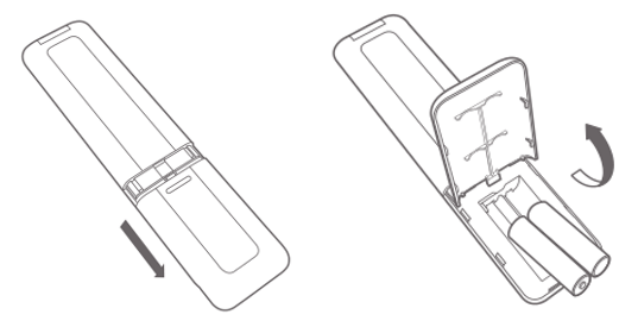
1. Press the indentation at the top of the battery cover with your finger and slide it downward to remove the cover;
2. Insert two AAA batteries into the battery compartment, ensuring the correct polarity as shown in the diagram. Then, securely close the battery cover.
Note:
Ensure the batteries are installed with the correct polarity, as incorrect installation can cause the remote control to malfunction. Do not use excessive force or attempt to pry open the battery cover.
6. Q: How to update the firmware of the Mijia Air Conditioner Pro Eco 2.6 kW?
A: When a new version is available for the Mijia Air Conditioner Pro Eco 2.6 kW, you will see an update notification at the upper right corner of the air conditioner control interface (accessible via the three-dot icon). The firmware is continuously updated to optimize performance. For a better experience, it is recommended to update to the latest version.
Note:
Do not power off the air conditioner during the upgrade process.
7. Q: How to set a timer for turning the Mijia Air Conditioner Pro Eco 2.6 kW on or off?
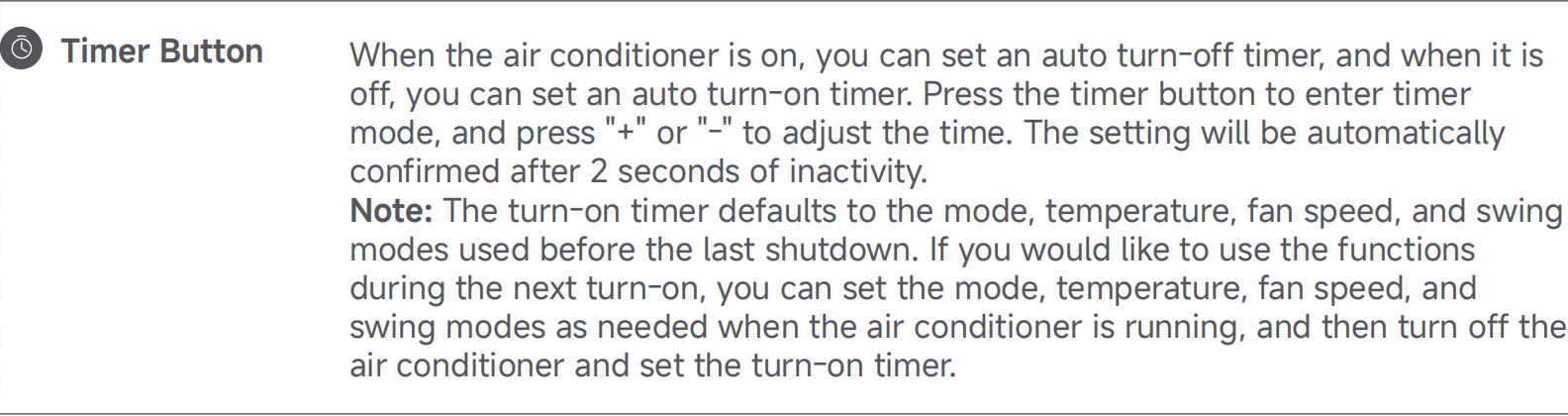
A: You can set the timer of the Mijia Air Conditioner Pro Eco 2.6 kW using the remote control. While the air conditioner is on or off, press the [Timer] button to select the desired time. The setting will automatically confirm and take effect after 2 seconds.
You can use the Mi Home/Xiaomi Home APP to control the timer in the following three ways:
1. Through the [Timer] function on the air conditioner plug's home page in the Mi Home/Xiaomi Home APP, select [Power on timer] to set the time for the air conditioner to turn on;
2. Through the [Timer] function on the air conditioner plug's home page in the Mi Home/Xiaomi Home APP, select [Schedule] to set the air conditioner to turn on and off at specified times;
Note:
This method includes both an on time and an off time. The air conditioner will automatically turn on at the start of the specified period and turn off at the end.
3. Using smart scenes, you can set up scheduled on/off times by adding a smart scene in the [Automation] section of the Mi Home/Xiaomi Home APP.
8. Q: How can multiple people control the Mijia Air Conditioner Pro Eco 2.6 kW?
A: After connecting and binding the Mijia Air Conditioner Pro Eco 2.6 kW with the Mi Home/Xiaomi Home APP, you can share the air conditioner with family members to control it.
Open the Mi Home/Xiaomi Home APP >> select the air conditioner >> tap the three-dot icon at the upper right corner >> choose [Share device] to share it with your family members.
9. Q: How to link the Mijia Air Conditioner Pro Eco 2.6 kW with other devices?
A: This Mijia Air Conditioner Pro Eco 2.6 kW supports smart scene settings, allowing it to be linked with other smart devices for automation.
You can go to the Mi Home/Xiaomi Home APP >> select the air conditioner >> tap the three-dot icon at the upper right corner >> select [Automation] >> tap the [+] icon at the upper right corner to manual control or set up automation.
10. Q: How to adjust the operating mode of the Mijia Air Conditioner Pro Eco 2.6 kW?
A: To adjust the operating mode of the Mijia Air Conditioner Pro Eco 2.6 kW, press the Mode button on the remote control. Each press of the Mode button will cycle through the available modes in sequence: cooling mode, dry mode, fan mode and heating mode.

11. Q: How to adjust the fan speed of the Mijia Air Conditioner Pro Eco 2.6 kW?
A: To adjust the fan speed of the Mijia Air Conditioner Pro Eco 2.6 kW, press the Fan Speed button on the remote control to adjust the fan speed. Each press will cycle through the available speeds: automatic, quiet (level 1), low (level 2), low-medium (level 3), medium (level 4), medium-high (level 5), high (level 6), super-high (level 7).
Note:
The fan speed is not adjustable in dry mode.

12. Q: How to enable the child lock function on the Mijia Air Conditioner Pro Eco 2.6 kW?
A: To enable or disable the child lock on the Mijia Air Conditioner Pro Eco 2.6 kW, press and hold the + and - buttons on the remote control simultaneously for more than 3 seconds.

13. Q: How to adjust the direction of airflow on the Mijia Air Conditioner Pro Eco 2.6 kW?
A: To adjust the direction of airflow on the Mijia Air Conditioner Pro Eco 2.6 kW, press the Up/Down Swing button to activate or deactivate the vertical swing function and press the Left/Right Swing button to control the horizontal oscillation.

14. Q: How to adjust the screen brightness on the Mijia Air Conditioner Pro Eco 2.6 kW?
A: The Mijia Air Conditioner Pro Eco 2.6 kW supports turning the display of the indoor unit on or off. You can press the Light button to enable or disable it.

15. Q: How to turn the Mijia Air Conditioner Pro Eco 2.6 kW on or off?
A: You can press the On/Off button to turn the Mijia Air Conditioner Pro Eco 2.6 kW on or off.

16. Q: How to activate the sleep mode on the Mijia Air Conditioner Pro Eco 2.6 kW?
A: To activate the sleep mode of the Mijia Air Conditioner Pro Eco 2.6 kW, please refer to the following information:
1. In cooling or heating mode, press the Sleep button to turn sleep mode on or off. When sleep mode is enabled, the sleep icon will appear on the remote control display.
2. When sleep mode is activated, the air conditioner will automatically adjust the temperature based on a sleep curve.

17. Q: How to use the dry mode on the Mijia Air Conditioner Pro Eco 2.6 kW?
A: To activate the dry mode on the Mijia Air Conditioner Pro Eco 2.6 kW, press the Mode button on the remote control repeatedly until the dry mode is selected.
1. Q: What are the selling points of the Mijia Air Conditioner Pro Eco 2.6 kW?
A: 1. The Mijia Air Conditioner Pro Eco 2.6 kW delivers outstanding power efficiency for energy-conscious performance;
2. With Mijia AI Energy Saving mode, it offers intelligent power-saving capabilities;
3. Smart control is available through the Mi Home/Xiaomi Home APP for convenient remote management;
4. It provides quick cooling in just 30 seconds and rapid heating within 60 seconds;
5. The micro-hole air flaps ensure a gentle and comfortable airflow;
6. It operates at a low noise level, making it ideal for optimized performance during nighttime use.
2. Q: What does the standard configuration of the Mijia Air Conditioner Pro Eco 2.6 kW include?
A: The standard configuration of the Mijia Air Conditioner Pro Eco 2.6 kW includes the following:
1. Indoor unit and accessories include 1 indoor unit, 1 remote control, 1 user manual, 1 screw pack, 2 AAA batteries and 1 warranty notice;
2. Outdoor unit and accessories include 1 outdoor unit, 4 connecting nuts, 1 drain port and 1 drainage hose.
3. Q: What is the appearance of the Mijia Air Conditioner Pro Eco 2.6 kW?
A: The appearance information of the Mijia Air Conditioner Pro Eco 2.6 kW is as follows:
1. Geometric shapes are used, avoiding excessive decorative lines, maintaining a minimalist design language;
2. The shape is smooth and friendly, offering a strong homey feel;
3. It is equipped with an LED small black screen, maintaining the classic Mi look, ensuring the product has a cohesive and recognizable design.
4. Q: What color is the Mijia Air Conditioner Pro Eco 2.6 kW?
A: The Mijia Air Conditioner Pro Eco 2.6 kW features a white and gray color scheme.
The advantages are as follows:
1. This versatile color scheme fits various home styles;
2. A neutral color palette is used to avoid color preferences from influencing the purchasing decision;
3. The white and gray color matches the brand tone.
5. Q: What are the packaging dimensions of the Mijia Air Conditioner Pro Eco 2.6 kW?
A: The packaging dimensions of the Mijia Air Conditioner Pro Eco 2.6 kW are 915×292×382mm (W×H×D) for the indoor unit and 925×625×389mm (W×H×D) for the outdoor unit.
6. Q: What are the dimensions of the indoor and outdoor units of the Mijia Air Conditioner Pro Eco 2.6 kW?
A: The indoor unit of the Mijia Air Conditioner Pro Eco 2.6 kW measures 840×200×311mm (W×H×D), while the outdoor unit measures 860×551×331mm (W×H×D).
7. Q: Is the Mijia Air Conditioner Pro Eco 2.6 kW an inverter air conditioner?
A: Yes, the Mijia Air Conditioner Pro Eco 2.6 kW intelligently adjusts the compressor's operating frequency based on the actual environment, set temperature, and fan speed.
8. Q: What is the net weight of the Mijia Air Conditioner Pro Eco 2.6 kW?
A: The net weight of the Mijia Air Conditioner Pro Eco 2.6 kW’s indoor unit is 9.8kg. And the net weight of the air conditioner’s outdoor unit is 25.5kg.
9. Q: What is the gross weight of the Mijia Air Conditioner Pro Eco 2.6 kW (including net weight, packaging and accessories)?
A: The gross weight of the Mijia Air Conditioner Pro Eco 2.6 kW’s indoor unit is 11.8kg. And the gross weight of the air conditioner’s outdoor unit is 28.9kg.
10. Q: Which APP does the Mijia Air Conditioner Pro Eco 2.6 kW connect to?
A: The Mijia Air Conditioner Pro Eco 2.6 kW supports connectivity through the Mi Home/Xiaomi Home APP.
11. Q: What is the networking method of the Mijia Air Conditioner Pro Eco 2.6 kW?
A: The Mijia Air Conditioner Pro Eco 2.6 kW uses a 2.4GHz Wi-Fi connection.
12. Q: Does the Mijia Air Conditioner Pro Eco 2.6 kW support firmware upgrades?
A: The Mijia Air Conditioner Pro Eco 2.6 kW supports firmware upgrades. It features full-link OTA technology, ensuring continuous product upgrades and providing a fresh experience every time.
Note:
During an OTA upgrade, the indoor unit display lights up as shown in the figure below. Do not power off or perform any operation, otherwise the upgrade can fail. During the upgrade, the air conditioner restarts, stops, and no indicator is displayed. After the upgrade is complete, the air conditioner returns to normal. The whole upgrade process takes 2-15 minutes, please wait patiently.
13. Q: What is the rated voltage of the Mijia Air Conditioner Pro Eco 2.6 kW?
A: The rated voltage of the Mijia Air Conditioner Pro Eco 2.6 kW is 220-240V~/1 Phase/50Hz.
14. Q: What is the voltage fluctuation range for the Mijia Air Conditioner Pro Eco 2.6 kW?
A: The Mijia Air Conditioner Pro Eco 2.6 kW can tolerate a voltage fluctuation range of 220-240V. In extreme conditions, it can operate within a wide voltage range of 130-265V. However, this affects the air conditioner's service life.
15. Q: What is the rated current of the Mijia Air Conditioner Pro Eco 2.6 kW?
A: The rated current of the Mijia Air Conditioner Pro Eco 2.6 kW is not specified. The maximum operating current is 7.1A.
16. Q: What is the power plug specification for the Mijia Air Conditioner Pro Eco 2.6 kW?
A: The Mijia Air Conditioner Pro Eco 2.6 kW does not come with a power cord for the indoor unit.
17. Q: What is the cooling power of the Mijia Air Conditioner Pro Eco 2.6 kW?
A: The rated cooling power of the Mijia Air Conditioner Pro Eco 2.6 kW is 650W.
18. Q: What is the operating temperature range of the Mijia Air Conditioner Pro Eco 2.6 kW?
A: The Mijia Air Conditioner Pro Eco 2.6 kW’s normal operating temperature for cooling is 18°C to 43°C, and for heating is -20°C to 24°C.
19. Q: Is the Mijia Air Conditioner Pro Eco 2.6 kW waterproof? What is its waterproof rating?
A: The outdoor unit of the Mijia Air Conditioner Pro Eco 2.6 kW is waterproof (resistant to rain), with a waterproof rating of IPX4.
20. Q: What certification does the Mijia Air Conditioner Pro Eco 2.6 kW have?
A: The Mijia Air Conditioner Pro Eco 2.6 kW has Safety Certification (CE), Energy Efficiency Certification (ERP), Wireless Certification (CE-RED), and Environmental Certification(REACH/RoHS).
21. Q: What is the cooling capacity of the Mijia Air Conditioner Pro Eco 2.6 kW?
A: The cooling capacity of the Mijia Air Conditioner Pro Eco 2.6 kW is 2600W.
22. Q: What is the recommended room size for the Mijia Air Conditioner Pro Eco 2.6 kW?
A: The recommended room size for the Mijia Air Conditioner Pro Eco 2.6 kW is 10-20㎡.
23. Q: What is the energy efficiency rating of the Mijia Air Conditioner Pro Eco 2.6 kW?
A: The energy efficiency rating of the Mijia Air Conditioner Pro Eco 2.6 kW is A+++ for cooling, and A++ (average climate)/A+++ (warmer climate) for heating.
24. Q: What type of refrigerant does the Mijia Air Conditioner Pro Eco 2.6 kW use?
A: The Mijia Air Conditioner Pro Eco 2.6 kW uses R32 refrigerant.
25. Q: What is the normal noise level for the Mijia Air Conditioner Pro Eco 2.6 kW?
A: The Mijia Air Conditioner Pro Eco 2.6 kW’s indoor unit normal noise level is 53 dB(A), and its outdoor unit noise level is 59 dB(A). The actual measured noise level will increase when combined with ambient noise.
Note:
The minimum indoor unit noise is 23 dB, which is the lowest noise level when the indoor unit is delivering air.
26. Q: Does the Mijia Air Conditioner Pro Eco 2.6 kW use a DC motor?
A: The Mijia Air Conditioner Pro Eco 2.6 kW uses DC motors for both the indoor unit (model RD20HR) and the outdoor unit (model ZKFN-37-10-1).
27. Q: Is the compressor of the Mijia Air Conditioner Pro Eco 2.6 kW inverter-based?
A: Yes, the Mijia Air Conditioner Pro Eco 2.6 kW uses a full DC inverter compressor (model GSX098BKSF6JV9).
28. Q: What brand is the compressor used in the Mijia Air Conditioner Pro Eco 2.6 kW?
A: The Mijia Air Conditioner Pro Eco 2.6 kW uses a compressor from the Highly manufacturer.
29. Q: How many rows of condenser and evaporator does the Mijia Air Conditioner Pro Eco 2.6 kW have?
A: The Mijia Air Conditioner Pro Eco 2.6 kW uses a single-row condenser and a dual-row evaporator.
30. Q: How many filters does the Mijia Air Conditioner Pro Eco 2.6 kW have, and what type are they?
A: The Mijia Air Conditioner Pro Eco 2.6 kW has one filter located at the top of the indoor unit. It is a PETK anti-mold and antibacterial filter.
31. Q: Is the filter of the Mijia Air Conditioner Pro Eco 2.6 kW antibacterial and anti-mold?
A: Yes, the filter of the Mijia Air Conditioner Pro Eco 2.6 kW is both antibacterial and anti-mold.
32. Q: What are the length, diameter, and material of the drainage hose for the Mijia Air Conditioner Pro Eco 2.6 kW?
A: The drainage hose for the Mijia Air Conditioner Pro Eco 2.6 kW is 2 meters long, with a diameter of Φ18mm. It is made of LDPE, EVA, and includes anti-aging and antioxidant agents.
33. Q: What is the length of the high-pressure and low-pressure pipes included in the packaging of the Mijia Air Conditioner Pro Eco 2.6 kW?
A: The packaging of the Mijia Air Conditioner Pro Eco 2.6 kW does not include connecting pipes.
34. Q: What materials are the connecting pipes of the Mijia Air Conditioner Pro Eco 2.6 kW made of?
A: The packaging of the Mijia Air Conditioner Pro Eco 2.6 kW does not include connecting pipes.
35. Q: What type of throttling method does the Mijia Air Conditioner Pro Eco 2.6 kW use?
A: The Mijia Air Conditioner Pro Eco 2.6 kW uses an electronic expansion valve for throttling.
36. Q: What is the air circulation volume of the Mijia Air Conditioner Pro Eco 2.6 kW?
A: The air circulation volume of the Mijia Air Conditioner Pro Eco 2.6 kW is 600m³/h.
37. Q: What is the maximum current of the Mijia Air Conditioner Pro Eco 2.6 kW?
A: The maximum operating current of the Mijia Air Conditioner Pro Eco 2.6 kW is 7.1A.
38. Q: What swing modes does the Mijia Air Conditioner Pro Eco 2.6 kW support?
A: The Mijia Air Conditioner Pro Eco 2.6 kW supports both left/right swing and up/down swing modes.
39. Q: Does the Mijia Air Conditioner Pro Eco 2.6 kW support automatic defrosting?
A: The Mijia Air Conditioner Pro Eco 2.6 kW supports automatic defrosting.
40. Q: Does the Mijia Air Conditioner Pro Eco 2.6 kW support intelligent dry mode?
A: The Mijia Air Conditioner Pro Eco 2.6 kW only supports regular dry mode. Please follow OTA update notifications, as intelligent dry mode will be available after an update.
41. Q: Does the Mijia Air Conditioner Pro Eco 2.6 kW support battery usage statistics?
A: Yes, the Mijia Air Conditioner Pro Eco 2.6 kW supports battery consumption statistics. You can view the details in the Mi Home/Xiaomi Home APP by selecting the air conditioner and scrolling down to see battery usage statistics.
42. Q: Does the Mijia Air Conditioner Pro Eco 2.6 kW support anti-direct blowing?
A: The Mijia Air Conditioner Pro Eco 2.6 kW comes with a soft air guide blade and allows you to switch between gentle airflow, upward airflow, downward airflow, circulating air, and off using the Air Flow button.
43. Q: Does the Mijia Air Conditioner Pro Eco 2.6 kW use an infrared or Bluetooth remote control?
A: The Mijia Air Conditioner Pro Eco 2.6 kW uses an infrared remote control.
44. Q: What material is the screen of the Mijia Air Conditioner Pro Eco 2.6 kW made of?
A: The screen on the indoor unit of the Mijia Air Conditioner Pro Eco 2.6 kW is made of PC material.
45. Q: Does the remote control of the Mijia Air Conditioner Pro Eco 2.6 kW have an LED indicator?
A: The remote control of the Mijia Air Conditioner Pro Eco 2.6 kW does not have an LED indicator.
46. Q: What type of battery does the remote control of the Mijia Air Conditioner Pro Eco 2.6 kW use?
A: The remote control of the Mijia Air Conditioner Pro Eco 2.6 kW uses AAA dry batteries.
47. Q: How much electricity does the Mijia Air Conditioner Pro Eco 2.6 kW consume per day?
A: The actual power consumption of the Mijia Air Conditioner Pro Eco 2.6 kW depends on the operating environment, such as temperature and insulation conditions, making it difficult to estimate. If you want to check the power consumption, you can view it in the Mi Home/Xiaomi Home APP.
48. Q: Which smartphone brands are compatible with the Mijia Air Conditioner Pro Eco 2.6 kW, and are there any specific requirements for the phone?
A: The Mijia Air Conditioner Pro Eco 2.6 kW is compatible with smartphones running both Android and iOS systems. After downloading the Mi Home/Xiaomi Home APP, you can connect and control the air conditioner remotely. There are no specific requirements for the phone.
49. Q: What type of mold does the Mijia Air Conditioner Pro Eco 2.6 kW's anti-mold function protect against, and what are the specific standards?
A: The Mijia Air Conditioner Pro Eco 2.6 kW uses a PETK anti-mold and antibacterial filter. It has been tested against the following mold strains: Aspergillus niger (CGMCC3.5487), Chaetomium globosum (CGMCC3.3601), and Penicillium funiculosum (CGMCC3.3875).
Under standard test conditions, after 28 days of cultivation, no significant mold growth was observed.
50. Q: How to find the serial number on the Mijia Air Conditioner Pro Eco 2.6 kW?
A: The Mijia Air Conditioner Pro Eco 2.6 kW's SN information can be found in the following locations:
1. The label on the packaging box of both the indoor and outdoor units;
2. The label on the right-side panel of the indoor unit;
3. Inside the accessory bag of the indoor unit (SN sticker);
4. The label inside the large handle of the outdoor unit.
51. Q: How can I distinguish between the indoor and outdoor units using the serial number (SN) of the Mijia Air Conditioner Pro Eco 2.6 kW?
A: It is not possible to distinguish between the indoor and outdoor units of the Mijia Air Conditioner Pro Eco 2.6 kW by the serial number alone. However, the model number shown on the SN label can be used to differentiate them.
The indoor unit model number is ASH-09W/N1C3-E U, where 'W' indicates the indoor unit.
The outdoor unit model is ASH-09O/N1C3-EU, where 'O' indicates the outdoor unit.
52. Q: What are the key features of the split air conditioner?
A: The key features of the split air conditioner are as follows:
1. Composition: It consists of an indoor unit and an outdoor unit, which are installed separately and connected via pipes and electrical wiring;
2. Types: The types of split air conditioners are wall-mounted, cabinet-type, ceiling-mounted, embedded, and floor-standing;
3. Advantages:
(1). The split air conditioner is known for its aesthetic design, various styles, space-saving, low noise, and flexible usage;
(2). The indoor unit is installed flexibly. The outdoor unit’s size is not limited;
(3). It produce very little noise, around 40~50dB, whereas window air conditioners generate about 60dB;
(4). It does not affect indoor lighting and will not cause the window to vibrate along with the air conditioner;
(5). The split air conditioner allows for easy installation and maintenance;
(6). It is cost-effective, practical, and durable.
53. Q: What safety precautions should be followed when using the Mijia Air Conditioner Pro Eco 2.6 kW?
A: The Mijia Air Conditioner Pro Eco 2.6 kW’s safety precautions are as follows:
1. This product can only use the power supply indicated on the nameplate. Please use the specified power cord and do not change it by yourself;
2. Do not connect the grounding wire of the power supply to a gas tank or water pipe. insufficient grounding will result in electric shock;
3. Make sure that the wiring harness, drainage pipe, and compressor pipe are connected correctly. Improper connection will cause the air conditioner not to function normally or reduce performance after some time or even have problems of water leakage, electrical leakage, fluorine leakage, electric shock, or fire accidents;
4. Use the button to turn the product on or off instead of plugging or unplugging the power plug during daily use. Please turn off the product and unplug the power plug when not in use for a long time;
5. When the ambient humidity is high, please increase the fan speed or adjust the air guide blade angle to the maximum using the wind direction button to prevent water droplets from falling;
6. Do not install the air conditioner in places where flammable or explosive gases leak, where the environment is humid, or where electromagnetic interference is significant. The indoor unit of this air conditioner is not waterproof, so do not use it in humid environments such as laundry rooms or bathrooms;
7. When indoor ventilation equipment is used together with indoor heating equipment or gas stoves, it should be ensured to avoid hypoxic accidents caused by insufficient ventilation;
8. Do not blow the air from the air conditioner directly to animals or plants; otherwise it will cause adverse effects;
9. When cleaning the air conditioner, be sure to turn it off and cut off the power supply, and make sure that the air conditioner has completely stopped before operating;
10. Do not poke your fingers or sticks into the exhaust inlet or exhaust outlet of the air conditioner. Otherwise, it will cause damage to the air conditioner or even personal injury;
11. Do not place any objects on the outdoor unit and check its mounting bracket frequently. If there is any damage, repair it in time; otherwise, the outdoor unit will fall and cause injury;
12. If any abnormality in the air conditioner (such as a burnt smell) is found, turn the air conditioner off, cut off the power supply immediately, and contact the after-sales service team;
13. For safety's sake, cut off the power supply before touching the air conditioner;
14. Do not install the air conditioner in special places such as ships or vehicles.
Note:
For the rest of the precautions, please refer to the user manual.
54. Q: What to do if accidentally touch the Mijia Air Conditioner Pro Eco 2.6 kW and feel an electric tingling sensation?
A: For your safety, please avoid touching the indoor or outdoor units while the Mijia Air Conditioner Pro Eco 2.6 kW is operating. If you experience a tingling sensation when accidentally touching the outdoor unit, please contact a technician to ensure the air conditioner's grounding wire is properly connected to prevent electric shock or other hazards. If the grounding is confirmed to be properly connected, please contact after-sales service for further inspection.
55. Q: What is the dehumidification capacity of the Mijia Air Conditioner Pro Eco 2.6 kW?
A: The dehumidification capacity of the Mijia Air Conditioner Pro Eco 2.6 kW is 1.2 L/h.
56. Q: How to find the manufacturing date of the Mijia Air Conditioner Pro Eco 2.6 kW?
A: You can find the manufacturing date on the label of the indoor and outdoor units of the Mijia Air Conditioner Pro Eco 2.6 kW.
57. Q: What do the letters in the model name of the Mijia Air Conditioner Pro Eco 2.6 kW represent?
A: The model number of the Mijia Air Conditioner Pro Eco 2.6 kW is ASH-09WO/N1C3-EU.
The meanings of the letters are as follows:
1. The letter A stands for “Air Conditioner” as the product category code;
2. The letter S represents “Split” as the type code;
3. The letter H indicates “Heating and cooling” as the cooling and heating function code;
4. The number 09 refers to “9000 BTU/h” as the capacity code;
5. The letter W stands for “Wall-mounted” as the indoor unit code;
6. The letter O represents “Outdoor unit” as the outdoor unit code;
7. N1 indicates the “Ultra Energy-saving Series” as the product series and generation code;
8. The letter C refers to “R32 refrigerant” as the refrigerant code;
9. The number 3 represents “A+++ cooling efficiency” as the energy efficiency level;
10. EU refers to “the European Union” as the energy efficiency standard code.
58. Q: How often does the Mijia Air Conditioner Pro Eco 2.6 kW need a refrigerant recharge?
A: The Mijia Air Conditioner Pro Eco 2.6 kW do not require regular refrigerant recharging, as the refrigerant circulates within a sealed system and does not get consumed under normal conditions. Recharging is only necessary if there is a leak in the system.
59. Q: How is the refrigerant distributed in the outdoor unit of the Mijia Air Conditioner Pro Eco 2.6 kW?
A: In the Mijia Air Conditioner Pro Eco 2.6 kW, the refrigerant in the outdoor unit’s condenser is distributed using a four-in, four-out flow system.
60. Q: How is the refrigerant distributed in the indoor unit of the Mijia Air Conditioner Pro Eco 2.6 kW?
A: In the Mijia Air Conditioner Pro Eco 2.6 kW, the refrigerant in the indoor unit evaporator is distributed in a two-in, one-out flow system.
61. Q: What is the GWP value of the Mijia Air Conditioner Pro Eco 2.6 kW? Is there a difference in GWP between 1.0 and 1.5 models?
A: The Mijia Air Conditioner Pro Eco 2.6 kW uses the environmentally friendly R32 refrigerant (difluoromethane), which has a Global Warming Potential (GWP) of 675 based on the IPCC AR5 standard. This represents a 68% reduction in greenhouse effect compared to the traditional R410A refrigerant (GWP 2088), and its Ozone Depletion Potential (ODP) is zero. The GWP is a fixed value certified by international authoritative organizations, so individual testing is not required. It complies with the Kigali Amendment as well as environmental certification standards in the EU and the United States.
62. Q: What is the SEER value of the Mijia Air Conditioner Pro Eco 2.6 kW in the EU?
A: SEER (Seasonal Energy Efficiency Ratio) measures the cooling season energy efficiency of an air conditioner, reflecting its performance under varying outdoor temperatures throughout the year. It is especially useful for evaluating the real-world energy consumption of inverter air conditioners. The SEER value of the Mijia Air Conditioner Pro Eco 2.6 kW model released by Xiaomi in the EU is 8.5.
Function usage
1. Q: How to connect the Mijia Air Conditioner Pro Eco 2.6 kW to the Mi Home/Xiaomi Home APP?
A: To connect your Mijia Air Conditioner Pro Eco 2.6 kW, you need to install the Mi Home/Xiaomi Home APP and log into your account.
Please refer to the following steps to connect the air conditioner:
1. First, connect your smartphone to your home Wi-Fi network, then open the Mi Home/Xiaomi Home APP. Tap the [+] icon at the upper right corner to enter the [Add device] page. Select the detected air conditioner from the list to proceed to the Wi-Fi setup page;
2. Continue following the prompts on screen until you see the message displayed [Device added successfully].
Note:
1. For Android phones, you can add the air conditioner via nearby devices or manually. For iPhones, after installing the Mi Home/Xiaomi Home APP, tap the [+] icon on the homepage to manually select the device or select the scanned new device to add;
2. To update the air conditioner firmware, you can go to the Mi Home/Xiaomi Home APP >> select the air conditioner >> tap the three-dot icon at the upper right corner >> select [Firmware update] to check if there are any updates available.
2. Q: How to reset the Wi-Fi of the Mijia Air Conditioner Pro Eco 2.6 kW?
A: To reset the Wi-Fi of the Mijia Air Conditioner Pro Eco 2.6 kW, press and hold the Sleep and Light buttons simultaneously for more than 3 seconds.
3. Q: How to adjust the temperature on the Mijia Air Conditioner Pro Eco 2.6 kW?
A: In cooling mode, the temperature adjustment range of the Mijia Air Conditioner Pro Eco 2.6 kW is 16°C to 31°C. Use the Temperature up and down buttons on the remote control to adjust the temperature, with each press changing the temperature by 0.5°C.
4. Q: How to control the Mijia Air Conditioner Pro Eco 2.6 kW with the remote control?
A: The remote control of the Mijia Air Conditioner Pro Eco 2.6 kW uses infrared technology. Simply point it at the front of the air conditioner (where the display screen is) to operate it.
Note:
1. The infrared receiver is located behind the display screen that has a certain level of transparency;
2. The effective range of the remote control is within 8 meters and approximately 45° to the left and right.
5. Q: How to install the batteries in the remote control of the Mijia Air Conditioner Pro Eco 2.6 kW?
A: Follow these steps to install the batteries for the Mijia Air Conditioner Pro Eco 2.6 kW's remote control:
1. Press the indentation at the top of the battery cover with your finger and slide it downward to remove the cover;
2. Insert two AAA batteries into the battery compartment, ensuring the correct polarity as shown in the diagram. Then, securely close the battery cover.
Note:
Ensure the batteries are installed with the correct polarity, as incorrect installation can cause the remote control to malfunction. Do not use excessive force or attempt to pry open the battery cover.
6. Q: How to update the firmware of the Mijia Air Conditioner Pro Eco 2.6 kW?
A: When a new version is available for the Mijia Air Conditioner Pro Eco 2.6 kW, you will see an update notification at the upper right corner of the air conditioner control interface (accessible via the three-dot icon). The firmware is continuously updated to optimize performance. For a better experience, it is recommended to update to the latest version.
Note:
Do not power off the air conditioner during the upgrade process.
7. Q: How to set a timer for turning the Mijia Air Conditioner Pro Eco 2.6 kW on or off?
A: You can set the timer of the Mijia Air Conditioner Pro Eco 2.6 kW using the remote control. While the air conditioner is on or off, press the [Timer] button to select the desired time. The setting will automatically confirm and take effect after 2 seconds.
You can use the Mi Home/Xiaomi Home APP to control the timer in the following three ways:
1. Through the [Timer] function on the air conditioner plug's home page in the Mi Home/Xiaomi Home APP, select [Power on timer] to set the time for the air conditioner to turn on;
2. Through the [Timer] function on the air conditioner plug's home page in the Mi Home/Xiaomi Home APP, select [Schedule] to set the air conditioner to turn on and off at specified times;
Note:
This method includes both an on time and an off time. The air conditioner will automatically turn on at the start of the specified period and turn off at the end.
3. Using smart scenes, you can set up scheduled on/off times by adding a smart scene in the [Automation] section of the Mi Home/Xiaomi Home APP.
8. Q: How can multiple people control the Mijia Air Conditioner Pro Eco 2.6 kW?
A: After connecting and binding the Mijia Air Conditioner Pro Eco 2.6 kW with the Mi Home/Xiaomi Home APP, you can share the air conditioner with family members to control it.
Open the Mi Home/Xiaomi Home APP >> select the air conditioner >> tap the three-dot icon at the upper right corner >> choose [Share device] to share it with your family members.
9. Q: How to link the Mijia Air Conditioner Pro Eco 2.6 kW with other devices?
A: This Mijia Air Conditioner Pro Eco 2.6 kW supports smart scene settings, allowing it to be linked with other smart devices for automation.
You can go to the Mi Home/Xiaomi Home APP >> select the air conditioner >> tap the three-dot icon at the upper right corner >> select [Automation] >> tap the [+] icon at the upper right corner to manual control or set up automation.
10. Q: How to adjust the operating mode of the Mijia Air Conditioner Pro Eco 2.6 kW?
A: To adjust the operating mode of the Mijia Air Conditioner Pro Eco 2.6 kW, press the Mode button on the remote control. Each press of the Mode button will cycle through the available modes in sequence: cooling mode, dry mode, fan mode and heating mode.
11. Q: How to adjust the fan speed of the Mijia Air Conditioner Pro Eco 2.6 kW?
A: To adjust the fan speed of the Mijia Air Conditioner Pro Eco 2.6 kW, press the Fan Speed button on the remote control to adjust the fan speed. Each press will cycle through the available speeds: automatic, quiet (level 1), low (level 2), low-medium (level 3), medium (level 4), medium-high (level 5), high (level 6), super-high (level 7).
Note:
The fan speed is not adjustable in dry mode.
12. Q: How to enable the child lock function on the Mijia Air Conditioner Pro Eco 2.6 kW?
A: To enable or disable the child lock on the Mijia Air Conditioner Pro Eco 2.6 kW, press and hold the + and - buttons on the remote control simultaneously for more than 3 seconds.
13. Q: How to adjust the direction of airflow on the Mijia Air Conditioner Pro Eco 2.6 kW?
A: To adjust the direction of airflow on the Mijia Air Conditioner Pro Eco 2.6 kW, press the Up/Down Swing button to activate or deactivate the vertical swing function and press the Left/Right Swing button to control the horizontal oscillation.
14. Q: How to adjust the screen brightness on the Mijia Air Conditioner Pro Eco 2.6 kW?
A: The Mijia Air Conditioner Pro Eco 2.6 kW supports turning the display of the indoor unit on or off. You can press the Light button to enable or disable it.
15. Q: How to turn the Mijia Air Conditioner Pro Eco 2.6 kW on or off?
A: You can press the On/Off button to turn the Mijia Air Conditioner Pro Eco 2.6 kW on or off.
16. Q: How to activate the sleep mode on the Mijia Air Conditioner Pro Eco 2.6 kW?
A: To activate the sleep mode of the Mijia Air Conditioner Pro Eco 2.6 kW, please refer to the following information:
1. In cooling or heating mode, press the Sleep button to turn sleep mode on or off. When sleep mode is enabled, the sleep icon will appear on the remote control display.
2. When sleep mode is activated, the air conditioner will automatically adjust the temperature based on a sleep curve.
17. Q: How to use the dry mode on the Mijia Air Conditioner Pro Eco 2.6 kW?
A: To activate the dry mode on the Mijia Air Conditioner Pro Eco 2.6 kW, press the Mode button on the remote control repeatedly until the dry mode is selected.

18. Q: How to restore the Mijia Air Conditioner Pro Eco 2.6 kW to factory settings?
A: To restore factory settings for the Mijia Air Conditioner Pro Eco 2.6 kW, you can refer to the following steps:
1. Within five minutes of the air conditioner connecting to power (make sure it is turned off), quickly press the Light button on the remote control six times in five seconds, and then the air conditioner makes a buzzer sound for two seconds. Disconnect the power and reconnect the power, and the factory settings will be restored;
Note:
1. When restored to the factory settings, the air conditioner will delete all data including but not limited to the set temperature, fan speed, timing information, function switches, and accumulated electricity consumption;
2. It is not recommended to restore the factory settings unless necessary, so as not to affect the experience of some functions. For example, the accumulated electricity consumption value will be significantly different from the actual electricity consumption value.
19. Q: What precautions should be taken when using the Mijia Air Conditioner Pro Eco 2.6 kW?
A: Please keep the following precautions in mind when using the Mijia Air Conditioner Pro Eco 2.6 kW:
1. Confirm the usage conditions:
(1). For cooling mode, the operating temperature range is 18°C to 43°C. The unit will enter protection mode and stop working if the ambient temperature is too high or too low;
(2). For heating mode, the operating temperature range is -20°C to 24°C. The unit will enter protection mode and stop working if the ambient temperature is too high or too low.
2. Safety precautions:
For safety-related usage instructions, please refer to the user manual.
20. Q: How to use the Drying function of the Mijia Air Conditioner Pro Eco 2.6 kW?
A: This Mijia Air Conditioner Pro Eco 2.6 kW supports Drying function. You can enable it using the remote control or through the Mi Home/Xiaomi Home APP.
To enable the Drying function via the APP, open the Mi Home/Xiaomi Home APP >> select the air conditioner >> tap the three-dot icon at the upper right corner >> enable [Drying function].
21. Q: How to use the AI function of the Mijia Air Conditioner Pro Eco 2.6 kW?
A: To use the AI function of the Mijia Air Conditioner Pro Eco 2.6 kW, follow the steps below:
1. Voice control via Google Home APP or Amazon Alexa APP:
(1). Download and log into the Google Home APP or Amazon Alexa APP;
(2). Connect (bind) the air conditioner in the voice assistant APP. If you have a Google or Alexa smart speaker at home, you can also bind the air conditioner to the speaker;
(3). Once connected to the internet, you can control the air conditioner using voice commands;
2. AI energy saver:
(1). This feature uses a self-developed deep learning algorithm for long-term energy efficiency and improved environmental adaptability;
(2). Once the air conditioner is connected to the internet, it will automatically detect its environment and location to intelligently select the best mode. For example, if the ambient temperature is 40°C and the room size is 16m², the air conditioner will cool the room quickly. While in cooling mode, you can enable the AI energy saver mode in the Mi Home/Xiaomi Home APP to maintain precise and stable temperature control, achieving long-term energy efficiency.
22. Q: How to check the filter’s service life of the Mijia Air Conditioner Pro Eco 2.6 kW?
A: This Mijia Air Conditioner Pro Eco 2.6 kW does not have a replaceable filter. The filter is durable and does not require replacement. Simply follow the cleaning instructions as needed.
23. Q: How to check the sleep curve of the Mijia Air Conditioner Pro Eco 2.6 kW?
A: Follow these steps to check the sleep operation curve of the Mijia Air Conditioner Pro Eco 2.6 kW:
1. Open the Mi Home/Xiaomi Home APP and find the air conditioner;
2. Tap the three-dot icon at the upper right corner;
3. Select [Additional features];
4. Choose [Customize sleep curve] to view the sleep operation curve.
24. Q: How to change the device name of the Mijia Air Conditioner Pro Eco 2.6 kW?
A: Follow these steps to modify the device name of the Mijia Air Conditioner Pro Eco 2.6 kW:
1. Open the Mi Home/Xiaomi Home APP and locate the air conditioner;
2. Tap the three-dot icon and enter [Device name] to modify the device name;
3. Change the name and confirm that the modification is saved successfully.
25. Q: How to manage the location of the Mijia Air Conditioner Pro Eco 2.6 kW?
A: Follow these steps to manage the Mijia Air Conditioner Pro Eco 2.6 kW's location:
1. Open the Mi Home/Xiaomi Home APP and locate the air conditioner;
2. Tap the three-dot icon and enter [Manage locations] to manage the device location.
26. Q: How to add the Mijia Air Conditioner Pro Eco 2.6 kW to the Home screen?
A: Follow these steps to add the Mijia Air Conditioner Pro Eco 2.6 kW to the Home screen:
1. Open the Mi Home/Xiaomi Home APP and locate the air conditioner;
2. Tap the three-dot icon;
3. Enter [Additional settings];
4. Tap [Add to Home screen] to complete the process.
27. Q: What is the most energy-efficient temperature setting for the Mijia Air Conditioner Pro Eco 2.6 kW?
A: The energy efficiency of the Mijia Air Conditioner Pro Eco 2.6 kW depends on factors such as room size and insulation. For an optimal balance between comfort and energy savings, it is recommended to set the cooling mode between 24°C and 28°C, and the heating mode between 18°C and 22°C.
28. Q: How to bind the Mijia Air Conditioner Pro Eco 2.6 kW to a smart band? How to use a smart band to control the air conditioner?
A: This Mijia Air Conditioner Pro Eco 2.6 kW does not support pairing with a smart band.
29. Q: Does the Mijia Air Conditioner Pro Eco 2.6 kW have a memory function? (Will it restore previous settings after a power outage?)
A: The Mijia Air Conditioner Pro Eco 2.6 kW has a power-off memory function, which saves the last operational state before a power outage. However, it will not turn back on automatically when power is restored. You need to turn it on manually.
30. Q: How to use the Auto clean function of the Mijia Air Conditioner Pro Eco 2.6 kW?
A: When the Mijia Air Conditioner Pro Eco 2.6 kW is turned off, press and hold the ECO and Timer buttons on the remote control simultaneously for 3 seconds to activate Auto clean. The process takes approximately 40 minutes to complete.
31. Q: How to use the ECO function on the Mijia Air Conditioner Pro Eco 2.6 kW?
A: Follow these steps to use the ECO function on the Mijia Air Conditioner Pro Eco 2.6 kW:
1. In cooling/heating mode, press and hold the ECO button for less than 3 seconds to turn on or off the ECO mode, and the remote control display shows "ECO" when the ECO mode is on;
2. In heating mode, press and hold the button for 3 seconds to activate/deactivate 8°C heating, and the set temperature display area on the remote control display shows "8°C" when 8°C heating is activated.

Note:
Temperature adjustment is not available when the ECO function is enabled. If you need to change the temperature, please turn off the ECO function.
32. Q: How to turn the Mijia Air Conditioner Pro Eco 2.6 kW on and off?
A: You can turn the Mijia Air Conditioner Pro Eco 2.6 kW on or off using the following methods:
1. Point the remote control at the air conditioner's display screen and press the On/Off button;
2. If the air conditioner is connected to the internet, open the Mi Home/Xiaomi Home APP and press the On/Off button to turn it on or off;
3. Use the Timer button on the remote control or the Mi Home/Xiaomi Home APP to set a schedule for automatic power on/off.
33. Q: What modes are available on the Mijia Air Conditioner Pro Eco 2.6 kW?
A: The Mijia Air Conditioner Pro Eco 2.6 kW supports cooling mode, dry mode, fan mode, and heating mode.
34. Q: Can the indoor unit's piping direction of the Mijia Air Conditioner Pro Eco 2.6 kW be adjusted?
A: Yes, the outlet direction of the Mijia Air Conditioner Pro Eco 2.6 kW’s indoor unit pipeline can be adjusted to the left, back or right.
35. Q: Why is the Mijia Air Conditioner Pro Eco 2.6 kW's filter positioned at the top? What are the advantages?
A: The integrated filter design simplifies the structure of the Mijia Air Conditioner Pro Eco 2.6 kW while effectively enabling the top air inlet to block dust.
The advantages are as follows:
1. The filter is easy to remove with a single operation, without the need to disassemble other parts;
2. The integrated filter does not need to be separated for cleaning, making the process simpler.
36. Q: How to use turbo mode on the Mijia Air Conditioner Pro Eco 2.6 kW?
A: Once the Mijia Air Conditioner Pro Eco 2.6 kW is powered on and running normally, press the Turbo button on the remote control to enable or disable turbo mode. If the air conditioner is connected to the internet, you can also toggle turbo mode via the Mi Home/Xiaomi Home APP.
37. Q: How does the turbo mode work on the Mijia Air Conditioner Pro Eco 2.6 kW?
A: Turbo mode maximizes the cooling power of the Mijia Air Conditioner Pro Eco 2.6 kW at the press of a button. Once activated, the system adjusts the compressor frequency and fan speed to their highest levels, enabling rapid cooling.
38. Q: How to use the gentle airflow feature on the Mijia Air Conditioner Pro Eco 2.6 kW?
A: The Mijia Air Conditioner Pro Eco 2.6 kW supports the Gentle airflow function. In cooling mode, you can press the Air Flow button to cycle through gentle airflow, upward airflow, downward airflow, circulating airflow, and off. When the selection remains on gentle airflow, the feature is activated. In heating mode, pressing the Air Flow button cycles through upward airflow, downward airflow, and off.
39. Q: How does the gentle airflow feature work on the Mijia Air Conditioner Pro Eco 2.6 kW?
A: The Mijia Air Conditioner Pro Eco 2.6 kW is equipped with soft air guide blade. When Gentle airflow mode is activated, the left and right airflow guide blades adjust their angles to be perpendicular to the airflow direction. The perforations on these guide blades help disperse the airflow, creating a softer and more comfortable breeze. Additionally, the direction of the airflow can be adjusted by changing the angle of the guide blades.
40. Q: After the Mijia Air Conditioner Pro Eco 2.6 kW is connected to Wi-Fi, will it automatically connect when it is powered on again after a power outage?
A: After the Mijia Air Conditioner Pro Eco 2.6 kW is connected to Wi-Fi, the device will automatically connect to APP when it is powered on again after a power outage. However, if the power outage is too long and you cannot connect, please reset the Wi-Fi and reconnect.
41. Q: How does the Mijia Air Conditioner Pro Eco 2.6 kW's Auto clean function work?
A: When the Mijia Air Conditioner Pro Eco 2.6 kW’s Auto clean function is working, the evaporator goes through a series of steps including cooling to condense moisture, frost formation, defrosting, and heated air drying.
42. Q: Does the Mijia Air Conditioner Pro Eco 2.6 kW need to be connected to the Mi Home/Xiaomi Home APP to function?
A: The Mijia Air Conditioner Pro Eco 2.6 kW does not need to be connected to the Mi Home/Xiaomi Home APP to work. All functions on the remote control can still be used normally without APP connection. However, connecting the air conditioner to the Mi Home/Xiaomi Home APP enables additional features such as remote control, smart adjustments, scheduled on/off, product interconnectivity, and filter clogging reminders. We recommend connecting the air conditioner to the APP for a more convenient and intelligent experience.
43. Q: What voice command does the Mijia Air Conditioner Pro Eco 2.6 kW support?
A: The Mijia Air Conditioner Pro Eco 2.6 kW supports the voice command function of Google Assistant.
Currently, the following voice commands are supported to control the air conditioner:
1. Say "Hey Google, turn on/off <device name>" to turn on/off the air conditioner;
2. Say "Hey Google, set <device name> speed to <speed name>" to adjust the fan speed;
3. Say "Hey Google, set <device name> to xx degrees" to adjust the temperature;
4. Say "Hey Google, set <device name> to <mode name>" to change the operating mode.
44.Q: What languages does the Google Assistant voice command function of the Mijia Air Conditioner Pro Eco 2.6 kW support?
A: The Mijia Air Conditioner Pro Eco 2.6 kW can be easily controlled with voice commands via Google Assistant. Currently, 16 languages are supported:
Danish, Dutch, English, French, German, Hindi, Indonesian, Italian, Japanese, Korean, Norwegian, Portuguese, Spanish, Swedish, Thai, and Chinese.
For more languages, please await further updates for Google Assistant.
Troubleshooting
1. Q: What to do if the Mijia Air Conditioner Pro Eco 2.6 kW fails to connect to the Mi Home/Xiaomi Home APP?
A: Try the following steps to resolve the connection issue of the Mijia Air Conditioner Pro Eco 2.6 kW:
1. Check if the air conditioner is powered on and in pairing mode. Unplug the device for 10 seconds, then plug it back in, or reset the Wi-Fi settings before reconnecting;
2. Please check if the connected Wi-Fi is a 2.4GHz network. The air conditioner only supports 2.4GHz Wi-Fi and does not support 5GHz Wi-Fi;
3. Ensure that the router is within a reasonable distance from the air conditioner and that it is functioning properly;
4. Make sure the router's SSID and password do not contain Chinese characters or special symbols, and verify that the entered SSID and password are correct;
5. Try connecting using a mobile hotspot to check if the issue is with the router network;
6. Update the Mi Home/Xiaomi Home APP to the latest version or uninstall and reinstall it. Make sure to follow the step-by-step instructions in the Mi Home/Xiaomi Home APP to connect the air conditioner.
If the problem persists, please contact the after-sales service for further inspection.
2. Q: What to do if the firmware upgrade of the Mijia Air Conditioner Pro Eco 2.6 kW fails in the Mi Home/Xiaomi Home APP?
A: If the firmware upgrade for the Mijia Air Conditioner Pro Eco 2.6 kW fails, follow these steps:
1. Update the Mi Home/Xiaomi Home APP to the latest version and retry;
2. Check if the Wi-Fi connection is stable;
3. Try switching to a different network and attempt the upgrade again;
4. Do not exit the upgrade page or close the Mi Home/Xiaomi Home APP during the update to ensure a complete installation.
If the issue persists, please contact the after-sales service for further inspection.
3. Q: What to do if the Mijia Air Conditioner Pro Eco 2.6 kW stops working automatically during cooling?
A: If the Mijia Air Conditioner Pro Eco 2.6 kW stops working, check the following:
1. Verify if the room temperature has reached the set temperature. If so, the air conditioner can automatically reduce frequency and fan speed;
2. Please enable ECO mode and observe if it operates normally;
3. Please check if the air conditioner displays a fault code. Some codes are protection codes. Turn off the power, wait for a while, and then turn the power back on to see if the device operates normally.
If the issue persists, please contact the after-sales service for further inspection.
4. Q: What are the different Wi-Fi indicator statuses on the Mijia Air Conditioner Pro Eco 2.6 kW?
A: The Wi-Fi indicator statuses of the Mijia Air Conditioner Pro Eco 2.6 kW’s indoor unit are as follows:
1. The Wi-Fi indicator flashes, indicating that the Wi-Fi is not connected within 30 minutes;
2. The Wi-Fi indicator turns off when the air conditioner is on, indicating that the Wi-Fi has not been connected for more than 30 minutes;
3. The Wi-Fi indicator remains light when the air conditioner is on, indicating that the Wi-Fi is successfully connected;
4. The Wi-Fi indicator remains light when the air conditioner is off, indicating that the air conditioner is in standby mode.
5. Q: What to do if the Wi-Fi indicator on the Mijia Air Conditioner Pro Eco 2.6 kW displays abnormally?
A: Ensure that the Mijia Air Conditioner Pro Eco 2.6 kW is properly connected to the internet. If the issue persists, contact the after-sales service for further inspection.
6. Q: What to do if the temperature on the Mijia Air Conditioner Pro Eco 2.6 kW cannot be adjusted?
A: If you cannot control the Mijia Air Conditioner Pro Eco 2.6 kW using remote control, please refer to the following methods:
1. Check if the remote control battery has power. If depleted, replace it with a new battery;
2. If the battery is functional, check if the remote control display is working and if other buttons respond;
3. Please confirm if the air conditioner is in ECO mode or Sleep mode, as these modes can limit the temperature adjustment function;
4. If the remote control is functioning properly, ensure the air conditioner is receiving the remote signal (listen for a beeping sound);
5. Please turn off the air conditioner for 3 to 5 minutes, then restart it and check if it can be restored.
If the issue persists, please contact the after-sales service for further inspection.
If you cannot control the air conditioner using the Mi Home/Xiaomi Home APP, please refer to the following methods:
1. Remove the device from the Mi Home/Xiaomi Home APP, reset the air conditioner’s Wi-Fi, and control it using only the remote control;
2. Check if the issue occurs when using other remote-controlled devices at home to rule out signal interference;
3. If the issue persists after the above troubleshooting, please contact the after-sales service for inspection;
4. If the issue is resolved, check if the Mi Home/Xiaomi Home APP settings (such as smart scenes like sleep curve or ECO mode) are affecting operation. You can reset the air conditioner’s Wi-Fi, reconnect to the Mi Home/Xiaomi Home APP, and clear historical data.
If both the remote control and the Mi Home/Xiaomi Home APP are unable to control the device, please contact the after-sales service for inspection.
7. Q: What to do if the airflow temperature of the Mijia Air Conditioner Pro Eco 2.6 kW is not ideal?
A: Follow these steps to adjust the settings of the Mijia Air Conditioner Pro Eco 2.6 kW:
1. Check if the correct mode is selected for the season (cooling or fan mode);
2. Adjust the temperature setting to increase or decrease the desired cooling level;
3. Modify the fan speed setting, as this can also affect airflow comfort;
4. Please check if the indoor unit filter of the air conditioner is dirty or clogged. If so, clean the indoor unit filter.
8. Q: What to do if the airflow direction of the Mijia Air Conditioner Pro Eco 2.6 kW cannot be changed?
A: If the airflow direction of the Mijia Air Conditioner Pro Eco 2.6 kW does not change, follow these steps:
1. Ensure that the swing function is enabled;
2. Check if the air guide blade is stuck. If so, identify the cause of the obstruction.
If the issue persists, please contact the after-sales service for further inspection.
9. Q: What to do if the fan speed cannot be adjusted on the Mijia Air Conditioner Pro Eco 2.6 kW?
A: If you cannot control the fan speed of the Mijia Air Conditioner Pro Eco 2.6 kW using remote control, please refer to the following methods:
1. Check if the remote control battery has power. If depleted, replace it with a new battery;
2. If the battery is functional, check if the remote control display is working and if other buttons respond;
3. Please confirm if you can view the fan speed level on the LCD display area at the top of the remote control, and adjust it using the Fan Speed button;
4. If the remote control is functioning properly, ensure the air conditioner is receiving the remote signal (listen for a beeping sound);
5. Please turn off the air conditioner for 3 to 5 minutes, then restart it and check if it can be restored.
If the issue persists, please contact the after-sales service for further inspection.
If you cannot control the fan speed of the air conditioner using the Mi Home/Xiaomi Home APP, please refer to the following methods:
1. Remove the device from the Mi Home/Xiaomi Home APP, reset the air conditioner’s Wi-Fi, and control it using only the remote control;
2. Check if the issue occurs when using other remote-controlled devices at home to rule out signal interference;
3. If the issue persists after the above troubleshooting, please contact the after-sales service for inspection;
4. If the issue is resolved, check if the Mi Home/Xiaomi Home APP settings are affecting operation. You can reset the air conditioner’s Wi-Fi, reconnect to the Mi Home/Xiaomi Home APP, and clear historical data.
If both the remote control and the Mi Home/Xiaomi Home APP are unable to control the device, please contact the after-sales service for inspection.
10. Q: What to do if the timer function on the Mijia Air Conditioner Pro Eco 2.6 kW is not working?
A: If the timer function of the Mijia Air Conditioner Pro Eco 2.6 kW is not working, please troubleshoot as follows:
1. First, check if your device is connected to the network properly, as the timer function requires a stable internet connection;
2. If the device is connected but the timer function still doesn't work, try restarting the device to see if that resolves the issue;
3. If the issue persists after restarting the device, check if you have set the timer function via the Mi Home/Xiaomi Home APP plugin. Ensure that the device's storage chip has not been reset due to power loss. If the device is configured through smart scene to use the timer, it will not work after a network disconnection, as the servers need to send commands to the device over the network.
11. Q: What to do if the Mijia Air Conditioner Pro Eco 2.6 kW cooling effect is poor?
A: If the cooling effect of the Mijia Air Conditioner Pro Eco 2.6 kW is poor, please follow these steps:
1. Check the air conditioner settings, turn off Sleep mode, and increase the indoor unit fan speed to improve the cooling effect;
2. Check the environment, including whether there are any heat sources indoors and if the doors and windows are properly closed;
3. Check if the air intake and air outlet of the air conditioner are obstructed to ensure proper airflow;
4. Check if the indoor unit filter is dirty or clogged, and clean the filter;
5. Check if the outdoor temperature is too high (over 43°C), as the cooling effect will decrease under such conditions, which is normal.
If the issue persists after the above checks, please contact the after-sales service for inspection.
12. Q: What to do if the Mijia Air Conditioner Pro Eco 2.6 kW is not cooling?
A: If your Mijia Air Conditioner Pro Eco 2.6 kW is not cooling, please follow these troubleshooting steps:
1. Check the air conditioner settings, turn on cooling mode, and set the fan speed to the highest;
2. After turning on the air conditioner for 5 minutes, place your hand near the air outlet to feel if cold air is blowing out. If cold air is blowing, the air conditioner is working normally. However, it takes time for the cooling to lower the room temperature.
If the above steps do not resolve the issue, it is recommended to apply for after-sales service.
13. Q: What to do if the Mijia Air Conditioner Pro Eco 2.6 kW’s airflow is weak?
A: If the airflow from the Mijia Air Conditioner Pro Eco 2.6 kW is weak, please follow these steps:
1. Check the fan speed settings and try setting the fan speed to the highest;
2. Check if the indoor unit filter is dirty or clogged. A clogged filter can reduce airflow, so clean the indoor unit filter.
If the issue persists after the above checks, please contact the after-sales service for inspection.
14. Q: What to do if the Mijia Air Conditioner Pro Eco 2.6 kW cannot start?
A: If your Mijia Air Conditioner Pro Eco 2.6 kW is not starting, please follow these troubleshooting steps:
1. First, check if the power cord is properly connected and the plug is inserted correctly;
2. Check if the socket is powered. If using a power outlet, you can try using another appliance to check if there is power (the air conditioner will emit a beep sound when powered on, indicating that the power is normal);
3. Check if the remote control batteries are depleted, and try replacing the batteries;
4. Use your phone's camera to point at the remote control and check if a signal is being emitted. If you see a red flashing light, the remote control is functioning properly;
5. If connected to the Mi Home/Xiaomi Home APP, you can try turning on the air conditioner via the APP.
If the issue persists after the above checks, please contact the after-sales service for inspection.
15. Q: What to do if the circuit breaker trips during the Mijia Air Conditioner Pro Eco 2.6 kW use?
A: If the circuit breaker trips during the air conditioner use, please try using the Mijia Air Conditioner Pro Eco 2.6 kW’s ECO function to see if it works properly. If it does, the issue can be due to power limitations.
If the problem persists, please contact the after-sales service for inspection.
16. Q: What to do if the Mijia Air Conditioner Pro Eco 2.6 kW makes noise during operation?
A: If the Mijia Air Conditioner Pro Eco 2.6 kW makes noise during operation, please follow these steps:
1. Identify the type of noise, for example, airflow sound, relay clicking sound, thermal expansion or contraction of plastic parts, compressor operation noise, or water flow sound. These are considered normal;
2. If there are external speakers nearby, they can produce noise due to electromagnetic interference after the air conditioner is turned on. Try adjusting the position of the external speakers;
3. If you hear other unusual sounds or the noise level is excessively loud, please contact after-sales service for inspection.
17. Q: How to prevent the Mijia Air Conditioner Pro Eco 2.6 kW from freezing?
A: The Mijia Air Conditioner Pro Eco 2.6 kW will not freeze during normal operation in cooling mode. If you notice ice buildup on the indoor unit, please contact the after-sales service for inspection.
In heating mode, it is normal for the outdoor unit to have ice buildup during operation. However, if the indoor unit freezes, please contact the after-sales service for inspection.
18. Q: What to do if the indoor unit of the Mijia Air Conditioner Pro Eco 2.6 kW is leaking water?
A: To handle water leakage from the indoor unit of the Mijia Air Conditioner Pro Eco 2.6 kW, follow these steps:
1. Check if the indoor unit filter is excessively dirty. A dirty filter can restrict airflow, leading to moisture buildup and causing leakage. Clean the indoor unit filter;
2. Observe if water droplets occasionally form at the air outlet. This can be due to high humidity in the air, where water vapor condenses when it comes into contact with cold surfaces. This is a normal phenomenon. You can try closing the doors and windows, raising the temperature setting, increasing the fan speed, or turning on the swing mode;
3. If there is a large amount of water leakage from the indoor unit, immediately turn off the air conditioner, disconnect the power, wipe up the water, and contact the after-sales service for inspection. Ensure that the air conditioner is not used before the service personnel arrive.
19. Q: How to handle water leakage from the outdoor unit of the Mijia Air Conditioner Pro Eco 2.6 kW?
A: The Mijia Air Conditioner Pro Eco 2.6 kW’s outdoor unit does not generate condensate in cooling mode. If water leakage occurs from the outdoor unit during cooling, it is due to the outdoor unit's pipes being at a low temperature during cooling. When the outdoor air humidity is high, condensation forms on the surface of the cold pipes. The condensate then drips onto the base and is drained out through the drainage hole. This is a normal phenomenon and does not require repair.
During heating mode, the outdoor unit can frost over, and the defrosting process can generate condensate. This is also a normal occurrence. If you believe this situation needs to be addressed, you can request an after-sales service to install a drainage nozzle and pipe on the outdoor unit’s base.
Note:
It can also be residual rainwater draining out from the drainage hole after rainfall.
20. Q: What to do if the remote control of the Mijia Air Conditioner Pro Eco 2.6 kW is not working or the buttons are unresponsive?
A: If the remote control of the Mijia Air Conditioner Pro Eco 2.6 kW is not working, please follow these steps to troubleshoot:
1. Please check whether the remote control's battery level is normal;
2. If the remote still does not work, try turning off the power and restarting the device;
3. Check if there are any sources of interference in the surrounding environment, such as nearby routers or high-power appliances that could affect the signal;
4. After inserting the remote control batteries correctly, press and hold a button, and use your phone's camera to point at the remote control to check if a signal is being emitted. If you see a red flashing light, the remote control is functioning properly.
If none of the above steps resolve the issue, it is recommended to contact after-sales service for further assistance.
21. Q: What to do if the Mijia Air Conditioner Pro Eco 2.6 kW emits an odor during operation?
A: If the Mijia Air Conditioner Pro Eco 2.6 kW emits an unpleasant odor, please check if the filter is excessively dirty. Clean the filter and check if the odor persists. If the problem continues, please contact the after-sales service for inspection.
22. Q: What to do if the outdoor unit of the Mijia Air Conditioner Pro Eco 2.6 kW emits smoke during operation?
A: If you notice smoke coming from the outdoor unit of the Mijia Air Conditioner Pro Eco 2.6 kW, immediately disconnect the power and contact the after-sales service for inspection.
23. Q: What to do if the Auto clean function of the Mijia Air Conditioner Pro Eco 2.6 kW fails or is ineffective?
A: If the Auto clean function of the Mijia Air Conditioner Pro Eco 2.6 kW fails or is ineffective, please follow these steps:
1. Please check if you started the Auto clean function properly (press and hold the ECO and Timer buttons simultaneously for 3 seconds);
2. The Auto clean function cannot be activated if the following temperature conditions are met: The indoor temperature is above 30°C and the outdoor temperature is above 40°C, the indoor temperature is above 38°C, the outdoor temperature is above 40°C, the indoor temperature is below 16°C, or the outdoor temperature is below 0°C.
If the problem persists, please contact the after-sales service for inspection.
24. Q: What to do if the Mijia Air Conditioner Pro Eco 2.6 kW indoor unit blows water or mist into the room?
A: If the indoor unit of the Mijia Air Conditioner Pro Eco 2.6 kW is blowing water or mist into the room, it is due to high humidity in the room. The cold air blown out from the indoor unit encounters warmer air with higher humidity, causing condensation. This is a normal phenomenon and does not require any additional action. If the room's air humidity is too high, or if the evaporator or connecting pipe temperature is low, condensation can form on the panel and connecting pipes, which is also considered normal.
25. Q: What to do if there is a strange smell after unpacking the new Mijia Air Conditioner Pro Eco 2.6 kW?
A: If you notice an odor after unpacking the new Mijia Air Conditioner Pro Eco 2.6 kW, please confirm the following:
1. Check if the air conditioner has been covered for a long time, causing the air outlet to become damp or moldy;
2. If the smell comes from the plastic parts of the indoor unit, this is normal for a new device. The smell will disappear after a period of time, so you can use it with confidence.
26. Q: What to do if there is a burning odor while the Mijia Air Conditioner Pro Eco 2.6 kW is running?
A: If you notice a distinct burnt smell while using the Mijia Air Conditioner Pro Eco 2.6 kW, it is recommended to immediately disconnect the power and stop using it. Please contact the after-sales service for inspection.
27. Q: What to do if the Mijia Air Conditioner Pro Eco 2.6 kW does not power on?
A: If the Mijia Air Conditioner Pro Eco 2.6 kW does not power on, please follow these steps:
1. Check if the power cable is properly connected and the plug is securely inserted;
2. Confirm that the power outlet is functional. You can test it by plugging in another electrical device to see if it works;
3. Verify if you hear a beep sound when the air conditioner is powered on. If you hear the sound, it indicates that the air conditioner is receiving power properly.
If the issue persists, please contact the after-sales service for inspection.
28. Q: What to do if the air deflector of the Mijia Air Conditioner Pro Eco 2.6 kW cannot close properly?
A: If the Mijia Air Conditioner Pro Eco 2.6 kW's air deflector does not close properly, turn off the air conditioner and unplug the power cord. Wait for two minutes, then plug it back in and check if the issue is resolved.
If the problem persists, please contact the after-sales service for inspection.
29. Q: What to do if the Mijia Air Conditioner Pro Eco 2.6 kW remote control does not display or only partially displays?
A: If the Mijia Air Conditioner Pro Eco 2.6 kW remote control does not display, follow these steps:
1. Check if the remote control batteries are depleted and replace them if necessary;
2. Ensure the remote control is powered on by pressing the power button and checking if the display appears.
If the issue persists, please contact the after-sales service for inspection.
30. Q: What to do if the Mijia Air Conditioner Pro Eco 2.6 kW screen does not show or only partially displays?
A: If the Mijia Air Conditioner Pro Eco 2.6 kW screen does not show or only partially displays, follow these steps:
1. Use the remote control to turn on the display light by pressing the Light button and check if it resolves the issue;
2. Turn off the air conditioner and unplug it for two minutes, then reconnect the power and check if the display returns to normal.
If the issue persists, please contact the after-sales service for inspection.
31. Q: What to do if the Mijia Air Conditioner Pro Eco 2.6 kW remote control screen is not illuminated?
A: The Mijia Air Conditioner Pro Eco 2.6 kW remote control display does not have a backlight. If the numbers and icons are displayed normally, the lack of illumination is a normal condition.
32. Q: How to handle the Mijia Air Conditioner Pro Eco 2.6 kW error codes?
A: The Mijia Air Conditioner Pro Eco 2.6 kW error codes explanations and solutions are listed below:
| Number | Error Code Category | Error Code | Definition | Explanation | Solution |
| 1 | Sensor Fault Protection | F1.1 | Indoor ambient temperature sensor failure | Indoor unit ambient temperature sensing pack failure | 1. Find the corresponding sensor according to the displayed error code, re-plug the sensor, and confirm whether the sensor failure is caused by poor contact; 2. Use a multimeter to test the sensor resistance to detect whether there is a short circuit, open circuit, or whether the resistance value. Hold the temperature sensor with your hand and detect its resistance. If it gradually decreases, it is normal. If there is a fault, replace the corresponding sensor; 3. You can use the "debugging mode" to see whether the corresponding displayed temperature is normal for auxiliary judgment. If it displays "50" or "0" or "--" and flashes, it means that the sensor is abnormal. |
| 2 | F1.2 | Outdoor ambient temperature sensor failure | Outdoor unit ambient temperature sensing pack failure | ||
| 3 | F2.1 | Indoor coil temperature sensor failure | Indoor unit pipe temperature sensing pack failure | ||
| 4 | F2.2 | Outdoor coil temperature sensor failure | Outdoor unit pipe temperature sensing pack failure | ||
| 5 | F2.3 | Indoor pipe temperature sensing pack failure | Indoor unit pipe temperature sensing pack failure protection | ||
| 6 | F2.4 | Outdoor pipe temperature sensing pack failure | Outdoor unit pipe temperature sensing pack failure protection | ||
| 7 | F3.1 | Outdoor exhaust temperature sensor failure | Outdoor unit exhaust temperature sensing pack failure | ||
| 8 | F3.2 | Exhaust temperature sensing pack failure protection | Outdoor unit exhaust temperature sensing pack failure protection | ||
| 9 | Electronic Control Hardware Error | E1 | Outdoor EEPROM failure | Outdoor unit electronic control program failure | 1. If you use an after-sales board, check whether the EEPROM parameters match; 2. Replace the outdoor unit electronic control board. |
| 10 | E3 | Communication failure between the indoor unit board and the display board | Communication failure between the indoor unit board and the display board | 1. Check the connection wires between the main board and the display board to ensure that the wire sequence and connection are reliable: replug and connect; 2. If the wires are normal, replace the indoor unit board or display board. | |
| 11 | E6.1 | Indoor and outdoor communication: Data cannot be received indoors | Communication failure between the indoor and outdoor units main boards | 1. Eliminate communication failures caused by poor power supply and wiring; 2. Check unit connections; 3. Test and determine the voltage of the indoor unit; 4. Check the outdoor unit. | |
| 12 | E6.2 | Indoor and outdoor communication: Data cannot be received outdoors | Communication failure between the indoor and outdoor units main boards | ||
| 13 | E8.1 | Communication failure between the outdoor unit compressor chip and the fan chip | Outdoor unit electronic control communication failure | Replace the outdoor unit electrical control panel. | |
| 14 | E8.2 | Communication failure between indoor unit board and fan chip | Indoor unit electronic control communication failure | Replace the indoor unit electrical control panel. | |
| 15 | FF | The indoor unit cannot receive the Internet module (SOC, Wi-Fi) communication failure | Indoor unit display panel communication failure | Request and replace the display board. | |
| 16 | Fan Error | E0 | Indoor PG/DC fan failure | Indoor unit fan failure | 1. Move the fan to confirm whether it is stuck. If the fan blade is stuck, remove it and reassemble it; 2. Check the circuit between the circuit board and the motor line. If the terminal is out of place, oxidized, or disconnected, reconnect it and ensure the connection is reliable; 3. Detect the resistance between the motor terminals. If it is abnormal, replace the motor; Note: When replacing the motor, connect the new motor to the main board and test it. If it works normally, replace it. If it is abnormal, continue to check the main board. 4. If there is no problem with the above inspection, check the output voltage of the main board to confirm whether it is a main board problem. If there is a problem, replace it. |
| 17 | E2 (E2.1/E2.2/E2.3/E2.4/E2.5/E2.6/E2.7) | Outdoor DC fan failure | Outdoor unit fan failure | 1. Move the fan to see if it is stuck. If so, reassemble or replace the deformed parts; 2. Check the circuit between the circuit board and the motor line. If the terminal is out of place, contact is poor, or circuit is disconnected, reconnect it reliably; 3. Detect the resistance between the motor terminals. If it is abnormal, replace the motor. Note: Before replacing the motor, connect the new motor to the main board for testing. If the new motor runs normally, replace it. If it runs abnormally, check whether it is a main board problem. | |
| 18 | Outdoor unit electronic control drive protection | U0 | U0.0: Inverter DC overvoltage fault U0.1: Inverter DC low voltage fault U0.2:Inverter DC voltage mutation fault U0.3:AC input low voltage (effective value) detection fault | Outdoor unit electronic control voltage failure | 1. First check whether the input voltage at both ends of the N and L lines on the white wiring terminal of the outdoor unit is within the normal allowable range (160V, 260V) and test it in the power-on state. If it exceeds this range, it is normal protection; 2. Check whether the grid voltage fluctuates greatly and has mutations, and restart the machine after a period of time; 3. If the voltage is normal, there is a problem with the voltage sampling circuit, and replace the outdoor electric control board. Note: Before replacing the outdoor main board, test whether the compressor is short-circuited to the copper pipe and whether the three-phase resistance is consistent. |
| 19 | U1.1 | Inverter module fault/inverter module hardware overcurrent fault | Outdoor unit electric control module current fault | 1. Check the compressor wiring, if the wiring is bad, rewire 2. Unplug the UVW line at the compressor end and re-power on. If the fault cannot be cleared, replace the outdoor unit electronic control; 3. If the impedance between the compressor phase line and the casing is too low, replace the compressor; 4. If the electronic control board is a common spare part, it could be that the electronic control and compressor parameters do not match, and the E-side program needs to be refreshed; 5. Replace the outdoor unit electronic control board; 6. Check whether the system condensing pressure is too high: abnormal fan (replace the motor), too much refrigerant (refill), capillary blockage (replace the capillary), dirty blockage inside the two devices (replace the two devices); 7. Replace the compressor. | |
| 20 | U1.2 | Outdoor current sensor failure | Outdoor unit electric control current fault | ||
| 21 | U1.3 | Compressor phase current circuit detection fault | Outdoor unit compressor current fault | ||
| 22 | U2(U2.1/U2.2/U2.3) | Overcurrent protection | Outdoor unit electric control overcurrent protection | 1. Check if the voltage is too low; 2. Check if the outdoor unit heat exchanger is dirty or blocked; the outdoor unit does not exchange heat well in the grille 3. Check if the indoor/outdoor unit air outlet is not smooth; 4. Check if the indoor unit filter is dirty or blocked; 5. Check if the indoor/outdoor motor speed drops; 6. Check if the indoor/outdoor fan blades are damaged; 7. Check if the refrigerant is abnormal: After eliminating the actual current over-current protection, if the actual current is lower than the rated current and the protection is still on, the current detection circuit can be faulty, causing the detected current to be greater than the actual current value. Replace the outdoor unit electric control board. In addition, if the protection code appears under high temperature and other conditions, the machine can operate properly, which is normal. The protection will be eliminated when the temperature drops. | |
| 23 | U3 | Drive initialization fault | Outdoor unit drive start failure | 1. Check whether the main power supply voltages of the outdoor unit (DC310V, DC15V, DC12V, DC5V) are normal; 2. Replace the outdoor unit control board (if the abnormal voltage is caused by the electronic expansion valve coil or the DC fan, replace the electronic expansion valve coil or the DC fan). | |
| 24 | U4(U4.1/U4.2/U4.3/U4.4) | Step loss detection/Compressor step loss protection | Outdoor unit compressor out-of-step protection | 1. System pressure imbalance, insufficient shutdown time-wait for 3-5 minutes before restarting; 2. Abnormal input voltage-use a voltage stabilizer; 3. Check whether the compressor wiring is properly connected and in the correct sequence-reconnect if necessary; 4. Faulty external fan motor-replace the motor; 5. Poor heat dissipation-clean the heat exchangers and improve the heat dissipation environment; 6. Control board phase sampling resistor value deviation or sampling circuit failure-replace the control board; 7. Excess refrigerant-recharge according to the required specifications; 8. Compressor failure (such as seizure, winding short circuit, or open circuit)-replace the compressor. | |
| 25 | U5 | Compressor phase loss/Reverse phase protection | Outdoor unit compressor missing/reverse phase protection | ||
| 26 | U6.1 | Module temperature protection | Outdoor unit electronic control module temperature protection | 1. Check the voltage; it should be between 170V and 270V—use a voltage stabilizer; 2. Check if the outdoor unit heat exchanger is dirty or blocked—remove obstructions or clean the condenser; 3. Ensure smooth airflow from the outdoor unit-remove any obstructions; 4. Check if the outdoor unit motor speed has decreased or if the fan blades are damaged-replace the motor or fan blades if needed; 5. If the module temperature detection circuit is faulty-replace the outdoor unit control board. | |
| 27 | U6.2 | Module temperature sensor circuit fault | The temperature sensing pack of the outdoor unit electronic control module is faulty | 1. Check if the module board is making proper contact with the heat sink. Ensure tight, debris-free, and seamless contact between the module and the heat sink. Secure the module board screws properly. If needed, replace the outdoor unit control board; 2. Abnormal outdoor system or excessive compressor current—refer to U6.1; 3. Module temperature detection circuit failure—replace the outdoor unit control board. | |
| 28 | U8.1 | PFC hardware overcurrent | Outdoor unit electronic control PFC circuit overcurrent protection | 1. System pressure imbalance, insufficient shutdown time—wait for 3–5 minutes before restarting 2. Abnormal input voltage—use a voltage stabilizer; 3. Check if the compressor wiring is properly connected and in the correct sequence—reconnect if necessary; 4. Faulty outdoor fan motor-replace the motor; 5. Poor heat dissipation-clean the heat exchangers and improve the heat dissipation environment; 6. Control board phase sampling resistor deviation or sampling circuit failure-replace the control board; 7. Excess refrigerant-recharge according to the required specifications; 8. Compressor failure (such as seizure, winding short circuit, or open circuit)-replace the compressor. | |
| 29 | U8.2 | PFC software overcurrent | Outdoor unit electronic control PFC circuit overcurrent protection | 1. Sudden fluctuation in mains voltage—normal protection; use a voltage stabilizer; 2. Inductor (reactor) short circuit or PFC detection circuit failure-replace the outdoor unit control board. | |
| 30 | U8.3 | PFC RMS overcurrent protection | Outdoor unit electronic control PFC circuit overcurrent protection | 1. System pressure imbalance, insufficient shutdown time-wait for 3–5 minutes before restarting; 2. Abnormal input voltage—use a voltage stabilizer; 3. Check if the compressor wiring is properly connected and in the correct sequence-reconnect if necessary; 4. Faulty outdoor fan motor-replace the motor; 5. Poor heat dissipation-clean the heat exchangers and improve the heat dissipation environment; 6. Control board phase sampling resistor deviation or sampling circuit failure-replace the control board; 7. Excess refrigerant-recharge according to the required specifications; 8. Compressor failure (such as seizure, winding short circuit, or open circuit)-replace the compressor. | |
| 31 | Drive limit frequency reduction (adjust display 17) | C1 | Module current (compressor phase current) protection limit/frequency reduction | Outdoor unit electric control module current limit/frequency reduction | 1. Check if the voltage is too low; use a voltage stabilizer; 2. Check if the outdoor unit's heat exchanger is dirty or clogged; if the outdoor unit has poor heat dissipation due to being inside a grille: clean both heat exchangers and improve the heat dissipation environment; 3. Check if the airflow of the indoor/outdoor unit is obstructed; improve the heat dissipation environment; 4. Check if the indoor unit's filter is dirty or clogged; clean the filter and improve the heat dissipation environment; 5. Check if the rotation speed of the indoor/outdoor motor has decreased; replace the motor; 6. Check if the indoor/outdoor fan blades are damaged; replace the indoor and outdoor fans. After excluding the actual current over-large protection, for example, if the actual current is lower than the rated current but the protection is still on, it may be due to a fault in the current detection circuit, causing the detected current to be greater than the actual current value. Replace the outdoor unit electronic control board. |
| 32 | C2 | External AC current protection limit/frequency reduction | Outdoor unit electric control AC current limit/frequency reduction | ||
| 33 | C3 | Compressor module temperature limit frequency reduction | Outdoor unit electric control module temperature limit/frequency reduction | ||
| 34 | C4 | Whole machine current peak limit frequency reduction | Outdoor unit electric control current peak limit/frequency reduction | ||
| 35 | C5 | Drive protection limit/frequency reduction | Outdoor unit electric control drive protection limit/frequency reduction | ||
| 36 | System Protection | P1 | Outdoor unit exhaust temperature over-high protection | Outdoor unit exhaust temperature over-high protection | 1. Check if the outdoor unit is operating under extreme high-temperature conditions. This protection is for the safety of the air conditioner; 2. Check if the outdoor unit is improperly installed, such as having obstructions at the air outlet, intense sun exposure, or poor ventilation. If so, adjust the installation position; 3. Check if the outdoor unit condenser or the indoor unit filter is dirty or blocked. If so, clean them promptly; 4. Check if the indoor and outdoor fans are not operating or running too slowly; 5. Check if the motor power supply circuit on the control board is normal, and if the motor capacitor is functioning properly. If not, replace the motor; 6. Check if the refrigeration system is clogged, and if the capillary tube is frosted and not melting. If so, replace the capillary tube or other clogged components; 7. Check if the system's operating pressure is normal (Connect a pressure gauge to measure the low-pressure side operating pressure. Normal cooling system pressure range is approximately 0.8-1.3MPa, and the normal heating system pressure range is approximately 2.0-3.6MPa) to determine if there is refrigerant leakage or air intake. If so, refill with the appropriate amount of R32 refrigerant; 8. Confirm if the exhaust temperature sensor is sensing the temperature correctly (resistance is normal). If the actual pipe temperature is low, and the detected temperature exceeds 100°C (for example, after 30 minutes of shutdown, there is a significant difference between 15 and 14), compare the sensor's resistance with the resistance table. If the resistance is abnormal, replace the sensor; 9. If all the above checks are normal, replace the outdoor unit control board. |
| 37 | P2 | Limit/Reduction frequency (display 17) | |||
| 38 | P2.1 | Exhaust protection limit/reduction frequency | Outdoor unit exhaust temperature over-high limit/reduction frequency | P2.1 Check according to P1 | |
| 39 | P2.2 | Anti-freezing protection limit/reduction frequency | Refrigerant anti-freezing limit/reduction frequency | P2.2 Check according to P5 | |
| 40 | P2.3 | Anti-condensation protection limit/reduction frequency | Indoor unit evaporator anti-condensation limit/reduction frequency | P2.3 Anti-condensation protection: When humidity is too high and the device is operating at low speed, reduce the frequency to prevent excessive condensation. This is a normal protection. Close windows and doors or adjust the fan speed to high. | |
| 41 | P2.4 | Power over-high limit/reduction frequency | Overall unit power over-high limit/reduction frequency | P2.4 Check according to U2 | |
| 42 | P2.5 | Overload protection limit/reduction frequency | Overall unit overload limit/reduction frequency | P2.5 Heating overheat protection: Same as P4 or P6 | |
| 43 | P5 | Over-cooling protection in cooling mode | Evaporator over-cooling protection in cooling mode | 1. Check if the indoor unit filter is clogged. If so, clean it; 2. Check if the indoor unit's air intake is blocked by foreign objects (curtains, paper, etc.). If so, remove the objects blocking the air intake; 3. Check if the indoor unit's cross-flow fan is stuck. If so, replace the bearings or fan, and tighten the fan screws; 4. Check if the indoor fan is not running or running too slowly; 5. Check if the motor power supply circuit on the control board is normal and whether the motor capacitor is functioning properly. If not, replace the motor; 6. The internal coil temperature sensor's IPT resistance can drift, causing the temperature sampled by the chip to deviate from the actual temperature. Replace the internal coil temperature sensor. Use the remote control to check the device's detected internal coil temperature with code 12. If the reading is significantly low (it shouldn't normally be lower than 5°C), replace the internal coil sensor. If the fault cannot be cleared, replace the indoor control board; 7. Check if the system's operating pressure is normal (Connect a pressure gauge to check the low-pressure side's operating pressure. The normal cooling system pressure range is about 0.8~1.3MPa). If there is refrigerant leakage, refill with the required amount of R32 refrigerant; 8. If all the above are normal, it can be an issue with indoor and outdoor communication data, and the indoor control board needs to be replaced. | |
| 44 | P8 | Outdoor unit high/low temperature protection | Outdoor unit high/low temperature protection | 1. Check if the outdoor ambient temperature is normal for cooling operation. If the ambient temperature is abnormal, it is normal protection. This occurs when the cooling temperature exceeds the protection range (low-temperature cooling is more likely to occur); 2. Observe if the outdoor unit is located in a confined or narrow space where heat dissipation is poor, causing the outdoor environment temperature to be too high or too low. If heat dissipation is confirmed to be poor, move the outdoor unit to ensure proper ventilation and heat dissipation; 3. If this code appears when the ambient temperature of the overall unit is within the normal range, it indicates that the outdoor ambient temperature sensor is faulty, resulting in inaccurate temperature sampling. First, replace the outdoor ambient temperature sensor. If replacing the sensor does not clear the fault, replace the outdoor power board. | |
| 45 | PA | Refrigerant shortage protection/abnormal refrigerant circulation protection | Overall unit refrigerant shortage protection/abnormal refrigerant circulation protection |
33. Q: Does the Mi Home/Xiaomi Home APP support filter cleaning reminders for air conditioners?
A: Yes, the Mi Home/Xiaomi Home APP supports filter cleaning reminders for air conditioners. After 500 hours of operation, the air conditioner will send a message through the Mi Home/Xiaomi Home APP reminding you to clean the filter.
34. Q: Why can the heat exchanger fins of the Mijia Air Conditioner Pro Eco 2.6 kW get damaged?
A: The fins of the Mijia Air Conditioner Pro Eco 2.6 kW are designed to be relatively thin and densely structured, contributing to their functionality. It is important to note that during the various stages of production and transportation, there can be rare instances of slight fin inversion occurring due to extreme conditions.
However, we would like to inform you that this minor inversion of the fins will not negatively impact the overall performance or efficiency of the air conditioner unit. Therefore, you can feel assured and confident in utilizing the air conditioner without concern regarding any potential effects of this phenomenon.
35. Q: What to do if the Mijia Air Conditioner Pro Eco 2.6 kW temperature is lower than the set temperature?
A: If the Mijia Air Conditioner Pro Eco 2.6 kW is cooling below the set temperature, please check whether the room size is too small, which can cause the cold air to blow directly at you. The air conditioner is designed with a temperature compensation mechanism to enhance cooling performance, ensuring effective cooling even at a distance from the device.
36. Q: What to do if the display shows rotating lines after the Mijia Air Conditioner Pro Eco 2.6 kW is turned off and does not shut off automatically?
A: When the Mijia Air Conditioner Pro Eco 2.6 kW is turned off, if the evaporator temperature is still low and a large amount of condensate remains, the device will keep the indoor unit fan running for a while. This is to help dry the evaporator and prevent microbial growth or mold caused by prolonged moisture inside the sealed unit. The display shows rotating lines during this process and will turn off automatically afterward.
Installation related
1. Q: Where is the location of the connecting pipe on the indoor unit during Mijia Air Conditioner Pro Eco 2.6 kW installation?
A: During the installation process of the Mijia Air Conditioner Pro Eco 2.6 kW, the connecting pipe of the indoor unit can be positioned as needed. It can exit from the left side, right side, or the back of the indoor unit to ensure flexible installation in various positions within the room.
2. Q: How much clearance is required for Mijia Air Conditioner Pro Eco 2.6 kW installation?
A: The minimum space requirements for the Mijia Air Conditioner Pro Eco 2.6 kW’s installation are as follows:
1. The space requirements of the indoor unit:
(1). There should be at least 15 cm of clearance between the top of the indoor unit and the ceiling;
(2). There should be at least 200 cm of clearance between the bottom of the indoor unit and the floor;
(3). If the connecting pipes and drainage hose are installed on either the left or right side of the indoor unit, there must be no obstructions within 15 cm on the installation side;
2. The space requirements of the outdoor unit:
(1). No obstructions within 200 cm above the unit;
(2). No obstructions within 10 cm below the unit;
(3). No obstructions within 30 cm on the left side;
(4). No obstructions within 40 cm on the right side.
3. Q: What is the maximum vertical distance between the indoor and outdoor units during installation of the Mijia Air Conditioner Pro Eco 2.6 kW?
A: The maximum vertical distance between the indoor and outdoor units during the Mijia Air Conditioner Pro Eco 2.6 kW’s installation is 5 meters.
4. Q: How to install the Mijia Air Conditioner Pro Eco 2.6 kW?
A: The Mijia Air Conditioner Pro Eco 2.6 kW must be installed before use. Since installation requires professional expertise, it is recommended to schedule an on-site installation service. Self-installation is not advised.
5. Q: What is the ideal location for installing an air conditioner? What should be considered?
A: The installation of the air conditioner requires professional expertise, so it is recommended to schedule an installation service instead of attempting to install it yourself.
Here are some key points for selecting the installation location of the outdoor unit:
1. Avoid exposure to direct sunlight or strong winds;
2. Keep away from heat sources, steam, and areas with potential flammable gas leakage or smoke;
3. Choose a location that is sheltered from rain and has good ventilation;
4. Ensure that the air outlet and operating noise do not disturb others, animals, or plants;
5. Make sure the installation space is not smaller than the size requirements;
6. Ensure that the air outlet is unobstructed for optimal performance;
7. The outdoor unit should not block public walkways. If it’s installed near a building along a road, the distance from the bottom of the outdoor unit to the ground should be greater than 25cm, ensuring the mounting bracket does not obstruct public spaces;
8. To ensure effective temperature regulation, remove obstructions like shutters in front of the outdoor unit. If such obstructions cannot be removed, place the air outlet as close to the shutter as possible;
9. The installation site should be stable and secure to avoid excessive noise and vibration.
Here are some key points for selecting the installation location of the indoor unit:
1. Avoid direct sunlight;
2. There are no obstacles at the air inlet and outlet to maintain good air circulation;
3. It’s convenient for the drainage hose to drain water;
4. The distance to radio devices (such as TV or radio) is greater than 1m;
5. The air conditioner shall be installed on a wall that can bear the weight of the indoor unit and does not increase the operating noise and vibration;
6. The minimum clearance between the auxiliary electric heating air conditioners and the surfaces of combustible materials is 1.5m;
7. The auxiliary electric heating components are assembled and fixed in the indoor unit evaporator. They are ceramic PTC electric heating elements. The input power can be found in the "PTC" on the nameplate (Input Power for the Auxiliary Electric Heater).
Note:
Installation technicians should advise on the proper spacing for both the indoor and outdoor units to ensure optimal performance.
6. Q: What is the size of the connecting pipes for the Mijia Air Conditioner Pro Eco 2.6 kW (high-pressure pipe and low-pressure pipe inner and outer diameters)?
A: The copper connecting pipes for the Mijia Air Conditioner Pro Eco 2.6 kW have an diameter of Φ6mm and Φ9mm, with the outer diameter of Φ6 being 6.35mm and Φ9 being 9.52mm. The wall thickness is 0.6mm or 0.7mm for Φ6 pipes and 0.7mm for Φ9 pipes.
7. Q: What is the maximum allowable extended length for the connecting pipes of the Mijia Air Conditioner Pro Eco 2.6 kW?
A: The maximum allowable extended length for the connecting pipes of the Mijia Air Conditioner Pro Eco 2.6 kW is 10 meters. If the piping length exceeds 7 meters, it is necessary to add 15g of refrigerant per meter to ensure the cooling performance is not affected.
8. Q: Can the Mijia Air Conditioner Pro Eco 2.6 kW be used with a drainage pump?
A: The Mijia Air Conditioner Pro Eco 2.6 kW comes with a drainage hose that allows for natural drainage during installation, so an additional drainage pump is not required.
However, if your room does not have a proper drainage outlet, a drainage pump can be installed. Please note that the outlet of the drainage pipe must not be submerged in water.
In a room with a drainage setup, the indoor unit connects to a drainage pipe that leads to a drainage tank and then to a drainage pump, which discharges the water outside.
Cleaning and maintenance
1. Q: Does the filter of the Mijia Air Conditioner Pro Eco 2.6 kW need to be replaced regularly?
A: As long as the filter of the Mijia Air Conditioner Pro Eco 2.6 kW is not damaged or deformed, there is no need to replace it.
2. Q: How to clean the evaporator of the Mijia Air Conditioner Pro Eco 2.6 kW?
A: To clean the evaporator of the Mijia Air Conditioner Pro Eco 2.6 kW, please turn off the power and remove the front panel of the indoor unit. First, spray a cleaning agent onto the evaporator fins and wait 5-10 minutes. Then, rinse thoroughly with clean water.
If using the Auto clean mode, refer to the corresponding instructions for operation. Cleaning the evaporator requires disassembling the indoor unit panel, so it is not recommended to do it yourself.
Note:
Avoid getting water into the electrical control box or display panel terminals, as this can cause electrical malfunctions.
3. Q: How often does the Auto clean function of the Mijia Air Conditioner Pro Eco 2.6 kW run?
A: It is recommended that use the Auto clean function of the Mijia Air Conditioner Pro Eco 2.6 kW once a month. If the use environment is poor, such as dusty, it is recommended to shorten the cycle.
4. Q: What to do if the Auto clean function of the Mijia Air Conditioner Pro Eco 2.6 kW fails or is ineffective?
A: If the Auto clean function of the Mijia Air Conditioner Pro Eco 2.6 kW fails or is ineffective, please follow these steps:
1. After activating the Auto clean function, the air conditioner should complete the entire cleaning process. The Auto clean process takes around 30-40 minutes. However, the time can vary depending on the working environment. Ensure the air conditioner completes the Auto clean cycle automatically;
2. During the Auto clean process, protection can be triggered due to high or low temperatures, which could prevent the self-cleaning mode from operating properly or cause it to exit prematurely. It is recommended to start the Auto clean mode in a suitable temperature environment to avoid extreme temperatures;
3. During the Auto clean process, you can hear some noise, experience reduced airflow from the indoor unit, or notice cold or warm air being blown out. These are normal indications that the cleaning function is working. To avoid discomfort, it is recommended to ventilate the room.
Note:
1. The Auto clean function cannot be activated if the following temperature conditions are met: The indoor temperature is above 30°C and the outdoor temperature is above 40°C, the indoor temperature is above 38°C, the outdoor temperature is above 40°C, the indoor temperature is below 16°C, or the outdoor temperature is below 0°C;
2. If you turn off the device during Auto clean, the mode will not exit immediately. It will depend on the current operation process, and a proper running mode should be selected to complete or end the function, preventing damage to the air conditioner.
5. Q: How to clean the filter of the Mijia Air Conditioner Pro Eco 2.6 kW?
A: Please follow these steps to clean the filter of the Mijia Air Conditioner Pro Eco 2.6 kW:
1. Removing the filter: As shown in the figure, open the clips at both ends and the middle of the filter, and pull upward to remove the filter;
2. Cleaning the filter: After the filter is removed, use a vacuum cleaner to remove the dust or rinse the filter with clean water. If the filter is dirty, clean it with neutral detergent or soapy water, then rinse it with clean water and put it in a cool place to dry;
3. Reinstalling the filter: Align the clips with the snapping positions and reinstall the filter correctly.
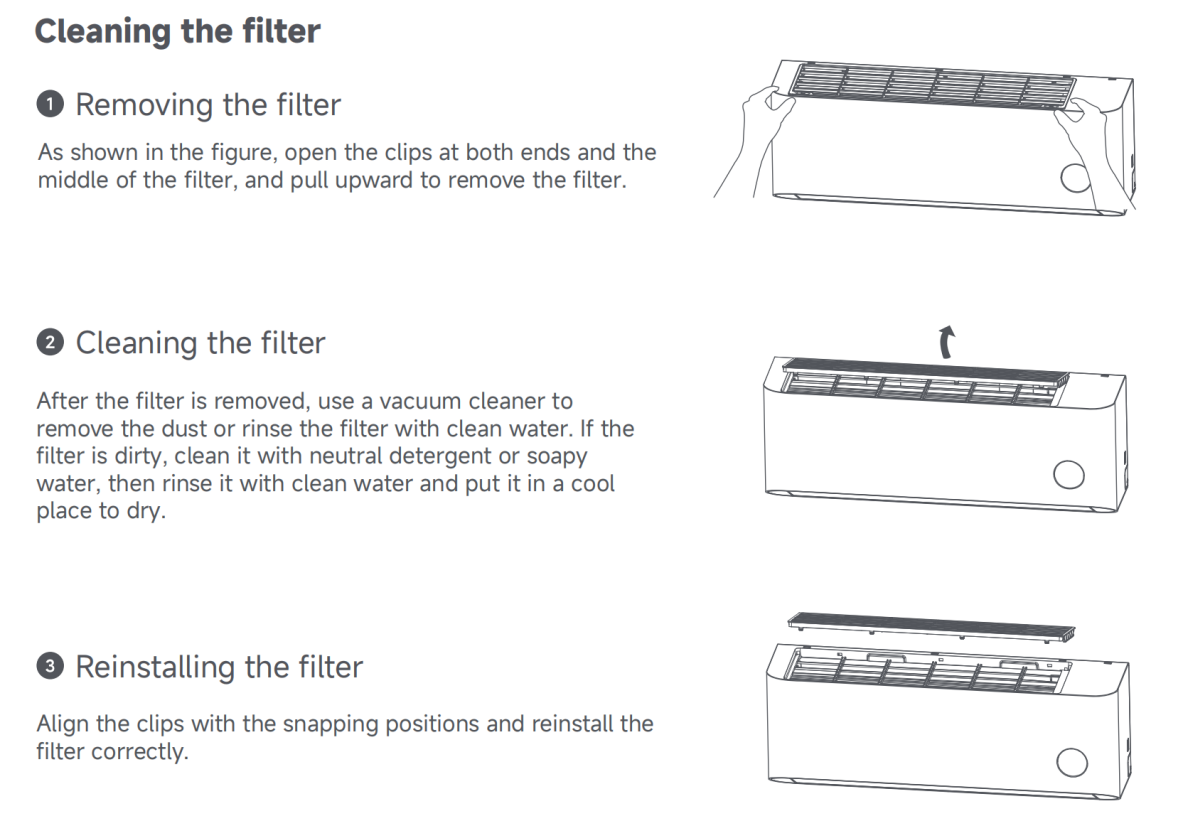
6. Q: How to clean the Mijia Air Conditioner Pro Eco 2.6 kW, and how often should it be cleaned?
A: The internal components of the Mijia Air Conditioner Pro Eco 2.6 kW should be cleaned once a year by a professional. The exterior can be cleaned by yourself.
Warnings for cleaning the indoor unit:
1. Before performing the care and maintenance on the air conditioner, make sure the air conditioner is turned off and the power supply is cut off;
2. When performing the care and maintenance on the air conditioner, avoid accidents such as tumbling or falling to avoid injury;
3. After removing the indoor unit panel, do not touch the metal fins of the heat exchanger to avoid injury;
4. Do not clean this product with water. If water gets into the indoor unit, malfunction or electric shocks will occur;
5. Do not use chemicals or solvents such as alcohol, gasoline, banana oil, polishing powder, essential balm, toothpaste or laundry detergent to clean any parts of this product to avoid damage;
6. After cleaning, make sure all parts are completely dry before installing and using them. Avoid direct sunlight.
The specific method for cleaning is as follows:
Use a soft cloth or sponge dipped in clean water or diluted neutral detergent to wipe the surface of the air conditioner’s body.
Note:
1. Do not apply excessive force when cleaning the indoor unit panel to avoid damage;
2. Do not wipe the panel and remote control casing with wire cleaning balls, brushes, etc. to avoid damaging the casing.
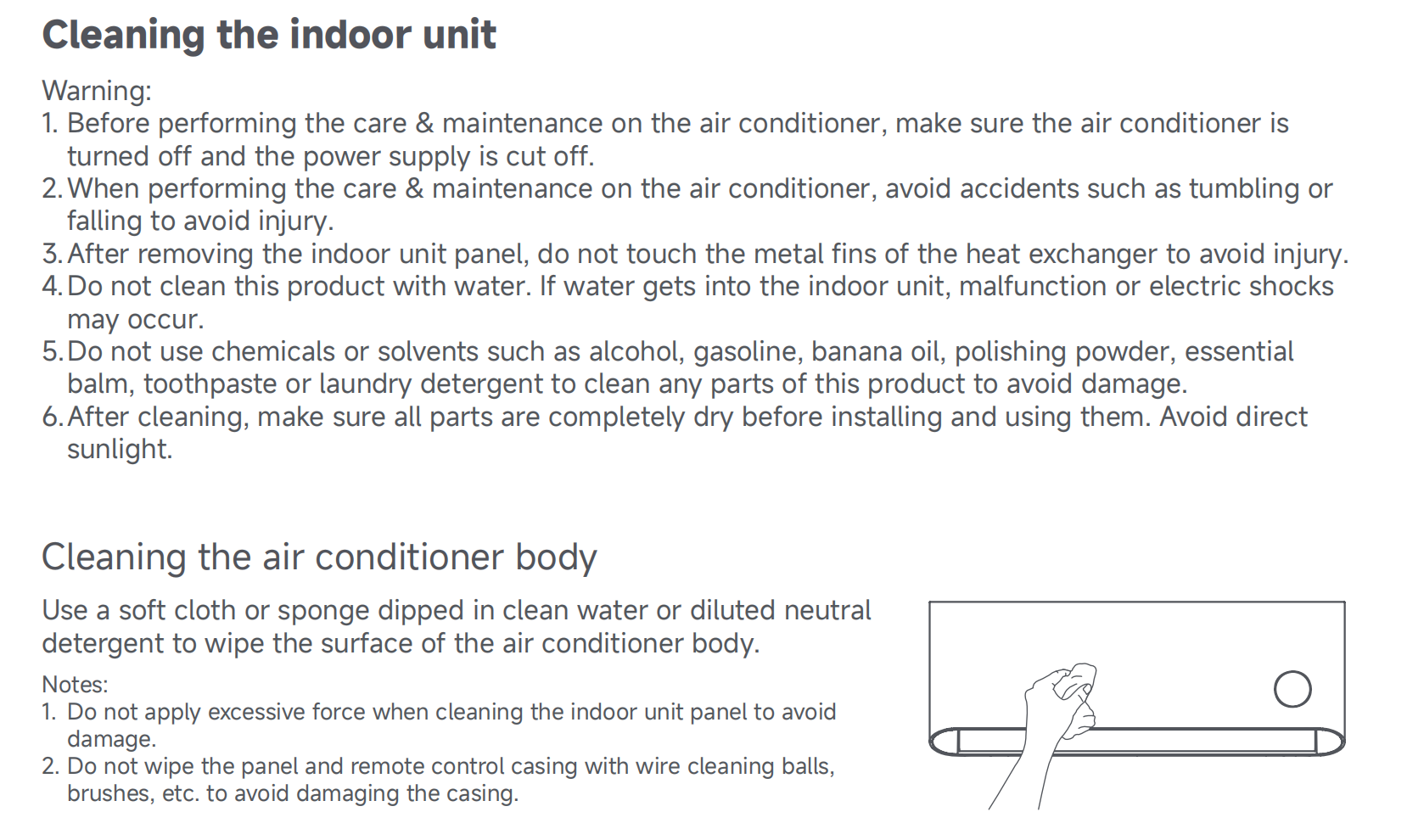
7. Q: How to clean the filter of the Mijia Air Conditioner Pro Eco 2.6 kW, and how often should it be cleaned?
A: It is recommended to clean the filter of the Mijia Air Conditioner Pro Eco 2.6 kW every three months. Once the air conditioner is connected to the network, the system will automatically send a cleaning notification.
If you receive a push notification, please follow these steps to clean the filter:
1. Removing the filter: Press down both ends of the top filter until it pops up, and then lift the filter upwards to remove the filter;
2. Cleaning the filter: After the filter is removed, use a vacuum cleaner to remove the dust or rinse the filter with clean water. If the filter is dirty, clean it with neutral detergent or soapy water, then rinse it with clean water and put it in a cool place to dry;
3. Reinstalling the filter: Align the clips with the snapping positions and reinstall the filter correctly.
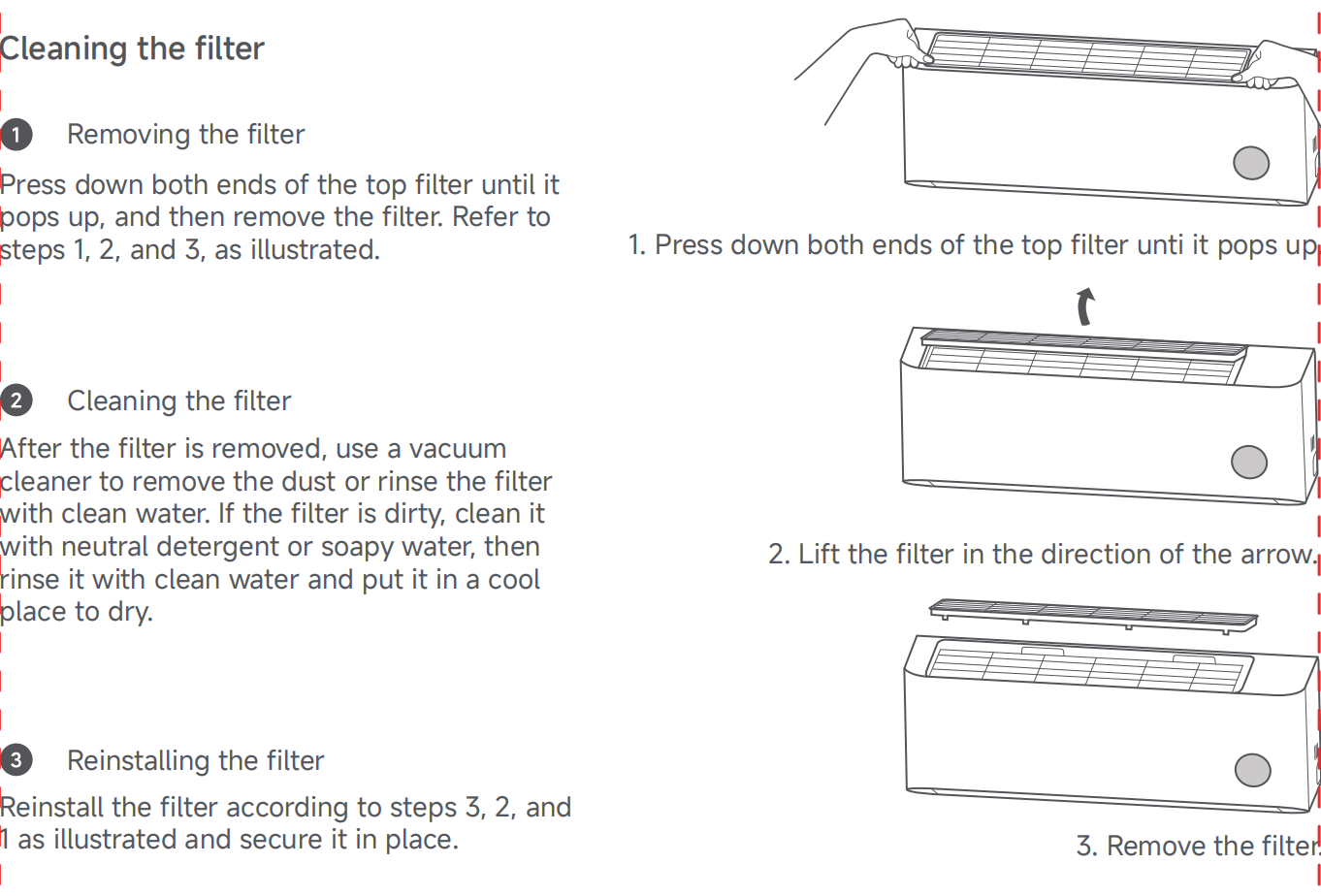
Note:
1. Do not use wire scrubbers or brushes to clean the air filter to avoid damage;
2. Do not wash the unit with water to prevent malfunctions or electric shock hazards;
3. Do not wash the remote control with water to avoid malfunctions;
4. Do not use alcohol, gasoline, banana oil, polishing powder, essential balm, toothpaste, laundry detergent, or other chemical products or solvents to clean the air conditioner, as they will damage the product.
8. Q: How to use the Auto clean function of the Mijia Air Conditioner Pro Eco 2.6 kW?
A: You can use the Mijia Air Conditioner Pro Eco 2.6 kW’s Auto clean function by following the steps below:
1. When the air conditioner is turned off, simultaneously press and hold the ECO button and the Timer button for more than three seconds to enable the Auto clean function;
2. The remote control will show “Auto Clean”, and the air conditioner display will start blinking;
3. The air conditioner will then run for about 40 minutes before automatically exiting the Auto clean mode and shutting down.
Note:
1. The duration displayed on the remote control and the air conditioner display can vary;
2. There can be noise, breeze, and cold air during the Auto clean operation, which is normal;
3. When the ambient temperature is too high or too low, the air conditioner will automatically activate the protection function, which can cause the Auto clean function to be exited or fail to start;
4. Auto clean can only clean the heat exchanger.
Heating function related
1. Q: What is the heating power of the Mijia Air Conditioner Pro Eco 2.6 kW?
A: The rated heating power of the Mijia Air Conditioner Pro Eco 2.6 kW is 860W.
2. Q: Does the Mijia Air Conditioner Pro Eco 2.6 kW support electric auxiliary heating?
A: The Mijia Air Conditioner Pro Eco 2.6 kW does not support electric auxiliary heating.
3. Q: What is the power of the Mijia Air Conditioner Pro Eco 2.6 kW’s electric auxiliary heating function?
A: The the Mijia Air Conditioner Pro Eco 2.6 kW does not support electric auxiliary heating.
4. Q: What is the operating temperature range of the Mijia Air Conditioner Pro Eco 2.6 kW for heating?
A: The operating ambient temperature range of the Mijia Air Conditioner Pro Eco 2.6 kW for heating is -20°C to 24°C.
5. Q: What is the recommended heating area for the Mijia Air Conditioner Pro Eco 2.6 kW?
A: The recommended heating area for the Mijia Air Conditioner Pro Eco 2.6 kW is 10–20㎡.
6. Q: What is the rated heating capacity of the Mijia Air Conditioner Pro Eco 2.6 kW?
A: The rated heating capacity of the Mijia Air Conditioner Pro Eco 2.6 kW is 3600W.
7. Q: Does the Mijia Air Conditioner Pro Eco 2.6 kW support automatic defrosting?
A: The Mijia Air Conditioner Pro Eco 2.6 kW supports automatic defrosting.
8. Q: What to do if the Mijia Air Conditioner Pro Eco 2.6 kW is not heating?
A: If the Mijia Air Conditioner Pro Eco 2.6 kW does not blow air after being turned on, or only blows natural (unheated) air, it can indicate a heating failure and a technician visit should be arranged directly.
In other cases, please follow these troubleshooting steps:
1. The air conditioner is designed with a preheating function, so it will not blow air immediately after switching to heating mode. Please wait a few minutes and check if warm air starts coming out;
2. Ensure that the doors and windows are properly closed to prevent cold air from entering, which can reduce heating efficiency;
3. Check whether the outdoor unit is installed in a well-ventilated location to ensure proper heat dissipation.
If the issue persists, please request after-sales service for inspection.
Note:
If the unit is producing warm air but the heating performance seems poor, please allow it to run for 5 minutes and consider whether the defrosting function is affecting its performance to avoid misjudgment.
9. Q: What to do if the Mijia Air Conditioner Pro Eco 2.6 kW’s heating airflow is weak?
A: If the Mijia Air Conditioner Pro Eco 2.6 kW’s heating airflow is weak, please first confirm whether the unit capacity is suitable for the room size and avoid frequently opening or closing doors and windows.
To resolve this issue, please follow these steps:
1. Clean the filter to prevent airflow obstruction due to dust buildup, and ensure the air inlet is not blocked and the air outlet has sufficient airflow;
2. Set the fan speed to level 5 or higher (high speed), and direct the airflow downward using the guide blades;
3. Close all doors and windows to maintain indoor insulation. Please note that heating performance can decrease significantly when the outdoor temperature drops below -7°C;
4. Switch to heating mode and set the temperature higher than the current room temperature (such as 31°C), then let it run for more than 5 minutes;
5. Check if the defrosting mechanism has been activated since it can pause warm air output for about 10 minutes every 30–60 minutes.
If the air conditioner fails to start properly or the issue persists, it is recommended to request after-sales inspection.
10. Q: What to do if the Mijia Air Conditioner Pro Eco 2.6 kW does not blow air when heating is turned on?
A: If the Mijia Air Conditioner Pro Eco 2.6 kW does not blow air during heating, the possible reasons are as follows:
1. The unit has just been turned on and is in cold air prevention mode. Please wait patiently, and air will start blowing once the unit begins heating normally;
2. The unit is in defrosting mode. Please wait for the defrosting process to finish, after which air will resume.
If the unit still does not blow air, please request after-sales inspection.
11. Q: What to do if the Mijia Air Conditioner Pro Eco 2.6 kW stops working automatically during heating?
A: During the heating process of the Mijia Air Conditioner Pro Eco 2.6 kW, the outdoor unit needs to defrost at regular intervals. It is normal for the unit to stop temporarily during this period. It will resume operation automatically once defrosting is complete. If the unit does not resume operation on its own, please request after-sales inspection.
12. Q: What to do if the outdoor unit of the Mijia Air Conditioner Pro Eco 2.6 kW emits white smoke during heating?
A: If you notice white smoke coming from the outdoor unit of the Mijia Air Conditioner Pro Eco 2.6 kW, please turn off the air conditioner immediately and contact after-sales service for inspection.
13. Q: What to do if water is dripping from the Mijia Air Conditioner Pro Eco 2.6 kW’s outdoor unit during heating?
A: This is normal and caused by the defrosting process of the Mijia Air Conditioner Pro Eco 2.6 kW’s outdoor unit. No action is needed.
A: If the Mijia Air Conditioner Pro Eco 2.6 kW is cooling below the set temperature, please check whether the room size is too small, which can cause the cold air to blow directly at you. The air conditioner is designed with a temperature compensation mechanism to enhance cooling performance, ensuring effective cooling even at a distance from the device.
36. Q: What to do if the display shows rotating lines after the Mijia Air Conditioner Pro Eco 2.6 kW is turned off and does not shut off automatically?
A: When the Mijia Air Conditioner Pro Eco 2.6 kW is turned off, if the evaporator temperature is still low and a large amount of condensate remains, the device will keep the indoor unit fan running for a while. This is to help dry the evaporator and prevent microbial growth or mold caused by prolonged moisture inside the sealed unit. The display shows rotating lines during this process and will turn off automatically afterward.
Installation related
1. Q: Where is the location of the connecting pipe on the indoor unit during Mijia Air Conditioner Pro Eco 2.6 kW installation?
A: During the installation process of the Mijia Air Conditioner Pro Eco 2.6 kW, the connecting pipe of the indoor unit can be positioned as needed. It can exit from the left side, right side, or the back of the indoor unit to ensure flexible installation in various positions within the room.
2. Q: How much clearance is required for Mijia Air Conditioner Pro Eco 2.6 kW installation?
A: The minimum space requirements for the Mijia Air Conditioner Pro Eco 2.6 kW’s installation are as follows:
1. The space requirements of the indoor unit:
(1). There should be at least 15 cm of clearance between the top of the indoor unit and the ceiling;
(2). There should be at least 200 cm of clearance between the bottom of the indoor unit and the floor;
(3). If the connecting pipes and drainage hose are installed on either the left or right side of the indoor unit, there must be no obstructions within 15 cm on the installation side;
2. The space requirements of the outdoor unit:
(1). No obstructions within 200 cm above the unit;
(2). No obstructions within 10 cm below the unit;
(3). No obstructions within 30 cm on the left side;
(4). No obstructions within 40 cm on the right side.
3. Q: What is the maximum vertical distance between the indoor and outdoor units during installation of the Mijia Air Conditioner Pro Eco 2.6 kW?
A: The maximum vertical distance between the indoor and outdoor units during the Mijia Air Conditioner Pro Eco 2.6 kW’s installation is 5 meters.
4. Q: How to install the Mijia Air Conditioner Pro Eco 2.6 kW?
A: The Mijia Air Conditioner Pro Eco 2.6 kW must be installed before use. Since installation requires professional expertise, it is recommended to schedule an on-site installation service. Self-installation is not advised.
5. Q: What is the ideal location for installing an air conditioner? What should be considered?
A: The installation of the air conditioner requires professional expertise, so it is recommended to schedule an installation service instead of attempting to install it yourself.
Here are some key points for selecting the installation location of the outdoor unit:
1. Avoid exposure to direct sunlight or strong winds;
2. Keep away from heat sources, steam, and areas with potential flammable gas leakage or smoke;
3. Choose a location that is sheltered from rain and has good ventilation;
4. Ensure that the air outlet and operating noise do not disturb others, animals, or plants;
5. Make sure the installation space is not smaller than the size requirements;
6. Ensure that the air outlet is unobstructed for optimal performance;
7. The outdoor unit should not block public walkways. If it’s installed near a building along a road, the distance from the bottom of the outdoor unit to the ground should be greater than 25cm, ensuring the mounting bracket does not obstruct public spaces;
8. To ensure effective temperature regulation, remove obstructions like shutters in front of the outdoor unit. If such obstructions cannot be removed, place the air outlet as close to the shutter as possible;
9. The installation site should be stable and secure to avoid excessive noise and vibration.
Here are some key points for selecting the installation location of the indoor unit:
1. Avoid direct sunlight;
2. There are no obstacles at the air inlet and outlet to maintain good air circulation;
3. It’s convenient for the drainage hose to drain water;
4. The distance to radio devices (such as TV or radio) is greater than 1m;
5. The air conditioner shall be installed on a wall that can bear the weight of the indoor unit and does not increase the operating noise and vibration;
6. The minimum clearance between the auxiliary electric heating air conditioners and the surfaces of combustible materials is 1.5m;
7. The auxiliary electric heating components are assembled and fixed in the indoor unit evaporator. They are ceramic PTC electric heating elements. The input power can be found in the "PTC" on the nameplate (Input Power for the Auxiliary Electric Heater).
Note:
Installation technicians should advise on the proper spacing for both the indoor and outdoor units to ensure optimal performance.
6. Q: What is the size of the connecting pipes for the Mijia Air Conditioner Pro Eco 2.6 kW (high-pressure pipe and low-pressure pipe inner and outer diameters)?
A: The copper connecting pipes for the Mijia Air Conditioner Pro Eco 2.6 kW have an diameter of Φ6mm and Φ9mm, with the outer diameter of Φ6 being 6.35mm and Φ9 being 9.52mm. The wall thickness is 0.6mm or 0.7mm for Φ6 pipes and 0.7mm for Φ9 pipes.
7. Q: What is the maximum allowable extended length for the connecting pipes of the Mijia Air Conditioner Pro Eco 2.6 kW?
A: The maximum allowable extended length for the connecting pipes of the Mijia Air Conditioner Pro Eco 2.6 kW is 10 meters. If the piping length exceeds 7 meters, it is necessary to add 15g of refrigerant per meter to ensure the cooling performance is not affected.
8. Q: Can the Mijia Air Conditioner Pro Eco 2.6 kW be used with a drainage pump?
A: The Mijia Air Conditioner Pro Eco 2.6 kW comes with a drainage hose that allows for natural drainage during installation, so an additional drainage pump is not required.
However, if your room does not have a proper drainage outlet, a drainage pump can be installed. Please note that the outlet of the drainage pipe must not be submerged in water.
In a room with a drainage setup, the indoor unit connects to a drainage pipe that leads to a drainage tank and then to a drainage pump, which discharges the water outside.
Cleaning and maintenance
1. Q: Does the filter of the Mijia Air Conditioner Pro Eco 2.6 kW need to be replaced regularly?
A: As long as the filter of the Mijia Air Conditioner Pro Eco 2.6 kW is not damaged or deformed, there is no need to replace it.
2. Q: How to clean the evaporator of the Mijia Air Conditioner Pro Eco 2.6 kW?
A: To clean the evaporator of the Mijia Air Conditioner Pro Eco 2.6 kW, please turn off the power and remove the front panel of the indoor unit. First, spray a cleaning agent onto the evaporator fins and wait 5-10 minutes. Then, rinse thoroughly with clean water.
If using the Auto clean mode, refer to the corresponding instructions for operation. Cleaning the evaporator requires disassembling the indoor unit panel, so it is not recommended to do it yourself.
Note:
Avoid getting water into the electrical control box or display panel terminals, as this can cause electrical malfunctions.
3. Q: How often does the Auto clean function of the Mijia Air Conditioner Pro Eco 2.6 kW run?
A: It is recommended that use the Auto clean function of the Mijia Air Conditioner Pro Eco 2.6 kW once a month. If the use environment is poor, such as dusty, it is recommended to shorten the cycle.
4. Q: What to do if the Auto clean function of the Mijia Air Conditioner Pro Eco 2.6 kW fails or is ineffective?
A: If the Auto clean function of the Mijia Air Conditioner Pro Eco 2.6 kW fails or is ineffective, please follow these steps:
1. After activating the Auto clean function, the air conditioner should complete the entire cleaning process. The Auto clean process takes around 30-40 minutes. However, the time can vary depending on the working environment. Ensure the air conditioner completes the Auto clean cycle automatically;
2. During the Auto clean process, protection can be triggered due to high or low temperatures, which could prevent the self-cleaning mode from operating properly or cause it to exit prematurely. It is recommended to start the Auto clean mode in a suitable temperature environment to avoid extreme temperatures;
3. During the Auto clean process, you can hear some noise, experience reduced airflow from the indoor unit, or notice cold or warm air being blown out. These are normal indications that the cleaning function is working. To avoid discomfort, it is recommended to ventilate the room.
Note:
1. The Auto clean function cannot be activated if the following temperature conditions are met: The indoor temperature is above 30°C and the outdoor temperature is above 40°C, the indoor temperature is above 38°C, the outdoor temperature is above 40°C, the indoor temperature is below 16°C, or the outdoor temperature is below 0°C;
2. If you turn off the device during Auto clean, the mode will not exit immediately. It will depend on the current operation process, and a proper running mode should be selected to complete or end the function, preventing damage to the air conditioner.
5. Q: How to clean the filter of the Mijia Air Conditioner Pro Eco 2.6 kW?
A: Please follow these steps to clean the filter of the Mijia Air Conditioner Pro Eco 2.6 kW:
1. Removing the filter: As shown in the figure, open the clips at both ends and the middle of the filter, and pull upward to remove the filter;
2. Cleaning the filter: After the filter is removed, use a vacuum cleaner to remove the dust or rinse the filter with clean water. If the filter is dirty, clean it with neutral detergent or soapy water, then rinse it with clean water and put it in a cool place to dry;
3. Reinstalling the filter: Align the clips with the snapping positions and reinstall the filter correctly.
6. Q: How to clean the Mijia Air Conditioner Pro Eco 2.6 kW, and how often should it be cleaned?
A: The internal components of the Mijia Air Conditioner Pro Eco 2.6 kW should be cleaned once a year by a professional. The exterior can be cleaned by yourself.
Warnings for cleaning the indoor unit:
1. Before performing the care and maintenance on the air conditioner, make sure the air conditioner is turned off and the power supply is cut off;
2. When performing the care and maintenance on the air conditioner, avoid accidents such as tumbling or falling to avoid injury;
3. After removing the indoor unit panel, do not touch the metal fins of the heat exchanger to avoid injury;
4. Do not clean this product with water. If water gets into the indoor unit, malfunction or electric shocks will occur;
5. Do not use chemicals or solvents such as alcohol, gasoline, banana oil, polishing powder, essential balm, toothpaste or laundry detergent to clean any parts of this product to avoid damage;
6. After cleaning, make sure all parts are completely dry before installing and using them. Avoid direct sunlight.
The specific method for cleaning is as follows:
Use a soft cloth or sponge dipped in clean water or diluted neutral detergent to wipe the surface of the air conditioner’s body.
Note:
1. Do not apply excessive force when cleaning the indoor unit panel to avoid damage;
2. Do not wipe the panel and remote control casing with wire cleaning balls, brushes, etc. to avoid damaging the casing.
7. Q: How to clean the filter of the Mijia Air Conditioner Pro Eco 2.6 kW, and how often should it be cleaned?
A: It is recommended to clean the filter of the Mijia Air Conditioner Pro Eco 2.6 kW every three months. Once the air conditioner is connected to the network, the system will automatically send a cleaning notification.
If you receive a push notification, please follow these steps to clean the filter:
1. Removing the filter: Press down both ends of the top filter until it pops up, and then lift the filter upwards to remove the filter;
2. Cleaning the filter: After the filter is removed, use a vacuum cleaner to remove the dust or rinse the filter with clean water. If the filter is dirty, clean it with neutral detergent or soapy water, then rinse it with clean water and put it in a cool place to dry;
3. Reinstalling the filter: Align the clips with the snapping positions and reinstall the filter correctly.
Note:
1. Do not use wire scrubbers or brushes to clean the air filter to avoid damage;
2. Do not wash the unit with water to prevent malfunctions or electric shock hazards;
3. Do not wash the remote control with water to avoid malfunctions;
4. Do not use alcohol, gasoline, banana oil, polishing powder, essential balm, toothpaste, laundry detergent, or other chemical products or solvents to clean the air conditioner, as they will damage the product.
8. Q: How to use the Auto clean function of the Mijia Air Conditioner Pro Eco 2.6 kW?
A: You can use the Mijia Air Conditioner Pro Eco 2.6 kW’s Auto clean function by following the steps below:
1. When the air conditioner is turned off, simultaneously press and hold the ECO button and the Timer button for more than three seconds to enable the Auto clean function;
2. The remote control will show “Auto Clean”, and the air conditioner display will start blinking;
3. The air conditioner will then run for about 40 minutes before automatically exiting the Auto clean mode and shutting down.
Note:
1. The duration displayed on the remote control and the air conditioner display can vary;
2. There can be noise, breeze, and cold air during the Auto clean operation, which is normal;
3. When the ambient temperature is too high or too low, the air conditioner will automatically activate the protection function, which can cause the Auto clean function to be exited or fail to start;
4. Auto clean can only clean the heat exchanger.
Heating function related
1. Q: What is the heating power of the Mijia Air Conditioner Pro Eco 2.6 kW?
A: The rated heating power of the Mijia Air Conditioner Pro Eco 2.6 kW is 860W.
2. Q: Does the Mijia Air Conditioner Pro Eco 2.6 kW support electric auxiliary heating?
A: The Mijia Air Conditioner Pro Eco 2.6 kW does not support electric auxiliary heating.
3. Q: What is the power of the Mijia Air Conditioner Pro Eco 2.6 kW’s electric auxiliary heating function?
A: The the Mijia Air Conditioner Pro Eco 2.6 kW does not support electric auxiliary heating.
4. Q: What is the operating temperature range of the Mijia Air Conditioner Pro Eco 2.6 kW for heating?
A: The operating ambient temperature range of the Mijia Air Conditioner Pro Eco 2.6 kW for heating is -20°C to 24°C.
5. Q: What is the recommended heating area for the Mijia Air Conditioner Pro Eco 2.6 kW?
A: The recommended heating area for the Mijia Air Conditioner Pro Eco 2.6 kW is 10–20㎡.
6. Q: What is the rated heating capacity of the Mijia Air Conditioner Pro Eco 2.6 kW?
A: The rated heating capacity of the Mijia Air Conditioner Pro Eco 2.6 kW is 3600W.
7. Q: Does the Mijia Air Conditioner Pro Eco 2.6 kW support automatic defrosting?
A: The Mijia Air Conditioner Pro Eco 2.6 kW supports automatic defrosting.
8. Q: What to do if the Mijia Air Conditioner Pro Eco 2.6 kW is not heating?
A: If the Mijia Air Conditioner Pro Eco 2.6 kW does not blow air after being turned on, or only blows natural (unheated) air, it can indicate a heating failure and a technician visit should be arranged directly.
In other cases, please follow these troubleshooting steps:
1. The air conditioner is designed with a preheating function, so it will not blow air immediately after switching to heating mode. Please wait a few minutes and check if warm air starts coming out;
2. Ensure that the doors and windows are properly closed to prevent cold air from entering, which can reduce heating efficiency;
3. Check whether the outdoor unit is installed in a well-ventilated location to ensure proper heat dissipation.
If the issue persists, please request after-sales service for inspection.
Note:
If the unit is producing warm air but the heating performance seems poor, please allow it to run for 5 minutes and consider whether the defrosting function is affecting its performance to avoid misjudgment.
9. Q: What to do if the Mijia Air Conditioner Pro Eco 2.6 kW’s heating airflow is weak?
A: If the Mijia Air Conditioner Pro Eco 2.6 kW’s heating airflow is weak, please first confirm whether the unit capacity is suitable for the room size and avoid frequently opening or closing doors and windows.
To resolve this issue, please follow these steps:
1. Clean the filter to prevent airflow obstruction due to dust buildup, and ensure the air inlet is not blocked and the air outlet has sufficient airflow;
2. Set the fan speed to level 5 or higher (high speed), and direct the airflow downward using the guide blades;
3. Close all doors and windows to maintain indoor insulation. Please note that heating performance can decrease significantly when the outdoor temperature drops below -7°C;
4. Switch to heating mode and set the temperature higher than the current room temperature (such as 31°C), then let it run for more than 5 minutes;
5. Check if the defrosting mechanism has been activated since it can pause warm air output for about 10 minutes every 30–60 minutes.
If the air conditioner fails to start properly or the issue persists, it is recommended to request after-sales inspection.
10. Q: What to do if the Mijia Air Conditioner Pro Eco 2.6 kW does not blow air when heating is turned on?
A: If the Mijia Air Conditioner Pro Eco 2.6 kW does not blow air during heating, the possible reasons are as follows:
1. The unit has just been turned on and is in cold air prevention mode. Please wait patiently, and air will start blowing once the unit begins heating normally;
2. The unit is in defrosting mode. Please wait for the defrosting process to finish, after which air will resume.
If the unit still does not blow air, please request after-sales inspection.
11. Q: What to do if the Mijia Air Conditioner Pro Eco 2.6 kW stops working automatically during heating?
A: During the heating process of the Mijia Air Conditioner Pro Eco 2.6 kW, the outdoor unit needs to defrost at regular intervals. It is normal for the unit to stop temporarily during this period. It will resume operation automatically once defrosting is complete. If the unit does not resume operation on its own, please request after-sales inspection.
12. Q: What to do if the outdoor unit of the Mijia Air Conditioner Pro Eco 2.6 kW emits white smoke during heating?
A: If you notice white smoke coming from the outdoor unit of the Mijia Air Conditioner Pro Eco 2.6 kW, please turn off the air conditioner immediately and contact after-sales service for inspection.
13. Q: What to do if water is dripping from the Mijia Air Conditioner Pro Eco 2.6 kW’s outdoor unit during heating?
A: This is normal and caused by the defrosting process of the Mijia Air Conditioner Pro Eco 2.6 kW’s outdoor unit. No action is needed.
Does it help?
Yes
No