

How to use the Super Cool mode of the Mijia Refrigerator Cross Door 510L?
The Mijia Refrigerator Cross Door 510L features Super Cool mode to set the refrigerator temperature to 2°C, which can meet your need when you want to quickly cool food placed in the fridge.
To enable the Super Cool mode, you can tap the Mode button icon. You can also tap the refrigerator plug-in in the Mi Home/Xiaomi Home APP, and then select [Super Cool].
The Super Cool mode will exit if any of the following conditions are met:
1. In unlocked state, touch the Mode button to switch to other modes;
2. The default duration of Super Cool mode is 8 hours, and it will automatically turn off after 8 hours;
3. In unlocked state, touch the Fridge button to adjust the set temperature of the refrigerator compartment, and the refrigerator will switch to custom mode.
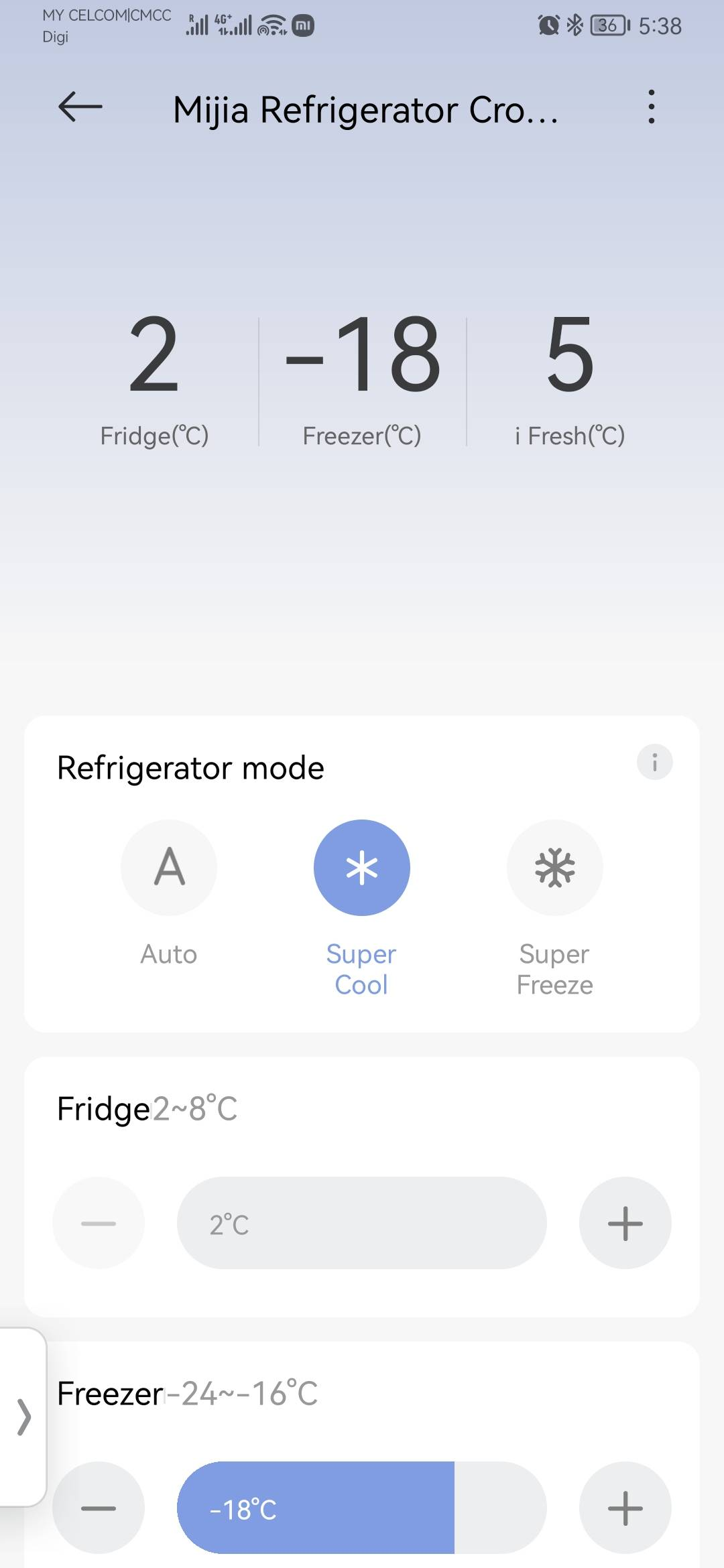
To enable the Super Cool mode, you can tap the Mode button icon. You can also tap the refrigerator plug-in in the Mi Home/Xiaomi Home APP, and then select [Super Cool].
The Super Cool mode will exit if any of the following conditions are met:
1. In unlocked state, touch the Mode button to switch to other modes;
2. The default duration of Super Cool mode is 8 hours, and it will automatically turn off after 8 hours;
3. In unlocked state, touch the Fridge button to adjust the set temperature of the refrigerator compartment, and the refrigerator will switch to custom mode.
Does it help?
Yes
No