

How to change the name of the Mijia Refrigerator Cross Door 510L?
The Mijia Refrigerator Cross Door 510L allows you to change name on the Mi Home/Xiaomi Home APP to customize the name of the device as you prefer. Through changing name freely, you can easily organize and group devices. Moreover, setting a specific name can prevent confusion when the default name is generic. It also help you quickly identify the right device if you have multiple smart appliance.
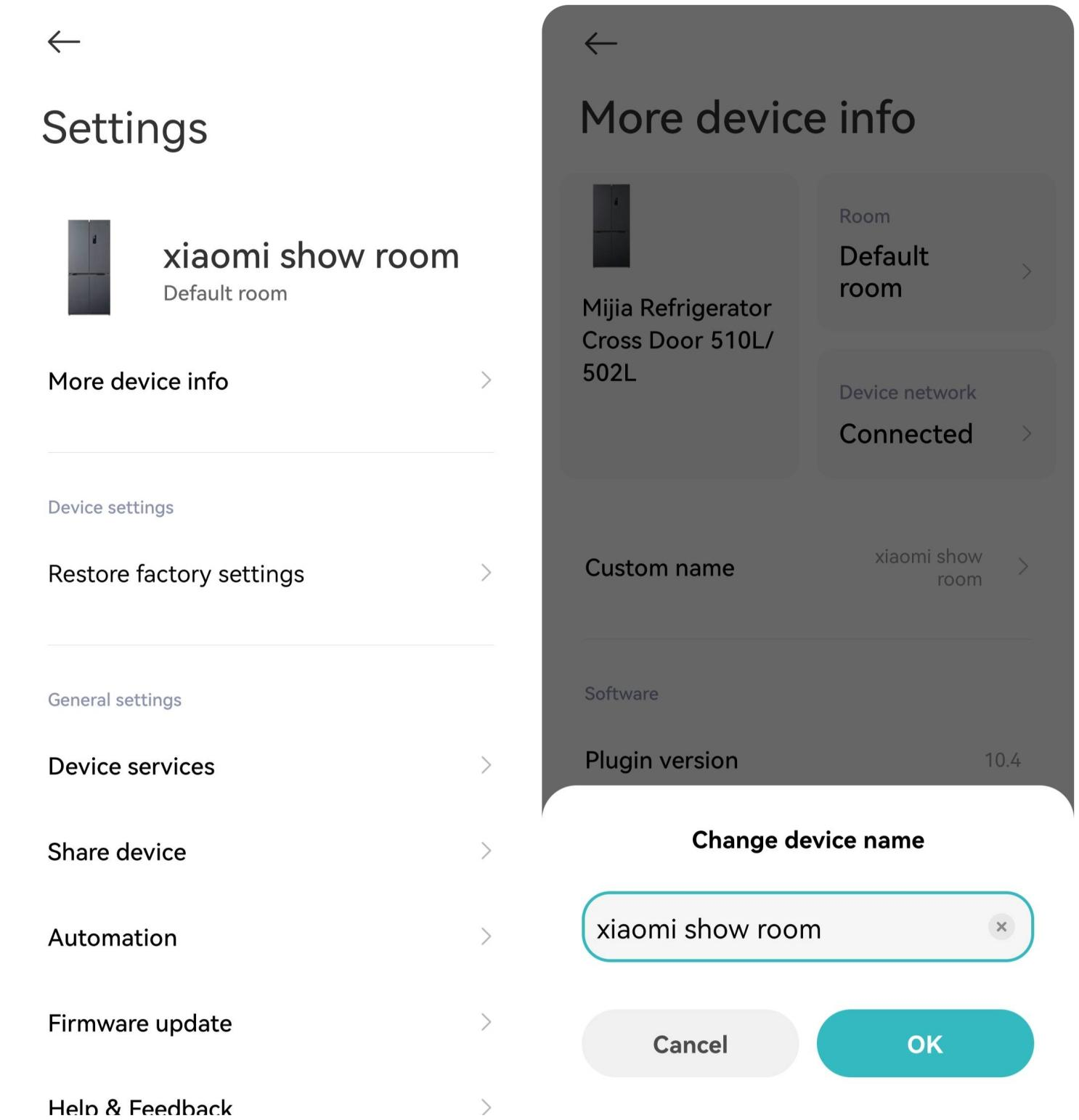
If you want to change the name of the device, please refer to the following steps:
1. Open the Mi Home/Xiaomi Home APP and find the device you want to change;
2. Enter the Settings interface, and tap [More device info];
3. Tap [Custom name] to change name;
4. Confirm that the changed name is saved successfully.
If you want to change the name of the device, please refer to the following steps:
1. Open the Mi Home/Xiaomi Home APP and find the device you want to change;
2. Enter the Settings interface, and tap [More device info];
3. Tap [Custom name] to change name;
4. Confirm that the changed name is saved successfully.
Does it help?
Yes
No