

How to set the text size for AI subtitles on the Xiaomi smartphone?
The Xiaomi smartphone supports the AI subtitles function. It can transcribe and translate internal and external audio into bilingual subtitles in real time. Besides, you can customize the text size for floating windows subtitles on your phone to ensure comfortable viewing and readability according to your preferences.
To set the text size for AI subtitles on the phone, please refer to the following steps:
1. Open the [Settings] APP on your phone;
2. Swipe down to find and select [Additional settings];
3. Tap [AI subtitles];
4. Go to [Text size];
5. Choose [S], [M] or [L] as you prefer.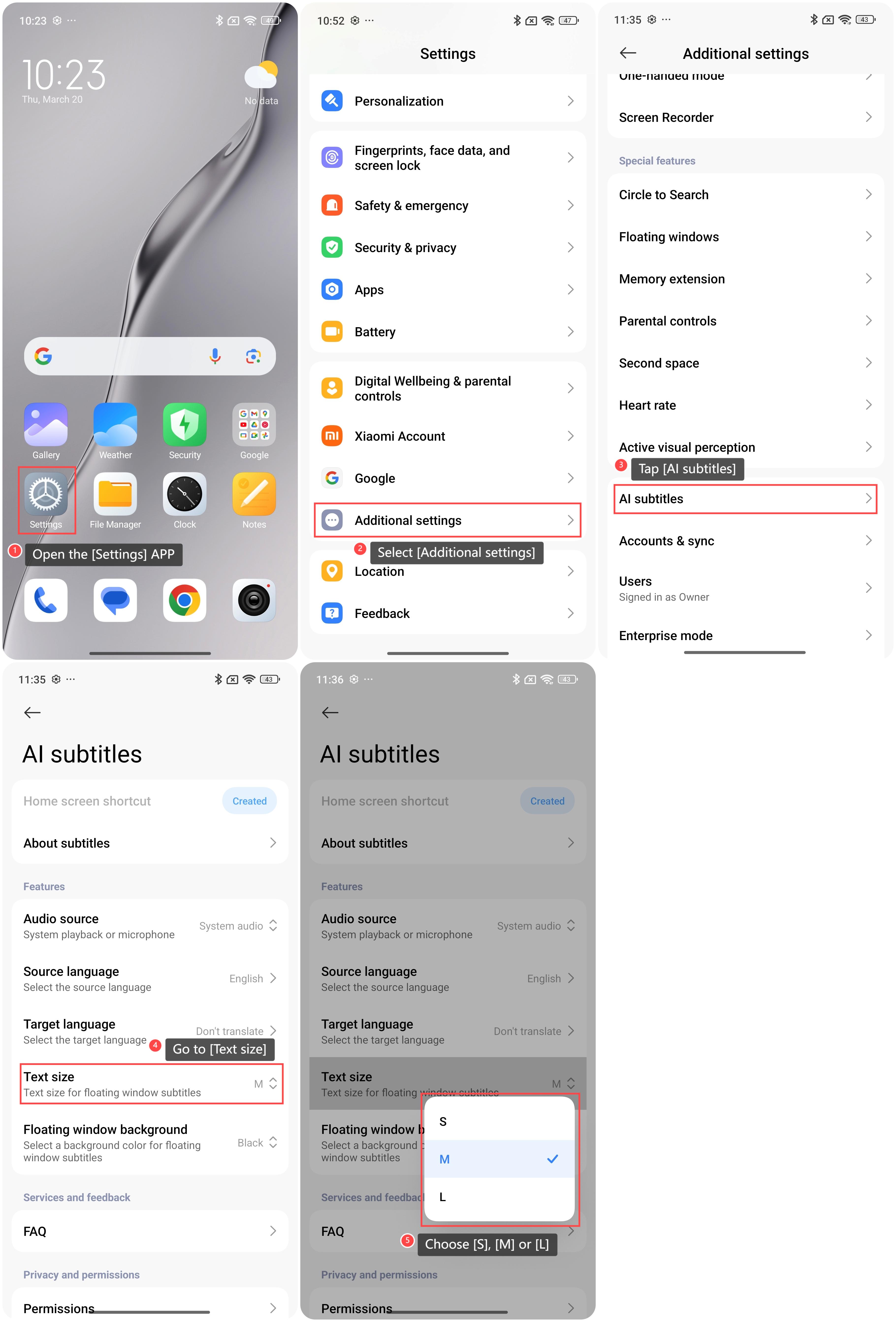
Friendly tips:
AI subtitles on Xiaomi smartphones enhance experience by providing real-time transcription of speech during calls, videos, and live content. This feature improves accessibility with hearing impairments, allows for better comprehension in noisy environments, and supports multilingual translation for cross-language communication.
Does it help?