

How to add the AI subtitles shortcut on the Xiaomi smartphone home screen?
The Xiaomi smartphone supports adding the shortcut of AI subtitles on the home screen, which can make you instantly launch AI subtitles without opening it in the Control center. AI subtitles can transcribe and translate internal and external audio into bilingual subtitles in real time. Great for online meetings, online classes, live videos, hearing accessibility, and more.
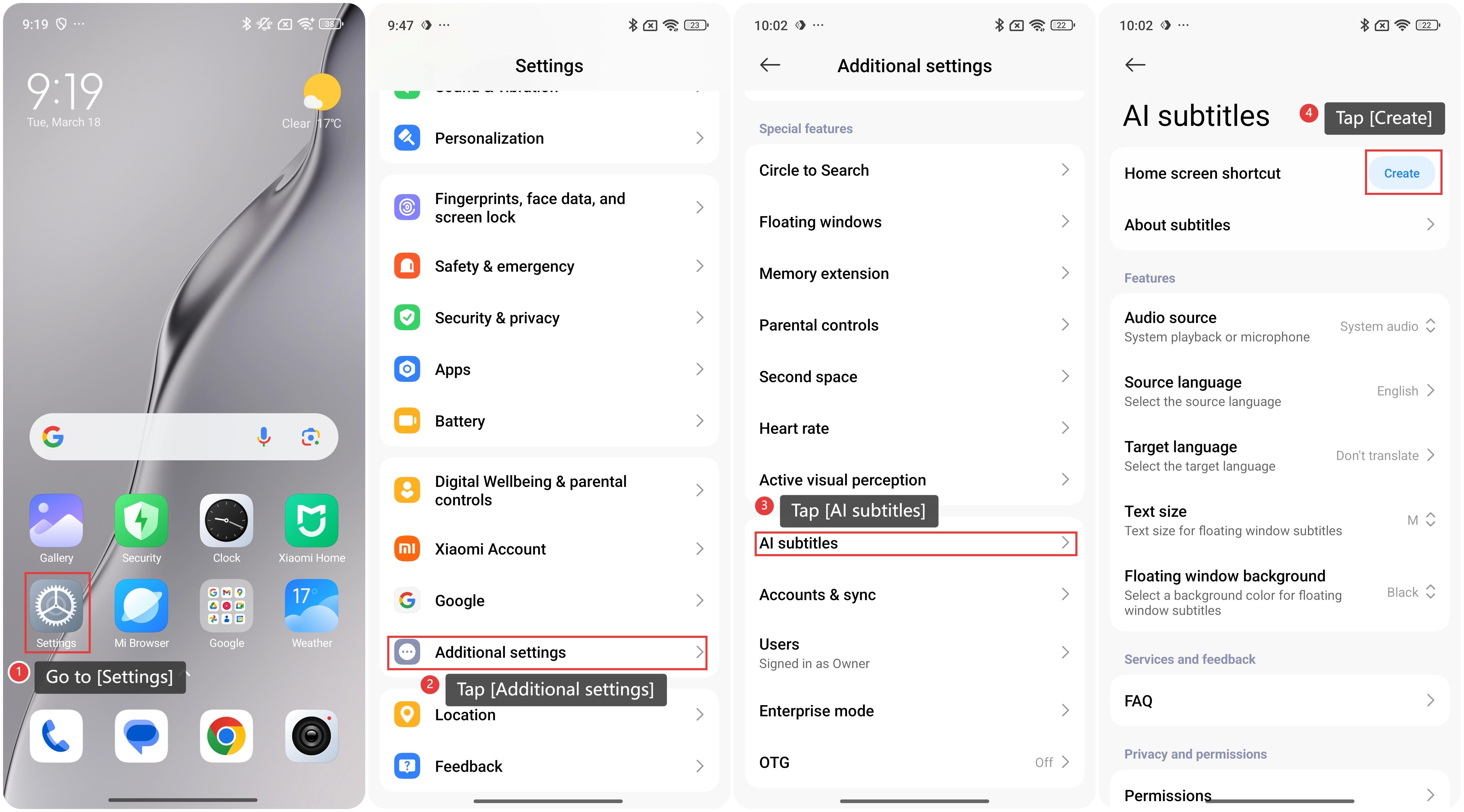
To add the shortcut of AI subtitles on the home screen of the phone, please refer to the following steps:
1. Go to [Settings];
2. Swipe down to find and tap [Additional settings];
3. Tap [AI subtitles];
4. Tap [Create] at the right of [Home screen shortcut] and you can use AI subtitles by tapping the [AI subtitles] shortcut on the home screen.
To add the shortcut of AI subtitles on the home screen of the phone, please refer to the following steps:
1. Go to [Settings];
2. Swipe down to find and tap [Additional settings];
3. Tap [AI subtitles];
4. Tap [Create] at the right of [Home screen shortcut] and you can use AI subtitles by tapping the [AI subtitles] shortcut on the home screen.
Does it help?
Yes
No