

How to turn on Detect gaze on the Xiaomi smartphone?
The Xiaomi smartphone supports Detect gaze function. When you turn on Detect gaze, the device won’t lock when it detects that you’re looking at the screen. Your facial characteristics won’t be analyzed, and your face information won’t be stored on your device or uploaded to the cloud.
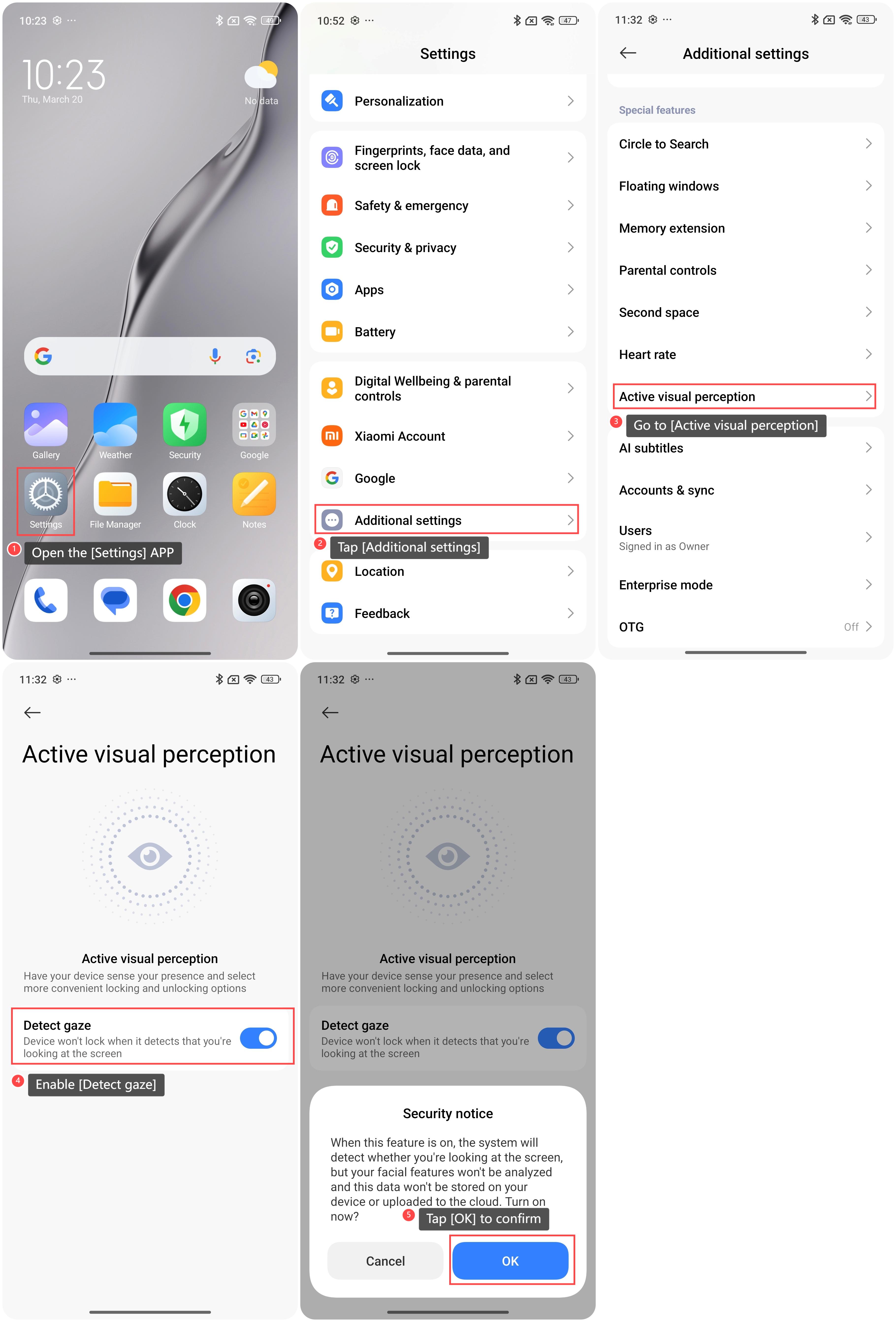
To enable Detect gaze on your phone, please refer to the following steps:
1. Open the [Settings] APP on your phone;
2. Swipe down to find and tap [Additional settings];
3. Go to [Active visual perception];
4. Enable [Detect gaze];
5. Tap [OK] to confirm.
To enable Detect gaze on your phone, please refer to the following steps:
1. Open the [Settings] APP on your phone;
2. Swipe down to find and tap [Additional settings];
3. Go to [Active visual perception];
4. Enable [Detect gaze];
5. Tap [OK] to confirm.
Note:
In strong or backlit scenes, the use of this feature can be affected by the brightness of the surrounding environment. Try adjusting your position or lighting conditions for better results.
In strong or backlit scenes, the use of this feature can be affected by the brightness of the surrounding environment. Try adjusting your position or lighting conditions for better results.
Does it help?
Yes
No