

How to set the background color for AI subtitles on the Xiaomi smartphone?
The Xiaomi smartphone supports setting the background color for AI subtitles, which can enhance contrast between text and background, making subtitles easier to read in different lighting conditions. With this feature, it can help subtitles stand out against various video backgrounds, preventing the subtitles from blending in with bright or busy scenes.
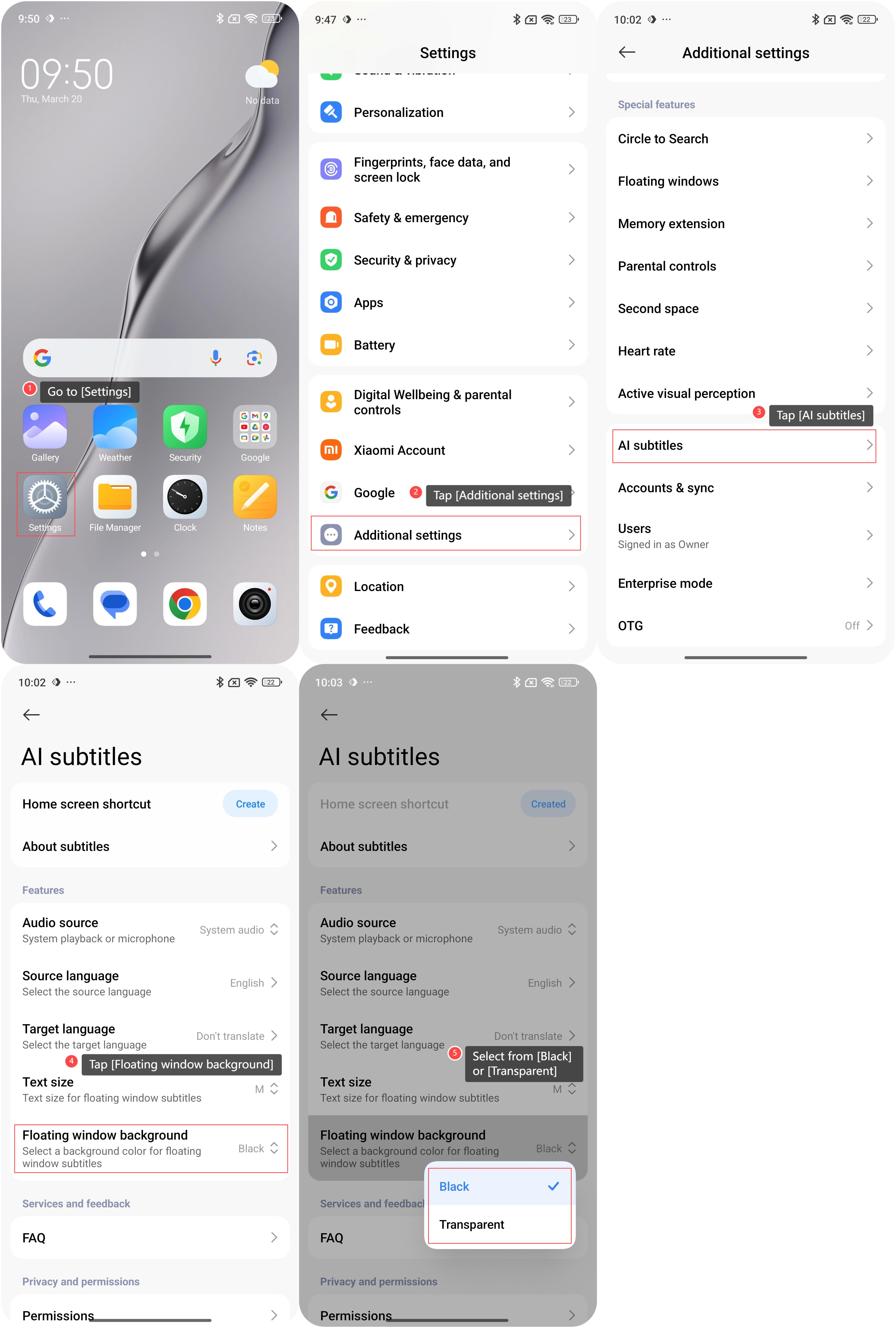
To set the background color for AI subtitles on the Xiaomi smartphone, please refer to the following steps:
1. Go to [Settings];
2. Swipe down to find and tap [Additional settings];
3. Tap [AI subtitles];
4. Tap [Floating window background];
5. Select from [Black] or [Transparent].
To set the background color for AI subtitles on the Xiaomi smartphone, please refer to the following steps:
1. Go to [Settings];
2. Swipe down to find and tap [Additional settings];
3. Tap [AI subtitles];
4. Tap [Floating window background];
5. Select from [Black] or [Transparent].
Friendly tips:
It is recommended to use a dark background with light fonts, or a light background with dark fonts to ensure that the subtitles are clearly visible.
It is recommended to use a dark background with light fonts, or a light background with dark fonts to ensure that the subtitles are clearly visible.
Does it help?
Yes
No