

Xiaomi Buds 5 Pro FAQ
Overview
1. Q: What are the features of the Xiaomi Buds 5 Pro?
A: 1. The Xiaomi Buds 5 Pro will automatically adjust the noise-cancellation level based on ambient noise, allowing for regulation in various scenarios, such as on buses, subways, or in bustling pedestrian streets, to minimize external noise interference;
2. The Xiaomi Buds 5 Pro supports aptX Lossless audio encoding under LE Audio, with a maximum high-bandwidth transmission of up to 2.1Mbps, enabling high-level (48k/24bit) lossless transmission;
3. Without relying on external devices, the Xiaomi Buds 5 Pro will intelligently recognize and dynamically track head orientation, creating a 360° surround sound and immersive experience where sound follows head movement;
4. The Xiaomi Buds 5 Pro will automatically adjust the volume based on ambient noise, ensuring a comfortable listening experience in different environments;
5. The Xiaomi Buds 5 Pro supports a 6ms ear back monitoring function, allowing you to listen to your voice while singing and adjust it at any time;
6. The Xiaomi Buds 5 Pro supports recording and storage of audio, which can be uploaded to a smartphone for transcription;
7. The Xiaomi Buds 5 Pro supports audio streaming with a one-tap connection on the front and personalized configuration through the Xiaomi Earbuds APP. The body of the Xiaomi Buds 5 Pro is IP54 dust and water resistant.
2. The Xiaomi Buds 5 Pro supports aptX Lossless audio encoding under LE Audio, with a maximum high-bandwidth transmission of up to 2.1Mbps, enabling high-level (48k/24bit) lossless transmission;
3. Without relying on external devices, the Xiaomi Buds 5 Pro will intelligently recognize and dynamically track head orientation, creating a 360° surround sound and immersive experience where sound follows head movement;
4. The Xiaomi Buds 5 Pro will automatically adjust the volume based on ambient noise, ensuring a comfortable listening experience in different environments;
5. The Xiaomi Buds 5 Pro supports a 6ms ear back monitoring function, allowing you to listen to your voice while singing and adjust it at any time;
6. The Xiaomi Buds 5 Pro supports recording and storage of audio, which can be uploaded to a smartphone for transcription;
7. The Xiaomi Buds 5 Pro supports audio streaming with a one-tap connection on the front and personalized configuration through the Xiaomi Earbuds APP. The body of the Xiaomi Buds 5 Pro is IP54 dust and water resistant.
2. Q: Introduction to the appearance of the Xiaomi Buds 5 Pro
A: The Xiaomi Buds 5 Pro are compact and exquisite, with an appearance as shown in the following image:
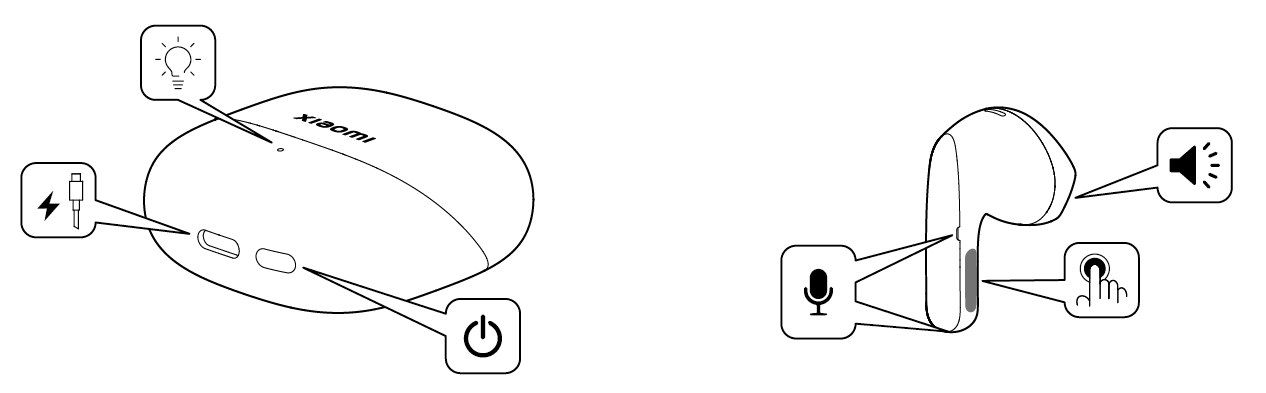
Introduction to the functional buttons on the charging case:
1. Press and hold for 2 seconds to initiate pairing;
2. Press and hold for 10 seconds to reset (clear pairing records).
3. Q: What is the corresponding name of the Xiaomi Buds 5 Pro in the Bluetooth device list on a mobile phone?
A: The corresponding name of the Xiaomi Buds 5 Pro in the Bluetooth device list is “Xiaomi Buds 5 Pro”.
Note:
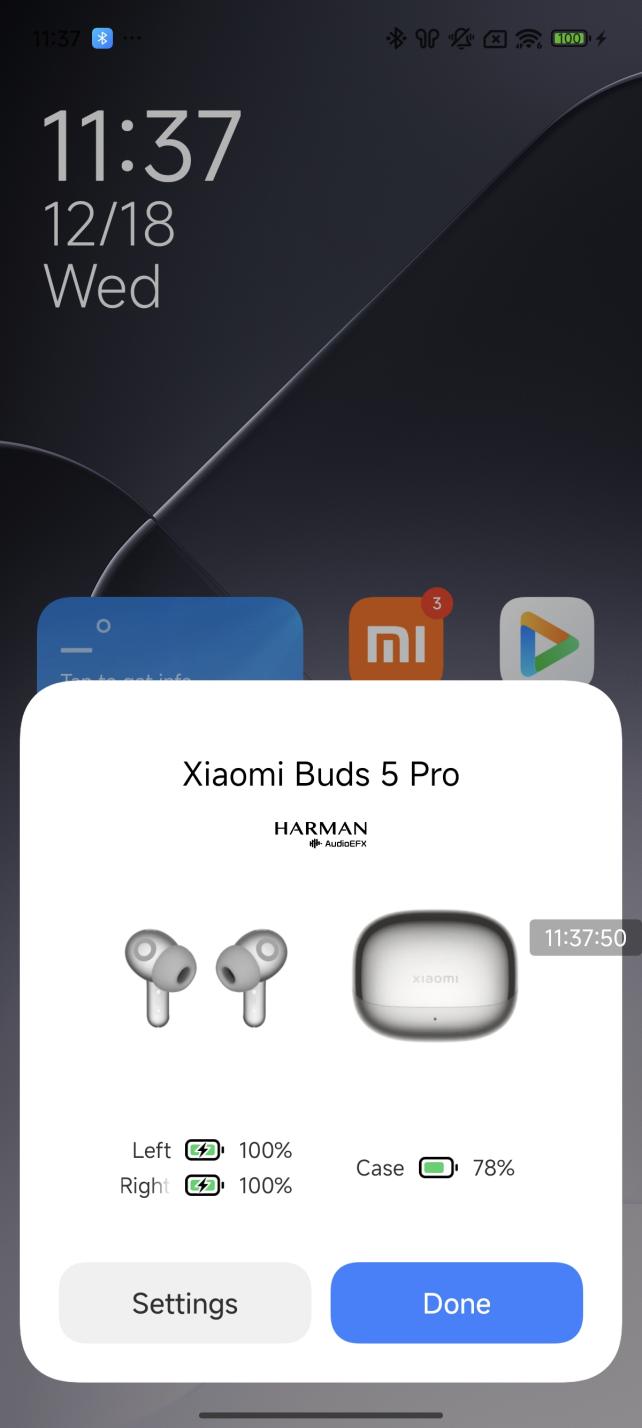
With the different colors, the image in the pop-up windows is different. The following image is an example of white earbuds.
4. Q: What is the Bluetooth version of the Xiaomi Buds 5 Pro?
A: The Xiaomi Buds 5 Pro adopts Bluetooth 5.4.
5. Q: What do the different colors of the indicator on the Xiaomi Buds 5 Pro charging case represent?
A: Charging:
When the battery level is above 90%, the indicator is green continuously; otherwise, the indicator is orange continuously.
Connection Status:
After opening the case, press and hold the function button for 2 seconds. The charging case indicator will flash in white, indicating that the Xiaomi Buds 5 Pro are waiting for a connection. If no connection is established within 1 minute, the Xiaomi Buds 5 Pro will enter sleep mode and the indicator will turn off.
Battery Level:
With the charging case closed, press the function button once. If the battery level of the charging case is above 40%, the green indicator will stay on for 5 seconds and then turn off; if the battery level is 40% or below, the orange indicator will stay on for 5 seconds and then turn off.
In-ear Detection:
When the Xiaomi Buds 5 Pro are placed in the case, the first second will display the battery level of the earbuds. When the battery level is above 60%, the indicator is green, otherwise, the indicator is orange. One second later, it will display the battery level of the charging case. If the battery level of the charging case is above 40%, the green light will stay on for 8 seconds and then turn off; if the battery level is 40% or below, the orange light will stay on for 8 seconds and then turn off.
6. Q: What is the battery life of the Xiaomi Buds 5 Pro?
A: With ANC (Active Noise Cancellation) off, it provides up to 8.2 hours of continuous music playback on a single charge, and up to 41 hours with the charging case.
Testing conditions for music playback battery life:
When the Xiaomi Buds 5 Pro are fully charged, with ANC, head tracking off, at 50% volume, and using AAC format, the music playback time will reach 8.2 hours. With both the Xiaomi Buds 5 Pro and charging case fully charged, the total music playback time will reach approximately 41 hours. When the Xiaomi Buds 5 Pro are fully charged, with ANC, head tracking off, at 50% volume, and using aptX Adaptive format with a 48kHz sampling rate, the music playback time will reach approximately 6.9 hours. With both the Xiaomi Buds 5 Pro and charging case fully charged, the total music playback time can reach approximately 34 hours.
Note:
1. The above data is based on laboratory tests, and actual battery life will vary depending on factors such as volume, audio source, environmental interference, product features, and usage habits;
2. Different phones will have varying battery life. If noise reduction or head tracking is enabled on the phone, the battery life of the Xiaomi Buds 5 Pro will be shortened.
7. Q: Is the Xiaomi Buds 5 Pro compatible with other wireless Bluetooth earbuds charging cases?
A: Not support.
8. Q: Does the Xiaomi Buds 5 Pro support removable batteries?
A: The battery is not removable and cannot be replaced.
9. Q: Does the Xiaomi Buds 5 Pro support single earbud replacement and re-pairing of the left and right earbuds?
A: Support.
1. After replacing a single earbud, place both earbuds in the charging case and close the lid;
2. Open the lid, and with the both earbuds still in the charging case, press and hold the function button on the charging case for 30 seconds. The earbuds will automatically re-pair.
10. Q: Does the Xiaomi Buds 5 Pro support dustproof and waterproof?
A: The Xiaomi Buds 5 Pro supports IP54, but the charging case does not support it.
The Xiaomi Buds 5 Pro is designed with IP54 dustproof and waterproof, which can prevent water splashes from all directions. Whether you are exercising (such as fitness) and sweating a lot or riding in light rain, the Xiaomi Buds 5 Pro are functioning properly. It is recommended to wipe it off promptly after sweating.
Note:
1. The splashproof, waterproof, and dustproof functions are not permanent and will decline due to daily wear and tear. Do not charge the earbuds when they are wet, and do not wear them while swimming. Damage caused by immersion in liquid is not covered by the warranty;
2. The Xiaomi Buds 5 Pro are not resistant to hot water and should not be worn while bathing. It is recommended to avoid intense exercise to prevent damage from sweat infiltration.
11. Q: Does the Xiaomi Buds 5 Pro support noise reduction?
A: The Xiaomi Buds 5 Pro features an in-ear design, with a measured ANC noise reduction depth of up to 55dB when worn normally. The noise reduction effect will vary depending on the shape and size of your ear canal, the tightness of the fit, and the wearing angle.
Note:
1. It is recommended not to wear the earbuds while riding a bike, crossing the street, or in other situations where you need to be aware of your surroundings;
2. The Xiaomi Buds 5 Pro supports adaptive noise reduction and manual noise reduction, which can be switched as needed;
3. Adaptive noise reduction automatically calculates and generates filter parameters based on the surrounding noise level to adjust to the most suitable noise reduction effect;
4. This Xiaomi Buds 5 Pro supports setting noise reduction options to adaptive noise reduction, environmental adaptive noise reduction, and manual noise reduction.
12. Q: Does the Xiaomi Buds 5 Pro support Xiaomi pop-up windows?
A: The Xiaomi pop-up windows of the Xiaomi Buds 5 Pro displays the current battery level of the earbuds and charging case, charging status, and quick connection.
Note:
1. Please place the Xiaomi Buds 5 Pro near your Xiaomi smartphone that supports the pop-up window, with the earbuds inside the case. Ensure that “Pair compatible devices” is enabled in the advanced settings of your phone's Bluetooth settings interface and that your phone's Bluetooth is updated to the latest version;
2. The first time you use the Xiaomi Buds 5 Pro, the phone must be connected to Wi-Fi. The quick connection function requires Wi-Fi to be enabled for the first time after identifying the earbuds to avoid excessive mobile data usage and to download the earbuds' animated graphics data. After the initial setup, the Xiaomi pop-up windows will function normally without an internet connection when using the same earbuds again;
3. Keep the charging case and phone within 30cm of each other, and slowly open and close the lid 3-5 times (do not open and close it quickly). The initial pop-up window shows a default image, but the animated effect will appear after a while over a Wi-Fi network (the specific duration depends on the network speed).
13. Q: How to enable the personalized listening experience for the Xiaomi Buds 5 Pro?
A: The method is as follows:
Open the [Xiaomi Earbuds APP] >> [Sound Effects] >> [Adaptive Volume On/Off]. Alternatively, open the [Bluetooth] >> [Sound Effects] >> [Adaptive Volume On/Off].
Note:
The Adaptive Volume feature is only visible in the Bluetooth settings interface for some Xiaomi smartphones.
14. Q: What are the specifications of the Xiaomi Buds 5 Pro?
A: Key information is as follows:
Platform: Qualcomm QCC-7228.
Battery Capacity: 53mAh for the BT version of the earbuds, 64mAh for the Wi-Fi version of the earbuds, 570mAh for the charging case.
15. Q: What is the package contents of the Xiaomi Buds 5 Pro?
A: Earbuds*2, Charging Case*1, Type-C Charging Cable*1, User Manual*1, Ear Tips*4, M ear tips have been pre-installed.
FAQs
Settings
Introduction to the functional buttons on the charging case:
1. Press and hold for 2 seconds to initiate pairing;
2. Press and hold for 10 seconds to reset (clear pairing records).
3. Q: What is the corresponding name of the Xiaomi Buds 5 Pro in the Bluetooth device list on a mobile phone?
A: The corresponding name of the Xiaomi Buds 5 Pro in the Bluetooth device list is “Xiaomi Buds 5 Pro”.
Note:
With the different colors, the image in the pop-up windows is different. The following image is an example of white earbuds.
4. Q: What is the Bluetooth version of the Xiaomi Buds 5 Pro?
A: The Xiaomi Buds 5 Pro adopts Bluetooth 5.4.
5. Q: What do the different colors of the indicator on the Xiaomi Buds 5 Pro charging case represent?
A: Charging:
When the battery level is above 90%, the indicator is green continuously; otherwise, the indicator is orange continuously.
Connection Status:
After opening the case, press and hold the function button for 2 seconds. The charging case indicator will flash in white, indicating that the Xiaomi Buds 5 Pro are waiting for a connection. If no connection is established within 1 minute, the Xiaomi Buds 5 Pro will enter sleep mode and the indicator will turn off.
Battery Level:
With the charging case closed, press the function button once. If the battery level of the charging case is above 40%, the green indicator will stay on for 5 seconds and then turn off; if the battery level is 40% or below, the orange indicator will stay on for 5 seconds and then turn off.
In-ear Detection:
When the Xiaomi Buds 5 Pro are placed in the case, the first second will display the battery level of the earbuds. When the battery level is above 60%, the indicator is green, otherwise, the indicator is orange. One second later, it will display the battery level of the charging case. If the battery level of the charging case is above 40%, the green light will stay on for 8 seconds and then turn off; if the battery level is 40% or below, the orange light will stay on for 8 seconds and then turn off.
6. Q: What is the battery life of the Xiaomi Buds 5 Pro?
A: With ANC (Active Noise Cancellation) off, it provides up to 8.2 hours of continuous music playback on a single charge, and up to 41 hours with the charging case.
Testing conditions for music playback battery life:
When the Xiaomi Buds 5 Pro are fully charged, with ANC, head tracking off, at 50% volume, and using AAC format, the music playback time will reach 8.2 hours. With both the Xiaomi Buds 5 Pro and charging case fully charged, the total music playback time will reach approximately 41 hours. When the Xiaomi Buds 5 Pro are fully charged, with ANC, head tracking off, at 50% volume, and using aptX Adaptive format with a 48kHz sampling rate, the music playback time will reach approximately 6.9 hours. With both the Xiaomi Buds 5 Pro and charging case fully charged, the total music playback time can reach approximately 34 hours.
Note:
1. The above data is based on laboratory tests, and actual battery life will vary depending on factors such as volume, audio source, environmental interference, product features, and usage habits;
2. Different phones will have varying battery life. If noise reduction or head tracking is enabled on the phone, the battery life of the Xiaomi Buds 5 Pro will be shortened.
7. Q: Is the Xiaomi Buds 5 Pro compatible with other wireless Bluetooth earbuds charging cases?
A: Not support.
8. Q: Does the Xiaomi Buds 5 Pro support removable batteries?
A: The battery is not removable and cannot be replaced.
9. Q: Does the Xiaomi Buds 5 Pro support single earbud replacement and re-pairing of the left and right earbuds?
A: Support.
1. After replacing a single earbud, place both earbuds in the charging case and close the lid;
2. Open the lid, and with the both earbuds still in the charging case, press and hold the function button on the charging case for 30 seconds. The earbuds will automatically re-pair.
10. Q: Does the Xiaomi Buds 5 Pro support dustproof and waterproof?
A: The Xiaomi Buds 5 Pro supports IP54, but the charging case does not support it.
The Xiaomi Buds 5 Pro is designed with IP54 dustproof and waterproof, which can prevent water splashes from all directions. Whether you are exercising (such as fitness) and sweating a lot or riding in light rain, the Xiaomi Buds 5 Pro are functioning properly. It is recommended to wipe it off promptly after sweating.
Note:
1. The splashproof, waterproof, and dustproof functions are not permanent and will decline due to daily wear and tear. Do not charge the earbuds when they are wet, and do not wear them while swimming. Damage caused by immersion in liquid is not covered by the warranty;
2. The Xiaomi Buds 5 Pro are not resistant to hot water and should not be worn while bathing. It is recommended to avoid intense exercise to prevent damage from sweat infiltration.
11. Q: Does the Xiaomi Buds 5 Pro support noise reduction?
A: The Xiaomi Buds 5 Pro features an in-ear design, with a measured ANC noise reduction depth of up to 55dB when worn normally. The noise reduction effect will vary depending on the shape and size of your ear canal, the tightness of the fit, and the wearing angle.
Note:
1. It is recommended not to wear the earbuds while riding a bike, crossing the street, or in other situations where you need to be aware of your surroundings;
2. The Xiaomi Buds 5 Pro supports adaptive noise reduction and manual noise reduction, which can be switched as needed;
3. Adaptive noise reduction automatically calculates and generates filter parameters based on the surrounding noise level to adjust to the most suitable noise reduction effect;
4. This Xiaomi Buds 5 Pro supports setting noise reduction options to adaptive noise reduction, environmental adaptive noise reduction, and manual noise reduction.
12. Q: Does the Xiaomi Buds 5 Pro support Xiaomi pop-up windows?
A: The Xiaomi pop-up windows of the Xiaomi Buds 5 Pro displays the current battery level of the earbuds and charging case, charging status, and quick connection.
Note:
1. Please place the Xiaomi Buds 5 Pro near your Xiaomi smartphone that supports the pop-up window, with the earbuds inside the case. Ensure that “Pair compatible devices” is enabled in the advanced settings of your phone's Bluetooth settings interface and that your phone's Bluetooth is updated to the latest version;
2. The first time you use the Xiaomi Buds 5 Pro, the phone must be connected to Wi-Fi. The quick connection function requires Wi-Fi to be enabled for the first time after identifying the earbuds to avoid excessive mobile data usage and to download the earbuds' animated graphics data. After the initial setup, the Xiaomi pop-up windows will function normally without an internet connection when using the same earbuds again;
3. Keep the charging case and phone within 30cm of each other, and slowly open and close the lid 3-5 times (do not open and close it quickly). The initial pop-up window shows a default image, but the animated effect will appear after a while over a Wi-Fi network (the specific duration depends on the network speed).
13. Q: How to enable the personalized listening experience for the Xiaomi Buds 5 Pro?
A: The method is as follows:
Open the [Xiaomi Earbuds APP] >> [Sound Effects] >> [Adaptive Volume On/Off]. Alternatively, open the [Bluetooth] >> [Sound Effects] >> [Adaptive Volume On/Off].
Note:
The Adaptive Volume feature is only visible in the Bluetooth settings interface for some Xiaomi smartphones.
14. Q: What are the specifications of the Xiaomi Buds 5 Pro?
A: Key information is as follows:
Platform: Qualcomm QCC-7228.
Battery Capacity: 53mAh for the BT version of the earbuds, 64mAh for the Wi-Fi version of the earbuds, 570mAh for the charging case.
15. Q: What is the package contents of the Xiaomi Buds 5 Pro?
A: Earbuds*2, Charging Case*1, Type-C Charging Cable*1, User Manual*1, Ear Tips*4, M ear tips have been pre-installed.
FAQs
Settings
1. Q: What is the recording function on the Xiaomi Buds 5 Pro?
A: Each of the left and right earbuds can record for 120 minutes, utilizing Opus encoding for the recordings. The recording files have an ogg extension and are saved within the earbuds. To export the recording files, you need to use the Xiaomi Earbuds APP.
Below is a brief explanation on how to use the recording function:
1. Ensure your earbuds are connected to your phone;
2. Press the "Press Area" three times consecutively. You will hear a “Recording starts” prompt, indicating that the recording has been activated;
3. Press the "Press Area" three times again. You will hear another prompt, “Recording Ended”, indicating that the recording has been stopped;
4. You can export the recording files through the Xiaomi Earbuds APP. Ensure your earbuds are connected to your phone and open the Xiaomi Earbuds APP.
In the Xiaomi Earbuds APP, find the [Recording History] option and select [Save All to Phone] to export the recording files to the internal storage of your phone.
2. Q: When recording videos or audio on a phone, does it use the Xiaomi Buds 5 Pro's microphone or the phone's microphone?
A: During video or audio recording, different phones and software have different settings, depending on the specific scenario you are using.
During calls, and listening to music, the earbuds' microphone is used. However, for video and audio recording, the phone's microphone is used.
Note:
Taking iOS 17.5.1 as an example, the earbuds' microphone is used for audio recording, while the phone's microphone is used for video recording.
You can test it as follows:
After connecting the earbuds to your phone, open the recording APP, wear the earbuds, and maintain a distance of about 3 to 5m from the phone before starting the recording. After stopping the recording, check if the recorded video or audio has sound. If there is no sound or the sound is low, it means the phone's microphone was used for recording. If the sound is clear, it means the earbuds' microphone was used.
3. Q: Why can't recording files of the Xiaomi Buds 5 Pro be played?
A: If recording files cannot be played, try playing the unplayable audio source using a third-party music player.
4. Q: When enabling music during live recording with the Xiaomi Buds 5 Pro, will the music be captured in the recording?
A: Live recording will continue, and the music will also be recorded.
5. Q: Why can't the Xiaomi Buds 5 Pro upload recordings using the Xiaomi Earbuds APP?
A: 1. Update the Xiaomi Earbuds APP to the latest version;
2. Clear the background data of the Xiaomi Earbuds APP and re-enter the Xiaomi Earbuds APP to try uploading again.
Taking Xiaomi phones as an example:
[Settings] >> [App Management] >> [Xiaomi Earbuds]. After entering the settings, tap the [Clear Data] option.
6. Q: How to set custom sound effects of the Xiaomi Buds 5 Pro?
A: Open [Bluetooth] >> [Sound Effects], and set under the [Custom Sound Effects menu].
Note:
Only some Xiaomi phones can see the custom sound effects function in the Bluetooth settings interface.
The “Custom Sound Effects” can already be enabled in the Bluetooth settings interface, and more models are being adapted.
7. Q: What method is used to control the Xiaomi Buds 5 Pro?
A: The earbuds use a press-and-slide method for function control. After wearing the earbuds, press slightly on the groove area on the side of the earbuds stem. You will hear a button operation prompt sound and then operate according to the function operation instructions in the manual. If there is no response after pressing, please try re-wearing the earbuds or adjusting the position.
Note:
You can customize the gesture functions of the left/right earbuds pressure sensor through the Xiaomi Earbuds APP. After resetting the earbuds, the left/right earbuds functions will return to default settings.
8. Q: What are the upgrade methods for the firmware of the Xiaomi Buds 5 Pro?
A: Active Upgrade:
1. Ensure the earbuds are connected to the mobile phone;
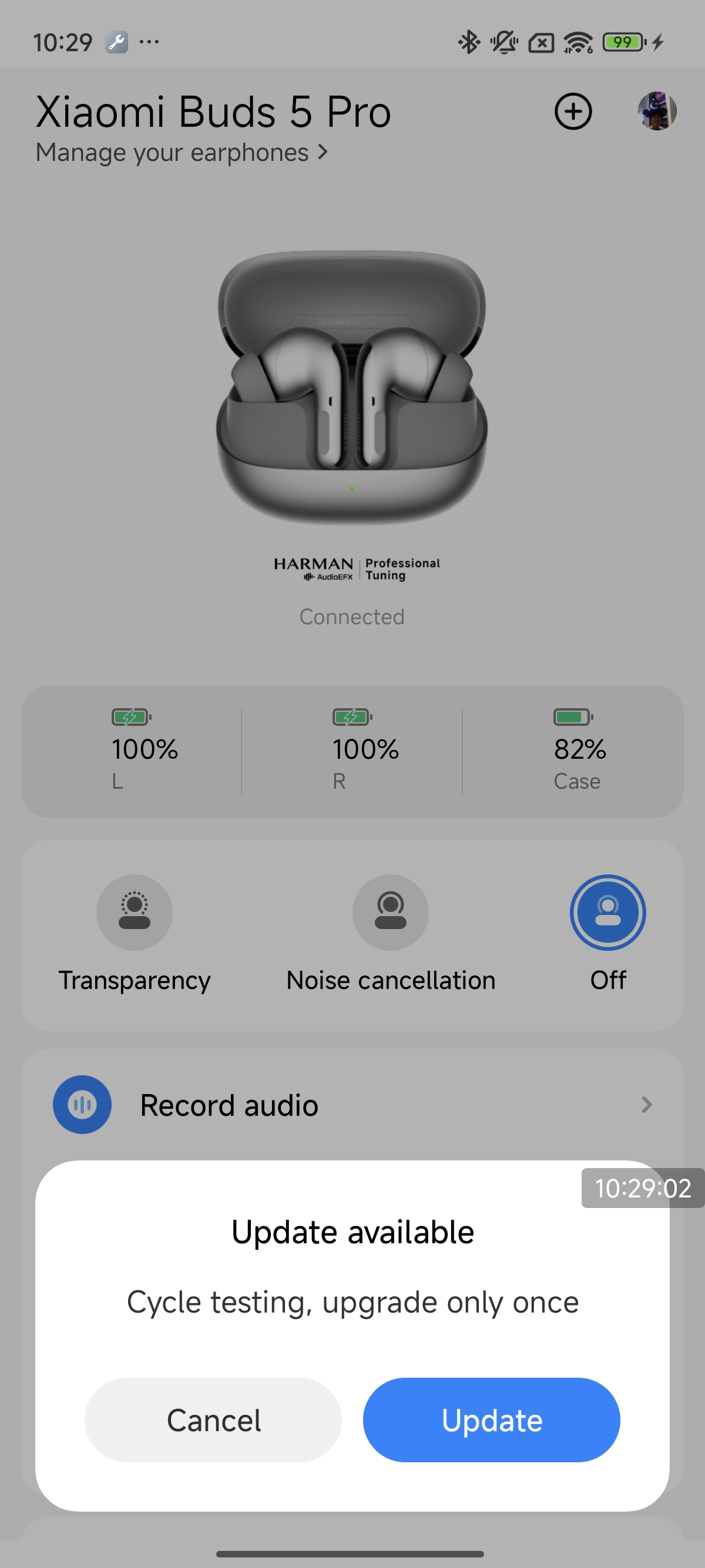
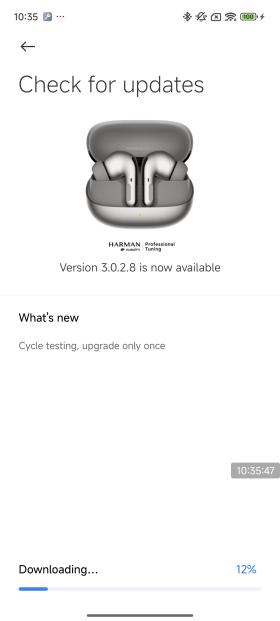
2. Open the Xiaomi Earbuds APP. If a new version is available, a firmware update prompt will appear;
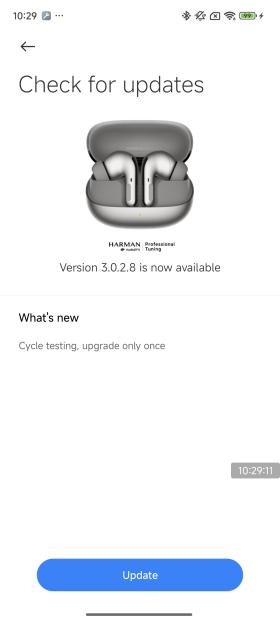
3. Tap on [Update];
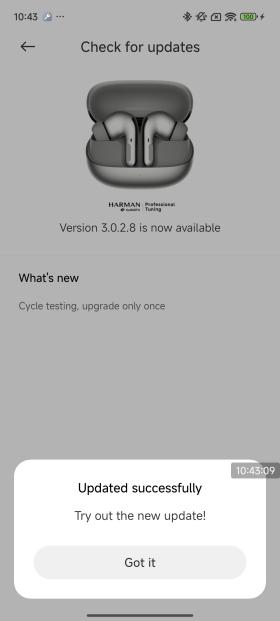
4. Enter the upgrade process and patiently wait until the progress reaches 100%. The earbuds firmware will automatically update to completion.
Note:
If the Xiaomi Earbuds APP fails to upgrade the firmware, please try the following methods:
1. Please ensure a stable internet connection, change the network, and try upgrading again;
2. The connection between your phone and earbuds is unstable. Please try again or move to a location with less wireless interference.
Active Upgrade via Settings Page:
1. Ensure the earbuds are connected to the mobile phone;
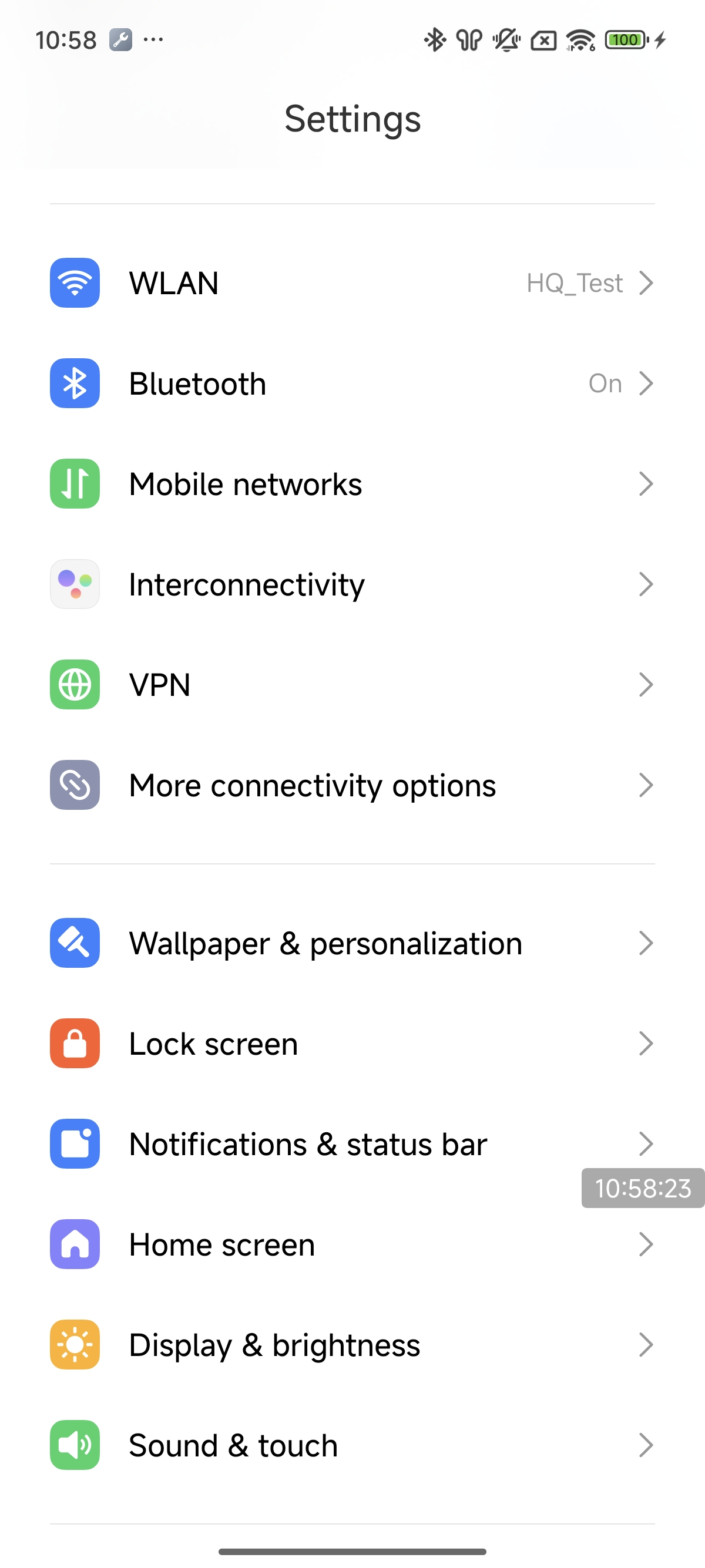
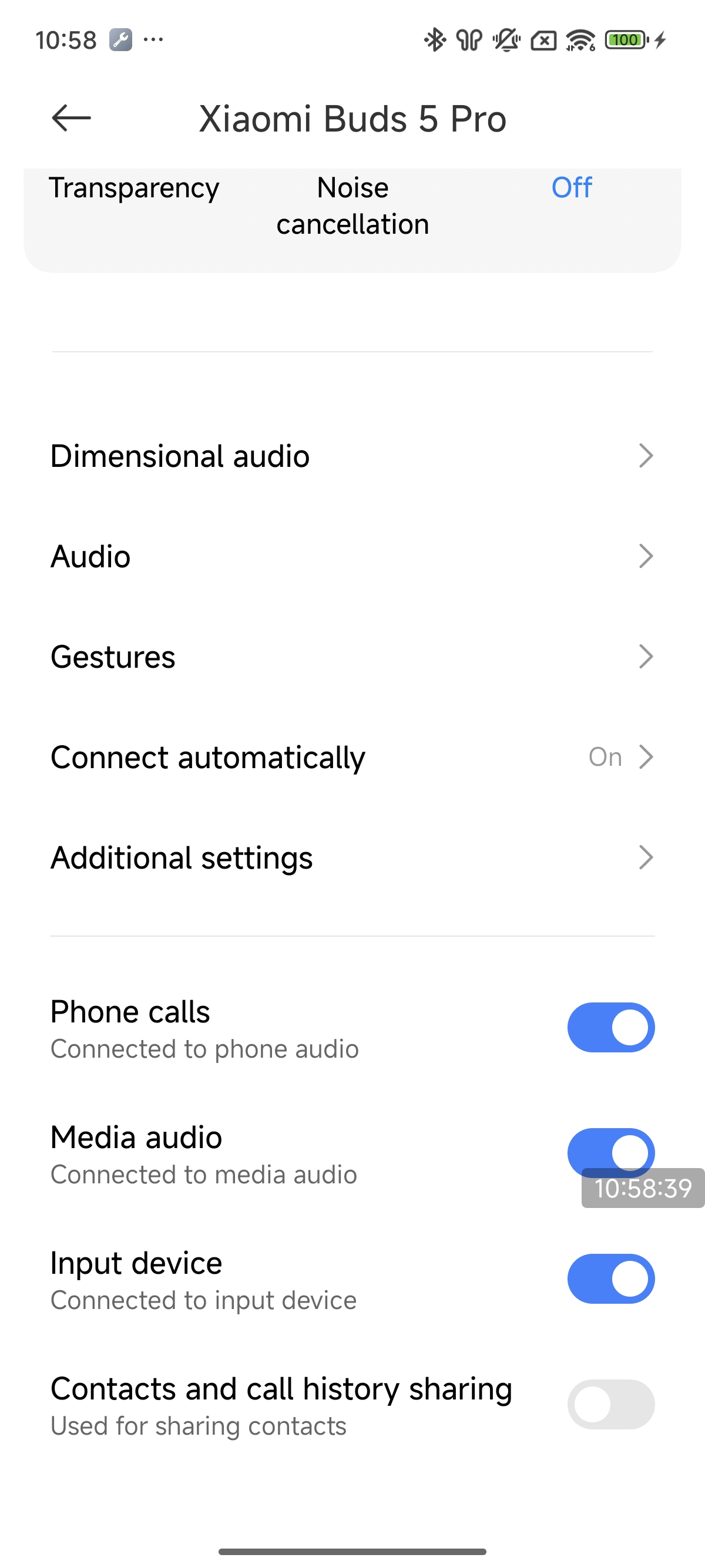
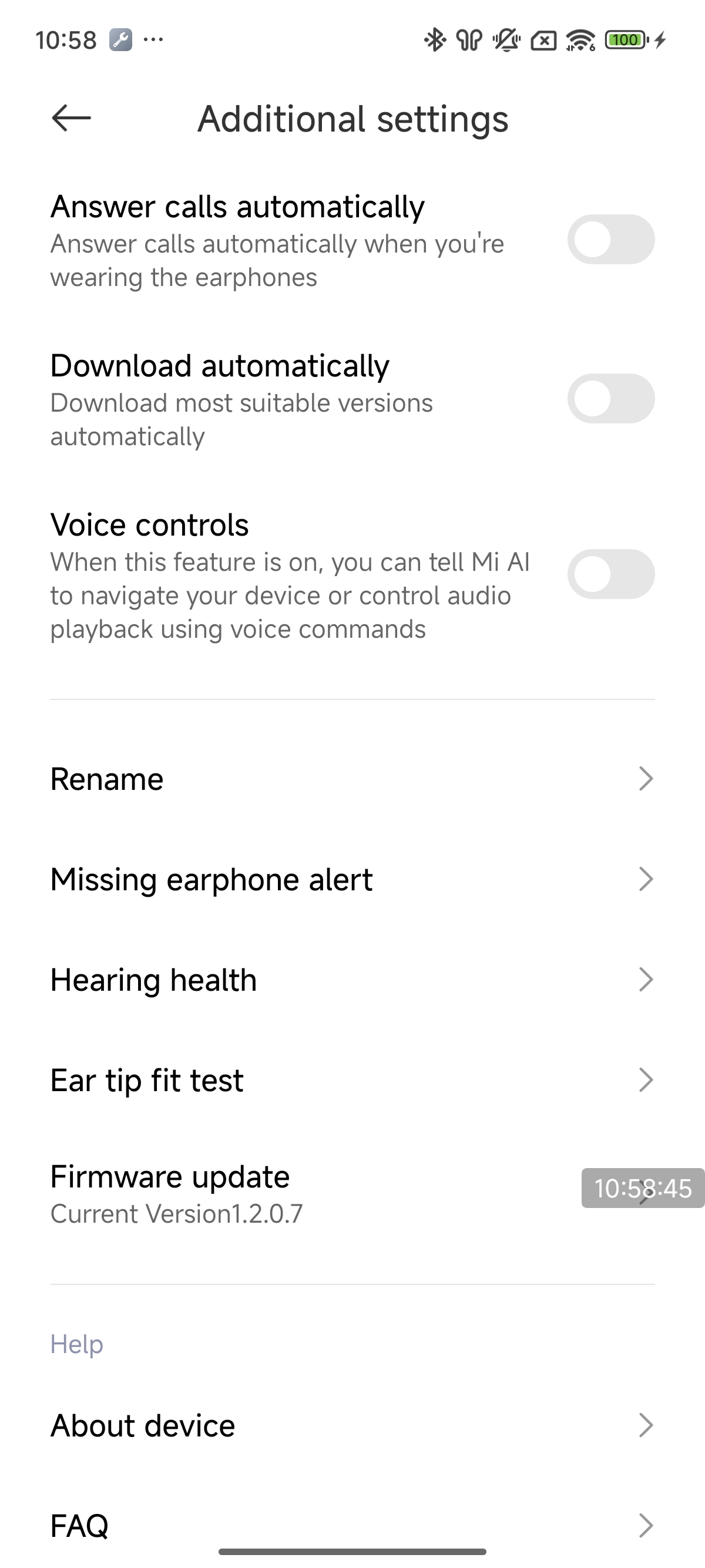
2. Open the [Settings], navigate to the [Bluetooth], and tap on [Additional settings];
3. Tap on [Firmware update]. Then enter the upgrade process and patiently wait until the progress reaches 100%. The earbuds firmware will automatically update to completion.
Silent Upgrade:
1. Ensure the earbuds are connected to the mobile phone;
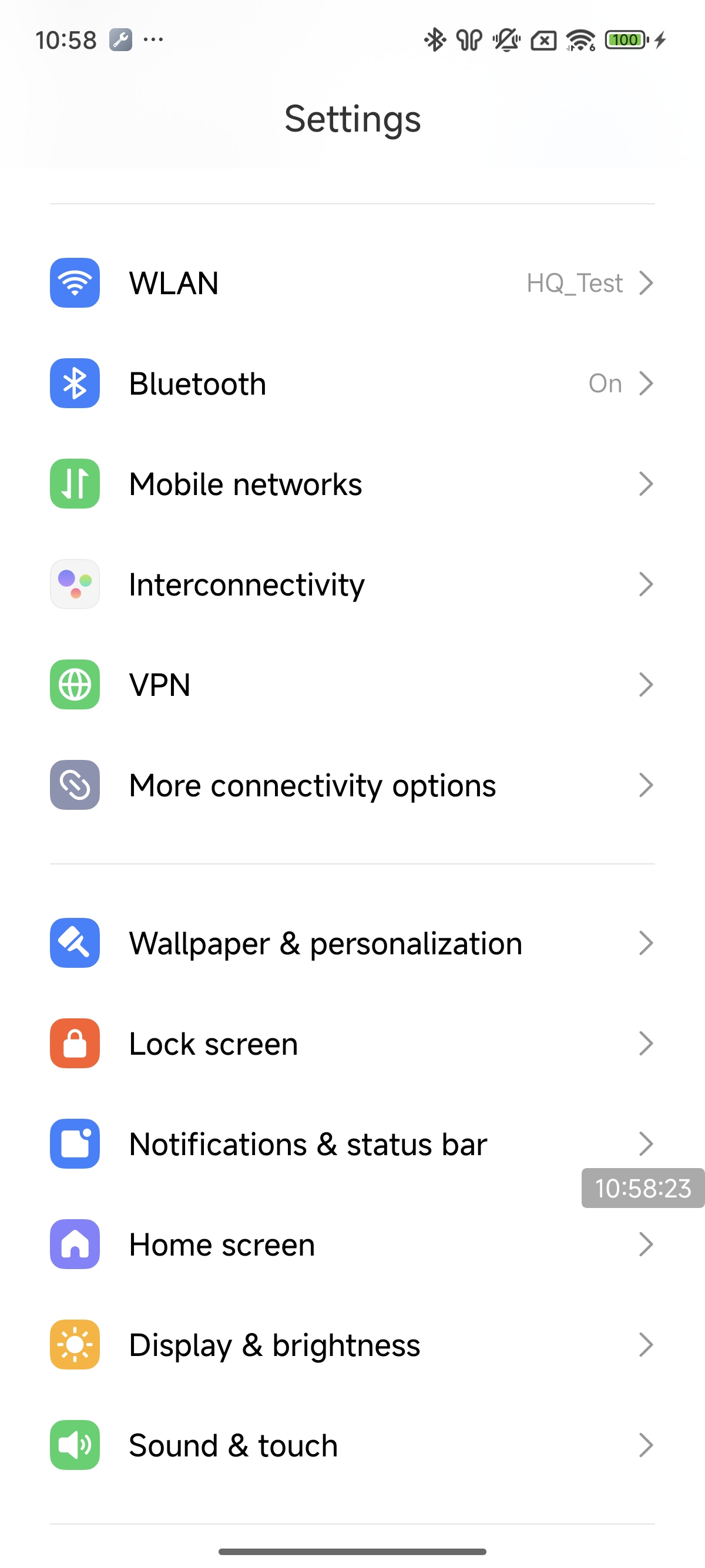
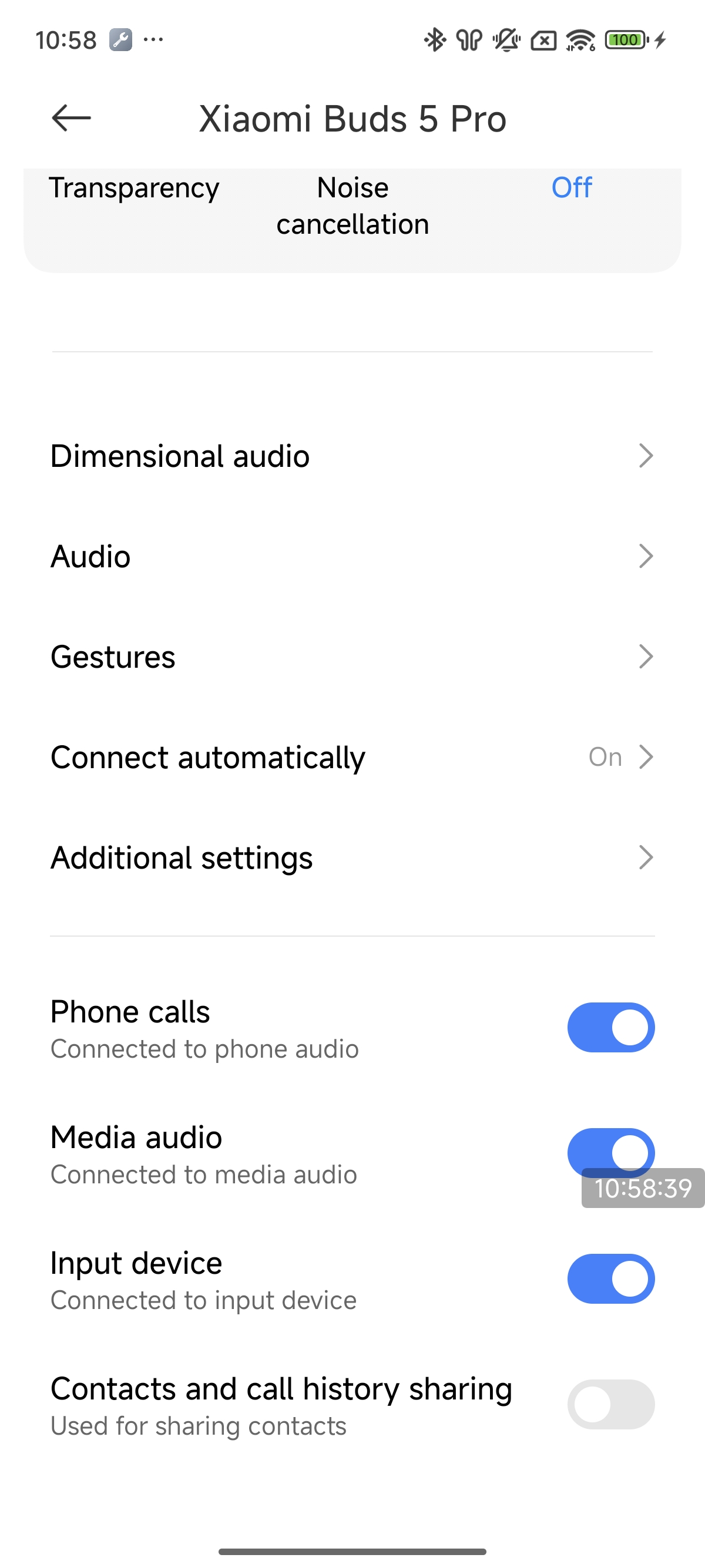
2. Open the [Settings], navigate to the [Bluetooth], and tap on the connected earbuds to enter the Xiaomi Buds 5 Pro interface;
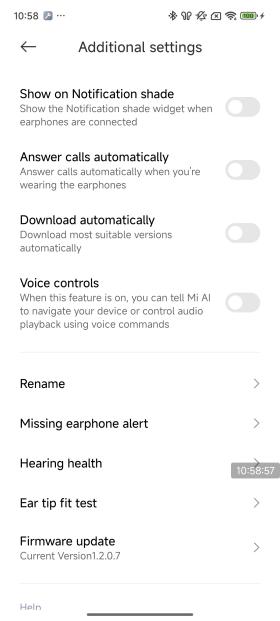
3. Tap on [Additional settings] and open the [Download automatically]. Subsequent new versions will automatically trigger an upgrade.
Note:
The following scenarios will affect OTA upgrades:
1. The earbuds cannot be upgraded if the battery level is below 20%;
2. Removing the earbuds from the charging case, closing the lid, pressing buttons, etc., will pause the upgrade process.
Connection
1. Q: How to connect the Xiaomi Buds 5 Pro to the phone?
A: To connect the Xiaomi Buds 5 Pro to a phone, please refer to the following steps:
1. Open the charging case, and the indicator flashes, this time the earbuds enter the pairing state. Turn on your phone's Bluetooth to connect;
2. Connect a new device:
(1). Put the earbuds into the charging case, open the lid and press and hold on the function button for 2 seconds, the charging case indicator will flash in white, and the earbuds will wait for the connection (if there is no connection for 1 minute, the earbuds will go into sleep mode and the indicator will turn off);
(2). Turn on the Bluetooth of your phone, search and connect to “Xiaomi Buds 5 Pro”. (If you need the connection password, enter “0000”).
Note:
If the connection fails, put the earbuds back to the charging case and repeat the above operation.
3. Use Xiaomi phone fast connection:
Put the earbuds into the charging case and close the lid. Close to the unlocked and Bluetooth-enabled Xiaomi phone. Open the lid of the charging case, according to the phone interface prompts to connect the earbuds;
Note:
For the fast connection function, you need to first update the phone system to the latest stable version, and then in the phone Bluetooth, enter [Advanced settings] and open the [Pair compatible devices]. At present, only some of the Xiaomi phone support Xiaomi pop-up function.
4. Connection interruption:
When the phone turns off the Bluetooth or out of the earbuds connection range, the Bluetooth will disconnect and the earbuds will emit a prompt, and then automatically enter the waiting connection state. If the earbuds are not connected to any device within 10 minutes, it will enter the passive reconnection state. 10 minutes later, it will enter the sleep mode, and can be woken up by wearing it again, and enter the waiting connection state;
Note:
Passive reconnection means that the earbuds can not actively connect back to the device, you need to enter the device Bluetooth interface to manually tap on the earbuds Bluetooth device name. (The earbuds have a connection record with the device).
5. Auto-connect:
Earbuds in the charging case, open the charging case, the earbuds will automatically connect back to the recently connected Bluetooth devices. If you can not successfully connect back to any Bluetooth device, the earbuds will enter the undiscoverable but connected state after 1 minute.
Note:
If the earbuds cannot connect back to the device automatically, you need to connect manually in the Bluetooth interface of the device. If you still can't solve the problem, please try to restore the earbuds to factory settings. Put the dual earbuds into the charging case and open the cover, press and hold on the function button for 10s, the indicator will flash continuously to restore the factory settings. After restoring the factory settings, please re-pair the earbuds.
2. Q: How to connect the Xiaomi Buds 5 Pro to the Xiaomi Earbuds APP?
A: Connect the Xiaomi Earbuds APP:
1. Download and install the Xiaomi Earbuds APP;
2. Follow the operation of the APP interface prompts to connect the earbuds.
Note:
1. Please make sure that the Bluetooth of your phone is on;
2. During the connection process, put the earbuds into the charging case, open the charging case lid and close to the phone;
3. The Xiaomi Earbuds APP is applicable to Android 6.0 and above phones, and iOS 14.0 and above phones;
4. Please upgrade the APP version to the latest version.
3. Q: What are the basic functions that can be achieved by binding the Xiaomi Buds 5 Pro to the Xiaomi Earbuds APP?
A: After binding the Xiaomi Buds 5 Pro to the Xiaomi Earbuds APP, you can customize the settings as follows:
1. You can get the updated firmware version and upgrade the earbuds firmware online. Xiaomi earbuds can only upgrade from a lower version to a higher version, it does not support upgrading from a higher version to a lower version;
2. You can set the [Noise cancellation] and [Transparency] and [Off];
3. You can record live/call recording, export recording, and play recording in the Xiaomi Earbuds APP >> [Record audio];
4. You can customize the gesture function for the left/right ear of the earbuds in the Xiaomi Earbuds APP>> [Gestures];
5. You can set the dimensional audio, adaptive listening, adaptive volume, and audio effect mode in the Xiaomi Earbuds APP >> [Audio effects];
6. You can set in-ear detection, ear tip fit test, dual connection, take calls automatically, voice control, and device renaming in Xiaomi Earbuds APP >> [Additional settings];
7. You can find the earbuds in Xiaomi Earbuds APP >> [Find your earphones];
8. In addition, you can check the power information of the earbuds and charging case, and check the firmware version of the earbuds.
4. Q: How to clear the pairing history between the Xiaomi Buds 5 Pro and the phone and reset the earbuds?
A: Clear the phone pairing record and reset method as follows:
1. Clear phone pairing:
Android phone: [Settings] >> [Bluetooth] >> [Xiaomi Buds 5 Pro] >> tap [Unpair] (Take Xiaomi phone as an example);
iOS phone: [Settings] >> [Bluetooth] >> [Xiaomi Buds 5 Pro] >> tap the “i” icon on the right side>> [Ignore this device] (Take the iPhone 15 for example).
2. Reset method:
(1). Place the earbuds in the charging case;
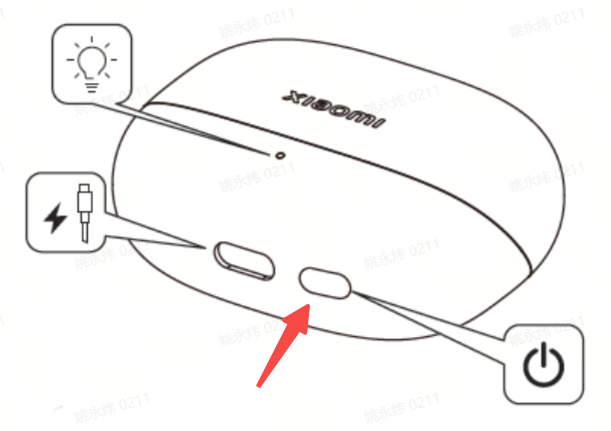
(2). Open the lid of the charging case, press and hold the function button of the charging case for more than 10 seconds, the white indicator of the charging case will flash continuously. Release the button, the earbuds will be reset, the connection history will be cleared, and the device will enter the pairing mode again.
5. Q: What is the effective range of the Xiaomi Buds 5 Pro's Bluetooth function? Is the connection stable?
A: The effective connection distance between the Xiaomi Buds 5 Pro and mobile phones in an unobstructed environment is about 10 meters. If there are walls or other obstacles blocking, the effective usage distance will be reduced. For example, if there are many walls in the house and the phone is placed in the living room, bringing the earbuds to the bedroom will cause lag or Bluetooth disconnection.
Note:
1. The Xiaomi Buds 5 Pro will not experience stuttering when used in open spaces, offices, coffee shops, homes, and other environments with weak interference signals;
2. Due to the connection characteristics of Bluetooth signals, the earbuds signal will be affected in strong interference environments, causing the earbuds to lag when listening to music. Bluetooth products all have this problem, for example, in subways/trains/airports, there will be varying degrees of interference, and there will be lagging/intermittent situations.
6. Q: What to do if the Xiaomi Buds 5 Pro cannot be searched and paired?
A: The Xiaomi Buds 5 Pro needs to be in the pairing status when searching for it on the phone.
(1). First of all, please make sure that the device is fully charged.
Open the lid of the charging case and press and hold the function button for 2s, the indicator will flash continuously, and the Xiaomi Buds 5 Pro is in pairing status. Please search “Xiaomi Buds 5 Pro” on your phone for pairing;
(2). Make sure the pairing procedure is correct. The earbuds are in pairing status and waiting for a connection. After 1 minute without connection, the earbuds will go to sleep and the indicator will turn off;
(3). If none of the above works, please try to reset the earbuds to factory settings.
Reset steps: Put the two earbuds into the charging case and open the lid, press and hold the function button for 10s, the indicator flashes continuously. It is indicated that the device is restored the factory settings and enter the pairing state. At this time, please try to re-pairing;
(4). Because there are many interferences in the surrounding area, please move to other locations to try. Due to the characteristics of the Bluetooth earbuds, the electromagnetic wave in your area will interfere with the Bluetooth connection, and will even cause no sound or disconnection after connection.
Note:
If you have already connected to one phone and need to connect to a new phone, please press and hold the function button of the charging case for 2 seconds, the white indicator will flash, and then search again.
7. Q: What to do if the device can search for the Xiaomi Buds 5 Pro but cannot connect?
A: If the device can search for the Xiaomi Buds 5 Pro but can't connect, please check if the Bluetooth data of the earbuds is abnormal. Try to delete the previous connection records on the device, press and hold the charging case button for 10s to reset the earbuds, and then try to pair and connect again.
Delete the Bluetooth records on your phone:
Android phone: [Settings] >> [Bluetooth] >> [Xiaomi Buds 5 Pro] >> tap [Unpair] (Take Xiaomi phone as an example);
iOS phone: [Settings] >> [Bluetooth] >> [Xiaomi Buds 5 Pro] >> tap the “i” symbol on the right side>> [Ignore this device] (Take the iPhone 15 for example).
8. Q: What to do if the Xiaomi Buds 5 Pro has disconnection issues?
A: The Xiaomi Buds 5 Pro around more than one router or Bluetooth device at the same time, there will be different degrees of interference, and will be lag, intermittent, and disconnected.
1. Disconnection reasons:
(1). The battery level of the Xiaomi Buds 5 Pro is too low or drained;
(2). The phone is far away from the earbuds, more than the effective transmission distance (10m or so), or between the earbuds and the phone there are obstacles;
(3). Due to the special characteristics of the Bluetooth earbuds, the electromagnetic waves in the area will interfere with the Bluetooth connection.
2. Solution:
(1). Please charge the earbuds to ensure that the it is fully charged;
(2). Put the earbuds and phone together, not more than the effective transmission distance (about 10m), and reconnect;
(3). Please make sure that your device is not in a strong interference environment, away from microwave ovens, monitoring and other objects with large electromagnetic interference. If there is a strong interference environment, it is recommended to try in an open field or a normal indoor;
(4). If none of the above works, put the earbuds into the charging case, close the lid for 15s, and then open the lid again for connection;
(5). If you still can't solve the problem, please try to restore the earbuds to factory settings. Put the two earbuds into the charging case and open the lid, press and hold the function button for 10s, the indicator will flash continuously to restore the factory settings. After restoring the factory settings, please try pairing again;
(6). The new version has been optimized. Please upgrade the firmware to the latest version in the Xiaomi Earbuds APP.
9. Q: Will the Xiaomi Buds 5 Pro connect automatically after reducing the distance, if it is too far away from the phone causing disconnection?
A: The operation of reconnecting are as follows:
(1). If the Xiaomi Buds 5 Pro is disconnected, it can be automatically reconnected when it is returned within 10 minutes. After 10 minutes, the earbuds will go to sleep, and then you can wear it once to reconnect automatically;
(2). If the earbuds can not be automatically connected to the phone, please try to put the earbuds into the charging case, close the lid, and wait for 5 seconds before opening the lid. Operate the phone to connect the earbuds;
(3). If step (2) can't connect back, please restart the Bluetooth on your phone, and press and hold the charging case function button for 2s, the charging case indicator will flash and the device will enter the pairing state, then connect your phone again.
10. Q: Does the Xiaomi Buds 5 Pro automatically disconnect when I put it in the charging case?
A: The logic of automatic disconnection of the Xiaomi Buds 5 Pro into the charging case is as follows:
(1). After the earbuds are put into the charging case, if the lid is not closed, the earbuds will not be disconnected automatically and will remain connected;
(2). After the earbuds are put into the charging case, if the cover is closed, the earbuds will automatically disconnect from the phone after 5s.
11. Q: What if the Xiaomi Buds 5 Pro cannot connect to the phone automatically after opening the charging case?
A: Please refer to the following methods to troubleshoot:
(1). The Xiaomi Buds 5 Pro automatically reconnects to the last connected device by default. If the last connection is not your current phone, you need to reset the earbuds to reconnect the phone;
(2). The phone is far away from the earbuds, more than the effective transmission distance (10m), or there are obstacles between the earbuds and the phone;
(3). Make sure the Bluetooth of your phone is turned on. If Bluetooth is not turned on, please turn on Bluetooth manually;
(4). Due to the special characteristics of the Bluetooth earbuds, the electromagnetic wave in your area will interfere with the Bluetooth connection, and the earbuds will be disconnected and can not automatically reconnect in time. Please move to another location to try.
12. Q: Why is it that after the Xiaomi Buds 5 Pro is in the charging case and the lid is closed, it first shows connected (no phone or media signal) on the phone and then disconnected?
A: Due to the existence of different Bluetooth connection services (A2DP and HFP) for the earbuds and phone, these two services will be disconnected successively and the phenomenon in question will occur. It does not affect the disconnection function of the earbuds, so please feel free to use it.
13. Q: How to deal with the situation where the Xiaomi Buds 5 Pro are disconnected and reconnected to the phone without any operation after being connected to the phone?
A: At this time the Xiaomi Buds 5 Pro appears to reboot, please restore the earbuds to the factory settings before use:
(1). Put the two earbuds into the charging case and open the lid, press and hold the function button for 10s, the indicator will flash continuously to restore the factory settings;
(2). After restoring the factory settings, please re-pairing;
(3). The new version has been optimized. Please upgrade the firmware to the latest version in the Xiaomi Earbuds APP.
14. Q: What to do if the Xiaomi Buds 5 Pro cannot enter the pairing status after opening the charging case and pressing and holding the function button?
A: If there is a case that you can't enter the pairing by pressing and holding on and it doesn't flash in white continuously. It is recommended to close the lid for 15 seconds and then open the lid and try again.
15. Q: What should I do if I press and hold the Xiaomi Buds 5 Pro for pairing, do not connect the device within 60s, put it into the charging case, close the lid and then open the lid, and the earbuds do not connect back?
A: Press and hold on the function button for pairing, 60s timeout did not judge the previous paired phone, you need to cancel the pairing on the phone side to reconnect. The new version has been optimized. Please upgrade the firmware to the latest version in the Xiaomi Earbuds APP.
16. Q: After connecting the Xiaomi Buds 5 Pro to the phone, one is worn and one is in the charging case. When the single earbud is taken far away and returned, the earbud is not connected back to the current device, but is connected to the other device, what is the reason for this?
A: When the earbuds are connected to multiple devices and the one is taken far away and back to connect (the other earbud is outside the charging case), if multiple devices are put together, the earbuds will appear to connect back to the other pairing records of the device, resulting in robbing the connection off the current phone. It is recommended to put the unworn earbud into the charging case and close the lid. The new version has been optimized. Please upgrade the firmware to the latest version in the Xiaomi Earbuds APP.
17. Q: What is the difference between the Connect automatically and Dual connection?
A: Connect automatically: After already connecting to one device, it will automatically connect back to the device that has a connection record when the charging case is opened.
Dual connection: The Bluetooth earbuds can be connected to two phones or other devices at the same time, allowing you to seamlessly switch audio sources between two devices without disconnecting and repairing.
18. Q: Can Connect automatically and Dual connection be turned on at the same time?
A: The Connect automatically and Dual connection functions cannot be turned on at the same time.
19. Q: Does the Xiaomi Buds 5 Pro support connecting with a smart band or watch?
A: The Xiaomi Buds 5 Pro supports connection with Xiaomi Watch, not with the smart band.
20. Q: Can the Xiaomi Buds 5 Pro connect two phones at the same time? How to operate?
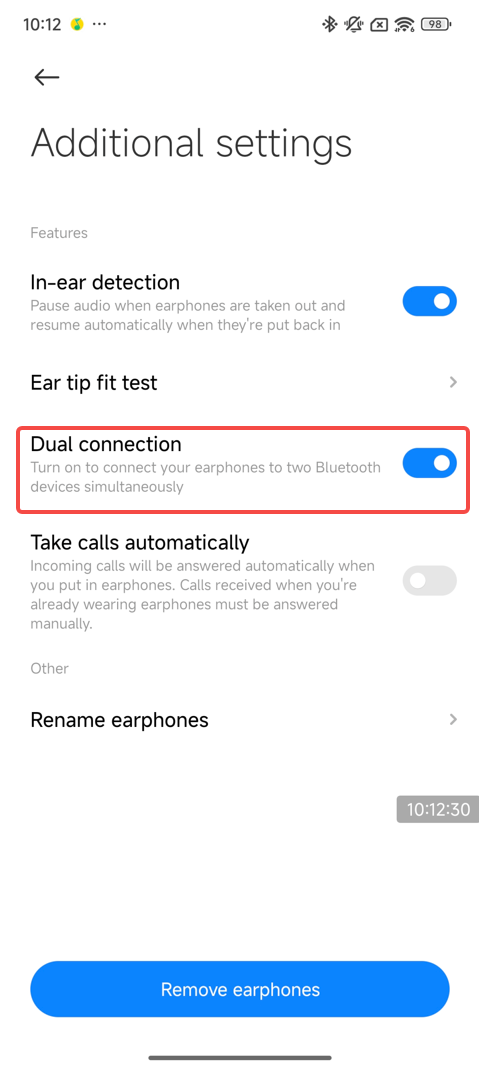
A: The Xiaomi Buds 5 Pro supports Dual connection function, and Dual connection function is turned on by default.
1. Setting method:
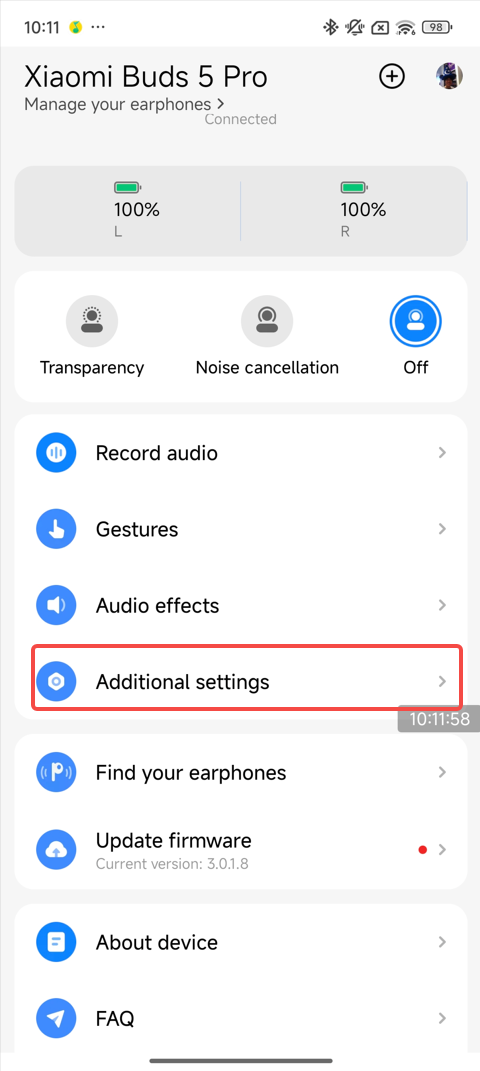
Xiaomi Earbuds APP >> [Xiaomi Buds 5 Pro] >> [Additional settings] >> [Dual connection] >> On/Off.
2. Connection method:
(1). Connect the earbuds to the Xiaomi Earbuds APP and turn on the [Dual connection] option.
(2). Put the earbuds into the charging case, with the charging case open, press and hold the charging case function button for 2s, the indicator will flash continuously, and the earbuds will enter the pairing state, Use another phone to search for the Bluetooth name of the earbuds to connect.
21. Q: Why is there a difference in volume level when connecting different devices to the Xiaomi Buds 5 Pro?
A: The following cases are the phenomenon of automatic volume adjustment that will occur. All are normal phenomena, please rest assured that the use:
(1). When connecting Xiaomi devices, Xiaomi volume protection mechanism will automatically adjust the volume to medium volume;
(2). When connecting iOS devices, the earbuds will automatically synchronize the volume of the original settings of the iOS device;
(3). When connecting to other Android phones, some phones do not turn on the absolute volume. It is recommended that you turn on the volume synchronization between the earbuds and your phone on the Bluetooth settings interface.
Note:
After pairing the earbuds with the phone successfully, the volume will be synchronized to the last set medium volume of the phone when the earbuds is connected to the phone again.
22. Q: Why is the left and right ear not synchronized after the Xiaomi Buds 5 Pro is connected to the device?
A: When playing music on iOS phone or connecting dual devices on Xiaomi phone, the right ear of the earbuds will be silent first after a successful connection, and the left ear will be silent after 0.5 seconds. The reason is that when the earbuds is connected to the Xiaomi phone, the Xiaomi phone's Spirit Island will have muted data over to grab the music. Because the left ear is the slave ear to synchronize data, than the right ear response slower, resulting in the left ear than the right ear 0.5 seconds slower no sound.
23. Q: When connecting the Xiaomi Buds 5 Pro to the phone and PC, if there is a conferencing in PC, why the audio on the phone automatically jump from the headset to the receiver?
A: Due to the difference in Bluetooth protocol between PC virtual voice calls and phone calls, PC virtual incoming calls do not notify the phone. So the phone will not go on hold during the call.
24. Q: Why does the voice assistant sometimes fail to recognize speech correctly when turned on through the Xiaomi Buds 5 Pro’s buttons?
A: This feature varies in design from one phone to another. Some phones will pick up the voice through the earbuds mic, then there will be the beginning of the 0.5 seconds time can not pick up the voice, resulting in the voice can not be recognized correctly. Please wait for half a second after you see the interface come out when you trigger the voice assistant through the earbuds, which can ensure a higher voice recognition rate.
25. Q: Why does the voice assistant fail to be woken up after I manually cancel it and use the Xiaomi Buds 5 Pro again?
A: This is a normal phenomenon. The time interval between two wake-up by pressing and holding on the button is too short the phone will not respond to the second press to wake up. It is recommended to wait 5 seconds to wake up again.
26. Q: Does the Xiaomi Buds 5 Pro support connecting two devices to each of the left and right earbuds so that they can be used as two single earbuds?
A: Not support.
27. Q: Can the right and left earbuds from two Xiaomi Buds 5 Pro be paired and used again?
A: Sure. Place the remaining right and left earbuds in the charging case, and press and hold the charging case function button for 30 seconds while the lid is open to complete the reassembly.
28. Q: Why does the Xiaomi Buds 5 Pro connect to iOS/Android phones, and when a call comes, both the phone and earbuds play sound at the same time?
A: Because iOS/Android phones will automatically select the ringtone play path according to whether mute is enabled or not. Without mute turned on, the sound is played on both the phone and earbuds during incoming call. With mute turned on, the sound is played on the earbuds only.
29. Q: Does the Xiaomi Buds 5 Pro support Low latency mode? How to turn on Low latency?
A: Some Xiaomi phones have this function in the Bluetooth settings interface, and the Low latency function will be enabled by default.
Function location: [Settings] >> [Bluetooth] >> [Audio effects] >> [Low Latency].
30. Q: Why does the Xiaomi Buds 5 Pro have a delay in playing games on iOS phones?
A: Due to the ecosystem limitations of iOS phones, the Xiaomi Buds 5 Pro does not currently support the low latency feature. Xiaomi series phones support the full-link low latency feature.
31. Q: What to do if the Xiaomi Buds 5 Pro doesn’t have the Xiaomi pop-up function?
A: Some phones support the function of Xiaomi pop-up, please refer to the following steps to deal with it:
1. Confirm whether the phones are supported and whether the system version is the latest;
2. Check whether [Pair compatible devices] is on. How to turn on: Phone [Settings] >> [Bluetooth] >> [Advanced settings] >> turn on the [Pair compatible devices]. When this function is off, you can't use the Xiaomi pop-up function. If you open the lid when the earbuds is in the charging case, the Xiaomi pop-up will appear;
3. If the above troubleshooting does not solve the problem, please pay attention to the recently released firmware update.
Note:
1. When you use it for the first time, you need to download the motion picture data. It is recommended that the phone connects to Wi-Fi (not connected to the phone hotspot, to avoid high consumption of mobile data traffic) to download the earbuds motion picture data, and then when you continue to use the same type of earbuds, the pop-up window can also be normal without connecting to the network;
2. The charging case and phone close to within 30cm, slowly open and close the lid 3-5 times (do not quickly open and close the lid), at first the Xiaomi pop-up will be the default picture, the animation effect will appear after the network download (the length of time is related to the speed of the network).
32. Q: Why is there a difference in the animation effect between the first image displayed in the Xiaomi pop-up and the subsequent one when the phone is connected to the Xiaomi Buds 5 Pro?
A: The first Xiaomi pop-up of the Xiaomi phone is the sketch, which is the initial setting of the APP. Because of the large number of earbuds models, it does not download the animated pictures of all models to the phone by default to avoid occupying unnecessary storage. Motion pictures need to be downloaded automatically from the cloud. Under normal circumstances, the earbuds for the second time and then connected to the phone, you can switch to the animation effect.
Note:
1. When replacing the connection to the phone, you will encounter the same problem, put the earbuds back into the charging case to reconnect;
2. If it is used for the first time, the surrounding network environment interferes with the loading speed of the dynamic pop-up window. If this pop-up window is the default interface during subsequent use, please put the earbuds back into the charging case and open the lid again, the dynamic pop-up window will be displayed normally.
33. Q: Why do the Xiaomi devices not pop up or display corresponding selection options (such as low latency) when connected to Xiaomi Buds 5 Pro?
A: Please go to [Settings] >> [Apps] >> [Manage apps] >> search for [Bluetooth] to clear all the data, and restart [Pair compatible devices] once.
34. Q: Why does the Xiaomi pop-up connection fail to connect?
A: 1. Please close the lid again, press and hold the function button of the charging case for 2s to enter the pairing mode, and reconnect the phone.
2. The new version has been optimized. Please upgrade the firmware to the latest version in the Xiaomi Earbuds APP.
35. Q: Why does controlling the Xiaomi Buds 5 Pro trigger the phone to take a photo?
A: When manipulating the earbuds, the earbuds will send a response event to the phone, and some phones in the Camera APP will take a picture according to the event. For example, some phones volume up/down events will trigger a photo.
36. Q: After setting the gestures, why can the phone not take photos when using the Xiaomi Buds 5 Pro?
A: Please follow the steps below to troubleshoot:
1. Confirm that dual devices are connected. When dual devices are connected, you cannot turn on photo taking;
2. Delete the paired devices that are no longer in use on your phone. If the phone is connected to more than 7 paired devices, the quick photo function cannot be triggered.
37. Q: Does the iOS system support the gesture operation function for quick photo taking using the Xiaomi Buds 5 Pro?
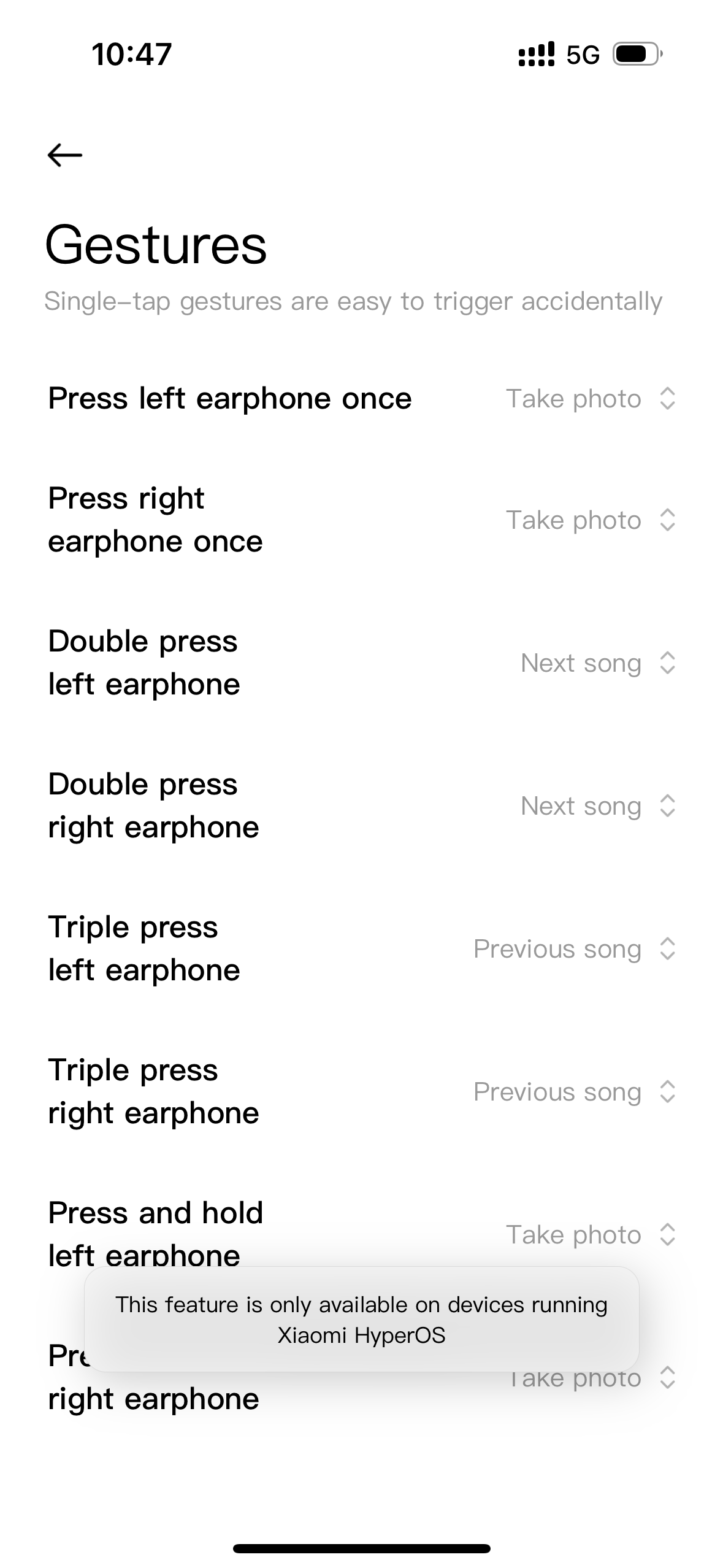
A: iOS does not support shortcut photography, shortcut photography only takes effect when connecting the phones of Xiaomi HyperOS.
Battery life
48. Q: How to check the battery level of the Xiaomi Buds 5 Pro?
A: To check the battery level, please refer to the following methods:
1. The battery level of the earbuds and the charging case can be viewed through the Xiaomi phone pop-up window/Bluetooth settings interface (The phones support Xiaomi pop-up);
2. After the earbuds are connected to the phone, you can check the battery level of the earbuds and the charging case through the Xiaomi Earbuds APP (Supported by both iOS and Android phones).
49. Q: Why does the notification bar not display the battery level after the Xiaomi Buds 5 Pro is connected to the phone?
A: The setting method and reason are as follows:
1. [Settings] >> [Bluetooth] >> [Xiaomi Buds 5 Pro] >> [Additional settings] >> turn on [Show on Notification shade];
2. The battery level displayed on the notification shade is not supported by all phones. If your phone does not support it, the battery level cannot be displayed.
50. Q: Why does the Xiaomi Earbuds APP sometimes not display the battery level of the charging case?
A: When the earbuds are out of the charging case, the phone will only display the battery level of the earbuds. When the earbuds are in the charging case, the APP will display the battery level of the earbuds and the charging case.
51. Q: Why does the battery level of the Xiaomi Buds 5 Pro displayed on the phone sometimes change?
A: It is normal for the battery level displayed on the phone to change slightly when the earbuds are working.
Note:
When the earbuds are charging or working, the battery level displayed on the phone will be updated synchronously.
52. Q: How to charge the Xiaomi Buds 5 Pro? Does the charging case of the Xiaomi Buds 5 Pro support wireless charging?
A: 1. The earbuds need to be placed in the charging case to charge. The charging case supports wired and wireless charging;
2. Wired charging: Put the earbuds into the charging case, and then insert the charging case into the Type-C to charge;
3. Wireless charging: Put the earbuds into the charging case, close the lid, and then place the charging case in the center of the wireless charging base to charge.
Note:
1. When charging, the indicator turns orange from 0-90% and turns green when the earbuds are almost fully charged;
2. When the ambient temperature is too high or too low, the charging efficiency will be affected. When the charging case is fully charged, it can charge the earbuds about 5 times;
3. The Xiaomi Buds 5 Pro supports wireless charging with the cover opened, but it will affect the charging efficiency.
53. Q: Why does the charging case of the Xiaomi Buds 5 Pro charge slowly and sometimes not fully?
A: This is to protect the battery.
1. Charging will stop when the temperature is below 0 ° C or above 45 ° C;
2. In low-temperature environments from 0 ° C to 15 ° C, the battery will charge slowly;
3. Please check if the charging cable is connected properly or unplug the charging cable again;
4. Replace the high-power charger for charging.
54. Q: What are the charging precautions for the Xiaomi Buds 5 Pro?
A: Please refer to the following charging precautions for the Xiaomi Buds 5 Pro:
1. It is recommended to use a 5V regular brand charger. (The input parameters of the charging case are 5V⎓2A);
2. Do not charge in high temperature (above 45℃), high humidity (above 85% humidity), or low temperature (below 0℃) environments;
3. If the product is not used for a long time, it is recommended to charge it once a month (the charging case is fully charged) to avoid low power causing battery damage and thus affecting the product life;
4. When using wireless charging, please use a wireless charging base with a charger, as other bases may have poor charging performance.
55. Q: Whether the Xiaomi Buds 5 Pro can be charged by a portable power bank?
A: It is not recommended to charge the Xiaomi Buds 5 Pro with a portable power bank.
Note:
Most portable power banks on the market do not support low current output, and the charging current of the charging case is lower than that of mobile phones and other devices. The charging current is lower than the minimum load current of the portable power bank. The portable power bank will determine that the battery is fully charged and automatically cut off the power, causing the earbuds not to be charged or fully charged.
56. Q: Can all versions of the Type-C charging cables charge the Xiaomi Buds 5 Pro?
A: All versions of the Type-C charging cables can be used for charging, but the power adapter must use a regular brand charger. And the output power of the charger cannot be less than 5V-1A.
The Xiaomi Buds 5 Pro is compatible with the following chargers:
Below is a brief explanation on how to use the recording function:
1. Ensure your earbuds are connected to your phone;
2. Press the "Press Area" three times consecutively. You will hear a “Recording starts” prompt, indicating that the recording has been activated;
3. Press the "Press Area" three times again. You will hear another prompt, “Recording Ended”, indicating that the recording has been stopped;
4. You can export the recording files through the Xiaomi Earbuds APP. Ensure your earbuds are connected to your phone and open the Xiaomi Earbuds APP.
In the Xiaomi Earbuds APP, find the [Recording History] option and select [Save All to Phone] to export the recording files to the internal storage of your phone.
2. Q: When recording videos or audio on a phone, does it use the Xiaomi Buds 5 Pro's microphone or the phone's microphone?
A: During video or audio recording, different phones and software have different settings, depending on the specific scenario you are using.
During calls, and listening to music, the earbuds' microphone is used. However, for video and audio recording, the phone's microphone is used.
Note:
Taking iOS 17.5.1 as an example, the earbuds' microphone is used for audio recording, while the phone's microphone is used for video recording.
You can test it as follows:
After connecting the earbuds to your phone, open the recording APP, wear the earbuds, and maintain a distance of about 3 to 5m from the phone before starting the recording. After stopping the recording, check if the recorded video or audio has sound. If there is no sound or the sound is low, it means the phone's microphone was used for recording. If the sound is clear, it means the earbuds' microphone was used.
3. Q: Why can't recording files of the Xiaomi Buds 5 Pro be played?
A: If recording files cannot be played, try playing the unplayable audio source using a third-party music player.
4. Q: When enabling music during live recording with the Xiaomi Buds 5 Pro, will the music be captured in the recording?
A: Live recording will continue, and the music will also be recorded.
5. Q: Why can't the Xiaomi Buds 5 Pro upload recordings using the Xiaomi Earbuds APP?
A: 1. Update the Xiaomi Earbuds APP to the latest version;
2. Clear the background data of the Xiaomi Earbuds APP and re-enter the Xiaomi Earbuds APP to try uploading again.
Taking Xiaomi phones as an example:
[Settings] >> [App Management] >> [Xiaomi Earbuds]. After entering the settings, tap the [Clear Data] option.
6. Q: How to set custom sound effects of the Xiaomi Buds 5 Pro?
A: Open [Bluetooth] >> [Sound Effects], and set under the [Custom Sound Effects menu].
Note:
Only some Xiaomi phones can see the custom sound effects function in the Bluetooth settings interface.
The “Custom Sound Effects” can already be enabled in the Bluetooth settings interface, and more models are being adapted.
7. Q: What method is used to control the Xiaomi Buds 5 Pro?
A: The earbuds use a press-and-slide method for function control. After wearing the earbuds, press slightly on the groove area on the side of the earbuds stem. You will hear a button operation prompt sound and then operate according to the function operation instructions in the manual. If there is no response after pressing, please try re-wearing the earbuds or adjusting the position.
Note:
You can customize the gesture functions of the left/right earbuds pressure sensor through the Xiaomi Earbuds APP. After resetting the earbuds, the left/right earbuds functions will return to default settings.
8. Q: What are the upgrade methods for the firmware of the Xiaomi Buds 5 Pro?
A: Active Upgrade:
1. Ensure the earbuds are connected to the mobile phone;
2. Open the Xiaomi Earbuds APP. If a new version is available, a firmware update prompt will appear;
3. Tap on [Update];
4. Enter the upgrade process and patiently wait until the progress reaches 100%. The earbuds firmware will automatically update to completion.
Note:
If the Xiaomi Earbuds APP fails to upgrade the firmware, please try the following methods:
1. Please ensure a stable internet connection, change the network, and try upgrading again;
2. The connection between your phone and earbuds is unstable. Please try again or move to a location with less wireless interference.
Active Upgrade via Settings Page:
1. Ensure the earbuds are connected to the mobile phone;
2. Open the [Settings], navigate to the [Bluetooth], and tap on [Additional settings];
3. Tap on [Firmware update]. Then enter the upgrade process and patiently wait until the progress reaches 100%. The earbuds firmware will automatically update to completion.
Silent Upgrade:
1. Ensure the earbuds are connected to the mobile phone;
2. Open the [Settings], navigate to the [Bluetooth], and tap on the connected earbuds to enter the Xiaomi Buds 5 Pro interface;
3. Tap on [Additional settings] and open the [Download automatically]. Subsequent new versions will automatically trigger an upgrade.
Note:
The following scenarios will affect OTA upgrades:
1. The earbuds cannot be upgraded if the battery level is below 20%;
2. Removing the earbuds from the charging case, closing the lid, pressing buttons, etc., will pause the upgrade process.
Connection
1. Q: How to connect the Xiaomi Buds 5 Pro to the phone?
A: To connect the Xiaomi Buds 5 Pro to a phone, please refer to the following steps:
1. Open the charging case, and the indicator flashes, this time the earbuds enter the pairing state. Turn on your phone's Bluetooth to connect;
2. Connect a new device:
(1). Put the earbuds into the charging case, open the lid and press and hold on the function button for 2 seconds, the charging case indicator will flash in white, and the earbuds will wait for the connection (if there is no connection for 1 minute, the earbuds will go into sleep mode and the indicator will turn off);
(2). Turn on the Bluetooth of your phone, search and connect to “Xiaomi Buds 5 Pro”. (If you need the connection password, enter “0000”).
Note:
If the connection fails, put the earbuds back to the charging case and repeat the above operation.
3. Use Xiaomi phone fast connection:
Put the earbuds into the charging case and close the lid. Close to the unlocked and Bluetooth-enabled Xiaomi phone. Open the lid of the charging case, according to the phone interface prompts to connect the earbuds;
Note:
For the fast connection function, you need to first update the phone system to the latest stable version, and then in the phone Bluetooth, enter [Advanced settings] and open the [Pair compatible devices]. At present, only some of the Xiaomi phone support Xiaomi pop-up function.
4. Connection interruption:
When the phone turns off the Bluetooth or out of the earbuds connection range, the Bluetooth will disconnect and the earbuds will emit a prompt, and then automatically enter the waiting connection state. If the earbuds are not connected to any device within 10 minutes, it will enter the passive reconnection state. 10 minutes later, it will enter the sleep mode, and can be woken up by wearing it again, and enter the waiting connection state;
Note:
Passive reconnection means that the earbuds can not actively connect back to the device, you need to enter the device Bluetooth interface to manually tap on the earbuds Bluetooth device name. (The earbuds have a connection record with the device).
5. Auto-connect:
Earbuds in the charging case, open the charging case, the earbuds will automatically connect back to the recently connected Bluetooth devices. If you can not successfully connect back to any Bluetooth device, the earbuds will enter the undiscoverable but connected state after 1 minute.
Note:
If the earbuds cannot connect back to the device automatically, you need to connect manually in the Bluetooth interface of the device. If you still can't solve the problem, please try to restore the earbuds to factory settings. Put the dual earbuds into the charging case and open the cover, press and hold on the function button for 10s, the indicator will flash continuously to restore the factory settings. After restoring the factory settings, please re-pair the earbuds.
2. Q: How to connect the Xiaomi Buds 5 Pro to the Xiaomi Earbuds APP?
A: Connect the Xiaomi Earbuds APP:
1. Download and install the Xiaomi Earbuds APP;
2. Follow the operation of the APP interface prompts to connect the earbuds.
Note:
1. Please make sure that the Bluetooth of your phone is on;
2. During the connection process, put the earbuds into the charging case, open the charging case lid and close to the phone;
3. The Xiaomi Earbuds APP is applicable to Android 6.0 and above phones, and iOS 14.0 and above phones;
4. Please upgrade the APP version to the latest version.
3. Q: What are the basic functions that can be achieved by binding the Xiaomi Buds 5 Pro to the Xiaomi Earbuds APP?
A: After binding the Xiaomi Buds 5 Pro to the Xiaomi Earbuds APP, you can customize the settings as follows:
1. You can get the updated firmware version and upgrade the earbuds firmware online. Xiaomi earbuds can only upgrade from a lower version to a higher version, it does not support upgrading from a higher version to a lower version;
2. You can set the [Noise cancellation] and [Transparency] and [Off];
3. You can record live/call recording, export recording, and play recording in the Xiaomi Earbuds APP >> [Record audio];
4. You can customize the gesture function for the left/right ear of the earbuds in the Xiaomi Earbuds APP>> [Gestures];
5. You can set the dimensional audio, adaptive listening, adaptive volume, and audio effect mode in the Xiaomi Earbuds APP >> [Audio effects];
6. You can set in-ear detection, ear tip fit test, dual connection, take calls automatically, voice control, and device renaming in Xiaomi Earbuds APP >> [Additional settings];
7. You can find the earbuds in Xiaomi Earbuds APP >> [Find your earphones];
8. In addition, you can check the power information of the earbuds and charging case, and check the firmware version of the earbuds.
4. Q: How to clear the pairing history between the Xiaomi Buds 5 Pro and the phone and reset the earbuds?
A: Clear the phone pairing record and reset method as follows:
1. Clear phone pairing:
Android phone: [Settings] >> [Bluetooth] >> [Xiaomi Buds 5 Pro] >> tap [Unpair] (Take Xiaomi phone as an example);
iOS phone: [Settings] >> [Bluetooth] >> [Xiaomi Buds 5 Pro] >> tap the “i” icon on the right side>> [Ignore this device] (Take the iPhone 15 for example).
2. Reset method:
(1). Place the earbuds in the charging case;
(2). Open the lid of the charging case, press and hold the function button of the charging case for more than 10 seconds, the white indicator of the charging case will flash continuously. Release the button, the earbuds will be reset, the connection history will be cleared, and the device will enter the pairing mode again.
5. Q: What is the effective range of the Xiaomi Buds 5 Pro's Bluetooth function? Is the connection stable?
A: The effective connection distance between the Xiaomi Buds 5 Pro and mobile phones in an unobstructed environment is about 10 meters. If there are walls or other obstacles blocking, the effective usage distance will be reduced. For example, if there are many walls in the house and the phone is placed in the living room, bringing the earbuds to the bedroom will cause lag or Bluetooth disconnection.
Note:
1. The Xiaomi Buds 5 Pro will not experience stuttering when used in open spaces, offices, coffee shops, homes, and other environments with weak interference signals;
2. Due to the connection characteristics of Bluetooth signals, the earbuds signal will be affected in strong interference environments, causing the earbuds to lag when listening to music. Bluetooth products all have this problem, for example, in subways/trains/airports, there will be varying degrees of interference, and there will be lagging/intermittent situations.
6. Q: What to do if the Xiaomi Buds 5 Pro cannot be searched and paired?
A: The Xiaomi Buds 5 Pro needs to be in the pairing status when searching for it on the phone.
(1). First of all, please make sure that the device is fully charged.
Open the lid of the charging case and press and hold the function button for 2s, the indicator will flash continuously, and the Xiaomi Buds 5 Pro is in pairing status. Please search “Xiaomi Buds 5 Pro” on your phone for pairing;
(2). Make sure the pairing procedure is correct. The earbuds are in pairing status and waiting for a connection. After 1 minute without connection, the earbuds will go to sleep and the indicator will turn off;
(3). If none of the above works, please try to reset the earbuds to factory settings.
Reset steps: Put the two earbuds into the charging case and open the lid, press and hold the function button for 10s, the indicator flashes continuously. It is indicated that the device is restored the factory settings and enter the pairing state. At this time, please try to re-pairing;
(4). Because there are many interferences in the surrounding area, please move to other locations to try. Due to the characteristics of the Bluetooth earbuds, the electromagnetic wave in your area will interfere with the Bluetooth connection, and will even cause no sound or disconnection after connection.
Note:
If you have already connected to one phone and need to connect to a new phone, please press and hold the function button of the charging case for 2 seconds, the white indicator will flash, and then search again.
7. Q: What to do if the device can search for the Xiaomi Buds 5 Pro but cannot connect?
A: If the device can search for the Xiaomi Buds 5 Pro but can't connect, please check if the Bluetooth data of the earbuds is abnormal. Try to delete the previous connection records on the device, press and hold the charging case button for 10s to reset the earbuds, and then try to pair and connect again.
Delete the Bluetooth records on your phone:
Android phone: [Settings] >> [Bluetooth] >> [Xiaomi Buds 5 Pro] >> tap [Unpair] (Take Xiaomi phone as an example);
iOS phone: [Settings] >> [Bluetooth] >> [Xiaomi Buds 5 Pro] >> tap the “i” symbol on the right side>> [Ignore this device] (Take the iPhone 15 for example).
8. Q: What to do if the Xiaomi Buds 5 Pro has disconnection issues?
A: The Xiaomi Buds 5 Pro around more than one router or Bluetooth device at the same time, there will be different degrees of interference, and will be lag, intermittent, and disconnected.
1. Disconnection reasons:
(1). The battery level of the Xiaomi Buds 5 Pro is too low or drained;
(2). The phone is far away from the earbuds, more than the effective transmission distance (10m or so), or between the earbuds and the phone there are obstacles;
(3). Due to the special characteristics of the Bluetooth earbuds, the electromagnetic waves in the area will interfere with the Bluetooth connection.
2. Solution:
(1). Please charge the earbuds to ensure that the it is fully charged;
(2). Put the earbuds and phone together, not more than the effective transmission distance (about 10m), and reconnect;
(3). Please make sure that your device is not in a strong interference environment, away from microwave ovens, monitoring and other objects with large electromagnetic interference. If there is a strong interference environment, it is recommended to try in an open field or a normal indoor;
(4). If none of the above works, put the earbuds into the charging case, close the lid for 15s, and then open the lid again for connection;
(5). If you still can't solve the problem, please try to restore the earbuds to factory settings. Put the two earbuds into the charging case and open the lid, press and hold the function button for 10s, the indicator will flash continuously to restore the factory settings. After restoring the factory settings, please try pairing again;
(6). The new version has been optimized. Please upgrade the firmware to the latest version in the Xiaomi Earbuds APP.
9. Q: Will the Xiaomi Buds 5 Pro connect automatically after reducing the distance, if it is too far away from the phone causing disconnection?
A: The operation of reconnecting are as follows:
(1). If the Xiaomi Buds 5 Pro is disconnected, it can be automatically reconnected when it is returned within 10 minutes. After 10 minutes, the earbuds will go to sleep, and then you can wear it once to reconnect automatically;
(2). If the earbuds can not be automatically connected to the phone, please try to put the earbuds into the charging case, close the lid, and wait for 5 seconds before opening the lid. Operate the phone to connect the earbuds;
(3). If step (2) can't connect back, please restart the Bluetooth on your phone, and press and hold the charging case function button for 2s, the charging case indicator will flash and the device will enter the pairing state, then connect your phone again.
10. Q: Does the Xiaomi Buds 5 Pro automatically disconnect when I put it in the charging case?
A: The logic of automatic disconnection of the Xiaomi Buds 5 Pro into the charging case is as follows:
(1). After the earbuds are put into the charging case, if the lid is not closed, the earbuds will not be disconnected automatically and will remain connected;
(2). After the earbuds are put into the charging case, if the cover is closed, the earbuds will automatically disconnect from the phone after 5s.
11. Q: What if the Xiaomi Buds 5 Pro cannot connect to the phone automatically after opening the charging case?
A: Please refer to the following methods to troubleshoot:
(1). The Xiaomi Buds 5 Pro automatically reconnects to the last connected device by default. If the last connection is not your current phone, you need to reset the earbuds to reconnect the phone;
(2). The phone is far away from the earbuds, more than the effective transmission distance (10m), or there are obstacles between the earbuds and the phone;
(3). Make sure the Bluetooth of your phone is turned on. If Bluetooth is not turned on, please turn on Bluetooth manually;
(4). Due to the special characteristics of the Bluetooth earbuds, the electromagnetic wave in your area will interfere with the Bluetooth connection, and the earbuds will be disconnected and can not automatically reconnect in time. Please move to another location to try.
12. Q: Why is it that after the Xiaomi Buds 5 Pro is in the charging case and the lid is closed, it first shows connected (no phone or media signal) on the phone and then disconnected?
A: Due to the existence of different Bluetooth connection services (A2DP and HFP) for the earbuds and phone, these two services will be disconnected successively and the phenomenon in question will occur. It does not affect the disconnection function of the earbuds, so please feel free to use it.
13. Q: How to deal with the situation where the Xiaomi Buds 5 Pro are disconnected and reconnected to the phone without any operation after being connected to the phone?
A: At this time the Xiaomi Buds 5 Pro appears to reboot, please restore the earbuds to the factory settings before use:
(1). Put the two earbuds into the charging case and open the lid, press and hold the function button for 10s, the indicator will flash continuously to restore the factory settings;
(2). After restoring the factory settings, please re-pairing;
(3). The new version has been optimized. Please upgrade the firmware to the latest version in the Xiaomi Earbuds APP.
14. Q: What to do if the Xiaomi Buds 5 Pro cannot enter the pairing status after opening the charging case and pressing and holding the function button?
A: If there is a case that you can't enter the pairing by pressing and holding on and it doesn't flash in white continuously. It is recommended to close the lid for 15 seconds and then open the lid and try again.
15. Q: What should I do if I press and hold the Xiaomi Buds 5 Pro for pairing, do not connect the device within 60s, put it into the charging case, close the lid and then open the lid, and the earbuds do not connect back?
A: Press and hold on the function button for pairing, 60s timeout did not judge the previous paired phone, you need to cancel the pairing on the phone side to reconnect. The new version has been optimized. Please upgrade the firmware to the latest version in the Xiaomi Earbuds APP.
16. Q: After connecting the Xiaomi Buds 5 Pro to the phone, one is worn and one is in the charging case. When the single earbud is taken far away and returned, the earbud is not connected back to the current device, but is connected to the other device, what is the reason for this?
A: When the earbuds are connected to multiple devices and the one is taken far away and back to connect (the other earbud is outside the charging case), if multiple devices are put together, the earbuds will appear to connect back to the other pairing records of the device, resulting in robbing the connection off the current phone. It is recommended to put the unworn earbud into the charging case and close the lid. The new version has been optimized. Please upgrade the firmware to the latest version in the Xiaomi Earbuds APP.
17. Q: What is the difference between the Connect automatically and Dual connection?
A: Connect automatically: After already connecting to one device, it will automatically connect back to the device that has a connection record when the charging case is opened.
Dual connection: The Bluetooth earbuds can be connected to two phones or other devices at the same time, allowing you to seamlessly switch audio sources between two devices without disconnecting and repairing.
18. Q: Can Connect automatically and Dual connection be turned on at the same time?
A: The Connect automatically and Dual connection functions cannot be turned on at the same time.
19. Q: Does the Xiaomi Buds 5 Pro support connecting with a smart band or watch?
A: The Xiaomi Buds 5 Pro supports connection with Xiaomi Watch, not with the smart band.
20. Q: Can the Xiaomi Buds 5 Pro connect two phones at the same time? How to operate?
A: The Xiaomi Buds 5 Pro supports Dual connection function, and Dual connection function is turned on by default.
1. Setting method:
Xiaomi Earbuds APP >> [Xiaomi Buds 5 Pro] >> [Additional settings] >> [Dual connection] >> On/Off.
2. Connection method:
(1). Connect the earbuds to the Xiaomi Earbuds APP and turn on the [Dual connection] option.
(2). Put the earbuds into the charging case, with the charging case open, press and hold the charging case function button for 2s, the indicator will flash continuously, and the earbuds will enter the pairing state, Use another phone to search for the Bluetooth name of the earbuds to connect.
21. Q: Why is there a difference in volume level when connecting different devices to the Xiaomi Buds 5 Pro?
A: The following cases are the phenomenon of automatic volume adjustment that will occur. All are normal phenomena, please rest assured that the use:
(1). When connecting Xiaomi devices, Xiaomi volume protection mechanism will automatically adjust the volume to medium volume;
(2). When connecting iOS devices, the earbuds will automatically synchronize the volume of the original settings of the iOS device;
(3). When connecting to other Android phones, some phones do not turn on the absolute volume. It is recommended that you turn on the volume synchronization between the earbuds and your phone on the Bluetooth settings interface.
Note:
After pairing the earbuds with the phone successfully, the volume will be synchronized to the last set medium volume of the phone when the earbuds is connected to the phone again.
22. Q: Why is the left and right ear not synchronized after the Xiaomi Buds 5 Pro is connected to the device?
A: When playing music on iOS phone or connecting dual devices on Xiaomi phone, the right ear of the earbuds will be silent first after a successful connection, and the left ear will be silent after 0.5 seconds. The reason is that when the earbuds is connected to the Xiaomi phone, the Xiaomi phone's Spirit Island will have muted data over to grab the music. Because the left ear is the slave ear to synchronize data, than the right ear response slower, resulting in the left ear than the right ear 0.5 seconds slower no sound.
23. Q: When connecting the Xiaomi Buds 5 Pro to the phone and PC, if there is a conferencing in PC, why the audio on the phone automatically jump from the headset to the receiver?
A: Due to the difference in Bluetooth protocol between PC virtual voice calls and phone calls, PC virtual incoming calls do not notify the phone. So the phone will not go on hold during the call.
24. Q: Why does the voice assistant sometimes fail to recognize speech correctly when turned on through the Xiaomi Buds 5 Pro’s buttons?
A: This feature varies in design from one phone to another. Some phones will pick up the voice through the earbuds mic, then there will be the beginning of the 0.5 seconds time can not pick up the voice, resulting in the voice can not be recognized correctly. Please wait for half a second after you see the interface come out when you trigger the voice assistant through the earbuds, which can ensure a higher voice recognition rate.
25. Q: Why does the voice assistant fail to be woken up after I manually cancel it and use the Xiaomi Buds 5 Pro again?
A: This is a normal phenomenon. The time interval between two wake-up by pressing and holding on the button is too short the phone will not respond to the second press to wake up. It is recommended to wait 5 seconds to wake up again.
26. Q: Does the Xiaomi Buds 5 Pro support connecting two devices to each of the left and right earbuds so that they can be used as two single earbuds?
A: Not support.
27. Q: Can the right and left earbuds from two Xiaomi Buds 5 Pro be paired and used again?
A: Sure. Place the remaining right and left earbuds in the charging case, and press and hold the charging case function button for 30 seconds while the lid is open to complete the reassembly.
28. Q: Why does the Xiaomi Buds 5 Pro connect to iOS/Android phones, and when a call comes, both the phone and earbuds play sound at the same time?
A: Because iOS/Android phones will automatically select the ringtone play path according to whether mute is enabled or not. Without mute turned on, the sound is played on both the phone and earbuds during incoming call. With mute turned on, the sound is played on the earbuds only.
29. Q: Does the Xiaomi Buds 5 Pro support Low latency mode? How to turn on Low latency?
A: Some Xiaomi phones have this function in the Bluetooth settings interface, and the Low latency function will be enabled by default.
Function location: [Settings] >> [Bluetooth] >> [Audio effects] >> [Low Latency].
30. Q: Why does the Xiaomi Buds 5 Pro have a delay in playing games on iOS phones?
A: Due to the ecosystem limitations of iOS phones, the Xiaomi Buds 5 Pro does not currently support the low latency feature. Xiaomi series phones support the full-link low latency feature.
31. Q: What to do if the Xiaomi Buds 5 Pro doesn’t have the Xiaomi pop-up function?
A: Some phones support the function of Xiaomi pop-up, please refer to the following steps to deal with it:
1. Confirm whether the phones are supported and whether the system version is the latest;
2. Check whether [Pair compatible devices] is on. How to turn on: Phone [Settings] >> [Bluetooth] >> [Advanced settings] >> turn on the [Pair compatible devices]. When this function is off, you can't use the Xiaomi pop-up function. If you open the lid when the earbuds is in the charging case, the Xiaomi pop-up will appear;
3. If the above troubleshooting does not solve the problem, please pay attention to the recently released firmware update.
Note:
1. When you use it for the first time, you need to download the motion picture data. It is recommended that the phone connects to Wi-Fi (not connected to the phone hotspot, to avoid high consumption of mobile data traffic) to download the earbuds motion picture data, and then when you continue to use the same type of earbuds, the pop-up window can also be normal without connecting to the network;
2. The charging case and phone close to within 30cm, slowly open and close the lid 3-5 times (do not quickly open and close the lid), at first the Xiaomi pop-up will be the default picture, the animation effect will appear after the network download (the length of time is related to the speed of the network).
32. Q: Why is there a difference in the animation effect between the first image displayed in the Xiaomi pop-up and the subsequent one when the phone is connected to the Xiaomi Buds 5 Pro?
A: The first Xiaomi pop-up of the Xiaomi phone is the sketch, which is the initial setting of the APP. Because of the large number of earbuds models, it does not download the animated pictures of all models to the phone by default to avoid occupying unnecessary storage. Motion pictures need to be downloaded automatically from the cloud. Under normal circumstances, the earbuds for the second time and then connected to the phone, you can switch to the animation effect.
Note:
1. When replacing the connection to the phone, you will encounter the same problem, put the earbuds back into the charging case to reconnect;
2. If it is used for the first time, the surrounding network environment interferes with the loading speed of the dynamic pop-up window. If this pop-up window is the default interface during subsequent use, please put the earbuds back into the charging case and open the lid again, the dynamic pop-up window will be displayed normally.
33. Q: Why do the Xiaomi devices not pop up or display corresponding selection options (such as low latency) when connected to Xiaomi Buds 5 Pro?
A: Please go to [Settings] >> [Apps] >> [Manage apps] >> search for [Bluetooth] to clear all the data, and restart [Pair compatible devices] once.
34. Q: Why does the Xiaomi pop-up connection fail to connect?
A: 1. Please close the lid again, press and hold the function button of the charging case for 2s to enter the pairing mode, and reconnect the phone.
2. The new version has been optimized. Please upgrade the firmware to the latest version in the Xiaomi Earbuds APP.
35. Q: Why does controlling the Xiaomi Buds 5 Pro trigger the phone to take a photo?
A: When manipulating the earbuds, the earbuds will send a response event to the phone, and some phones in the Camera APP will take a picture according to the event. For example, some phones volume up/down events will trigger a photo.
36. Q: After setting the gestures, why can the phone not take photos when using the Xiaomi Buds 5 Pro?
A: Please follow the steps below to troubleshoot:
1. Confirm that dual devices are connected. When dual devices are connected, you cannot turn on photo taking;
2. Delete the paired devices that are no longer in use on your phone. If the phone is connected to more than 7 paired devices, the quick photo function cannot be triggered.
37. Q: Does the iOS system support the gesture operation function for quick photo taking using the Xiaomi Buds 5 Pro?
A: iOS does not support shortcut photography, shortcut photography only takes effect when connecting the phones of Xiaomi HyperOS.
Battery life
48. Q: How to check the battery level of the Xiaomi Buds 5 Pro?
A: To check the battery level, please refer to the following methods:
1. The battery level of the earbuds and the charging case can be viewed through the Xiaomi phone pop-up window/Bluetooth settings interface (The phones support Xiaomi pop-up);
2. After the earbuds are connected to the phone, you can check the battery level of the earbuds and the charging case through the Xiaomi Earbuds APP (Supported by both iOS and Android phones).
49. Q: Why does the notification bar not display the battery level after the Xiaomi Buds 5 Pro is connected to the phone?
A: The setting method and reason are as follows:
1. [Settings] >> [Bluetooth] >> [Xiaomi Buds 5 Pro] >> [Additional settings] >> turn on [Show on Notification shade];
2. The battery level displayed on the notification shade is not supported by all phones. If your phone does not support it, the battery level cannot be displayed.
50. Q: Why does the Xiaomi Earbuds APP sometimes not display the battery level of the charging case?
A: When the earbuds are out of the charging case, the phone will only display the battery level of the earbuds. When the earbuds are in the charging case, the APP will display the battery level of the earbuds and the charging case.
51. Q: Why does the battery level of the Xiaomi Buds 5 Pro displayed on the phone sometimes change?
A: It is normal for the battery level displayed on the phone to change slightly when the earbuds are working.
Note:
When the earbuds are charging or working, the battery level displayed on the phone will be updated synchronously.
52. Q: How to charge the Xiaomi Buds 5 Pro? Does the charging case of the Xiaomi Buds 5 Pro support wireless charging?
A: 1. The earbuds need to be placed in the charging case to charge. The charging case supports wired and wireless charging;
2. Wired charging: Put the earbuds into the charging case, and then insert the charging case into the Type-C to charge;
3. Wireless charging: Put the earbuds into the charging case, close the lid, and then place the charging case in the center of the wireless charging base to charge.
Note:
1. When charging, the indicator turns orange from 0-90% and turns green when the earbuds are almost fully charged;
2. When the ambient temperature is too high or too low, the charging efficiency will be affected. When the charging case is fully charged, it can charge the earbuds about 5 times;
3. The Xiaomi Buds 5 Pro supports wireless charging with the cover opened, but it will affect the charging efficiency.
53. Q: Why does the charging case of the Xiaomi Buds 5 Pro charge slowly and sometimes not fully?
A: This is to protect the battery.
1. Charging will stop when the temperature is below 0 ° C or above 45 ° C;
2. In low-temperature environments from 0 ° C to 15 ° C, the battery will charge slowly;
3. Please check if the charging cable is connected properly or unplug the charging cable again;
4. Replace the high-power charger for charging.
54. Q: What are the charging precautions for the Xiaomi Buds 5 Pro?
A: Please refer to the following charging precautions for the Xiaomi Buds 5 Pro:
1. It is recommended to use a 5V regular brand charger. (The input parameters of the charging case are 5V⎓2A);
2. Do not charge in high temperature (above 45℃), high humidity (above 85% humidity), or low temperature (below 0℃) environments;
3. If the product is not used for a long time, it is recommended to charge it once a month (the charging case is fully charged) to avoid low power causing battery damage and thus affecting the product life;
4. When using wireless charging, please use a wireless charging base with a charger, as other bases may have poor charging performance.
55. Q: Whether the Xiaomi Buds 5 Pro can be charged by a portable power bank?
A: It is not recommended to charge the Xiaomi Buds 5 Pro with a portable power bank.
Note:
Most portable power banks on the market do not support low current output, and the charging current of the charging case is lower than that of mobile phones and other devices. The charging current is lower than the minimum load current of the portable power bank. The portable power bank will determine that the battery is fully charged and automatically cut off the power, causing the earbuds not to be charged or fully charged.
56. Q: Can all versions of the Type-C charging cables charge the Xiaomi Buds 5 Pro?
A: All versions of the Type-C charging cables can be used for charging, but the power adapter must use a regular brand charger. And the output power of the charger cannot be less than 5V-1A.
The Xiaomi Buds 5 Pro is compatible with the following chargers:
Number | Product Name | Charger Model | Charging Power | Charging Cable | Test Results |
1 | XIAOMI | MDY-14-EC | 90W | USB to Type-C | Pass |
2 | Switching adapter | XY-HWPD65W | 65W | Dual port Type-C | Pass |
4 | Power adapter | MDY-11-EMI | 22.5W | USB to Type-C | Pass |
5 | HUAWEI | HW-050200C02 | 10W | USB to Type-C | Pass |
6 | Switching adapter | S92A40 | 40W | USB to Type-C | Pass |
7 | VIVO | V1020E-CN | 10W | USB to Type-C | Pass |
8 | OPPO | VC54JBCH | 20W | USB to Type-C | Pass |
9 | ZMI | HA612 | 18W | USB to Type-C | Pass |
10 | NOKIA | T7-147 | 10W | USB to Type-C | Pass |
11 | SUPER(Travel charger) | ZC-036-B | 18W | USB to Type-C | Pass |
12 | SAMSUNG | EP-TA800 | 24.75W | Dual Type-C | Pass |
13 | ASUS | A299-200150U-IN | 30W | Dual Type-C | Pass |
14 | HUAWEI | HW-XX0X00C00 | 10W | USB to Type-C | Pass |
15 | OPPO | AK733HK | 10W | USB to Type-C | Pass |
16 | ZMI | HA835 | 65W | Dual Type-C | Pass |
17 | SAMSUNG | EP-T1510 | 15W | Dual Type-C | Pass |
18 | SAMSUNG | EP-TA50CBC | 7.75W | USB to Type-C | Pass |
19 | MEIZU USB power adapter | UP0515S | 7.5W | USB to Type-C | Pass |
20 | SAMSUNG | EP-TA50EWE | 7.8W | USB to Type-C | Pass |
57. Q: Can the charging case of the Xiaomi Buds 5 Pro be charged through a USB port on the computer?
A: The Xiaomi Buds 5 Pro can be charged through the computer’s USB port. Please use the Type-C charging cable to properly plug it into the computer’s USB port to charge the charging case.
58. Q: Does the charging case of the Xiaomi Buds 5 Pro support reverse charging on a phone?
A: Support.
59. Q: Does the standard charging cable of the Xiaomi Buds 5 Pro support transferring data?
A: Not support.
60. Q: Will the charging case's lack of power affect using the Xiaomi Buds 5 Pro?
A: If the earbuds are fully charged, the lack of power in the charging case will not affect the use of the earbuds when connected to the phone. However, long-term low power of the charging case will cause the battery performance to deteriorate. It is recommended that you charge the charging case in time.
61. Q: What are the effects of the Xiaomi Buds 5 Pro's charging case shutting down due to low power?
A: The following situations will occur:
1. The LED light of the charging case will not light when the lid is opened;
2. The second phone cannot be connected by pressing the pairing button;
3. The earbuds cannot be detected when they are put into the charging case;
4. The factory settings cannot be restored;
5. The firmware of the earbuds cannot be updated via OTA.
62. Q: Can only bring the earbuds of the Xiaomi Buds 5 Pro without the charging case when going outside?
A: If your phone is already connected to the earbuds, and the current battery life of the earbuds can meet your needs when you go out, you don’t need to bring the charging case.
Note:
It is recommended that you bring the charging case when you go out, which can improve the battery life of the earbuds and reduce the risk of losing them.
63. Q: Why is the actual battery duration of the Xiaomi Buds 5 Pro shorter than advertised?
A: Battery duration varies based on usage habits and environmental factors. The advertised data corresponds to specific scenarios (The advertised data is texted in a laboratory-specific environment).
1. The factors affecting battery duration:
(1). The low battery level of the earbuds;
(2). Higher volume will drain the battery faster;
(3). Presence of significant electromagnetic interference around the earbuds or obstacles like walls between the earbuds and the phone;
(4). Using audio encoding with better sound quality will affect battery life.
2. The advice for improving the battery duration:
(1). Ensure the earbuds are fully charged before use;
(2). Turn down the volume to check if the usage time is normal;
(3). Avoid using the earbuds near objects with strong electromagnetic interference, such as microwaves, and ensure there are no obstacles between the earbuds and the phone;
(4). Turn off infrequently used functions such as active noise cancellation and head tracking;
(5). Use audio coding with better battery life, such as AAC coding.
3. The testing data obtained from Xiaomi laboratories shows that under actual environmental conditions, there are variations due to signal interference and electromagnetic interference, which is considered normal. For example, music playback duration test conditions: with the earbuds fully charged, active noise cancellation and head tracking turned off, volume set at 50%, and using AAC format, the music playback time of the earbuds can reach 10 hours.
64. Q: Why does the battery duration of the Xiaomi Buds 5 Pro sometimes last less than 3 hours, but sometimes up to 6 hours?
A: This is primarily due to active noise cancellation and dimensional audio being turned on, the earbuds’ power consumption reaches its peak, resulting in around 3 hours of battery life. It is recommended turning off features that are not frequently used can improve battery life.
65. Q: When the Redmi Note 14 Pro is connected to the Xiaomi Buds 5 Pro, why is the battery life less than the standard time of about 10 minutes?
A: Because the Redmi Note 14 Pro has a fixed Bluetooth maximum transmission power, connecting earbuds to it will consume more power than connecting other phones with non-fixed maximum transmission power. There is no problem with the earbuds, please feel free to use them.
66. Q: Why are the battery levels/battery duration of the Xiaomi Buds 5 Pro’s two earbuds different?
A: In terms of working status, the two earbuds will be divided into a master earbud and a slave earbud. The master earbud is not only responsible for the slave earbud's function but also for transmitting data to the slave earbud and connecting to the phone. Therefore, the power consumption of the master earbud will be relatively high and fast.
When the power difference between the two earbuds reaches 5%, the master earbud and the slave earbud will switch seamlessly to balance the power. And the remaining power of the two earbuds will gradually approach. Therefore, a slight difference in earbuds’ battery level is normal.
67. Q: What to do if the Xiaomi Buds 5 Pro runs out of power after upgrading and the charging case cannot charge the earbuds?
A: Put the earbuds into the charging case and wait for about 10 minutes. After the earbuds are charged and activated, take them out and use them again. If the charging case also runs out of power, you can put the earbuds into the charging case and charge it to restore.
Other functions
68. Q: Does the Xiaomi Buds 5 Pro support showing on the notification shade?
A: Some Xiaomi smartphones support it. You need to set it in the Bluetooth settings. After setting it, you can check the battery level and some function entrances on the phone notification shade.
Setting method: [Settings] >> [Bluetooth] >> [Xiaomi Buds 5 Pro] >> [Additional settings] >> turn on [Show on Notification shade].
69. Q: What should do if the Xiaomi Buds 5 Pro starts recording when the call is ringing and ends recording when the call is answered?
A: If you want to record the call content, please turn on the recording function after the call is answered.
70. Q: How to use the Xiaomi Buds 5 Pro to answer and end calls?
A: Factory default:
1. When wearing the earbuds, press the Pinch Control area on either earbud once: answer/end calls;
2. Press the Pinch Control area on either earbud twice: reject calls;
Custom:
You can set the gesture to answer/end calls in the Bluetooth settings interface in the Xiaomi Earbuds APP/supported models.
71. Q: Does the Xiaomi Buds 5 Pro support picking up calls automatically?
A: Support. Android and iOS phones can realize the Take calls automatically function by installing the Xiaomi Earbuds APP.
1. Setting method: [Additional settings] >> turn on [Take calls automatically];
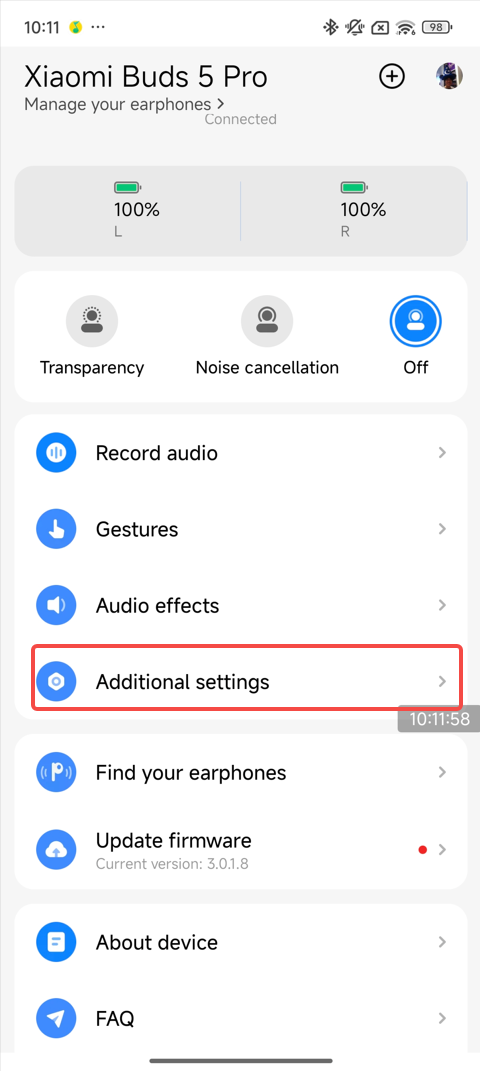 | 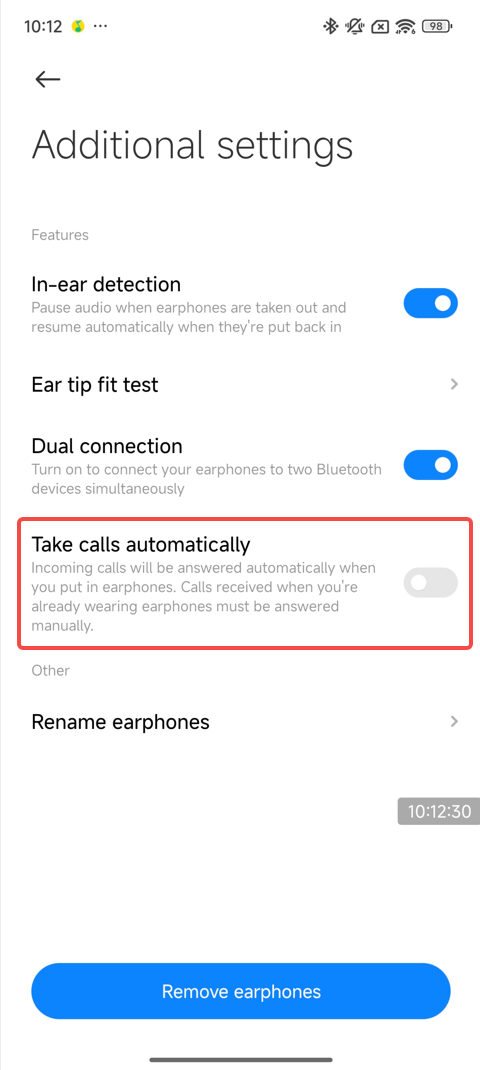 |
2. Set in the Bluetooth settings interface on some Xiaomi phones:
[Settings] >> [Bluetooth] >> [Xiaomi Buds 5 Pro] >> [Additional settings] >> turn on [Answer calls automatically]. Wearing the earbuds after receiving a call will automatically answer.
72. Q: Does the Xiaomi Buds 5 Pro support broadcasting the contact's name automatically?
A: No, it doesn’t.
Note:
If the phone has a broadcast function and the function is turned on, you can hear the broadcast after wearing the earbuds.
73. Q: Does the Xiaomi Buds 5 Pro support in-ear detection?
A: The Xiaomi Buds 5 supports an in-ear detection function, which is turned on by default. The earbuds will play music automatically when wearing them and will pause the music while listening when taking off the earbuds.
Note:
1. It is not recommended to manually turn off In-ear detection in the Xiaomi Earbuds APP;
2. If your Xiaomi smartphone can set the Bluetooth, you can turn on/off this function in the earbuds’ Bluetooth interface;
3. If the music does not stop when you take off the earbuds and does not start when you wear them, please wipe the earbuds to prevent sweat/water stains from affecting the In-ear detection.
74. Q: Why does the in-ear detection sometimes not work when using the Xiaomi Buds 5 Pro?
A: The factors about in-ear detection sometimes not working are as follows:
1. If the earbuds are removed for more than 2 minutes while music is playing, the earbuds will not play music when worn again. This is by design;
2. If the music is paused by touching the touch area on the earbuds, the headphones will not play music when taken off and worn again. This is by design;
Restore it through the following methods:
1. Place the earbuds back in the charging case, close the lid, and wait for 5 seconds, then open the lid and reconnect and wear;
2. If the above steps do not resolve the issue, try resetting the earbuds to factory settings. Place both earbuds in the charging case, open the lid, and press and hold the function button for 10 seconds until the indicator blinks and flashes continuously. This completes the factory reset.
75. Q: Why does the Xiaomi Buds 5 Pro automatically recognize the wearing status when it’s in environments ranging from low to high temperatures?
A: 1. The surface of the earbuds will have water vapor or mist, causing the earbuds to be recognized as wearing status;
2. If there is water vapor or mist on the surface of the earbuds, please wipe them dry without affecting their normal function.
76. Q: How to use the Ear tip fit test function of the Xiaomi Buds 5 Pro?
A: The Xiaomi Buds 5 Pro supports the Ear tip fit test function.
1. Function location:
(1). MIUI: [Settings] >> [Bluetooth] >> [Xiaomi Buds 5 Pro] >> [Additional settings] >> [Ear tip fit test];
(2). APP: APP homepage >> [Additional settings] >> [Ear tip fit test].
2. Operation steps: Dual ear wearing >> tap [Start test] >> wait for 6-8 seconds (text time) >> view results (good fit/please adjust earbuds position)
Note:
Removing the earbuds midway or interrupting the test will trigger a reminder of "please adjust the position of the earbud".
77. Q: Does the Xiaomi Buds 5 Pro support Missing earphone alert?
A: Some Xiaomi smartphones have the Missing earphone alert option in the Bluetooth setting interface.
Enable the Missing earphone alert for the Xiaomi Buds 5 Pro:
[Settings] >> [Bluetooth] >> [Xiaomi Buds 5 Pro] >> tap [Missing earphone alert] >> turn on [Missing earphone alert].
Note:
The Xiaomi Earbuds APP doesn’t support the Missing earphone alert function.
78. Q: How to use the Find your earphones function of the Xiaomi Buds 5 Pro?
A: Find your earphones through the Xiaomi Earbuds APP:
[Xiaomi Buds 5 Pro] >> [Find your earphones] >> tap [Left], [Right] or [Both] and your earbuds will make a high-frequency beep sound.
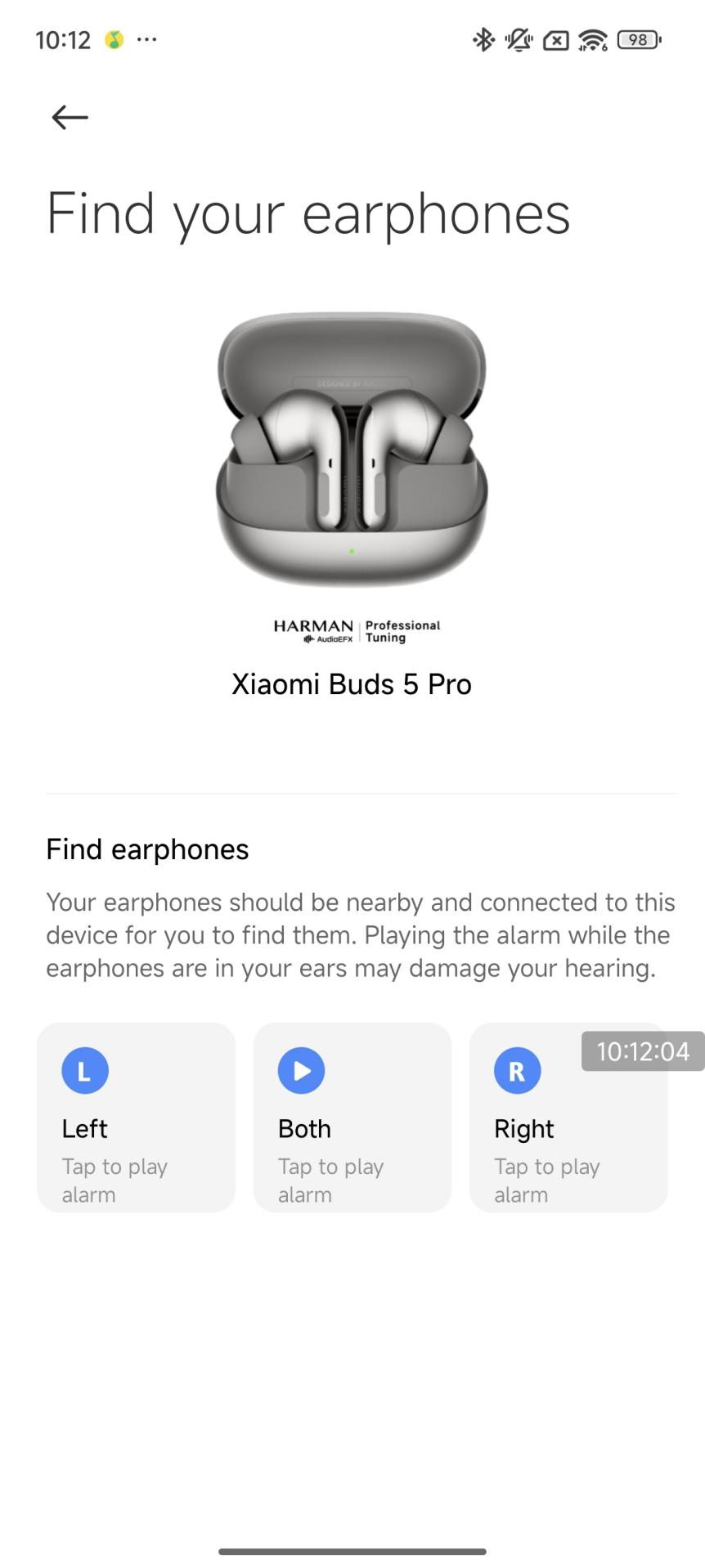
Note:
1. You can use the Find your earphones function when the earbuds are near you but you don't know their exact location. If the distance is a little far, you can’t hear the alarm sound from the earbuds;
2. The effective distance for hearing the alarm sound varies depending on personal hearing, and is expected to be within 1-2 meters. At the same time, if the surroundings are noisy, it will also affect the judgment of the location.
79. Q: How to maintain the Xiaomi Buds 5 Pro?
A: It is recommended to refer to the following information for maintenance:
1. Do not expose the earbuds to liquid or humid places;
2. Do not use abrasive solvents to clean the earbuds;
3. Please try to avoid placing the earbuds in low temperatures (below 0℃), high temperatures (above 45℃), or large temperature variation environments for a long time. The activity of the battery is easily destroyed in these environments for a long time, causing battery damage;
4. Do not expose the earbuds to open flames to avoid the risk of explosion;
5. Do not contact the earbuds with sharp objects, which will cause scratches or damage;
6. Do not insert any objects into the earbuds, which will damage the internal components;
7. Do not try to disassemble the earbuds;
8. If you do not use the earbuds for a long time, please make sure to place them in a dry place. If the earbuds are placed for more than one month, charge them on time to ensure the performance of the battery and the earbuds.
[Settings] >> [Bluetooth] >> [Xiaomi Buds 5 Pro] >> [Additional settings] >> turn on [Answer calls automatically]. Wearing the earbuds after receiving a call will automatically answer.
72. Q: Does the Xiaomi Buds 5 Pro support broadcasting the contact's name automatically?
A: No, it doesn’t.
Note:
If the phone has a broadcast function and the function is turned on, you can hear the broadcast after wearing the earbuds.
73. Q: Does the Xiaomi Buds 5 Pro support in-ear detection?
A: The Xiaomi Buds 5 supports an in-ear detection function, which is turned on by default. The earbuds will play music automatically when wearing them and will pause the music while listening when taking off the earbuds.
Note:
1. It is not recommended to manually turn off In-ear detection in the Xiaomi Earbuds APP;
2. If your Xiaomi smartphone can set the Bluetooth, you can turn on/off this function in the earbuds’ Bluetooth interface;
3. If the music does not stop when you take off the earbuds and does not start when you wear them, please wipe the earbuds to prevent sweat/water stains from affecting the In-ear detection.
74. Q: Why does the in-ear detection sometimes not work when using the Xiaomi Buds 5 Pro?
A: The factors about in-ear detection sometimes not working are as follows:
1. If the earbuds are removed for more than 2 minutes while music is playing, the earbuds will not play music when worn again. This is by design;
2. If the music is paused by touching the touch area on the earbuds, the headphones will not play music when taken off and worn again. This is by design;
Restore it through the following methods:
1. Place the earbuds back in the charging case, close the lid, and wait for 5 seconds, then open the lid and reconnect and wear;
2. If the above steps do not resolve the issue, try resetting the earbuds to factory settings. Place both earbuds in the charging case, open the lid, and press and hold the function button for 10 seconds until the indicator blinks and flashes continuously. This completes the factory reset.
75. Q: Why does the Xiaomi Buds 5 Pro automatically recognize the wearing status when it’s in environments ranging from low to high temperatures?
A: 1. The surface of the earbuds will have water vapor or mist, causing the earbuds to be recognized as wearing status;
2. If there is water vapor or mist on the surface of the earbuds, please wipe them dry without affecting their normal function.
76. Q: How to use the Ear tip fit test function of the Xiaomi Buds 5 Pro?
A: The Xiaomi Buds 5 Pro supports the Ear tip fit test function.
1. Function location:
(1). MIUI: [Settings] >> [Bluetooth] >> [Xiaomi Buds 5 Pro] >> [Additional settings] >> [Ear tip fit test];
(2). APP: APP homepage >> [Additional settings] >> [Ear tip fit test].
2. Operation steps: Dual ear wearing >> tap [Start test] >> wait for 6-8 seconds (text time) >> view results (good fit/please adjust earbuds position)
Note:
Removing the earbuds midway or interrupting the test will trigger a reminder of "please adjust the position of the earbud".
77. Q: Does the Xiaomi Buds 5 Pro support Missing earphone alert?
A: Some Xiaomi smartphones have the Missing earphone alert option in the Bluetooth setting interface.
Enable the Missing earphone alert for the Xiaomi Buds 5 Pro:
[Settings] >> [Bluetooth] >> [Xiaomi Buds 5 Pro] >> tap [Missing earphone alert] >> turn on [Missing earphone alert].
Note:
The Xiaomi Earbuds APP doesn’t support the Missing earphone alert function.
78. Q: How to use the Find your earphones function of the Xiaomi Buds 5 Pro?
A: Find your earphones through the Xiaomi Earbuds APP:
[Xiaomi Buds 5 Pro] >> [Find your earphones] >> tap [Left], [Right] or [Both] and your earbuds will make a high-frequency beep sound.
Note:
1. You can use the Find your earphones function when the earbuds are near you but you don't know their exact location. If the distance is a little far, you can’t hear the alarm sound from the earbuds;
2. The effective distance for hearing the alarm sound varies depending on personal hearing, and is expected to be within 1-2 meters. At the same time, if the surroundings are noisy, it will also affect the judgment of the location.
79. Q: How to maintain the Xiaomi Buds 5 Pro?
A: It is recommended to refer to the following information for maintenance:
1. Do not expose the earbuds to liquid or humid places;
2. Do not use abrasive solvents to clean the earbuds;
3. Please try to avoid placing the earbuds in low temperatures (below 0℃), high temperatures (above 45℃), or large temperature variation environments for a long time. The activity of the battery is easily destroyed in these environments for a long time, causing battery damage;
4. Do not expose the earbuds to open flames to avoid the risk of explosion;
5. Do not contact the earbuds with sharp objects, which will cause scratches or damage;
6. Do not insert any objects into the earbuds, which will damage the internal components;
7. Do not try to disassemble the earbuds;
8. If you do not use the earbuds for a long time, please make sure to place them in a dry place. If the earbuds are placed for more than one month, charge them on time to ensure the performance of the battery and the earbuds.
Audio
80. Q: How many microphones does the Xiaomi Buds 5 Pro have?
A: Each earbud has 3 microphones (6 microphones in total for both earbuds).
81. Q: Does the Xiaomi Buds 5 Pro have dual channels?
A: Yes, the earbuds have dual channels when worn in both ears.
82. Q: Does the Xiaomi Buds 5 Pro support single-ear mode?
A: Yes, the Xiaomi Buds 5 Pro supports single-ear use (you need to keep the other earbud in the charging case with the lid closed).
Note:
If you use one earbud for a while and then want to use both, the earbuds will automatically connect when the other earbud is worn.
Note:
If you use one earbud for a while and then want to use both, the earbuds will automatically connect when the other earbud is worn.
83. Q: Does the Xiaomi Buds 5 Pro support volume adjustment?
A: Yes, the Xiaomi Buds 5 Pro supports independent volume control for the earbuds.
The volume control method is as follows:
1. By default, the earbud allows volume adjustment by sliding up/down on the touch area;
2. In the Xiaomi Earbuds APP, you can customize gestures, such as setting "double tap" to "volume up" (to control the phone volume).
The volume control method is as follows:
1. By default, the earbud allows volume adjustment by sliding up/down on the touch area;
2. In the Xiaomi Earbuds APP, you can customize gestures, such as setting "double tap" to "volume up" (to control the phone volume).
84. Q: Does the Xiaomi Buds 5 Pro support absolute volume (Bluetooth earbuds volume)?
A: By default, the earbuds volume is synchronized with the device volume.
To enable absolute volume (Bluetooth earbuds volume), please set it on your Xiaomi smartphone via [Settings] >> [Bluetooth] >> tap the [>] icon beside the Xiaomi Buds 5 Pro >> turn off [Absolute volume].
To enable absolute volume (Bluetooth earbuds volume), please set it on your Xiaomi smartphone via [Settings] >> [Bluetooth] >> tap the [>] icon beside the Xiaomi Buds 5 Pro >> turn off [Absolute volume].
85. Q: How to use the dimensional audio with the Xiaomi Buds 5 Pro?
A: To use the dimensional audio, please refer to the following methods:
1. Open the Xiaomi Earbuds APP >> [Audio effects] >> toggle on/off [Dimensional Audio];
2. Open [Settings] >> [Bluetooth] >> tap the [>] icon beside the Xiaomi Buds 5 Pro >> toggle on/off [Dimensional Audio].
Note:
1. Once the dimensional audio is enabled in system settings, you can experience the dimensional audio effects in compatible music and video applications.
1. Open the Xiaomi Earbuds APP >> [Audio effects] >> toggle on/off [Dimensional Audio];
2. Open [Settings] >> [Bluetooth] >> tap the [>] icon beside the Xiaomi Buds 5 Pro >> toggle on/off [Dimensional Audio].
Note:
1. Once the dimensional audio is enabled in system settings, you can experience the dimensional audio effects in compatible music and video applications.
86. Q: Does the Xiaomi Buds 5 Pro support audio sharing?
A: Yes, the Xiaomi Buds 5 Pro supports audio sharing.
Devices that support audio sharing are listed below, with more devices being added:
Redmi Note 14 Pro, Redmi Note 13 Pro, Xiaomi 14, Xiaomi 14 Ultra, Xiaomi 13, Xiaomi 13 Pro, Xiaomi 13 Ultra, Xiaomi 12, Xiaomi 12S Ultra, Xiaomi 12 Pro, Xiaomi 12X, Xiaomi MIX Flip, Xiaomi Mix Fold 3, Xiaomi MIX Fold 2, Xiaomi Pad 6S Pro 12.4.
Devices that support audio sharing are listed below, with more devices being added:
Redmi Note 14 Pro, Redmi Note 13 Pro, Xiaomi 14, Xiaomi 14 Ultra, Xiaomi 13, Xiaomi 13 Pro, Xiaomi 13 Ultra, Xiaomi 12, Xiaomi 12S Ultra, Xiaomi 12 Pro, Xiaomi 12X, Xiaomi MIX Flip, Xiaomi Mix Fold 3, Xiaomi MIX Fold 2, Xiaomi Pad 6S Pro 12.4.
87. Q: Why does a puffing sound appear when ring the bell while cycling with the Xiaomi Buds 5 Pro?
A: The bell sound is too loud, and the ANC (Active Noise Control) is unable to capture the true sound, resulting in a puffing noise. For safety, it is not recommended to use the noise cancellation mode while cycling.
88. Q: Why is the sound quality of the Xiaomi Buds 5 Pro poor?
A: If the issue is with call quality, it will be improved based on the actual situation. If the default sound quality is poor, it is recommended to upgrade to the latest firmware version. You can also use the Xiaomi Earbuds APP to switch the audio balance to modes such as Enhance treble, Enhance voice, or Enhance bass for better sound quality.
89. Q: Why is the sound too low on the Xiaomi Buds 5 Pro?
A: It is due to the absolute volume issue on the phone.
Please try the following steps to see if it resolves:
For Xiaomi/Redmi phones: Tap the arrow icon beside the earbuds and turn on [Absolute volume].
For iOS devices: Open [Settings] >> [Sounds & Haptics] >> [Headphone Safety] >> [Reduce Loud Audio].
90. Q: Why is the sound uneven between the left and right earbuds of the Xiaomi Buds 5 Pro, with some sound leakage?
A: This is due to the earbud tips not fitting properly in the ears. Try switching to larger ear tips for a better fit.
Please try the following steps to see if it resolves:
For Xiaomi/Redmi phones: Tap the arrow icon beside the earbuds and turn on [Absolute volume].
For iOS devices: Open [Settings] >> [Sounds & Haptics] >> [Headphone Safety] >> [Reduce Loud Audio].
90. Q: Why is the sound uneven between the left and right earbuds of the Xiaomi Buds 5 Pro, with some sound leakage?
A: This is due to the earbud tips not fitting properly in the ears. Try switching to larger ear tips for a better fit.
Noise Cancellation
91. Q: Does the Xiaomi Buds 5 Pro support Active Noise Control (ANC) technology?
A: Yes, it supports ENC (Environmental Noise Cancellation) for calls and ANC (Active Noise Control) technology.
Differences between ENC and ANC are as follows:
Both ENC and ANC suppress environmental noise, however, their beneficiaries are different.
1. ENC reduces environmental noise by optimizing audio signal processing algorithms, adding extra steps between audio input and output to enhance call quality and audio clarity. The noise reduction effect needs to be validated through acoustic intervention;
2. ANC works by using microphones to collect external noise, and then the system generates an opposite sound wave to cancel out the noise. The resulting sound you hear is the environmental noise plus the opposite of that noise, which reduces the perceived noise. The beneficiary of ANC is the wearer of the earbuds, while cVc noise cancellation benefits the person on the other end of the call.
Differences between ENC and ANC are as follows:
Both ENC and ANC suppress environmental noise, however, their beneficiaries are different.
1. ENC reduces environmental noise by optimizing audio signal processing algorithms, adding extra steps between audio input and output to enhance call quality and audio clarity. The noise reduction effect needs to be validated through acoustic intervention;
2. ANC works by using microphones to collect external noise, and then the system generates an opposite sound wave to cancel out the noise. The resulting sound you hear is the environmental noise plus the opposite of that noise, which reduces the perceived noise. The beneficiary of ANC is the wearer of the earbuds, while cVc noise cancellation benefits the person on the other end of the call.
92. Q: How many levels of noise cancellation does the Xiaomi Buds 5 Pro have, and how to adjust them?
A: The Xiaomi Buds 5 Pro supports 20 levels of seamless noise cancellation. You can adjust it in the Xiaomi Earbuds APP >> [Noise cancellation] >> slide to adjust, or through [Settings] >> [Bluetooth] >> tap the [>] icon beside the earbuds >> [Noise cancellation] >> slide to adjust.
93. Q: Why does the noise cancellation not respond after wearing the Xiaomi Buds 5 Pro?
A: This is because the earbuds have become loose during use, preventing the noise cancellation from switching. Try adjusting the fit of the earbuds and attempt to switch the noise cancellation again.
94. Q: Why is the noise cancellation effect of the Xiaomi Buds 5 Pro sometimes poor?
A: Please consider the following reasons:
1. First, ANC works best when passive noise cancellation is effective, so a tighter fit will provide better noise cancellation;
2. Second, ANC is more effective at reducing low-frequency noise, however, has less impact on high-frequency noise. It is ideal for environments like airplanes, trains, or subways. For safety reasons, high-frequency signals like car horns and human voices are not filtered. If you find that the noise cancellation effect isn't strong enough in certain environments, try adjusting the angle at which you wear the earbuds or use adaptive noise cancellation for a better experience.
1. First, ANC works best when passive noise cancellation is effective, so a tighter fit will provide better noise cancellation;
2. Second, ANC is more effective at reducing low-frequency noise, however, has less impact on high-frequency noise. It is ideal for environments like airplanes, trains, or subways. For safety reasons, high-frequency signals like car horns and human voices are not filtered. If you find that the noise cancellation effect isn't strong enough in certain environments, try adjusting the angle at which you wear the earbuds or use adaptive noise cancellation for a better experience.
95. Q: Why is the low-frequency sound not effective when using the Xiaomi Buds 5 Pro?
A: Low-frequency performance is related to how tightly the earbuds fit.
To reduce low-frequency effects, please try the following methods:
1. Adjust the wearing position to make the earbuds fit snugly in your ears;
2. Adjust the audio effects in the APP to suit your preferred music style.
To reduce low-frequency effects, please try the following methods:
1. Adjust the wearing position to make the earbuds fit snugly in your ears;
2. Adjust the audio effects in the APP to suit your preferred music style.
96. Q: Why is there noise during recording, and is there noise cancellation during recording with the Xiaomi Buds 5 Pro?
A: Yes, there is noise cancellation during recording, mainly targeting conference scenarios to reduce background noise and white noise, while preserving your voice and surrounding voices. If you experience voice noise during recording, it is recommended to record in an environment with fewer voices.
97. Q: Why is the noise cancellation effect different between the left and right earbuds of the Xiaomi Buds 5 Pro in the subway and bus environments?
A: The reasons are as follows:
1. The issue arises because the earbuds become loose in bumpy environments (like subways or buses). If this happens, remove and wear the earbuds again, adjusting the angle to ensure a consistent fit in both ears;
2. The ear tips do not fit properly on both ears. Try using larger ear tips for a better experience;
3. Ensure the earbuds are updated to the latest firmware.
To upgrade the firmware, please refer to the following methods:
1. Via Xiaomi Earbuds APP:
Ensure the earbuds are connected to the phone, open the Xiaomi Earbuds APP, and if there is a new version, it will prompt a firmware update. Tap [Update now] to begin the process and wait for the update to complete;
2. Via Bluetooth settings:
Ensure the earbuds are connected to the phone, go to the phone's system settings, open Bluetooth settings, tap the [>] icon beside the connected earbuds, then tap [Check for updates] to initiate the process. Wait for the update to complete.
1. The issue arises because the earbuds become loose in bumpy environments (like subways or buses). If this happens, remove and wear the earbuds again, adjusting the angle to ensure a consistent fit in both ears;
2. The ear tips do not fit properly on both ears. Try using larger ear tips for a better experience;
3. Ensure the earbuds are updated to the latest firmware.
To upgrade the firmware, please refer to the following methods:
1. Via Xiaomi Earbuds APP:
Ensure the earbuds are connected to the phone, open the Xiaomi Earbuds APP, and if there is a new version, it will prompt a firmware update. Tap [Update now] to begin the process and wait for the update to complete;
2. Via Bluetooth settings:
Ensure the earbuds are connected to the phone, go to the phone's system settings, open Bluetooth settings, tap the [>] icon beside the connected earbuds, then tap [Check for updates] to initiate the process. Wait for the update to complete.
98. Q: Why are there continuous bang, tap, or roar sounds when using the Xiaomi Buds 5 Pro with the car windows opened?
A: This issue is caused by wind noise changes when the car windows are open or by roaring sounds when the car drives over bumpy roads. These noises interfere with the ANC system. This problem will be resolved through an OTA update to the earbuds software. Please keep focus on the Xiaomi Earbuds APP update notifications and update when available.
Note:
This issue can occur with high-depth noise-canceling earphones, particularly when driving at high speeds. Some earphones reduce the noise cancellation effect to deal with this, while others simply adjust the noise-canceling algorithm to balance the wind noise. In certain environments, you can still hear rumbling sounds from the wheels scraping against the road.
Note:
This issue can occur with high-depth noise-canceling earphones, particularly when driving at high speeds. Some earphones reduce the noise cancellation effect to deal with this, while others simply adjust the noise-canceling algorithm to balance the wind noise. In certain environments, you can still hear rumbling sounds from the wheels scraping against the road.
99. Q: Why is there wind blowing through the microphone of the Xiaomi Buds 5 Pro, and the wind sound disappears after a few seconds, however ANC becomes worse?
A: The Xiaomi Buds 5 Pro features a wind noise reduction algorithm. When there is sustained strong wind, to reduce the impact of wind noise, the earbuds enter wind noise reduction mode for about 3 seconds, which eliminates the wind sound. However, the ANC performance slightly decreases as the microphone algorithm adjusts to deal with the wind noise. We will continue to optimize this feature based on feedback.
100. Q: Why does the wind sound of the Xiaomi Buds 5 Pro sometimes disappear after a few seconds, however sometimes it doesn’t?
A: The earbuds' algorithm has logic restrictions for continuous and strong wind. This is to avoid the earbuds mistakenly entering wind noise reduction mode in cases of light wind, such as from air conditioning or a light breeze. When the earbuds enter wind noise reduction mode, it takes about 15 seconds to exit, during which time ANC performance is slightly reduced. We are continuing to optimize wind noise reduction based on feedback.
Note:
The current wind noise reduction feature is mainly for outdoor scenarios, such as cycling in strong winds or driving with the windows open.
Note:
The current wind noise reduction feature is mainly for outdoor scenarios, such as cycling in strong winds or driving with the windows open.
101. Q: Why does the music automatically pause when wearing the Xiaomi Buds 5 Pro?
A: This issue occurs if the earbuds become loose during use and the earbuds do not detect that they are still being worn, causing the music to pause. Try adjusting the fit and restarting the music.
102. Q: Why does the music pause or voice control activate when taking off or wearing the Xiaomi Buds 5 Pro?
A: The earbuds use an in-ear detection sensor to detect wear. If you cover the sensor while handling the earbuds, the earbuds will mistakenly detect that you are wearing them. If you don’t need the wear detection feature, you can turn it on or off in the Xiaomi Earbuds APP >> [Additional settings] >> [In-ear detection].
Note:
When you hold the earbuds, do not cover the sensor as shown below (where the red arrows are pointing at).
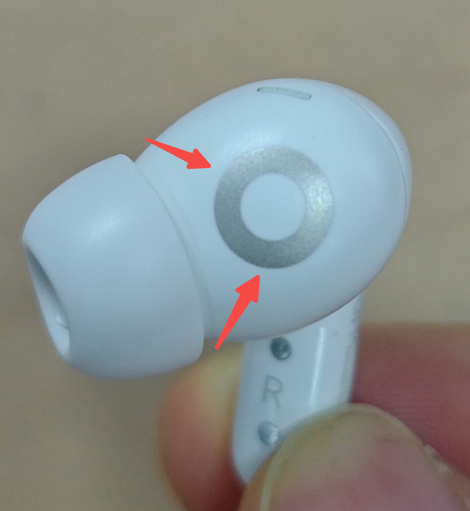
Note:
When you hold the earbuds, do not cover the sensor as shown below (where the red arrows are pointing at).
103. Q: Will the music automatically resume, when removing one earbud of the Xiaomi Buds 5 Pro while the music is playing and putting it back on?
A: If the In-ear detection is enabled, the music will automatically pause when the earbud is removed. When you wear the earbud again within 2 minutes, the music will automatically resume (whether or not the earbud is placed back in the case). For videos, whether they resume automatically when you wear the earbuds again depends on the video software. Some video applications will not automatically resume.
104. Q: Why does the music continue playing when the Xiaomi Buds 5 Pro is in the charging case?
A: This is because the charging case is powered off due to the low battery. Please charge the case promptly.
Note:
If the charging case is powered off due to low battery, it cannot communicate with the earbuds, so the earbuds continue to play music as if they are still connected to the phone.
Note:
If the charging case is powered off due to low battery, it cannot communicate with the earbuds, so the earbuds continue to play music as if they are still connected to the phone.
105. Q: Why does rotating the Xiaomi Buds 5 Pro cause the music to pause?
A: Since the earbuds in-ear detection sensor is located on the same surface, rotating the earbud will cause the sensor to not detect the ear, which can lead to the music pausing.
106. Q: Why does the music stutter when the phone disconnects from the Xiaomi Buds 5 Pro and reconnects when the "Dynamic Island" appears on certain phones?
A: This issue is related to some phone models. The "Dynamic Island" feature can cause audio data interference when switching between audio sources, which can cause some noise. It is recommended to reconnect the earbuds before resuming music playback.
107. Q: Why does the music not pause immediately when taking off one earbud of the Xiaomi Buds 5 Pro and placing it in the charging case or on the desk?
A: 1. When you remove the earbud during music playback, the music pauses after 1-2 seconds to avoid abrupt interruption. You can then place the earbud on a surface or back in the charging case;
2. When placing the earbud down, it is recommended to lay the stem flat on the surface, with the ear tip facing up, to ensure proper contact.
2. When placing the earbud down, it is recommended to lay the stem flat on the surface, with the ear tip facing up, to ensure proper contact.
108. Q: Why does the music pause and resume after taking off an earbud of the Xiaomi Buds 5 Pro?
A: The earbuds detect in-ear status using sensors located on both the upper and lower parts of the sound chamber. If you cover these sensors when removing the earbud, it will mistakenly recognize that the earbud is still in place and resume playback.
109. Q: Does the Xiaomi Buds 5 Pro have crosstalk issues?
A: No, it does not.
Note:
The earbuds are designed to connect to one device at a time, so there will be no crosstalk with other devices. During phone calls, others will not hear your conversation.
Note:
The earbuds are designed to connect to one device at a time, so there will be no crosstalk with other devices. During phone calls, others will not hear your conversation.
110. Q: Does the Xiaomi Buds 5 Pro support voice calls and voice input through third-party software?
A: Yes, it does.
The usage experience will vary depending on the system:
1. Both iOS and Android systems support voice calls and voice input;
2. For Windows systems with Bluetooth-enabled devices, voice calls can be made after proper connection and setup. As for voice input, third-party software support is required.
Note:
1. If third-party software does not have audio input/output options, you can configure the input and output devices in Windows sound settings;
2. If the third-party software has audio input and output channels, set it to use the earbuds.
The usage experience will vary depending on the system:
1. Both iOS and Android systems support voice calls and voice input;
2. For Windows systems with Bluetooth-enabled devices, voice calls can be made after proper connection and setup. As for voice input, third-party software support is required.
Note:
1. If third-party software does not have audio input/output options, you can configure the input and output devices in Windows sound settings;
2. If the third-party software has audio input and output channels, set it to use the earbuds.
111. Q: Why is the sound quality fine when listening to music but poor when playing games on the Xiaomi Buds 5 Pro?
A: The protocols used for music and games are different:
1. When listening to music, the A2DP protocol is activated;
2. When playing games, the game APP activates the HFP protocol, which has a narrower audio bandwidth and results in slightly lower sound quality.
1. When listening to music, the A2DP protocol is activated;
2. When playing games, the game APP activates the HFP protocol, which has a narrower audio bandwidth and results in slightly lower sound quality.
112. Q: Does the Xiaomi Buds 5 Pro make any prompt sounds when worn?
A: By default, when the noise cancellation function is not activated, a wearing prompt sound is heard when the earbuds are worn. If noise cancellation is enabled, a noise cancellation prompt sound will be heard instead.
113. Q: Does the Xiaomi Buds 5 Pro support voice commands and hot words?
A: Yes, it supports voice commands and hot words. You can control the following functions using voice commands: previous track, next track, increase volume, decrease volume, resume playback, pause playback, noise cancellation mode, and transparency mode.
114. Q: Does the Xiaomi Buds 5 Pro support audio streaming with a PC?
A: Not support.
115. Q: Why is the noise cancellation effect weak on the Xiaomi Buds 5 Pro?
A: The noise cancellation frequency range is from 20Hz to 4kHz, and not all sounds can be effectively canceled. Noise cancellation works best for low-frequency sounds, particularly in the 100-200Hz range, such as in environments like subways or buses. Human voices, which are in the 800Hz-2kHz range, are less affected by noise cancellation. To improve the noise cancellation effect, it is recommended to choose the appropriate ear tips for your ear size. The tighter the fit, the better the noise cancellation. Additionally, enabling adaptive noise cancellation can improve the experience.
116. Q: Why is there an echo when talking on the phone with the Xiaomi Buds 5 Pro?
A: There are two possible reasons:
1. The echo cancellation on the other person’s phone is not functioning correctly. Ask the other person to try using a different phone and call again to see if the echo persists;
2. The other person has their speakerphone volume set too high, or the environment has an echo (e.g., a large or empty room), which causes an echo in the earbuds.
1. The echo cancellation on the other person’s phone is not functioning correctly. Ask the other person to try using a different phone and call again to see if the echo persists;
2. The other person has their speakerphone volume set too high, or the environment has an echo (e.g., a large or empty room), which causes an echo in the earbuds.
117. Q: Why is there a static noise after wearing the Xiaomi Buds 5 Pro?
A: The hardware static noise is a faint "hiss" sound that is only noticeable in very quiet environments when the earbuds are playing silent audio. This sound is a constant presence. In office environments, other noises occasionally appear in the earbuds, such as crackling, popping, or white noise. These are not related to the hardware static noise and are temporary interference noises from the earbuds or phone. Please be aware of this distinction.
Appearance and Wear
118. Q: Will the Xiaomi Buds 5 Pro easily fall off when worn?
A: No, the Xiaomi Buds 5 Pro is not easy to fall off. The earbuds are designed ergonomically to fit snugly in the outer ear canal, ensuring a stable wearing.
1. If the earbuds seem to fall off easily, please check if they are being worn correctly as shown on the product page;
2. It is recommended to clean the surface of the earbuds with an alcohol wipe before wearing to remove any dirt or oils, which can improve stability;
3. The earbuds come with pre-installed M-size ear tips, and also include XS, S, and L ear tips. You can choose the ear tips that best fit your ear size.
Note:
Due to differences in ear structures, it cannot be guaranteed that the ear tips will fit 100% of ear shapes.
1. If the earbuds seem to fall off easily, please check if they are being worn correctly as shown on the product page;
2. It is recommended to clean the surface of the earbuds with an alcohol wipe before wearing to remove any dirt or oils, which can improve stability;
3. The earbuds come with pre-installed M-size ear tips, and also include XS, S, and L ear tips. You can choose the ear tips that best fit your ear size.
Note:
Due to differences in ear structures, it cannot be guaranteed that the ear tips will fit 100% of ear shapes.
119. Q: Why is there a clicking sound when shaking head while wearing the Xiaomi Buds 5 Pro?
A: The fit of the ear tips against the ear varies from person to person. You can choose the best-fitting ear tips from the available XS, S, M, and L sizes depending on your ear shape.
120. Q: Will wearing the Xiaomi Buds 5 Pro cause allergies or irritation (like inflammation) and how to handle it?
A: The parts of the earbuds that come into contact with your skin have passed strict harmful substance tests, so they should not have any adverse effects on the body. However, please avoid wearing the earbuds for extended periods (such as while sleeping), and ensure that the earbuds are kept clean to prevent discomfort, inflammation, or possible allergic reactions caused by sweat or dirt.
Possible causes of allergic reactions are as follows:
1. Prolonged wearing (e.g., while sleeping), lack of ventilation, and residual sweat on the earbuds;
2. Earbuds that have not been cleaned for a long time, leading to dirt buildup and possible allergic reactions;
3. If you experience significant discomfort or inflammation after wearing the earbuds, it is recommended to stop wearing them and consult a doctor.
Recommended guidelines for wearing the earbuds:
1. After exercise, check if there is any sweat on the earbuds. If so, wipe them clean before storing them in the case;
2. For daily use, regularly check the earbuds, ear tips, and charging case for dirt and clean them as necessary;
3. After wearing the earbuds for a long period, take them off and let your ears rest for around 30 minutes to relieve ear fatigue;
4. After showering, if there is any water left in your ears, clean it up before wearing the earbuds.
Troubleshooting
1. Q: How to do if the Xiaomi Buds 5 Pro doesn't charge, doesn't turn on, or the indicator doesn't illuminate?
A: The earbuds will fail to charge or charge unstably due to prolonged storage without use, poor contact between the earbuds and charging case (dirty contacts), etc.
Please troubleshoot according to the following methods:
1. First, ensure the earbuds are activated;
2. Check if the charging contacts of the earbuds are dirty, sunken, or damaged. Clean dirt promptly to ensure good contact between the charging contacts and the charging case;
Note:
Insert and remove the earbuds from the case repeatedly 3 times. If the contact is normal, the LED light will illuminate for 1 second when the earbuds are placed in the case (green light if battery level is above 60%, otherwise orange).
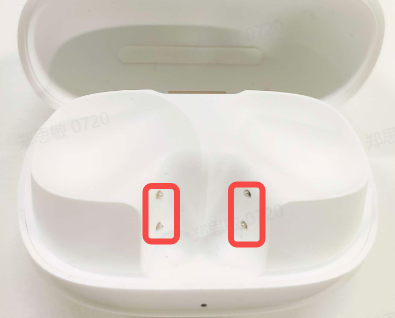
3. Place both earbuds in the charging case with the lid open, then connect using a mobile phone and check for a lightning bolt icon on the green battery icon in the Xiaomi pop-up window or Xiaomi Earbuds APP interface.
If there is no lightning bolt icon, please apply for after-sales service.
Check if the charging case has power. If not, charge the charging case before charging the earbuds, and try turning the earbuds on after charging. If the earbuds have not been used for a long time resulting in low battery, it will take some time for the indicator light to illuminate after charging.
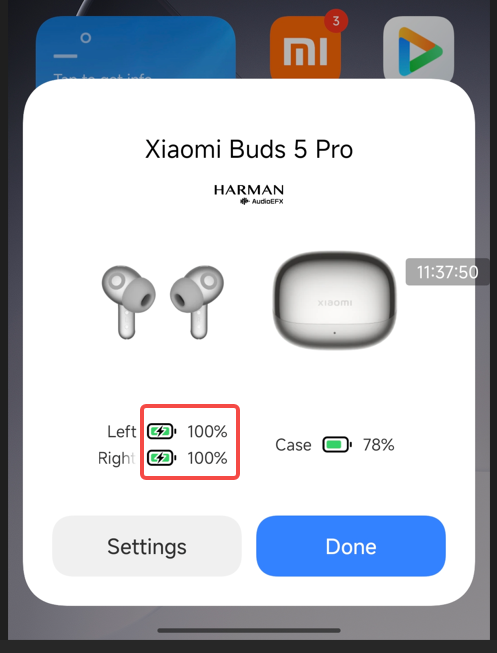
2. Q: How to do if the charging case of the the Xiaomi Buds 5 Pro doesn't charge?
A: Please troubleshoot according to the following methods:
1. After replacing the charging cable and charger, try again to see if the earbuds can be charged. If the earbuds can be charged after replacement, it is a fault with the charging cable or charger;
2. Use the charging cable and charger to charge other devices to verify if the earbuds are functioning normally. If the charging cable and charger can charge other devices normally, please charge the charging case for half an hour before observing again. If it still cannot charge, please apply for after-sales inspection.
Note:
Incompatibility of the charger is also one of the reasons why it cannot be charged.
3. Q: How to do if the sound is low when using the Xiaomi Buds 5 Pro?
A: Please troubleshoot according to the following methods:
1. Adjust the volume individually by sliding upwards in the touch area;
2. Enable Absolute Volume (or synchronize earbuds and phone volume) in settings and adjust the volume using the volume buttons;
3. Open the [Settings], navigate to [Gesture settings], and set pressing twice to increase volume, then press the earbuds to adjust the volume;
4. Insufficient battery power in the phone or earbuds is also one of the reasons why the sound is low;
5. Reset the earbuds and pair them again for use;
6. Test with another phone. If the problem persists, please apply for after-sales inspection;
7. Confirm if the earbuds sound outlet is blocked or has foreign objects. If so, please clean promptly.
Note:
It is normal for the sound to decrease in windy conditions or noisy environments like subways.
4. Q: How to do if the sound of the Xiaomi Buds 5 Pro is intermittent or has noise?
A: Please troubleshoot according to the following methods:
1. If the distance between the phone and earbuds or between the two earbuds is too far, or if objects block the signal (such as walls), it will cause intermittent sound or noise. Bring the phone and earbuds closer together, keep the two earbuds close, and avoid signal obstruction;
2. The usage environment has signal interference or weak phone signal. Try using it in another environment or a place with good phone signal to compare if the same phenomenon occurs;
3. If there are objects nearby with strong electromagnetic interference, it will cause the other party to hear a low volume or noise. It is recommended to stay away from objects with strong electromagnetic interference such as microwaves and Wi-Fi routers during use;
4. If connected to a Xiaomi phone and there is occasional hissing or current noise when playing music, but it returns to normal when pausing the music or "reinserting the earbuds into the charging case and wearing them again," please upgrade the system to the latest version. Open the [Settings], tap [About phone] to update system;
5. Reset the earbuds and restart the phone before pairing for use to see if it is normal;
6. Confirm that the earbuds have sufficient battery power (above 30%), test with another phone, and if the problem persists, please apply for after-sales inspection.
5. Q: Why are the the Xiaomi Buds 5 Pro connected but there is no sound or stuttering?
A: Reasons:
1. Due to the specificity of Bluetooth earbuds, electromagnetic waves in your area will interfere with Bluetooth connections, causing silence;
2. Please check the phone's volume settings to ensure the phone volume is not muted;
3. The phone is too far from the earbuds, exceeding the effective transmission distance (10m), or obstacles block the path between the earbuds and phone;
4. When the phone is connected to two Bluetooth devices simultaneously, sound will come from the second device, and the first connected device will have no sound.
Solutions:
1. Please confirm if your earbuds are in an environment with strong interference and stay away from objects with strong electromagnetic interference such as microwaves;
2. Unmute the phone and try increasing the volume to see if the sound is normal;
3. Use the phone and earbuds together or reconnect them;
4. Disconnect, place the earbuds back in the charging case, close the lid for 5 seconds, open the lid, and reconnect to the phone or disconnect the phone from another Bluetooth device;
5. If none of the above works, try resetting to factory settings. Place both earbuds in the charging case, open the lid, and press and hold the function button for 10 seconds until the indicator light blinks continuously to complete the factory reset.
6. Q: Why is the sound still playing out loud even though the Xiaomi Buds 5 Pro are connected to the phone?
A: The reason why the sound from music, videos, calls, etc., is still playing out loud even after connecting the earbuds to the phone is that the [Media audio] option is not selected.
After connecting the earbuds to the phone, open [Settings] >> [Bluetooth], find [Xiaomi Buds 5 Pro] and tap the [>] on the right to enable [Media audio]. Then follow these steps to troubleshoot:
1. On the phone's Bluetooth settings page, disconnect and reconnect Bluetooth to restore;
2. Turn off Bluetooth on the phone, turn it back on, and wait for the earbuds and phone to automatically reconnect to restore;
3. Place both earbuds in the charging case, press the button on the case for 2 seconds, and re-pair Bluetooth to restore;
4. If none of the above works, try resetting to factory settings. Place both earbuds in the charging case with the lid open, press and hold the function button for 10 seconds until the indicator flashes continuously to complete the factory reset.
7. Q: How to do if the sound of the left and right earbuds of the Xiaomi Buds 5 Pro is not synchronized?
A: Please follow these steps to troubleshoot:
1. Reconnect the earbuds (put them back in the charging case, close and reopen the case to take them out), and test if the sound of the left and right earbuds is synchronized;
2. Bind the earbuds to the Xiaomi Earbuds APP and check for firmware updates (You can view the current version at the bottom of the device details interface);
3. Reset the earbuds, reconnect them, and test if the sound of the left and right earbuds is synchronized.
8. Q: How to do if one earbud is silent after connecting the Xiaomi Buds 5 Pro to the phone?
A: Please follow these steps to address the issue:
Reasons:
1. Poor contact with one earbud, causing Bluetooth to only pair with one earbud;
2. One earbud has low battery and powered off;
3. The sound outlet of the earbud is blocked by dirt;
4. The earbud has been exposed to water or sweat, causing a short circuit and shutdown.
Solution:
1. Re-insert the earbuds into the charging case, confirm that the indicator on the charging case lights up, and then re-pair Bluetooth;
2. If the battery is low, ensure good contact, place the earbuds in the case for 10 minutes of charging, and pair Bluetooth again for use;
3. Check and clean the dirt in the earbuds;
4. Reset the earbuds. Place both earbuds in the charging case with the lid open, press and hold the function button for 10 seconds until the indicator flashes continuously to complete the factory reset;
5. Apply for after-sales inspection.
9. Q: What to do if the sound volume is different between the left and right earbuds of the Xiaomi Buds 5 Pro when listening to music or playing videos?
A: 1. When initially wearing, you need to adjust the wearing angle of the left and right earbuds to achieve the same fit between the left and right earbuds and the ears;
2. The Xiaomi Buds 5 Pro supports dimensional audio. Please confirm that the dimensional audio feature is turned off;
3. It is recommended to change to another song or switch videos to rule out issues with the phone's audio source;
4. It is recommended to check if there is dirt blocking the speaker holes. You can use a brush to remove foreign objects from the speaker holes and then check if the earbuds volume has returned to normal.
10. Q: Why does one earbud’s sound volume decrease after using the Xiaomi Buds 5 Pro for a period of time?
A: Troubleshooting methods are as follows:
1. Please use the Xiaomi Earbuds APP to confirm if both earbuds are connected to Bluetooth;
2. It is recommended to check if there is dirt blocking the speaker holes. You can use a brush to remove foreign objects from the speaker holes and then check if the earbuds volume has returned to normal;
3. The Xiaomi Buds 5 Pro supports dimensional audio. Please confirm that the dimensional audio feature is turned off.
11. Q: After using the Xiaomi Buds 5 Pro for a period of time, why is the volume of one earbud reduced even when the phone's volume is set to maximum?
A: Please refer to the following steps for troubleshooting:
1. Unpair the Bluetooth earbuds, re-search for them, and reconnect;
2. If the sound is still low after reconnecting, adjust the volume by sliding up on the touch control area;
3. Some phones have an absolute volume feature enabled. It is recommended that you enable volume synchronization between the earbuds and the phone in the Bluetooth settings.
12. Q: When connecting two pairs of the Xiaomi Buds 5 Pro to one phone simultaneously and enabling broadcast audio, what to do if one pair cannot hear the music?
A: Please try deleting the Bluetooth pairing record on the phone and then re-pair and reconnect the pair of earbuds that cannot hear the music.
Steps:
Deleting the Bluetooth pairing record on the phone.
For Android Phones: [Settings] >> [Bluetooth] >> [Xiaomi Buds 5 Pro] >> [Unpair].
For iPhone: [Settings] >> [Bluetooth] >> [Xiaomi Buds 5 Pro] >> [i] >> [Forget This Device].
Possible causes of allergic reactions are as follows:
1. Prolonged wearing (e.g., while sleeping), lack of ventilation, and residual sweat on the earbuds;
2. Earbuds that have not been cleaned for a long time, leading to dirt buildup and possible allergic reactions;
3. If you experience significant discomfort or inflammation after wearing the earbuds, it is recommended to stop wearing them and consult a doctor.
Recommended guidelines for wearing the earbuds:
1. After exercise, check if there is any sweat on the earbuds. If so, wipe them clean before storing them in the case;
2. For daily use, regularly check the earbuds, ear tips, and charging case for dirt and clean them as necessary;
3. After wearing the earbuds for a long period, take them off and let your ears rest for around 30 minutes to relieve ear fatigue;
4. After showering, if there is any water left in your ears, clean it up before wearing the earbuds.
Troubleshooting
1. Q: How to do if the Xiaomi Buds 5 Pro doesn't charge, doesn't turn on, or the indicator doesn't illuminate?
A: The earbuds will fail to charge or charge unstably due to prolonged storage without use, poor contact between the earbuds and charging case (dirty contacts), etc.
Please troubleshoot according to the following methods:
1. First, ensure the earbuds are activated;
2. Check if the charging contacts of the earbuds are dirty, sunken, or damaged. Clean dirt promptly to ensure good contact between the charging contacts and the charging case;
Note:
Insert and remove the earbuds from the case repeatedly 3 times. If the contact is normal, the LED light will illuminate for 1 second when the earbuds are placed in the case (green light if battery level is above 60%, otherwise orange).
3. Place both earbuds in the charging case with the lid open, then connect using a mobile phone and check for a lightning bolt icon on the green battery icon in the Xiaomi pop-up window or Xiaomi Earbuds APP interface.
If there is no lightning bolt icon, please apply for after-sales service.
Check if the charging case has power. If not, charge the charging case before charging the earbuds, and try turning the earbuds on after charging. If the earbuds have not been used for a long time resulting in low battery, it will take some time for the indicator light to illuminate after charging.
2. Q: How to do if the charging case of the the Xiaomi Buds 5 Pro doesn't charge?
A: Please troubleshoot according to the following methods:
1. After replacing the charging cable and charger, try again to see if the earbuds can be charged. If the earbuds can be charged after replacement, it is a fault with the charging cable or charger;
2. Use the charging cable and charger to charge other devices to verify if the earbuds are functioning normally. If the charging cable and charger can charge other devices normally, please charge the charging case for half an hour before observing again. If it still cannot charge, please apply for after-sales inspection.
Note:
Incompatibility of the charger is also one of the reasons why it cannot be charged.
3. Q: How to do if the sound is low when using the Xiaomi Buds 5 Pro?
A: Please troubleshoot according to the following methods:
1. Adjust the volume individually by sliding upwards in the touch area;
2. Enable Absolute Volume (or synchronize earbuds and phone volume) in settings and adjust the volume using the volume buttons;
3. Open the [Settings], navigate to [Gesture settings], and set pressing twice to increase volume, then press the earbuds to adjust the volume;
4. Insufficient battery power in the phone or earbuds is also one of the reasons why the sound is low;
5. Reset the earbuds and pair them again for use;
6. Test with another phone. If the problem persists, please apply for after-sales inspection;
7. Confirm if the earbuds sound outlet is blocked or has foreign objects. If so, please clean promptly.
Note:
It is normal for the sound to decrease in windy conditions or noisy environments like subways.
4. Q: How to do if the sound of the Xiaomi Buds 5 Pro is intermittent or has noise?
A: Please troubleshoot according to the following methods:
1. If the distance between the phone and earbuds or between the two earbuds is too far, or if objects block the signal (such as walls), it will cause intermittent sound or noise. Bring the phone and earbuds closer together, keep the two earbuds close, and avoid signal obstruction;
2. The usage environment has signal interference or weak phone signal. Try using it in another environment or a place with good phone signal to compare if the same phenomenon occurs;
3. If there are objects nearby with strong electromagnetic interference, it will cause the other party to hear a low volume or noise. It is recommended to stay away from objects with strong electromagnetic interference such as microwaves and Wi-Fi routers during use;
4. If connected to a Xiaomi phone and there is occasional hissing or current noise when playing music, but it returns to normal when pausing the music or "reinserting the earbuds into the charging case and wearing them again," please upgrade the system to the latest version. Open the [Settings], tap [About phone] to update system;
5. Reset the earbuds and restart the phone before pairing for use to see if it is normal;
6. Confirm that the earbuds have sufficient battery power (above 30%), test with another phone, and if the problem persists, please apply for after-sales inspection.
5. Q: Why are the the Xiaomi Buds 5 Pro connected but there is no sound or stuttering?
A: Reasons:
1. Due to the specificity of Bluetooth earbuds, electromagnetic waves in your area will interfere with Bluetooth connections, causing silence;
2. Please check the phone's volume settings to ensure the phone volume is not muted;
3. The phone is too far from the earbuds, exceeding the effective transmission distance (10m), or obstacles block the path between the earbuds and phone;
4. When the phone is connected to two Bluetooth devices simultaneously, sound will come from the second device, and the first connected device will have no sound.
Solutions:
1. Please confirm if your earbuds are in an environment with strong interference and stay away from objects with strong electromagnetic interference such as microwaves;
2. Unmute the phone and try increasing the volume to see if the sound is normal;
3. Use the phone and earbuds together or reconnect them;
4. Disconnect, place the earbuds back in the charging case, close the lid for 5 seconds, open the lid, and reconnect to the phone or disconnect the phone from another Bluetooth device;
5. If none of the above works, try resetting to factory settings. Place both earbuds in the charging case, open the lid, and press and hold the function button for 10 seconds until the indicator light blinks continuously to complete the factory reset.
6. Q: Why is the sound still playing out loud even though the Xiaomi Buds 5 Pro are connected to the phone?
A: The reason why the sound from music, videos, calls, etc., is still playing out loud even after connecting the earbuds to the phone is that the [Media audio] option is not selected.
After connecting the earbuds to the phone, open [Settings] >> [Bluetooth], find [Xiaomi Buds 5 Pro] and tap the [>] on the right to enable [Media audio]. Then follow these steps to troubleshoot:
1. On the phone's Bluetooth settings page, disconnect and reconnect Bluetooth to restore;
2. Turn off Bluetooth on the phone, turn it back on, and wait for the earbuds and phone to automatically reconnect to restore;
3. Place both earbuds in the charging case, press the button on the case for 2 seconds, and re-pair Bluetooth to restore;
4. If none of the above works, try resetting to factory settings. Place both earbuds in the charging case with the lid open, press and hold the function button for 10 seconds until the indicator flashes continuously to complete the factory reset.
7. Q: How to do if the sound of the left and right earbuds of the Xiaomi Buds 5 Pro is not synchronized?
A: Please follow these steps to troubleshoot:
1. Reconnect the earbuds (put them back in the charging case, close and reopen the case to take them out), and test if the sound of the left and right earbuds is synchronized;
2. Bind the earbuds to the Xiaomi Earbuds APP and check for firmware updates (You can view the current version at the bottom of the device details interface);
3. Reset the earbuds, reconnect them, and test if the sound of the left and right earbuds is synchronized.
8. Q: How to do if one earbud is silent after connecting the Xiaomi Buds 5 Pro to the phone?
A: Please follow these steps to address the issue:
Reasons:
1. Poor contact with one earbud, causing Bluetooth to only pair with one earbud;
2. One earbud has low battery and powered off;
3. The sound outlet of the earbud is blocked by dirt;
4. The earbud has been exposed to water or sweat, causing a short circuit and shutdown.
Solution:
1. Re-insert the earbuds into the charging case, confirm that the indicator on the charging case lights up, and then re-pair Bluetooth;
2. If the battery is low, ensure good contact, place the earbuds in the case for 10 minutes of charging, and pair Bluetooth again for use;
3. Check and clean the dirt in the earbuds;
4. Reset the earbuds. Place both earbuds in the charging case with the lid open, press and hold the function button for 10 seconds until the indicator flashes continuously to complete the factory reset;
5. Apply for after-sales inspection.
9. Q: What to do if the sound volume is different between the left and right earbuds of the Xiaomi Buds 5 Pro when listening to music or playing videos?
A: 1. When initially wearing, you need to adjust the wearing angle of the left and right earbuds to achieve the same fit between the left and right earbuds and the ears;
2. The Xiaomi Buds 5 Pro supports dimensional audio. Please confirm that the dimensional audio feature is turned off;
3. It is recommended to change to another song or switch videos to rule out issues with the phone's audio source;
4. It is recommended to check if there is dirt blocking the speaker holes. You can use a brush to remove foreign objects from the speaker holes and then check if the earbuds volume has returned to normal.
10. Q: Why does one earbud’s sound volume decrease after using the Xiaomi Buds 5 Pro for a period of time?
A: Troubleshooting methods are as follows:
1. Please use the Xiaomi Earbuds APP to confirm if both earbuds are connected to Bluetooth;
2. It is recommended to check if there is dirt blocking the speaker holes. You can use a brush to remove foreign objects from the speaker holes and then check if the earbuds volume has returned to normal;
3. The Xiaomi Buds 5 Pro supports dimensional audio. Please confirm that the dimensional audio feature is turned off.
11. Q: After using the Xiaomi Buds 5 Pro for a period of time, why is the volume of one earbud reduced even when the phone's volume is set to maximum?
A: Please refer to the following steps for troubleshooting:
1. Unpair the Bluetooth earbuds, re-search for them, and reconnect;
2. If the sound is still low after reconnecting, adjust the volume by sliding up on the touch control area;
3. Some phones have an absolute volume feature enabled. It is recommended that you enable volume synchronization between the earbuds and the phone in the Bluetooth settings.
12. Q: When connecting two pairs of the Xiaomi Buds 5 Pro to one phone simultaneously and enabling broadcast audio, what to do if one pair cannot hear the music?
A: Please try deleting the Bluetooth pairing record on the phone and then re-pair and reconnect the pair of earbuds that cannot hear the music.
Steps:
Deleting the Bluetooth pairing record on the phone.
For Android Phones: [Settings] >> [Bluetooth] >> [Xiaomi Buds 5 Pro] >> [Unpair].
For iPhone: [Settings] >> [Bluetooth] >> [Xiaomi Buds 5 Pro] >> [i] >> [Forget This Device].
Does it help?
Yes
No