

What is the APP interface of the Xiaomi Smart Pet Care Air Purifier?
After connecting the Xiaomi Smart Pet Care Air Purifier to the Mi Home/Xiaomi Home APP, you can control various functions directly from the main interface. For example, you can turn the purifier on or off, switch between different modes (Auto, Sleep, or Manual), and check the remaining filter lifespan. Additionally, you can set schedules or create automation routines to integrate the purifier with other smart devices for more advanced operations.
By tapping the three-dot icon at the upper-right corner, you can access more settings, such as adjusting the screen brightness, enabling the pet lock (which disables the physical buttons), or turning the notification sound on or off. You can explore the APP for even more features to customize your experience and maximize convenience.
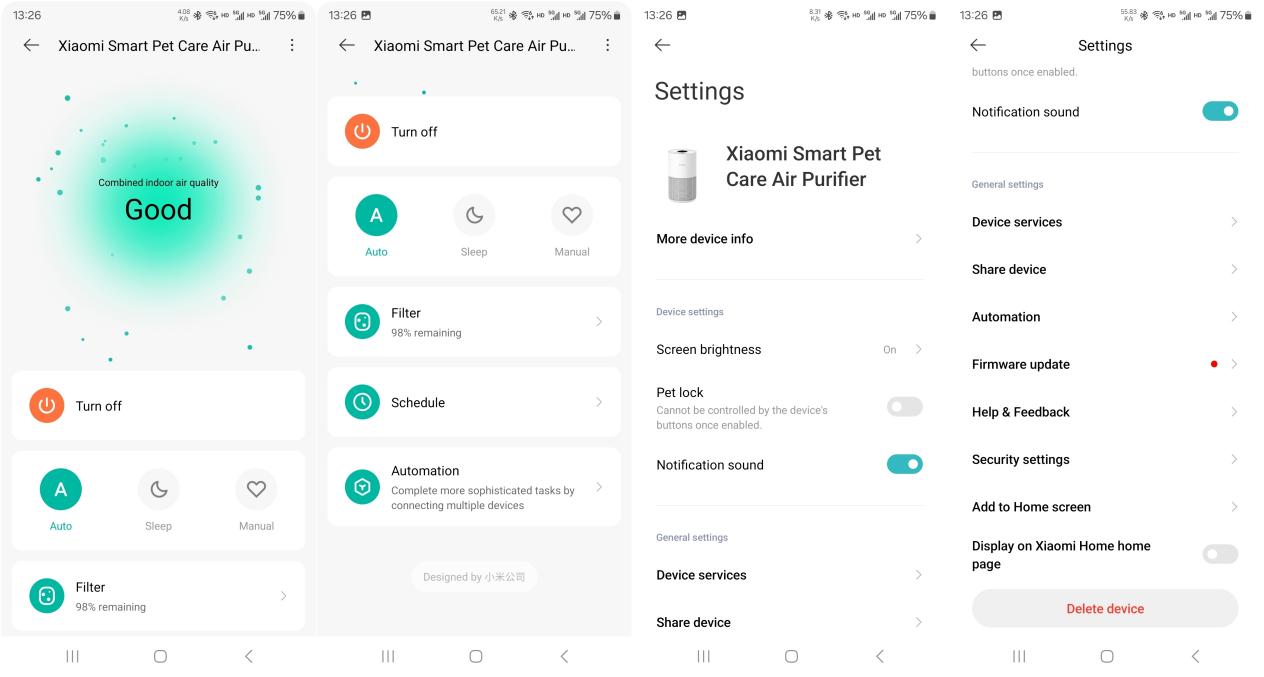
By tapping the three-dot icon at the upper-right corner, you can access more settings, such as adjusting the screen brightness, enabling the pet lock (which disables the physical buttons), or turning the notification sound on or off. You can explore the APP for even more features to customize your experience and maximize convenience.
Does it help?
Yes
No