

How to replace the filter of the Xiaomi Smart Pet Care Air Purifier?
To replace the filter of the Xiaomi Smart Pet Care Air Purifier, please refer to the following details:
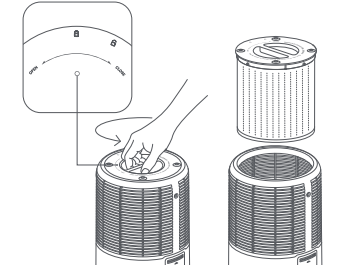
1. Start by removing the old filter and installing the new one correctly, as shown below;
2. Once the new filter is in place, ensure the purifier is on standby mode;
3. Then, press and hold the power button for 7 seconds;
4. After the filter is successfully reset, the purifier will make a notification sound, and the air quality indicator will stay green for 1 second, signaling that the reset is complete.
Note:
It is recommended to replace the filter every 6 to 12 months to maintain optimal performance. Always purchase genuine, compatible filters from official channels to ensure the purifier operates effectively.
1. Start by removing the old filter and installing the new one correctly, as shown below;
2. Once the new filter is in place, ensure the purifier is on standby mode;
3. Then, press and hold the power button for 7 seconds;
4. After the filter is successfully reset, the purifier will make a notification sound, and the air quality indicator will stay green for 1 second, signaling that the reset is complete.
Note:
It is recommended to replace the filter every 6 to 12 months to maintain optimal performance. Always purchase genuine, compatible filters from official channels to ensure the purifier operates effectively.
Does it help?
Yes
No