

How to adjust the brightness of the Xiaomi Smart Pet Care Air Purifier display?
To adjust the brightness of the Xiaomi Smart Pet Care Air Purifier's display, you can use the light adjustment button located on the left side of the display. Pressing the button cycles the screen through three different states: bright, dim, and off. This allows you to choose the brightness level that best suits your preferences or the lighting conditions in your room.
Additionally, You can also through the Mi Home/Xiaomi Home APP to turn the display on or off remotely.
Note:
When the screen is turned off, the power button will still remain visible, allowing for easy power control in a dark environment. This feature is particularly useful for managing the device's operation without needing to turn on additional lights, ensuring convenience and minimal disruption during nighttime use.
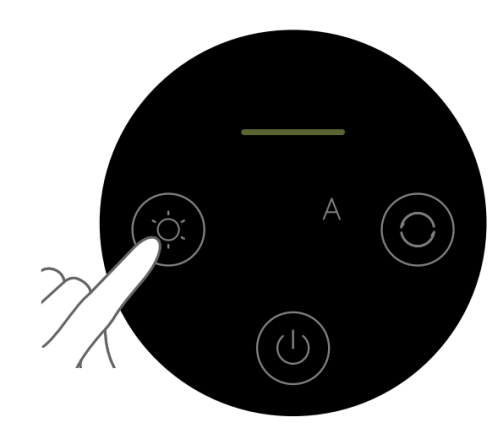
Additionally, You can also through the Mi Home/Xiaomi Home APP to turn the display on or off remotely.
Note:
When the screen is turned off, the power button will still remain visible, allowing for easy power control in a dark environment. This feature is particularly useful for managing the device's operation without needing to turn on additional lights, ensuring convenience and minimal disruption during nighttime use.
Does it help?
Yes
No