

Mijia Smart Pet Care Air Purifier FAQ
Overview
1. Q: What are the product features and selling points of the Mijia Smart Pet Care Air Purifier?
A: The Mijia Smart Pet Care Air Purifier boasts powerful performance, ideal for small spaces. It features a PCADR (Particle Clean Air Delivery Rate) of 230 m³/h, suitable for areas ranging from 16 to 27 m². Additionally, its operating noise level reaches a maximum of only 60 dB(A). The purifier has an air quality indicator and can display the current operating mode.
Product Introduction and Usage
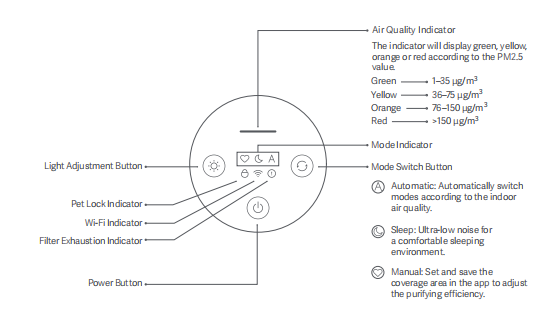
2. Q: What are the functions of the buttons on the Mijia Smart Pet Care Air Purifier?
A: The display screen has a Light Adjustment Button, Power Button, and Mode Switch Button. The Mijia Smart Pet Care Air Purifier also has an Air Quality Indicator, Pet Lock Indicator, Wi-Fi Indicator, Filter Exhaustion Indicator and Mode Indicator.
3. Q: What type of motor does the Mijia Smart Pet Care Air Purifier use, and what is the noise level?
A: The Mijia Smart Pet Care Air Purifier uses a DC brushless motor, which supports stepless speed regulation. It features low noise and long lifespan, with a maximum noise level of ≤60 dB(A). A sleep mode can be enabled for quieter operation during sleep.
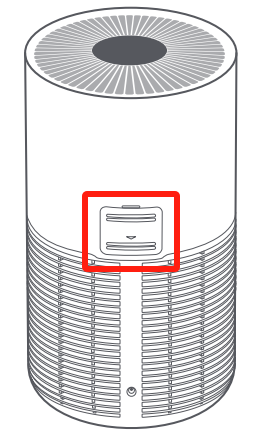
4. Q: What is the device on the back of the Mijia Smart Pet Care Air Purifier?
A: The device on the back of the Mijia Smart Pet Care Air Purifier is an infrared particle sensor, primarily used to monitor the concentration of particles in the ambient air.
5. Q: Can the Mijia Smart Pet Care Air Purifier be placed horizontally?
A: No, it cannot be placed horizontally. To ensure maximum air circulation in the space and allow clean air to reach every corner for optimal purification, the purifier should be placed vertically. Additionally, the back of the device should maintain at least 20 cm distance (as it has an infrared sensor), and the purifier should have 20cm of space on all sides to avoid obstructing the air intake.
6. Q: What settings will be lost after resetting the Wi-Fi on the Mijia Smart Pet Care Air Purifier?
A: After resetting the Wi-Fi on the Mijia Smart Pet Care Air Purifier, the settings in the App and any scheduled on/off timers will be lost.
7. Q: Can multiple people control the same Mijia Smart Pet Care Air Purifier at the same time?
A: Yes, multiple people can control the same Mijia Smart Pet Care Air Purifier by sharing it via the Xiaomi Home App with specified Xiaomi accounts.
8. Q: Can the shared person upgrade the firmware of the Mijia Smart Pet Care Air Purifier?
A: No, the shared person cannot upgrade the firmware.
9. Q: What is the favorite mode of the Mijia Smart Pet Care Air Purifier?
A: The so-called favorite mode is to set the speed of the Mijia Smart Pet Care Air Purifier fan through the Xiaomi Home App according to your own needs. The speed can be adjusted steplessly to adapt to the use area to achieve your favorite purification effect.
10. Q: Will a humidifier affect the air quality indicator on the Mijia Smart Pet Care Air Purifier?
A: Yes, it will. Ultrasonic humidifiers atomize water into fine mist particles, and the concentration can be quite high. The Mijia Smart Pet Care Air Purifier's sensor is very sensitive and will detect even the smallest water particles, causing the readings to be higher than normal or even exceed the scale. After turning off the humidifier, the readings will slowly return to normal. This is a normal phenomenon.
11. Q: Will an electric heater affect the PM2.5 indicator on the Mijia Smart Pet Care Air Purifier?
A: Yes, it will. Since an electric heater helps circulate the air in the room and makes the air relatively dry, it can cause small particles to float more easily in the air, allowing them to spread. This results in higher readings on the purifier's particle sensor.
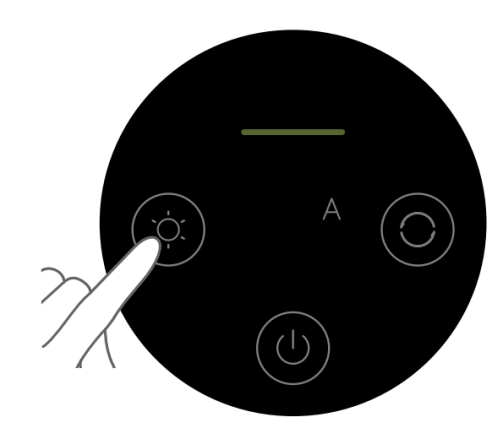
12. Q: How to turn on/off the display of the Mijia Smart Pet Care Air Purifier? How to adjust the brightness of the display?
A: The Mijia Smart Pet Care Air Purifier's main unit has a light adjustment button on the top. Each press of the button will cycle the screen between bright, dim, and off states. If connected to the Xiaomi Home App, find and tap the device, open more settings by tapping the three dots at the top right corner, then tap [Lighting] to turn the display on or off.
Note:
After the screen is turned off, the standby button will not completely turn off, making it easier to control the power in a dark environment.
13. Q: What type of filter is included with the Mijia Smart Pet Care Air Purifier?
A: The Mijia Smart Pet Care Air Purifier comes with a high-quality filter that combines a high-quality filter mesh and activated carbon. It is an integrated, high-quality composite filter.
14. Q: How to replace the filter of the Mijia Smart Pet Care Air Purifier?
A: Please remove the old filter and install a new one correctly as illustrated.
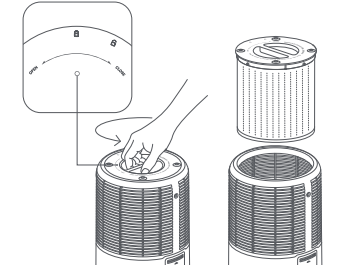
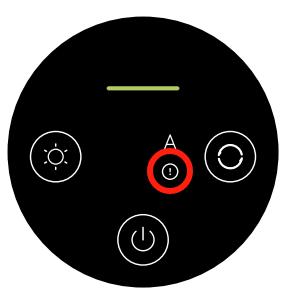
While the purifier is on standby, press and hold the power button for 7 seconds. When the filter is successfully reset, the purifier will make a notification sound and the air quality indicator will remain green for 1 second.
Note:
It is recommended to replace the filter every 6 to 12 months. Please purchase genuine and compatible filters from official channels.
15. Q: How is the filter lifespan of the Mijia Smart Pet Care Air Purifier calculated, and how often should the filter be replaced?
A: The Mijia Smart Pet Care Air Purifier automatically calculates the filter lifespan based on the air quality of the environment, the purifier's operation mode, speed, and runtime. If the purifier is used in an environment with poor air quality, the filter lifespan will be consumed more quickly. If the air quality is good, the filter will last longer. Overall, the filter lifespan is approximately 6 to 12 months. If the filter's remaining lifespan is ≤10%, the purifier will notify you through the display screen and the App, suggesting a replacement. It is recommended to clean the outer pre-filter of the filter once a month.
Note:
The above replacement time suggestions are based on laboratory testing, and the actual timing should be based on the real usage environment and system reminders.
16. Q: After replacing the filter of the Mijia Smart Pet Care Air Purifier, is it necessary to reset the filter’s lifespan?
A: Yes, after replacing the filter with a new one, you need to manually reset the filter’s lifespan.
17. Q: Why is the PM2.5 value on the Mijia Smart Pet Care Air Purifier higher indoors than outdoors?
A: The use of a humidifier, smoking, cooking, and other activities that produce mist or oil fumes indoors can affect the purifier's ability to accurately detect pollution levels.
18. Q: Why does the PM2.5 value change on the Mijia Smart Pet Care Air Purifier even when no filter is installed?
A: Without a filter, the PM2.5 value will either increase or decrease, depending on the environment. Without a filter, the device functions like a fan, circulating air in the room. It mixes areas with higher or lower PM2.5 concentrations, and during this process, the sensor detects varying PM2.5 levels. Over time, as the air becomes more evenly mixed, the PM2.5 concentration stabilizes, and the sensor reading will become more stable as well.
19. Q: Will the filter lifespan decrease if the Mijia Smart Pet Care Air Purifier is used without a filter?
A: Yes, the filter's lifespan will decrease if it is not installed in the device. The purifier calculates the filter's lifespan based on air quality, running status, and usage time. Since the device cannot detect whether the filter is installed, the purifier will still operate and prematurely reduce the filter's lifespan even when no filter is in place.
20. Q: Will the room's humidity decrease if the Mijia Smart Pet Care Air Purifier for a long time?
A: Yes, this is normal. The air purifier not only filters airborne particles but also removes moisture from the air, which can reduce the humidity in the room. Water molecules can accumulate in the filter and activated carbon, causing a decrease in humidity. This will also interfere with the purifier's performance and cause discrepancies in particle readings.
21. Q: Can the Mijia Smart Pet Care Air Purifier remove cooking smoke and odors?
A: Yes, it can, however the effectiveness depends on the environment, and it requires a longer time for the purifier to work effectively. Additionally, the amount of activated carbon in the filter and how long the filter has been used will affect the purifier's ability to remove odors.
22. Q: Does the Mijia Smart Pet Care Air Purifier have an ionizer function?
A: No, it does not.
23. Q: Can the Mijia Smart Pet Care Air Purifier be modified?
A: No, it cannot. Modifying the purifier could impact its performance, stability, and safety. Therefore, changing the purifier's original design and operating mode is prohibited.
24. Q: How to clean and store the Mijia Smart Pet Care Air Purifier?
A: When the device needs cleaning, first unplug the power cord before starting the cleaning process. For surface dirt, gently wipe the outer surface with a damp soft cloth. After prolonged use, open the filter compartment, remove the filter, and gently wipe the interior surfaces with a damp cloth. Let the filter air dry in a well-ventilated area. The particle sensor compartment can be removed and rinsed with water. Once everything is completely dry, reassemble and use the purifier. If the air purifier will not be used for a long period, it is recommended to store it in its original packaging, sealing it from top to bottom.
25. Q: Why is the air a little dry after turning on the Mijia Smart Pet Care Air Purifier?
A: The basic function of the air purifier is to circulate air through the filter to clean it. While filtering pollutants, it also removes moisture from the air, leading to a decrease in humidity. This causes the air to feel dry.
26. Q: Why does the packaging of the Mijia Smart Pet Care Air Purifier have an odor?
A: The cushioning foam inside the packaging has a slight material odor. Since the device has been in contact with the foam for a long time, it can absorb some of the foam's scent. This odor will dissipate naturally after opening the packaging, and it poses no harm to health.
27. Q: Does the filter of the Mijia Smart Pet Care Air Purifier have an expiration date?
A: The filter is an accessory, and as long as it remains unopened and unused, its storage time will not affect its performance. Feel free to use it. If the device and filter have been opened and used, refer to the user manual, the device's display screen, or the App for the expiration or replacement reminders.
App related
1. Q: How to connect the Mijia Smart Pet Care Air Purifier to the Xiaomi Home App?
A: 1. Scan the QR code on the user manual with your phone or install the Xiaomi Home App from the Play Store;
2. After binding your Xiaomi account, ensure that your home Wi-Fi is properly connected, and that your phone is connected to the same Wi-Fi network;
3. Turn on the air purifier, open the Xiaomi Home App, and the App will automatically search for nearby Xiaomi Home smart devices and prompt you to connect. Alternatively, you can manually add the device by tapping the [+] icon at the upper right corner;
4. Once added, you can control the purifier's power, switch between operation modes, and check the current indoor air quality through the App.
2. Q: What is the App interface of the Mijia Smart Pet Care Air Purifier?
A: After connecting the air purifier to the App, you can turn on/off in the App, and also switch the modes (Auto, Sleep or Manual) of the device. Tap the three-dot at the upper right corner, you can set up various settings for the air purifier
3. Q: What are the precautions for connecting the Mijia Smart Pet Care Air Purifier to the network?
A: The Mijia Smart Pet Care Air Purifier supports network control and is compatible with most personal routers on the market.
There are the following requirements for the router's wireless network:
1. The Mijia Smart Pet Care Air Purifier can only connect to a 2.4 GHz Wi-Fi network, it does not support 5 GHz Wi-Fi;
2. The Wi-Fi encryption method is WPA or WPA2, WEP is not supported
3. The router needs to enable DHCP, static IP assignment is not supported. Web authentication and enterprise-level 802.1X are not supported.
Note:
To control the Mijia Smart Pet Care Air Purifier, you need to download the Xiaomi Home App.
Common Issues and Troubleshooting
1. Q: What to do if the Mijia Smart Pet Care Air Purifier does not turn on?
A: First, ensure that the socket is working and that the power cord is properly plugged in. If the above are fine, the device should emit a beep and the power button on the screen should light up once the power cord is connected. At this point, pressing the power button should turn the device on. If pressing the power button results in no response, the device could be faulty.
2. Q: What to do if the Mijia Smart Pet Care Air Purifier makes unusual noise?
A: If the Mijia Smart Pet Care Air Purifier makes unusual noise during operation, first check if any foreign objects have entered the purifier. If any objects have fallen inside, open the filter compartment and remove them. Also, check if any foreign objects have entered the particle sensor.
3. Q: What to do if the App shows “motor failure”
A: Check if any foreign objects are obstructing the fan inside the device, causing the motor to jam or malfunction. Power off the device for 10 seconds and then turn it back on.
4. Q: Why does the Mijia Smart Pet Care Air Purifier have an odor?
A: If the new machine has an odor, it could be due to the following reasons:
The new Mijia Smart Pet Care Air Purifier has some harmless odor. This is due to the composite filter and residual materials from the manufacturing process. When the purifier is first used, there could be a slight smell from the main materials and additives. Over time, this odor will gradually decrease. This is normal and will not have any negative effects on your health. To accelerate the removal of the initial odor, it is recommended to run the purifier on the highest setting in a well-ventilated area for a while. Please use it with confidence.
If the purifier has an odor after one month of use, it could be due to the following reasons:
After prolonged use, the filter absorbs more pollutants, which can cause a slight odor. Additionally, factors such as prolonged use and a relatively humid environment can contribute to odors. People who are sensitive to smells can notice these odors. It is recommended to run the purifier at the highest setting for a while to reduce the smell, which is not harmful to health.
To avoid the risk of the filter absorbing moisture and producing an acidic smell, it is advised to keep the purifier running 24 hours a day in areas with high humidity and to clean the bottom pre-filter approximately every two weeks.
To avoid the risk of the filter absorbing moisture and producing an acidic smell, it is advised to keep the purifier running 24 hours a day in areas with high humidity and to clean the bottom pre-filter approximately every two weeks.
5. Q: Does the Mijia Smart Pet Care Air Purifier's filter come with packaging?
A: The Mijia Smart Pet Care Air Purifier is shipped with a plastic bag packaging for the whole unit, but the filter is already installed in the main unit and does not come with separate packaging.
6. Q: Why is the purifying effect of the Mijia Smart Pet Care Air Purifier poor?
A: Please check whether the size of the room and the device’s suitable area and setting are correct. The room's sealing and height can also affect the purifying effect.
7. Q: What to do if PM2.5 readings of the Mijia Smart Pet Care Air Purifier are abnormal or inaccurate?
A: When encountering inaccurate or abnormal PM2.5 readings, check if the particle sensor cover on the back of the device is dirty or clogged. If it is, use a non-sharp tool to open the particle sensor cover and clean it with an air blower or a hair dryer (do not use hot air). Gently brush the particle sensor cover with a used toothbrush dipped in clean water. After cleaning and drying, reinstall the door and test.
If multiple air purifiers show different values in the same environment, this could be due to factors like different heights, which can cause different readings. You can test them in sleep mode and with different levels of smoke. If the error increases linearly, it indicates a malfunction of the particle sensor. If the error stays within a certain range, it is normal.
8. Q: Why do the buttons of the Mijia Smart Pet Care Air Purifier become unresponsive
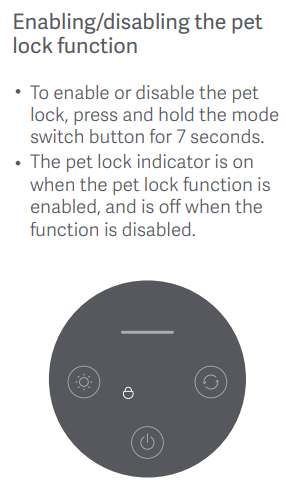
A: The Mijia Smart Pet Care Air Purifier has a Pet lock feature in the Xiaomi Home App. If the pet lock is activated, pressing the buttons on the purifier will not work. To resolve this, disable the pet lock feature to regain control of the buttons. You can deactivate the pet lock by holding the mode switch button for 7 seconds or by toggling the pet lock in the Xiaomi Home App.
9. Q: Why does the Mijia Smart Pet Care Air Purifier always show offline or fail to connect to Wi-Fi in the App?
A:
1. Ensure that the Mijia Smart Pet Care Air Purifier is powered on and functioning properly;
2. Check that your Wi-Fi is working properly;
3. Unplug the power cord, wait for 10 seconds, and then plug it back in (the device needs to be discharged for a period of time). Try resetting the Wi-Fi on the Mijia Smart Pet Care Air Purifier and reconnecting it to Wi-Fi.
10. Q: What do the different colors of the air quality indicator on the Mijia Smart Pet Care Air Purifier display mean? Why does it sometimes change rapidly?
A: The air quality indicator on the Mijia Smart Pet Care Air Purifier reflects the PM2.5 concentration and changes color based on the air quality data. When the value reaches a critical point, the color of the indicator will change accordingly.
11. Q: Why do the PM2.5 readings and the air quality indicator colors vary when using multiple Mijia Smart Pet Care Air Purifiers in the same environment?
A: In actual environments, dust moves with the airflow, so even in the same room, it is difficult to ensure that the dust levels are identical in all areas. Since the Mijia Smart Pet Care Air Purifier's sensors are highly sensitive, differences in readings could occur. A PM2.5 difference between two devices (calculated by the formula: (average value - reading) / average value) within 10% is considered normal. Additionally, electronic devices have tolerances, which can cause slight differences in sensor voltages, leading to discrepancies in the readings. If the PM2.5 difference is large, the sensor compartment will have accumulated dust, which can be cleaned. The different colors of the air quality indicator are due to differences in the PM2.5 values detected by the sensors. If the readings are close to the threshold, one purifier could be above the threshold while the other is below, leading to different indicator colors.
12. Q: Why does a new filter of the Mijia Smart Pet Care Air Purifier release black powder when unpacked, and is it harmful to humans?
A: During transportation, the filter can experience slight vibration and friction, causing small amounts of activated carbon powder to come loose. This is a normal occurrence. If you find black powder when opening the packaging or the purifier, it is from the activated carbon. Please wipe it clean with a damp, soft cloth before reassembling it . Once the purifier is in operation, the powder will not continue to fall out, and the device is safe to use.
13. Q: What is the logic behind the Mijia Smart Pet Care Air Purifier's auto mode fan speed adjustments?
A: When the air purifier is set to auto mode, it adjusts the fan speed based on the air quality detected by its sensors.
The air quality indicator corresponding to the fan speed in auto mode:
1. Green/400;
2. Yellow/1100;
3. Orange/1600;
4. Red/2050.
Does it help?
Yes
No