

How to set up the sound and light alert of the Xiaomi Outdoor Camera AW300?
The Xiaomi Outdoor Camera AW300 has the sound and light alert function, which is disabled by default. After enabling this feature, when the camera detects there is human movement, the camera will make a sound and light alert. You can select effective time, notification sound settings, and alert indicator settings.
To set up sound and light alert of your camera, please refer to the following steps:
1. Open the Mi Home/Xiaomi Home APP;
2. Select the camera;
3. Tap the [...] icon in the upper right corner;
4. Select [Home monitoring] and enable this feature;
5. Tap [Sound and light alert];

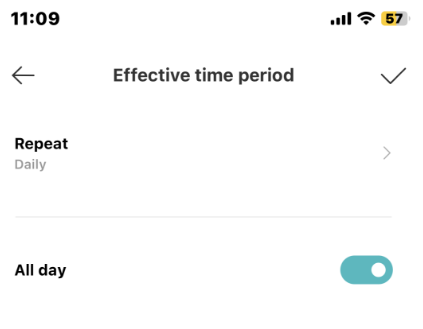
6. Tap [Effective time] to set the effective time period of the sound and light alert, which can be set by weeks. You can set the start and end time of 24 hours per day. It is set in daily and all day (24 hours) by default;
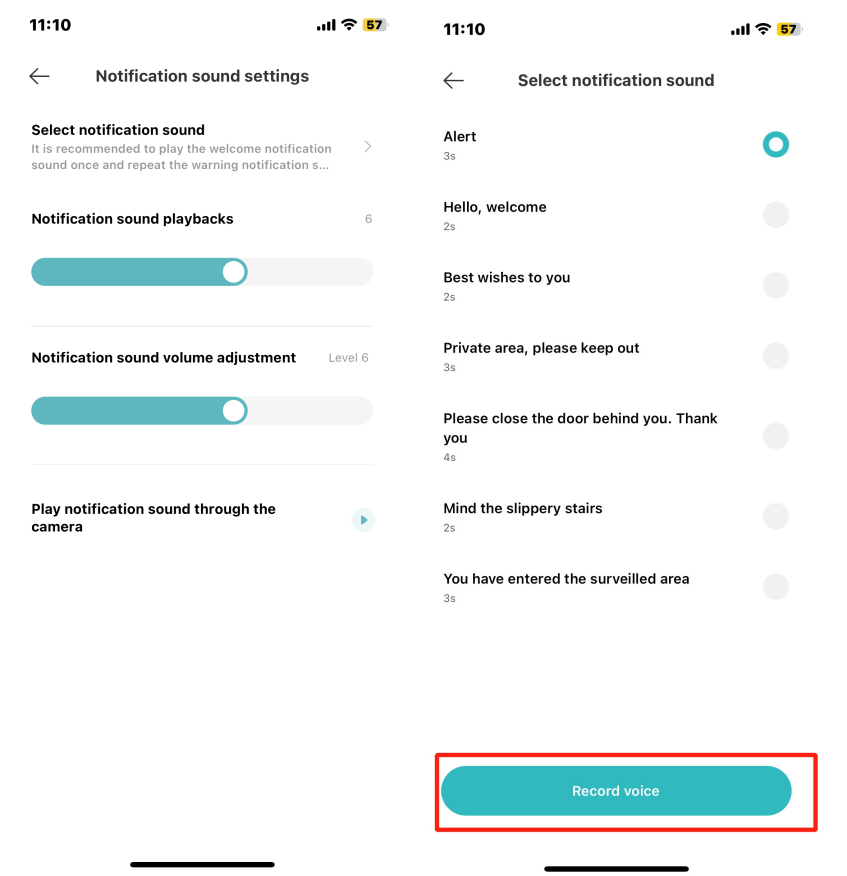
7. Select [Notification sound settings] and tap [Notification sound settings] again to choose the notification sound. The default notification sound is an alert sound;
8. Tap [Record voice] to record the custom sound, which supports up to 10s for each voice;
9. Adjust [Notification sound playbacks] and [Notification sound volume adjustment] as your preference, both of which can be set between 1-10;
10. Tap [Play notification sound through the camera] to play the set sound;
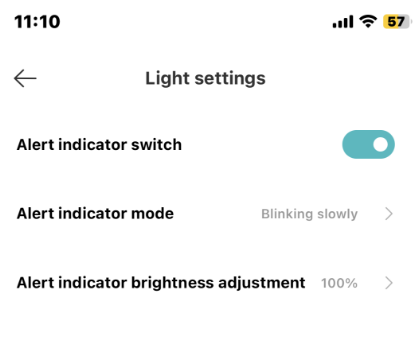
11. Tap [Alert indicator settings] and turn on [Alert indicator switch]. You can also set [Alert indicator mode] and [Alert indicator brightness adjustment] in this interface. By default, when you enable the sound and light alert, the light alert is also enabled with blinking and 100% brightness. You can set the alert indicator mode to [Always on], [Blinking slowly], or [Blinking quickly]. Adjust brightness from 1 to 100 levels;
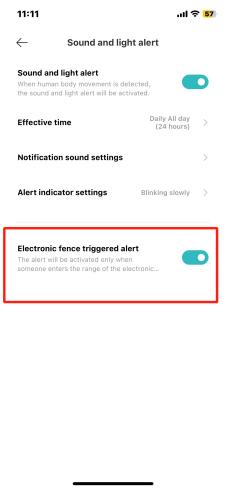
12. Turn on [Electronic fence triggered alert]. This switch is turned off by default. It will enter the electronic fence triggered settings interface when you enable it.
To set up sound and light alert of your camera, please refer to the following steps:
1. Open the Mi Home/Xiaomi Home APP;
2. Select the camera;
3. Tap the [...] icon in the upper right corner;
4. Select [Home monitoring] and enable this feature;
5. Tap [Sound and light alert];
6. Tap [Effective time] to set the effective time period of the sound and light alert, which can be set by weeks. You can set the start and end time of 24 hours per day. It is set in daily and all day (24 hours) by default;
7. Select [Notification sound settings] and tap [Notification sound settings] again to choose the notification sound. The default notification sound is an alert sound;
8. Tap [Record voice] to record the custom sound, which supports up to 10s for each voice;
9. Adjust [Notification sound playbacks] and [Notification sound volume adjustment] as your preference, both of which can be set between 1-10;
10. Tap [Play notification sound through the camera] to play the set sound;
11. Tap [Alert indicator settings] and turn on [Alert indicator switch]. You can also set [Alert indicator mode] and [Alert indicator brightness adjustment] in this interface. By default, when you enable the sound and light alert, the light alert is also enabled with blinking and 100% brightness. You can set the alert indicator mode to [Always on], [Blinking slowly], or [Blinking quickly]. Adjust brightness from 1 to 100 levels;
12. Turn on [Electronic fence triggered alert]. This switch is turned off by default. It will enter the electronic fence triggered settings interface when you enable it.
Does it help?
Yes
No