

How to use the control panel of the Xiaomi Multifunctional IH Rice Cooker?
The Xiaomi Multifunctional IH Rice Cooker comes with touch buttons and you can operate as follows:
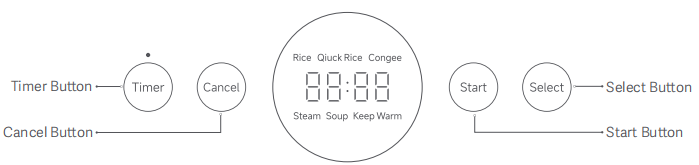
1. On the control panel of the Xiaomi Multifunctional IH Rice Cooker, there are four buttons: Timer Button; Cancel Button; Start Button; Select Button;
2. There is a screen, and you can check the scheduling time.
3. The scheduling indicator blinks, indicating that the rice cooker is in timer settings status. Press the timer button to adjust your desired schedule time;
4. The scheduling indicator keeps on, indicating that the rice cooker is in timer countdown mode. Cooking completes after the countdown ends.
Note:
The timer countdown counts the cooking completion time instead of the cooking start time.
1. On the control panel of the Xiaomi Multifunctional IH Rice Cooker, there are four buttons: Timer Button; Cancel Button; Start Button; Select Button;
2. There is a screen, and you can check the scheduling time.
3. The scheduling indicator blinks, indicating that the rice cooker is in timer settings status. Press the timer button to adjust your desired schedule time;
4. The scheduling indicator keeps on, indicating that the rice cooker is in timer countdown mode. Cooking completes after the countdown ends.
Note:
The timer countdown counts the cooking completion time instead of the cooking start time.
Does it help?
Yes
No