

Xiaomi Smart Ceiling Light D20 FAQ
Basic Information
1. Q: What are the selling points of the Xiaomi Smart Ceiling Light D20?
A: Equipped with radar and light-sensing dual sensors, it can sensitively identify humans passing by and sense the body’s activities in real time to achieve intelligent light-sensing detection.
2. Q: What's the appearance of the Xiaomi Smart Ceiling Light D20?
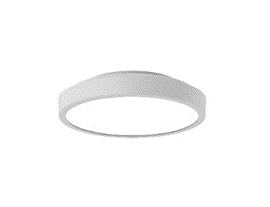
A: Product dimensions: Φ 250×60mm;
Net weight: Approx. 0.57kg.
3. Q: What are the package contents of the Xiaomi Smart Ceiling Light D20?
A: Xiaomi Smart Ceiling Light D20; Expansion screw x3; User manual; Warranty notice.
4. Q: What is the rated input power of the Xiaomi Smart Ceiling Light D20?
A: The rated input power is 17W.
5. Q: What is the luminous flux of the Xiaomi Smart Ceiling Light D20?
A: 900lm@4000K.
6. Q: Can the wall switch of the Xiaomi Smart Ceiling Light D20 change scene modes?
A: Yes. There are 3 scene modes:
Bright mode (100%, 5700k);
Leisure mode (100%, 4000k);
Night light mode (lowest dimming value, 2700k).
7. Q: Can the wall switch of the Xiaomi Smart Ceiling Light D20 change the three preset scenes?
A: Yes, after the ceiling light is connected to the APP, enter the ceiling light operation interface, tap [...] in the upper right corner >> turn on [Wall Switch] to go into the settings >> choose the scene mode you need and set the color temperature and brightness.
8. Q: What are the application areas for the Xiaomi Smart Ceiling Light D20?
A: It is suitable for corridors/balconies/entrances within 3m in length.
9. Q: Does the Xiaomi Smart Ceiling Light D20 support the Flex Switch?
A: No, it doesn’t.
Installation
1. Q: Which ceilings can the Xiaomi Smart Ceiling Light D20 be installed on?
A: This product is only suitable for concrete ceilings and cannot be installed on ceilings made of other materials.
2. Q: What are the requirements for the junction box during installation of the Xiaomi Smart Ceiling Light D20?
A: In order not to affect the dustproof effect of the product, it is recommended to choose IP50 junction box for installation.
APP
1. Q: How to reset the Xiaomi Smart Ceiling Light D20?
A: Reset method:
Quickly turn on and off 7 times within 7 seconds. When the lamp blinks three times, the reset is successful and the lamp returns to its factory default state.
2. Q: When the Xiaomi Smart Ceiling Light D20 is energized, does it maintain its settings before power failure?
A: Yes. After connecting the ceiling light successfully, tap [...] in the upper right corner to enter the setting interface and set.
3. Q: Can the brightening and dimming time of the Xiaomi Smart Ceiling Light D20 be set?
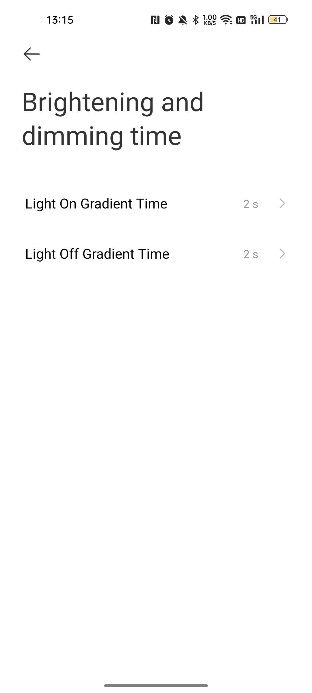
A: Yes, after successfully connecting to the Mi Home/Xiaomi Home APP, tap [...] in the upper right corner to enter the settings interface, and tap [Brightening and dimming time].
The default brightening and dimming time is 2 seconds, and the selectable time is 0.5s, 1s, and 1.5s.
4. Q: Can the turn-off delay for the Xiaomi Smart Ceiling Light D20 be set?
A: Yes. The default delay time is 1 minute. You can customize the delay time in the settings >> [Auto sensing on/off].
5. Q: Can the radar sensing time and sensitivity of the Xiaomi Smart Ceiling Light D20 be set?
A: Yes, go to [Settings] >> tap [Auto sensing on/off] to select the start time, end time and sensitivity.
6. Q: Why does the Mi Home APP prompt that the connection has timed out when connecting the Xiaomi Smart Ceiling Light D20?
A: Reason 1:
The Wi-Fi password is incorrect. It is recommended to reset the light and enter the correct Wi-Fi password.
Reason 2:
The network signal is not good. It is recommended to keep the lamps closer to the router while ensuring a good network environment. And then reconnect several times.
7. Q: What if the Xiaomi Smart Ceiling Light D20 reset is successful but the phone cannot discover it?
A: When downloading and using the Mi Home APP for the first time, you need to enable location service permission on your Android phone or iPhone.
8. Q: Does the Xiaomi Smart Ceiling Light D20 need to reconnect to the Mi Home APP manually when it is powered off or the Wi-Fi is disconnected?
A: No, it will automatically reconnect when it is powered on or Wi-Fi is restored.
9. Q: Does the Xiaomi Smart Ceiling Light D20 support HomeKit and Siri?
A: No, it doesn’t.
Frequently asked questions
1. Q: Why can’t the Xiaomi Smart Ceiling Light D20 sense and turn on?
A: The radar sensing function is turned off by default. You need to turn [Auto sensing on/off] in the settings when successfully connecting to the ceiling light.
2. Q: Where is the SN code of the Xiaomi Smart Ceiling Light D20?
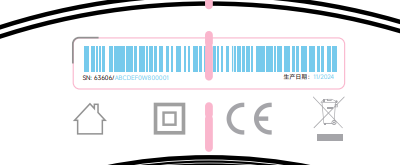
A: The SN code is at the bottom of the ceiling light.
3. Q: Why the default time of the Xiaomi Smart Ceiling Light D20 is also 2s after choosing the brightening and dimming time on the Mi Home APP?
A: The brightening and dimming time is selected by scrolling up and down. The time can be modified only after the scrolling is completed. Scrolling too fast will cause the modification to fail.
4. Q: Why does the Xiaomi Smart Ceiling Light D20 accidentally turn on or fail to turn off?
A: The human body’s sensing function will be affected by the surrounding environment. For example, pets, clothes wet by wind, and some electrical appliances (such as washing machines, dishwashers, robot vacuum and water heaters) moving or working in the sensing area can cause the lights to turn on by mistake or fail to turn off.
The sensing function will return to normal after the interference disappears.
At the same time, you can select the sensing sensitivity in the Mi Home APP (High sensitivity—less people movement; Medium sensitivity—people move around moderately; Low sensitivity—more people movement).
5. Q: Why doesn’t the Xiaomi Smart Ceiling Light D20 immediately turn on when passing by?
A: The default setting of the ceiling light is medium sensitivity, which may be affected by the surrounding environment/human factors and cause induction delay. It can be changed to high sensitivity to use.
1. Q: What are the selling points of the Xiaomi Smart Ceiling Light D20?
A: Equipped with radar and light-sensing dual sensors, it can sensitively identify humans passing by and sense the body’s activities in real time to achieve intelligent light-sensing detection.
2. Q: What's the appearance of the Xiaomi Smart Ceiling Light D20?
A: Product dimensions: Φ 250×60mm;
Net weight: Approx. 0.57kg.
3. Q: What are the package contents of the Xiaomi Smart Ceiling Light D20?
A: Xiaomi Smart Ceiling Light D20; Expansion screw x3; User manual; Warranty notice.
4. Q: What is the rated input power of the Xiaomi Smart Ceiling Light D20?
A: The rated input power is 17W.
5. Q: What is the luminous flux of the Xiaomi Smart Ceiling Light D20?
A: 900lm@4000K.
6. Q: Can the wall switch of the Xiaomi Smart Ceiling Light D20 change scene modes?
A: Yes. There are 3 scene modes:
Bright mode (100%, 5700k);
Leisure mode (100%, 4000k);
Night light mode (lowest dimming value, 2700k).
7. Q: Can the wall switch of the Xiaomi Smart Ceiling Light D20 change the three preset scenes?
A: Yes, after the ceiling light is connected to the APP, enter the ceiling light operation interface, tap [...] in the upper right corner >> turn on [Wall Switch] to go into the settings >> choose the scene mode you need and set the color temperature and brightness.
8. Q: What are the application areas for the Xiaomi Smart Ceiling Light D20?
A: It is suitable for corridors/balconies/entrances within 3m in length.
9. Q: Does the Xiaomi Smart Ceiling Light D20 support the Flex Switch?
A: No, it doesn’t.
Installation
1. Q: Which ceilings can the Xiaomi Smart Ceiling Light D20 be installed on?
A: This product is only suitable for concrete ceilings and cannot be installed on ceilings made of other materials.
2. Q: What are the requirements for the junction box during installation of the Xiaomi Smart Ceiling Light D20?
A: In order not to affect the dustproof effect of the product, it is recommended to choose IP50 junction box for installation.
APP
1. Q: How to reset the Xiaomi Smart Ceiling Light D20?
A: Reset method:
Quickly turn on and off 7 times within 7 seconds. When the lamp blinks three times, the reset is successful and the lamp returns to its factory default state.
2. Q: When the Xiaomi Smart Ceiling Light D20 is energized, does it maintain its settings before power failure?
A: Yes. After connecting the ceiling light successfully, tap [...] in the upper right corner to enter the setting interface and set.
3. Q: Can the brightening and dimming time of the Xiaomi Smart Ceiling Light D20 be set?
A: Yes, after successfully connecting to the Mi Home/Xiaomi Home APP, tap [...] in the upper right corner to enter the settings interface, and tap [Brightening and dimming time].
The default brightening and dimming time is 2 seconds, and the selectable time is 0.5s, 1s, and 1.5s.
4. Q: Can the turn-off delay for the Xiaomi Smart Ceiling Light D20 be set?
A: Yes. The default delay time is 1 minute. You can customize the delay time in the settings >> [Auto sensing on/off].
5. Q: Can the radar sensing time and sensitivity of the Xiaomi Smart Ceiling Light D20 be set?
A: Yes, go to [Settings] >> tap [Auto sensing on/off] to select the start time, end time and sensitivity.
6. Q: Why does the Mi Home APP prompt that the connection has timed out when connecting the Xiaomi Smart Ceiling Light D20?
A: Reason 1:
The Wi-Fi password is incorrect. It is recommended to reset the light and enter the correct Wi-Fi password.
Reason 2:
The network signal is not good. It is recommended to keep the lamps closer to the router while ensuring a good network environment. And then reconnect several times.
7. Q: What if the Xiaomi Smart Ceiling Light D20 reset is successful but the phone cannot discover it?
A: When downloading and using the Mi Home APP for the first time, you need to enable location service permission on your Android phone or iPhone.
8. Q: Does the Xiaomi Smart Ceiling Light D20 need to reconnect to the Mi Home APP manually when it is powered off or the Wi-Fi is disconnected?
A: No, it will automatically reconnect when it is powered on or Wi-Fi is restored.
9. Q: Does the Xiaomi Smart Ceiling Light D20 support HomeKit and Siri?
A: No, it doesn’t.
Frequently asked questions
1. Q: Why can’t the Xiaomi Smart Ceiling Light D20 sense and turn on?
A: The radar sensing function is turned off by default. You need to turn [Auto sensing on/off] in the settings when successfully connecting to the ceiling light.
2. Q: Where is the SN code of the Xiaomi Smart Ceiling Light D20?
A: The SN code is at the bottom of the ceiling light.
3. Q: Why the default time of the Xiaomi Smart Ceiling Light D20 is also 2s after choosing the brightening and dimming time on the Mi Home APP?
A: The brightening and dimming time is selected by scrolling up and down. The time can be modified only after the scrolling is completed. Scrolling too fast will cause the modification to fail.
4. Q: Why does the Xiaomi Smart Ceiling Light D20 accidentally turn on or fail to turn off?
A: The human body’s sensing function will be affected by the surrounding environment. For example, pets, clothes wet by wind, and some electrical appliances (such as washing machines, dishwashers, robot vacuum and water heaters) moving or working in the sensing area can cause the lights to turn on by mistake or fail to turn off.
The sensing function will return to normal after the interference disappears.
At the same time, you can select the sensing sensitivity in the Mi Home APP (High sensitivity—less people movement; Medium sensitivity—people move around moderately; Low sensitivity—more people movement).
5. Q: Why doesn’t the Xiaomi Smart Ceiling Light D20 immediately turn on when passing by?
A: The default setting of the ceiling light is medium sensitivity, which may be affected by the surrounding environment/human factors and cause induction delay. It can be changed to high sensitivity to use.
Does it help?
Yes
No