

Xiaomi Smart LED Bulb (White and Color) FAQ
Essential information
1. Q: What are the selling points of the Xiaomi Smart LED Bulb (White and Color)?
A: You can control the Xiaomi Smart LED Bulb (White and Color) after connecting with Amazon Alexa. The product is fully compatible with the Matter protocol and can be easily connected and controlled by simply using any APP that supports Matter.
2. Q: What are the dimensions of the Xiaomi Smart LED Bulb (White and Color)?
A: φ 60 × 114 mm.

3. Q: What is the weight of the Xiaomi Smart LED Bulb (White and Color)?
A: The net weight of the product is approximately 54g.
4. Q: What is the rated power of the Xiaomi Smart LED Bulb (White and Color)?
A: The rated power is 8.5w.
5. Q: What is the lumen of the Xiaomi Smart LED Bulb (White and Color)?
A: The lumen is 806 lm.
6. Q: What is the service life of the Xiaomi Smart LED Bulb (White and Color)?
A: The service life is approximately 15000 hours.
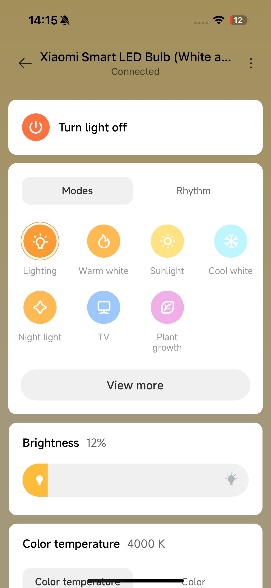
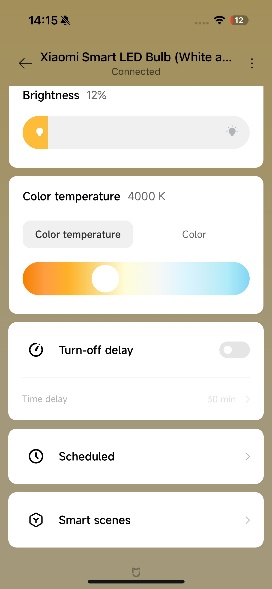
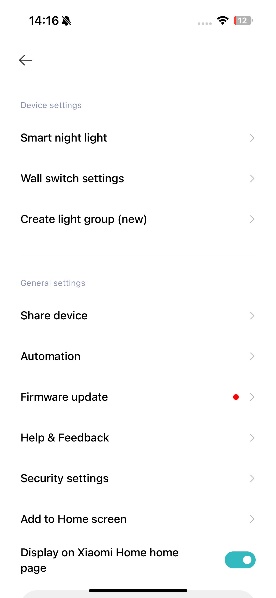
7. Q: Can the Mi Home APP control the Xiaomi Smart LED Bulb (White and Color)?
A: Yes. After the successful connection, the page will display as follows:
8. Q: Can Google Assistant control the Xiaomi Smart LED Bulb (White and Color)?
A: Yes.
The operation steps are as follows:
1. Tap [Google Home] >> search for Mi Home/Xiaomi Home, and follow the instructions to connect and log in to your Xiaomi Account;
2. [Settings] >> tap [+] in the main control to add the bulb>> follow the instructions on the screen. Once the account is connected, you can control the Xiaomi product using Google Assistant.
9. Q: Can Amazon Alexa control the Xiaomi Smart LED Bulb (White and Color)?
A: Yes.
The operation steps are as follows:
1. Tap [Amazon Alexa] APP >> [Skill & Games], search for Mi Home/Xiaomi Home, select the right skill, tap [ENABLE TO USE] and log in with your Xiaomi Account;
2. After a successful connection, follow the on-screen instructions and tap [Find devices] to add the new devices then you can control the Xiaomi product from Amazon Alexa.
Frequently asked questions
1. Q: How to reset the Xiaomi Smart LED Bulb (White and Color)?
A: Press the switch on the wall quickly 14 times in seven seconds and the bulb will stay on and start breathing, indicating that it has been reset successfully. After reset, the bulb will restore 100% brightness and 4000K color temperature.
2. Q: What if the reset is successful but the phone cannot detect the Xiaomi Smart LED Bulb (White and Color)?
A: You need to authorize the Mi Home/Xiaomi Home APP to use location services on your phone first.
3. Q: What to do if the Mi Home/Xiaomi Home APP shows that the Xiaomi Smart LED Bulb (White and Color) is offline?
A: Please confirm that the phone's network connection is normal first, and then refresh the "My Device" interface several times for about 20s, and it will display as online. If it still shows offline, please reset and reconnect the Xiaomi Smart LED Bulb (White and Color).
4. Q: Why does the Mi Home/Xiaomi Home APP prompt a connection timeout when connecting to the Xiaomi Smart LED Bulb (White and Color)?
A: Reason 1:
The Wi-Fi password is incorrect. It is recommended to reset the bulb and fill in the correct Wi-Fi password;
Reason 2:
The network signal is not good. It is recommended to make the router as close as possible to the bulb while ensuring a good network environment, and reconnect it a few more times.
5. Q: Will the previously saved settings be lost when the Xiaomi Smart LED Bulb (White and Color) is powered off?
A: No, it will save all the settings.
6. Q: Is it necessary to manually reconnect the network for the Xiaomi Smart LED Bulb (White and Color) if there is a power outage or Wi-Fi disconnection?
A: No, once power or Wi-Fi is restored, the bulb will automatically reconnect to the network.
1. Q: What are the selling points of the Xiaomi Smart LED Bulb (White and Color)?
A: You can control the Xiaomi Smart LED Bulb (White and Color) after connecting with Amazon Alexa. The product is fully compatible with the Matter protocol and can be easily connected and controlled by simply using any APP that supports Matter.
2. Q: What are the dimensions of the Xiaomi Smart LED Bulb (White and Color)?
A: φ 60 × 114 mm.
3. Q: What is the weight of the Xiaomi Smart LED Bulb (White and Color)?
A: The net weight of the product is approximately 54g.
4. Q: What is the rated power of the Xiaomi Smart LED Bulb (White and Color)?
A: The rated power is 8.5w.
5. Q: What is the lumen of the Xiaomi Smart LED Bulb (White and Color)?
A: The lumen is 806 lm.
6. Q: What is the service life of the Xiaomi Smart LED Bulb (White and Color)?
A: The service life is approximately 15000 hours.
7. Q: Can the Mi Home APP control the Xiaomi Smart LED Bulb (White and Color)?
A: Yes. After the successful connection, the page will display as follows:
8. Q: Can Google Assistant control the Xiaomi Smart LED Bulb (White and Color)?
A: Yes.
The operation steps are as follows:
1. Tap [Google Home] >> search for Mi Home/Xiaomi Home, and follow the instructions to connect and log in to your Xiaomi Account;
2. [Settings] >> tap [+] in the main control to add the bulb>> follow the instructions on the screen. Once the account is connected, you can control the Xiaomi product using Google Assistant.
9. Q: Can Amazon Alexa control the Xiaomi Smart LED Bulb (White and Color)?
A: Yes.
The operation steps are as follows:
1. Tap [Amazon Alexa] APP >> [Skill & Games], search for Mi Home/Xiaomi Home, select the right skill, tap [ENABLE TO USE] and log in with your Xiaomi Account;
2. After a successful connection, follow the on-screen instructions and tap [Find devices] to add the new devices then you can control the Xiaomi product from Amazon Alexa.
Frequently asked questions
1. Q: How to reset the Xiaomi Smart LED Bulb (White and Color)?
A: Press the switch on the wall quickly 14 times in seven seconds and the bulb will stay on and start breathing, indicating that it has been reset successfully. After reset, the bulb will restore 100% brightness and 4000K color temperature.
2. Q: What if the reset is successful but the phone cannot detect the Xiaomi Smart LED Bulb (White and Color)?
A: You need to authorize the Mi Home/Xiaomi Home APP to use location services on your phone first.
3. Q: What to do if the Mi Home/Xiaomi Home APP shows that the Xiaomi Smart LED Bulb (White and Color) is offline?
A: Please confirm that the phone's network connection is normal first, and then refresh the "My Device" interface several times for about 20s, and it will display as online. If it still shows offline, please reset and reconnect the Xiaomi Smart LED Bulb (White and Color).
4. Q: Why does the Mi Home/Xiaomi Home APP prompt a connection timeout when connecting to the Xiaomi Smart LED Bulb (White and Color)?
A: Reason 1:
The Wi-Fi password is incorrect. It is recommended to reset the bulb and fill in the correct Wi-Fi password;
Reason 2:
The network signal is not good. It is recommended to make the router as close as possible to the bulb while ensuring a good network environment, and reconnect it a few more times.
5. Q: Will the previously saved settings be lost when the Xiaomi Smart LED Bulb (White and Color) is powered off?
A: No, it will save all the settings.
6. Q: Is it necessary to manually reconnect the network for the Xiaomi Smart LED Bulb (White and Color) if there is a power outage or Wi-Fi disconnection?
A: No, once power or Wi-Fi is restored, the bulb will automatically reconnect to the network.
Does it help?
Yes
No