

How to use the Xiaomi Wireless Mouse Comfort Edition?
To use the Xiaomi Wireless Mouse Comfort Edition, please refer to the following details:
1. Slide down the battery compartment cover to remove it as illustrated;
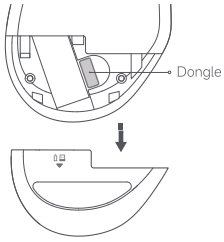
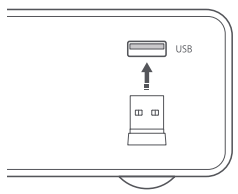
2. Take out the dongle and plug it into the USB port on the computer;
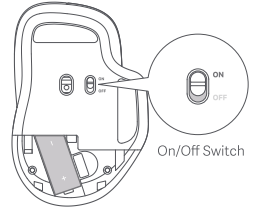
3. Install an AA battery into the battery compartment, and turn on the mouse;
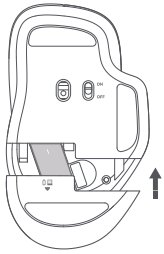
4. When your computer system notifies that the installation is successful, you can close the battery compartment cover and start using the mouse.
1. Slide down the battery compartment cover to remove it as illustrated;
2. Take out the dongle and plug it into the USB port on the computer;
3. Install an AA battery into the battery compartment, and turn on the mouse;
4. When your computer system notifies that the installation is successful, you can close the battery compartment cover and start using the mouse.
Does it help?
Yes
No