

How to set the items shown on the lock screen of the Redmi Pad Pro 5G after swiping down?
On the Redmi Pad Pro 5G, setting the items shown on the lock screen after swiping down involves customizing the quick access menu that appears when you swipe down from the top of the screen while your tablet is locked. This reduces the time spent navigating menus and settings, which makes your tablet more responsive.
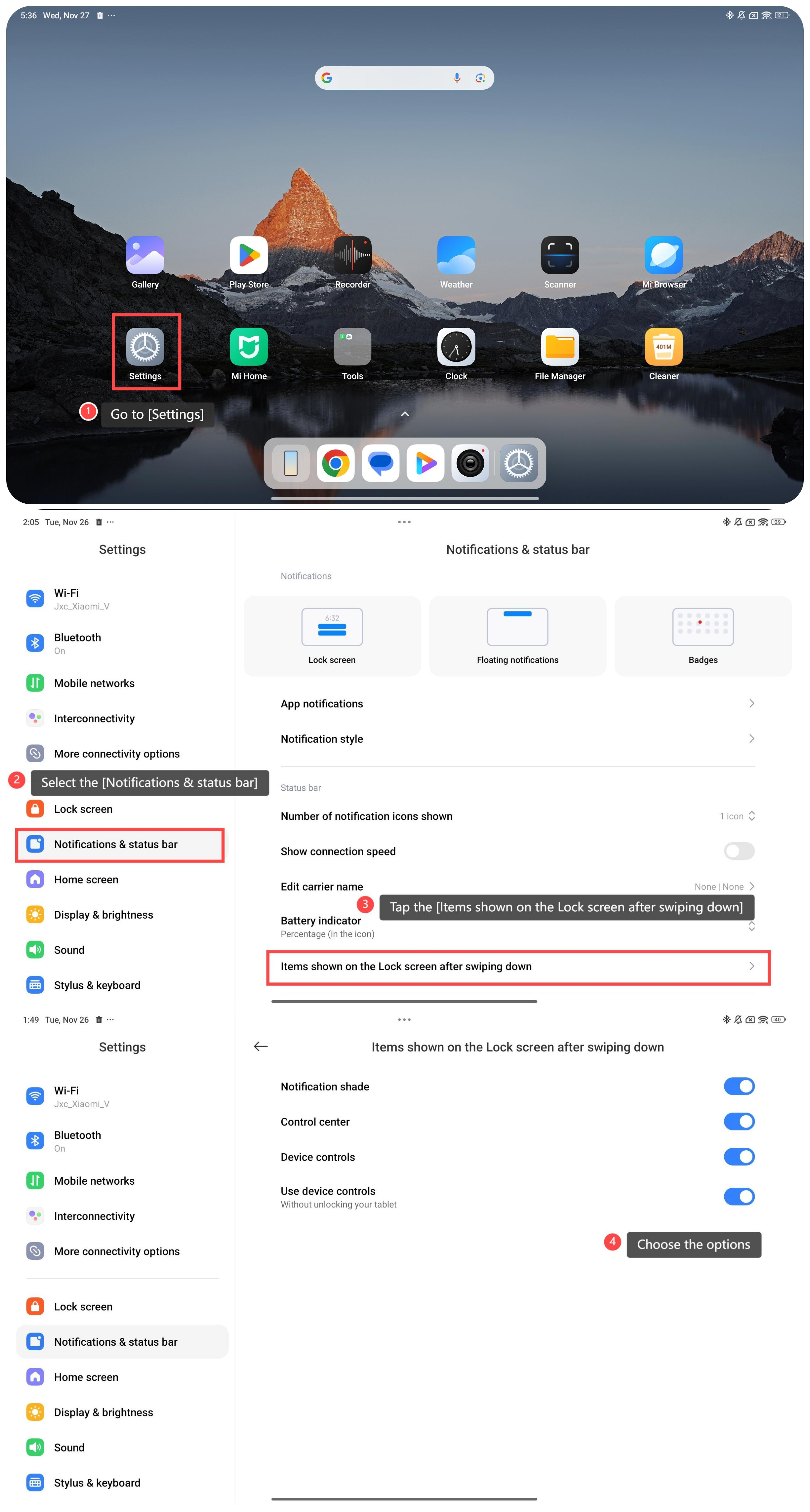
To set the items shown on the Lock screen after swiping down, please refer to the following steps:
1. Go to [Settings];
2. Select [Notifications & status bar];
3. Tap [Items shown on the Lock screen after swiping down];
4. Choose the options: [Notification shade], [Control center] and [Device controls]. When you enable [Device controls], the [Use device controls] icon will automatically turn on.
To set the items shown on the Lock screen after swiping down, please refer to the following steps:
1. Go to [Settings];
2. Select [Notifications & status bar];
3. Tap [Items shown on the Lock screen after swiping down];
4. Choose the options: [Notification shade], [Control center] and [Device controls]. When you enable [Device controls], the [Use device controls] icon will automatically turn on.
Does it help?
Yes
No