

How to manage APP notifications on the Redmi Pad Pro 5G?
APP notifications on the Redmi Pad Pro 5G are alerts generated by installed apps to inform you about updates, reminders, or actions that require your attention. They appear in the notification shade, lock screen, or as banners depending on your settings, allowing you to stay connected and informed.
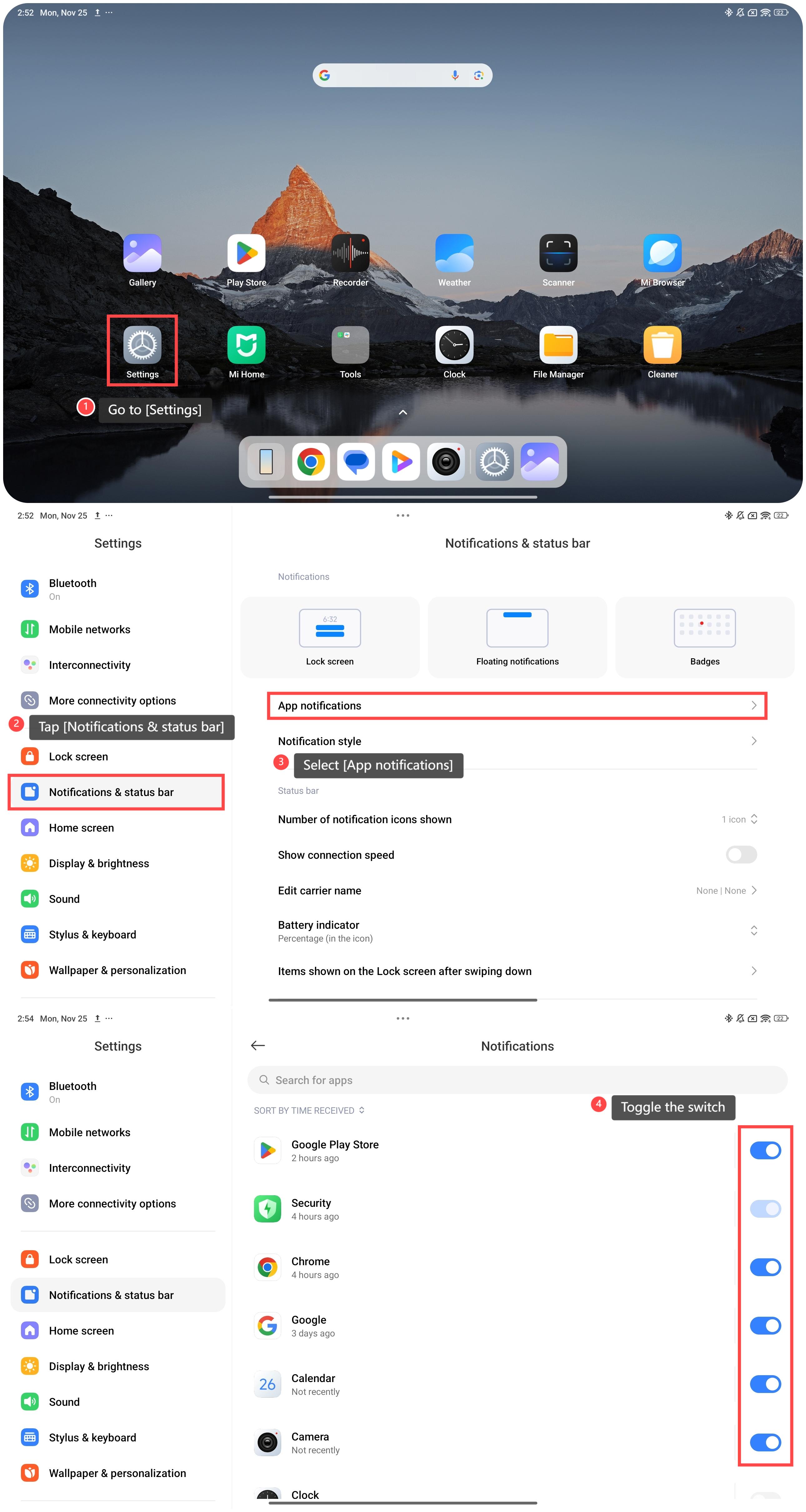
To manage APP notifications on your tablet, please refer to the following steps:
1. Go to [Settings];
2. Scroll down and tap [Notifications & status bar];
3. Select [App notifications] and you will see a list of APPs that are sorted by time received;
4. Look for the APP for which you want to manage notifications and toggle the switch next to the specific APP according to your preference.
Note:
You can set priority for important application or events, such as messages or calendar alerts, and disable notifications for less urgent apps.
To manage APP notifications on your tablet, please refer to the following steps:
1. Go to [Settings];
2. Scroll down and tap [Notifications & status bar];
3. Select [App notifications] and you will see a list of APPs that are sorted by time received;
4. Look for the APP for which you want to manage notifications and toggle the switch next to the specific APP according to your preference.
Note:
You can set priority for important application or events, such as messages or calendar alerts, and disable notifications for less urgent apps.
Does it help?
Yes
No