

How to turn on/off the Mi Home APP on the control center of the Redmi Pad Pro?
The Redmi Pad Pro allows you to turn on or turn off the Mi Home APP on the control center. With this feature you can quickly access the Mi Home APP, allowing you to manage your connected devices directly from the control center. There is no need to go to the app from the home screen. It helps you save time and energy by making device control faster and more convenient.
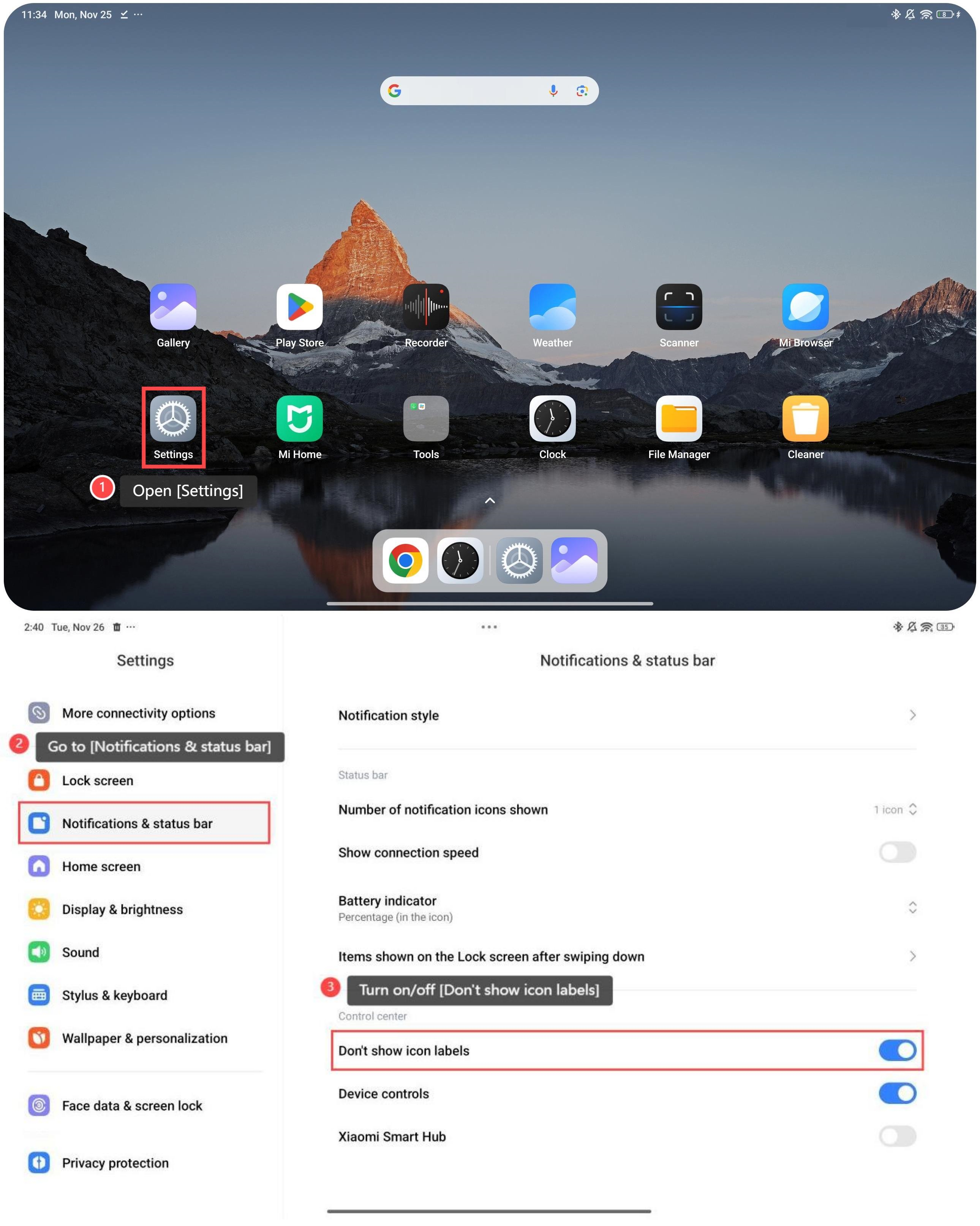
To turn on/off the Mi Home APP on the control center of the tablet, please refer to the following steps:
1. Tap [Settings];
2. Go to [Notifications & status bar];
3. Swipe down to find and enable or disable [Device controls].
To turn on/off the Mi Home APP on the control center of the tablet, please refer to the following steps:
1. Tap [Settings];
2. Go to [Notifications & status bar];
3. Swipe down to find and enable or disable [Device controls].
Friendly tips:
You can turn on/off the Mi Home APP on the control center as you prefer, making the device serve you in the way you like.
You can turn on/off the Mi Home APP on the control center as you prefer, making the device serve you in the way you like.
Does it help?
Yes
No