

How to turn on/off the icon labels on the control center of the Redmi Pad Pro 5G?
Turning on the icon labels on the control center of the Redmi Pad Pro 5G allows you to identify the function of each icon easily, especially if you're not familiar with the symbols used in the control center. With both icons and labels visible, you can more quickly understand what each control does without needing to tap and explore. The labels make the control center look more organized.
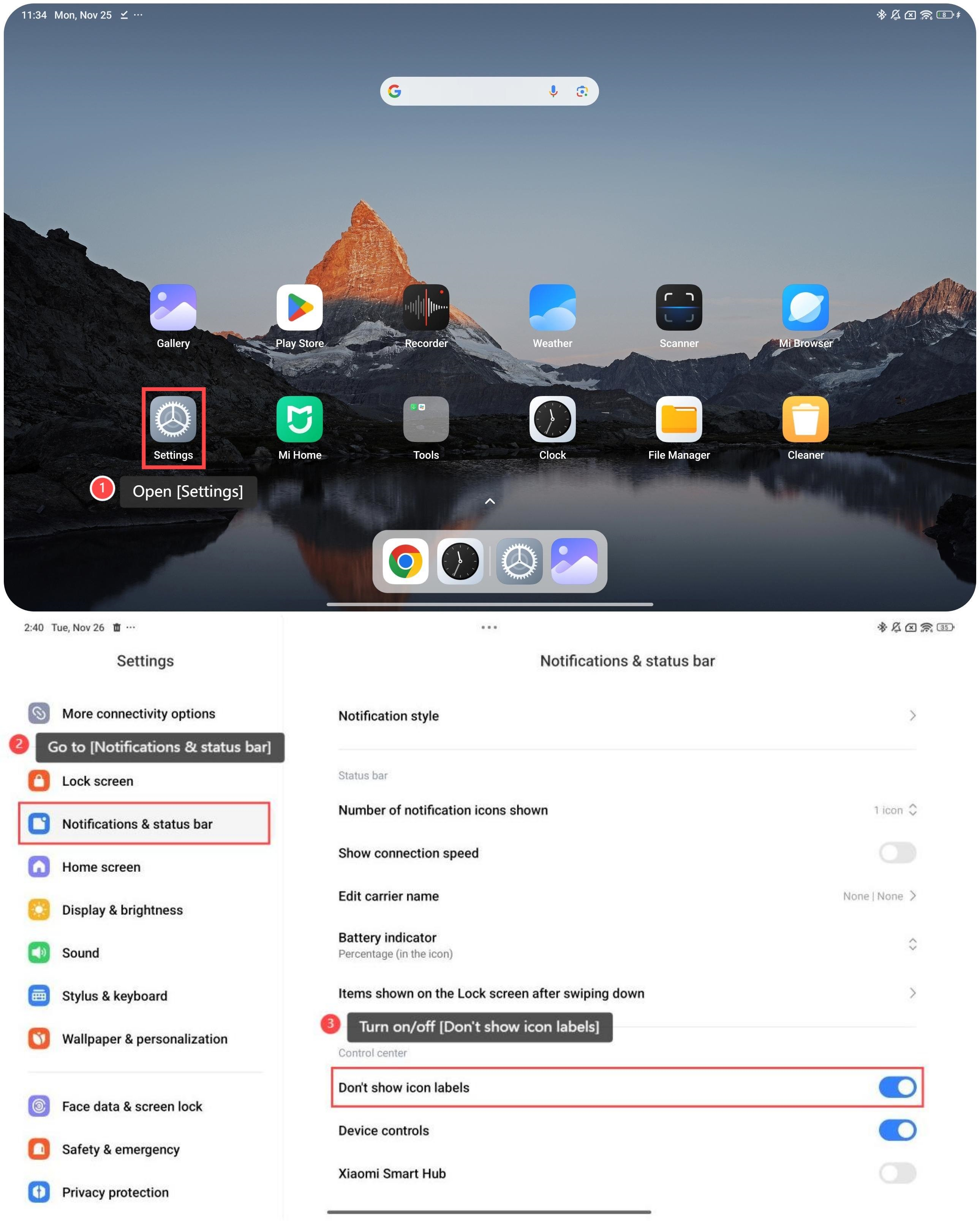
To turn on/off the icon labels on the control center, please refer to the following steps:
1. Open [Settings];
2. Go to [Notifications & status bar];
3. Turn on/off [Don’t show icon labels].
To turn on/off the icon labels on the control center, please refer to the following steps:
1. Open [Settings];
2. Go to [Notifications & status bar];
3. Turn on/off [Don’t show icon labels].
Friendly tips:
If you have visual impairments or are not familiar with the icons, it is suggested that you turn on the icon labels.
If you have visual impairments or are not familiar with the icons, it is suggested that you turn on the icon labels.
Does it help?
Yes
No