

How to adjust the battery indicator type on the Redmi Pad Pro?
The battery indicator on the Redmi Pad Pro allows you to see your tablet’s remaining charge level and the charging status at a glance. You can adjust the battery indicator type as you prefer. Besides the battery indicator will show various colors and symbols to convey important information. Such as if the battery is low, the battery icon turns red. By providing this real-time feedback, the battery indicator helps you decide when to charge your tablet and you can plan your use of the tablet accordingly.
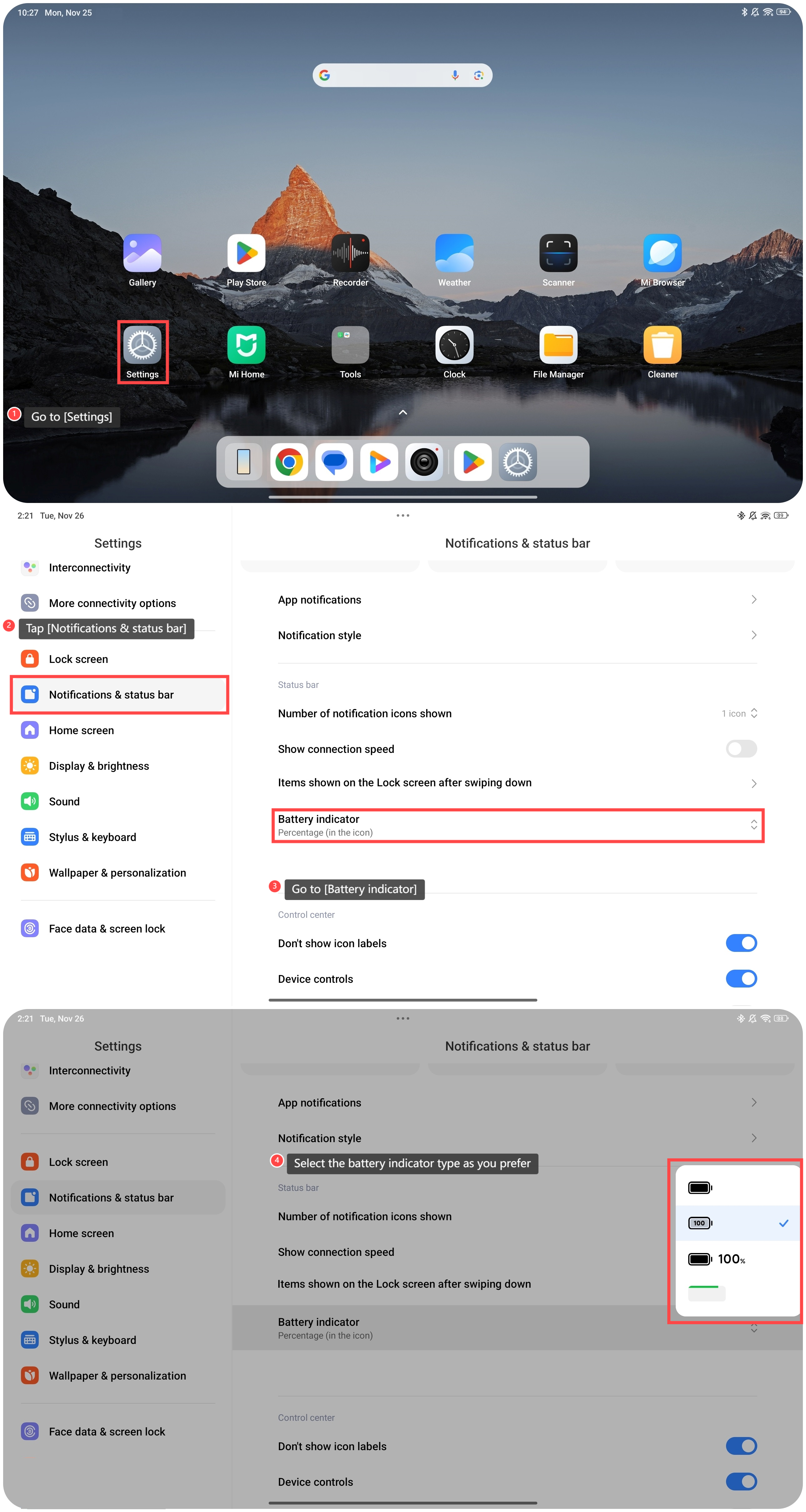
To adjust the battery indicator type on the Redmi Pad Pro, please refer to the following steps:
1. Go to [Settings];
2. Tap [Notifications & status bar];
3. Go to [Battery indicator];
4. Select the battery indicator type as you prefer.
To adjust the battery indicator type on the Redmi Pad Pro, please refer to the following steps:
1. Go to [Settings];
2. Tap [Notifications & status bar];
3. Go to [Battery indicator];
4. Select the battery indicator type as you prefer.
Does it help?
Yes
No