

How to manage the number of notification icons shown on the Redmi Pad Pro?
Setting the number of notification icons shown on the Redmi Pad Pro helps the status bar be cleaner and more organized. And it allows you to focus on the most important notifications that you want to see. Fewer notifications can make the interface less cluttered and more intuitive, making your interaction with your device smoother and more enjoyable.
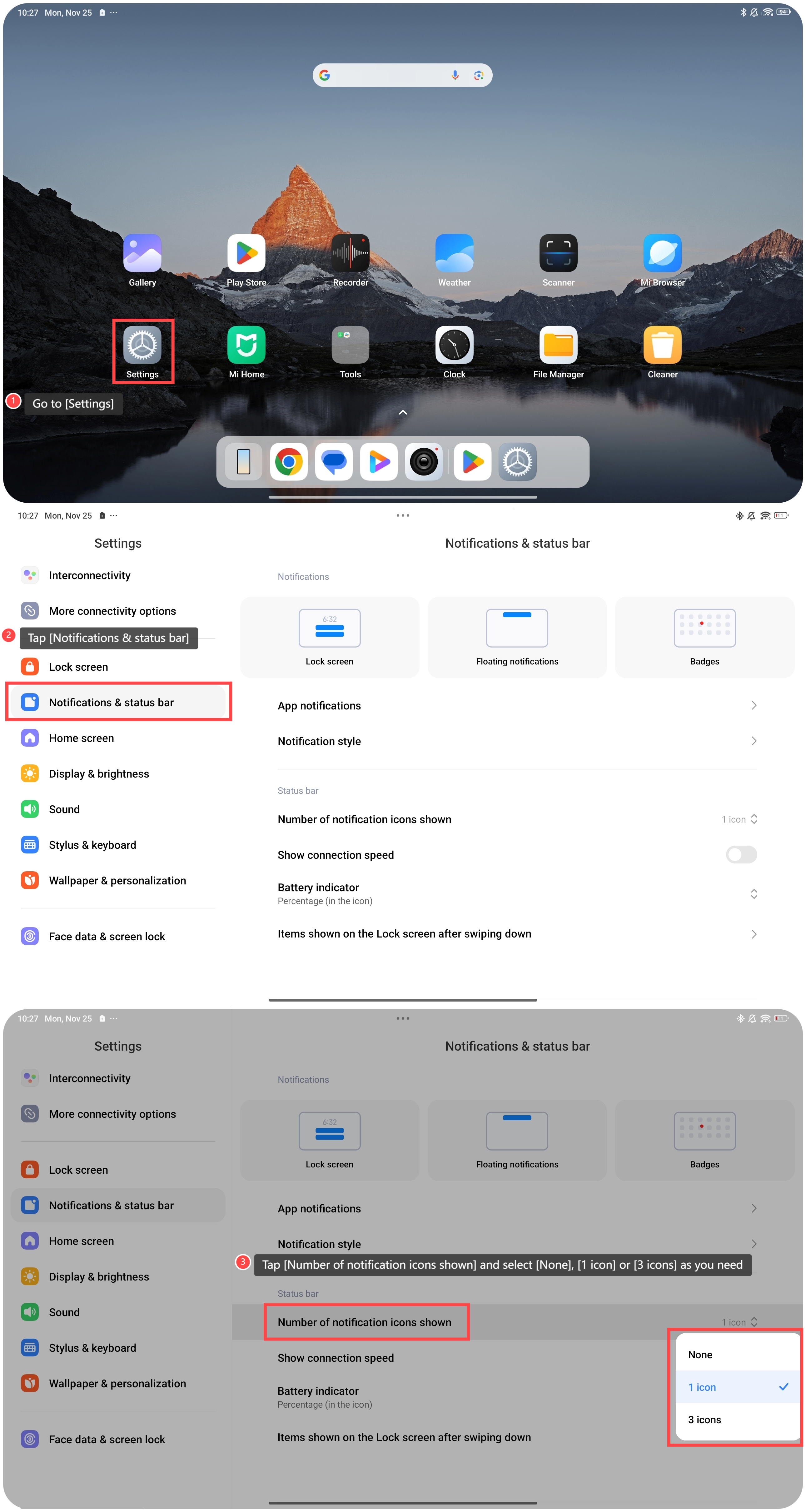
To manage the number of notification icons shown on the tablet, please refer to the following steps:
1. Go to [Settings];
2. Tap [Notifications & status bar];
3. Tap [Number of notification icons shown] and select [None], [1 icon] or [3 icons] as you need.
To manage the number of notification icons shown on the tablet, please refer to the following steps:
1. Go to [Settings];
2. Tap [Notifications & status bar];
3. Tap [Number of notification icons shown] and select [None], [1 icon] or [3 icons] as you need.
Friendly tips:
After the settings are completed, you can check the status bar to see if the number of notification icons shown matches your selection.
After the settings are completed, you can check the status bar to see if the number of notification icons shown matches your selection.
Does it help?
Yes
No