

How to manage notification shade style on the Redmi Pad Pro?
Managing notification shade style on the Redmi Pad Pro allows you to adjust the notification shade to match your preferences, modifying the position and design of notifications. Keeping notifications and settings well-organized helps you prioritize tasks and avoid missing important alerts.
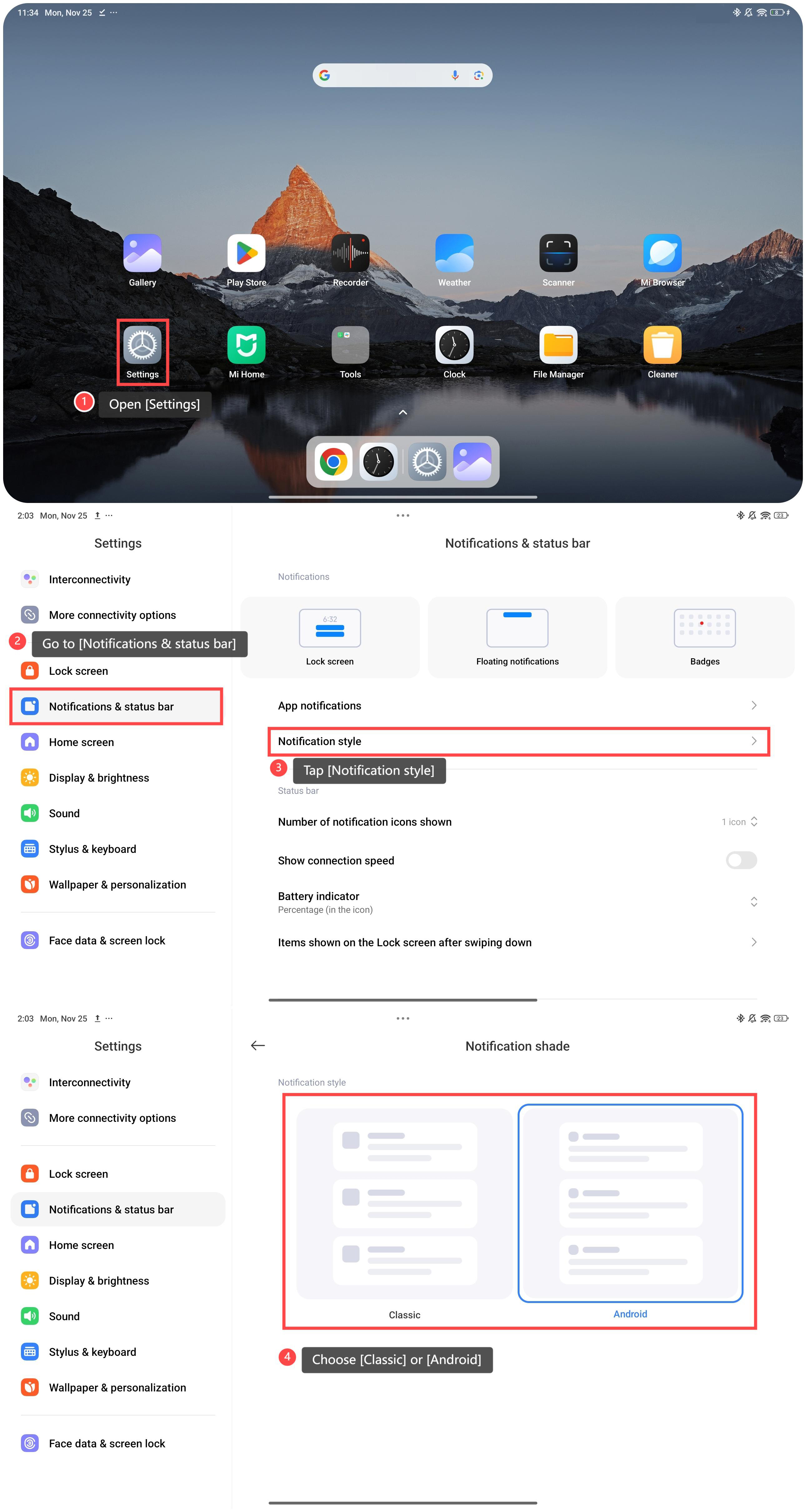
To manage notification shade style, please refer to the following steps:
1. Open [Settings];
2. Go to [Notifications & status bar];
3. Tap [Notification style];
4. You will see there are two notification styles, and you can select [Classic] or [Android] as you prefer.
To manage notification shade style, please refer to the following steps:
1. Open [Settings];
2. Go to [Notifications & status bar];
3. Tap [Notification style];
4. You will see there are two notification styles, and you can select [Classic] or [Android] as you prefer.
Friendly tips:
1. You can adjust the shade style to match your tablet's wallpaper or theme for a cohesive look;
2. Please select the Classic style if you prefer simplicity and accessing everything in one place.
1. You can adjust the shade style to match your tablet's wallpaper or theme for a cohesive look;
2. Please select the Classic style if you prefer simplicity and accessing everything in one place.
Does it help?
Yes
No