

How to check which Bluetooth device has been blocked on the Redmi Pad Pro?
The Redmi Pad Pro supports blocking Bluetooth devices, which can prevent unauthorized access and protect sensitive data. Fewer active connections can bring better overall performance and stability for your Bluetooth functions. Blocking Bluetooth devices can also ensure that only trusted devices can connect, improving overall performance and reducing interference.
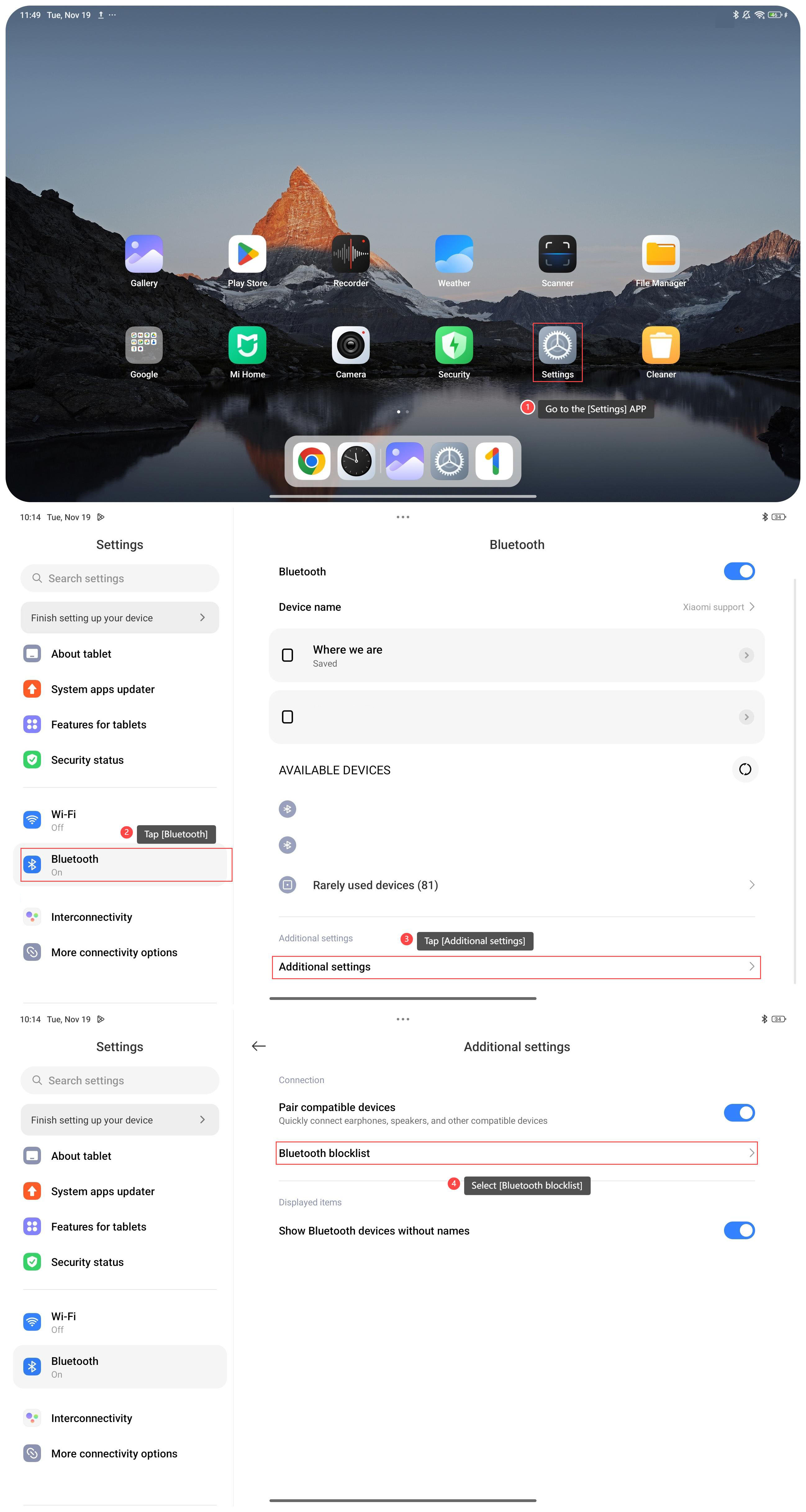
To check which Bluetooth device has been blocked on your device, please refer to the following steps:
1. Go to the [Settings] APP on your tablet;
2. Tap [Bluetooth];
3. Swipe down to find and tap [Additional settings];
4. Select [Bluetooth blocklist] to check the blocked Bluetooth devices.
To check which Bluetooth device has been blocked on your device, please refer to the following steps:
1. Go to the [Settings] APP on your tablet;
2. Tap [Bluetooth];
3. Swipe down to find and tap [Additional settings];
4. Select [Bluetooth blocklist] to check the blocked Bluetooth devices.
Does it help?
Yes
No