

How to edit the Redmi Pad Pro wallpaper by pressing and holding the lock screen?
The Redmi Pad Pro allows you to change the wallpaper by pressing and holding the lock screen. This helps you customize the wallpaper directly without navigating through the settings menu, saving time and effort. Additionally, this makes you instantly see how the new wallpaper will appear on the lock screen before finalizing your choice.
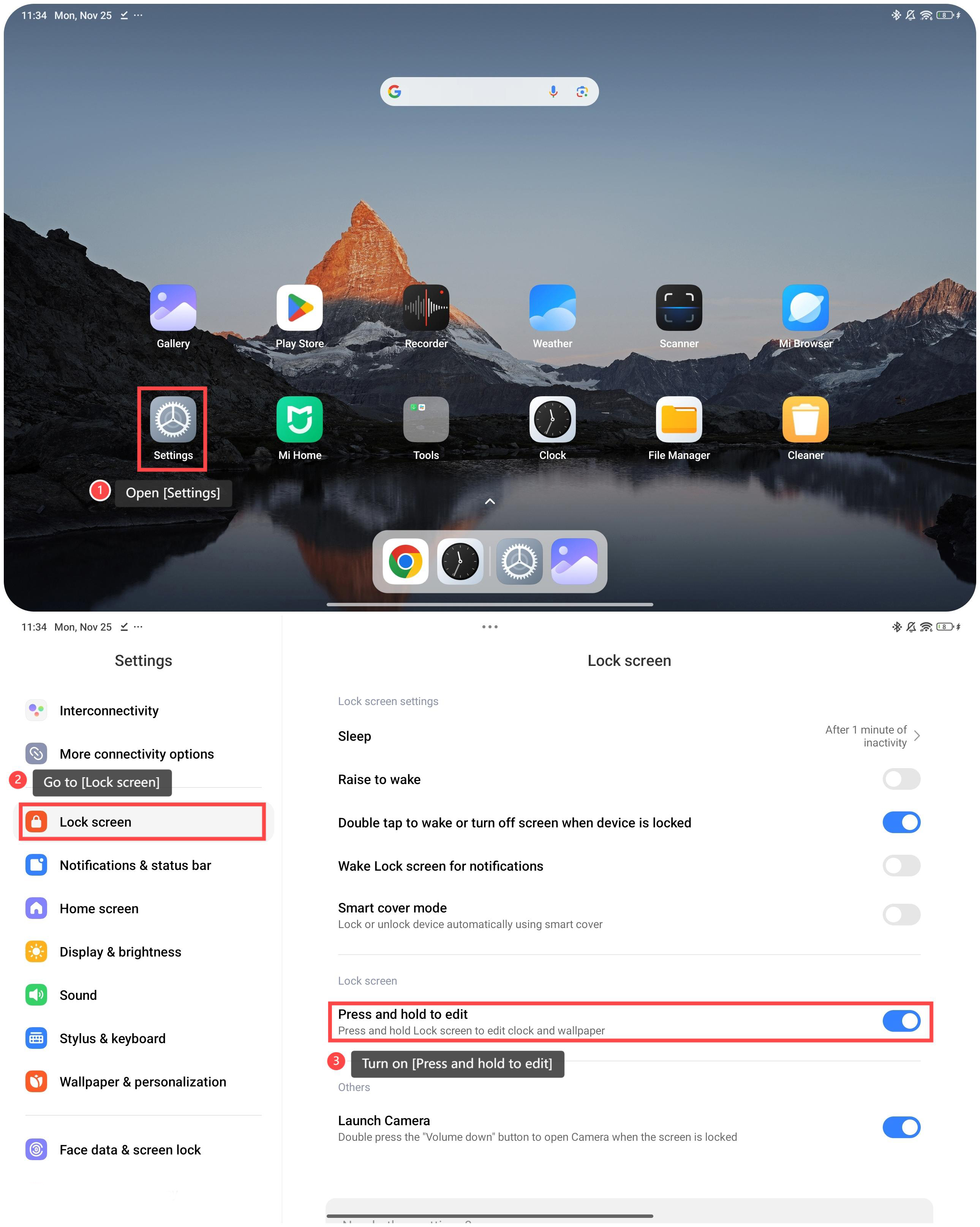
To edit the wallpaper by pressing and holding the lock screen, please refer to the following steps:
1. Open [Settings];
2. Go to [Lock screen];
3. Turn on [Press and hold to edit].
To edit the wallpaper by pressing and holding the lock screen, please refer to the following steps:
1. Open [Settings];
2. Go to [Lock screen];
3. Turn on [Press and hold to edit].
Friendly tips:
1. You can download the images from the internet to set the wallpaper, or choose the wallpaper that comes with the device;
2. When setting the wallpaper, you can cut the image size.
1. You can download the images from the internet to set the wallpaper, or choose the wallpaper that comes with the device;
2. When setting the wallpaper, you can cut the image size.
Does it help?
Yes
No