

How to set the sleep time on the Redmi Pad Pro?
The sleep time on the Redmi Pad Pro allows you to customize the duration before the screen turns off after inactivity. This helps consistently lower power usage during sleep hours and minimizes battery stress, improving its overall longevity. It also automatically locks the screen after the set sleep time, protecting your data from unauthorized access if the device is left unattended.
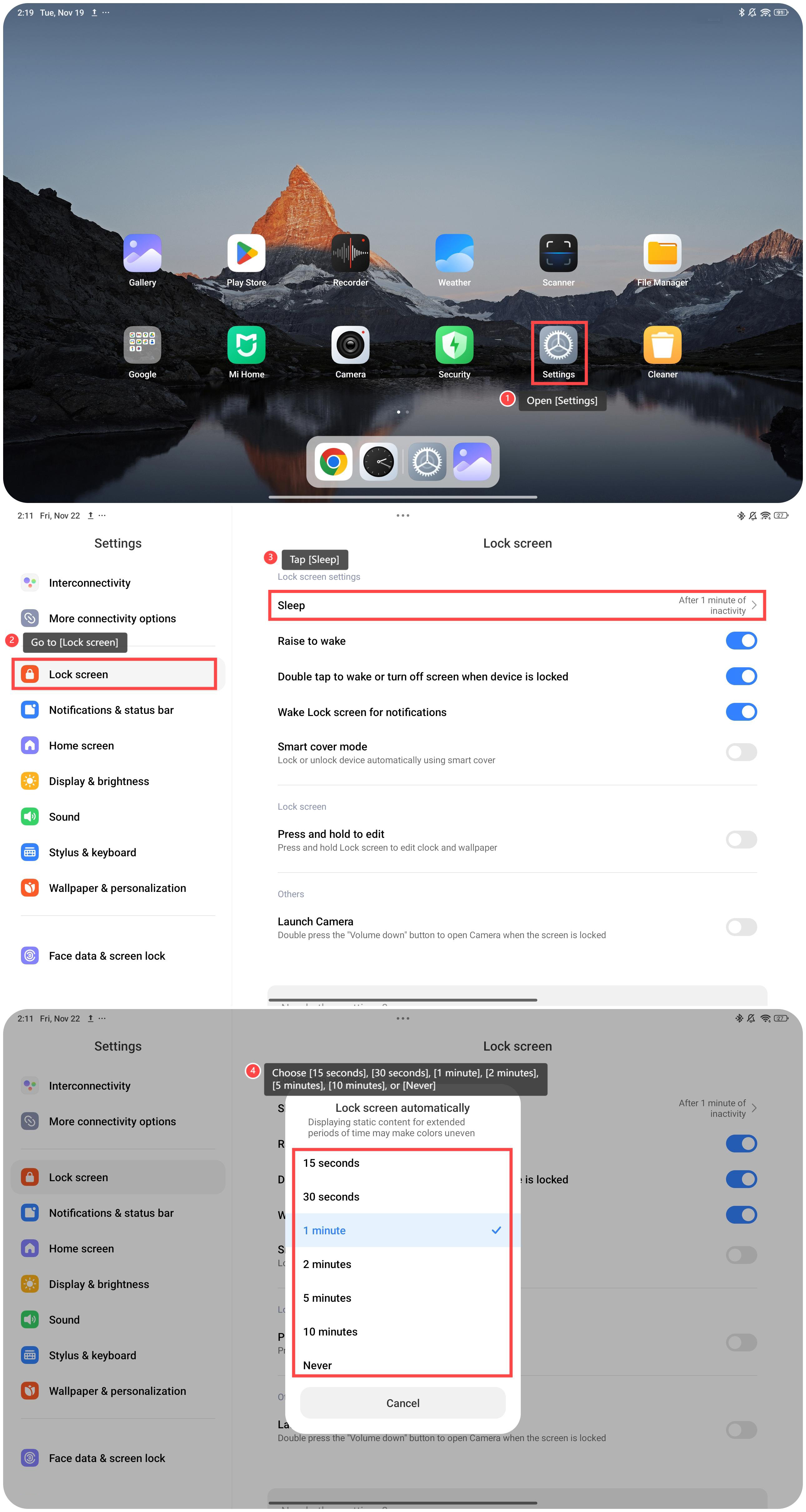
To set the sleep time, please refer to the following steps:
1. Open [Settings];
2. Go to [Lock screen];
3. Tap [Sleep];
4. You can choose the specific time as your preference, including [15 seconds], [30 seconds], [1 minute], [2 minutes], [5 minutes], [10 minutes], or [Never].
To set the sleep time, please refer to the following steps:
1. Open [Settings];
2. Go to [Lock screen];
3. Tap [Sleep];
4. You can choose the specific time as your preference, including [15 seconds], [30 seconds], [1 minute], [2 minutes], [5 minutes], [10 minutes], or [Never].
Friendly tips:
Temporary data and cache are minimized during inactivity, which can improve system speed and responsiveness.
Temporary data and cache are minimized during inactivity, which can improve system speed and responsiveness.
Does it help?
Yes
No