

How to set the default SIM card for mobile data on the Redmi Pad Pro 5G?
The Redmi Pad Pro 5G allows you to set a default SIM card for mobile data, offering greater control over data usage and helping to avoid unintentional consumption on the non-preferred SIM. This feature is especially useful for managing plans on dual-SIM devices, where one SIM can have a more favorable data package.
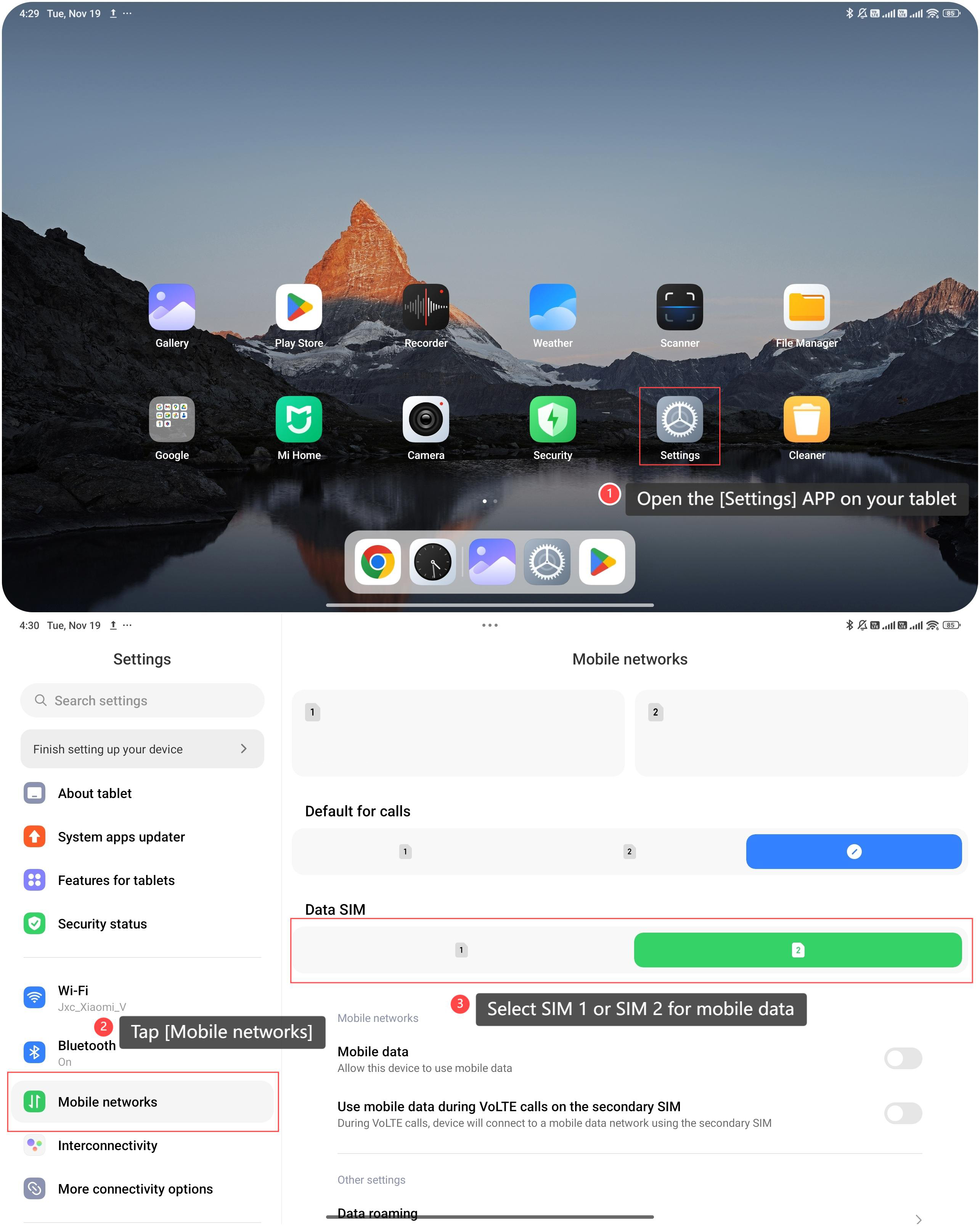
To set the default SIM for mobile data, please refer to the following steps:
1. Open the [Settings] APP on your tablet;
2. Tap [Mobile networks];
3. Select SIM 1 or SIM 2 for mobile data.
To set the default SIM for mobile data, please refer to the following steps:
1. Open the [Settings] APP on your tablet;
2. Tap [Mobile networks];
3. Select SIM 1 or SIM 2 for mobile data.
Note:
Ensure that the selected SIM card has sufficient data allowance to avoid additional charges due to insufficient data.
Ensure that the selected SIM card has sufficient data allowance to avoid additional charges due to insufficient data.
Does it help?
Yes
No