

What to do if the distance error of outdoor workouts is large or there is no track after the exercise with the Xiaomi Smart Band 9 Active?
Since the band does not have an independent positioning function, the positioning information and trajectory data all come from the mobile phone, so this type of outdoor workout requires turning on the mobile phone positioning information and connecting to the mobile phone.
The method to turn on the mobile phone positioning information is as follows:
1. Before using the band for outdoor workouts, Android phones should set the location permission of the Mi Fitness APP to [Always] or [While using the app] and turn on [Background permissions] on the APP device interface. Otherwise, there will be no movement track after the exercise and the distance will be inaccurate. When the location permission is set to [While using the app] or the Mi Fitness APP is in the background, the outdoor exercise distance will have a large error or there will be no track after the exercise;
2. Before using the band for outdoor workouts, iOS phones should set the location permission of the Mi Fitness APP to [Always] and go to [Settings] >> [Mi Fitness] >> turn on [Background App Refresh]. Otherwise, there will be no exercise track after the exercise and the distance will be inaccurate;
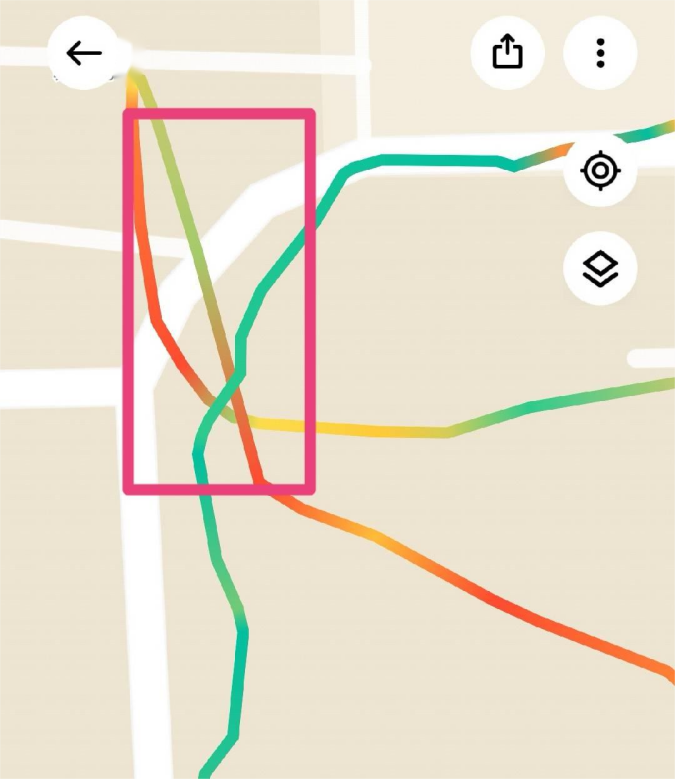
3. When the positioning information of the mobile phone is turned on normally and the track is displayed in the exercise record of the Mi Fitness APP, however, the distance still deviates, you can zoom in on the track of the exercise record to see if there is a long straight line in the exercise track. This phenomenon is caused by obstructions around, resulting in deviations in the positioning information of the mobile phone, which in turn causes deviations in the distance calculation of the band. As shown in the figure, similar scenarios will lead to inaccurate exercise distance calculation.
The method to turn on the mobile phone positioning information is as follows:
1. Before using the band for outdoor workouts, Android phones should set the location permission of the Mi Fitness APP to [Always] or [While using the app] and turn on [Background permissions] on the APP device interface. Otherwise, there will be no movement track after the exercise and the distance will be inaccurate. When the location permission is set to [While using the app] or the Mi Fitness APP is in the background, the outdoor exercise distance will have a large error or there will be no track after the exercise;
2. Before using the band for outdoor workouts, iOS phones should set the location permission of the Mi Fitness APP to [Always] and go to [Settings] >> [Mi Fitness] >> turn on [Background App Refresh]. Otherwise, there will be no exercise track after the exercise and the distance will be inaccurate;
3. When the positioning information of the mobile phone is turned on normally and the track is displayed in the exercise record of the Mi Fitness APP, however, the distance still deviates, you can zoom in on the track of the exercise record to see if there is a long straight line in the exercise track. This phenomenon is caused by obstructions around, resulting in deviations in the positioning information of the mobile phone, which in turn causes deviations in the distance calculation of the band. As shown in the figure, similar scenarios will lead to inaccurate exercise distance calculation.
Does it help?
Yes
No