

How to modify the Wi-Fi network on the Redmi Pad Pro?
The Redmi Pad Pro supports modifying the Wi-Fi network, including Proxy, IP settings, Privacy, and password. Modifying the Wi-Fi network can enhance security and reduce the risk of unauthorized access by setting up restrictions, which will promote a more stable and faster connection. Besides, it allows you to manage connected Wi-Fi networks more effectively.
To modify the Wi-Fi network on your tablet, please refer to the following steps:
1. Open the [Settings] APP on your device. You can find the gear icon on your home screen or in your APP drawer;
2. Navigate to [Wi-Fi] and tap it;
3. Tap the arrow icon on the Wi-Fi network that you connect;
4. Swipe down and modify this network according to your needs;
5. Tap [√] to confirm.
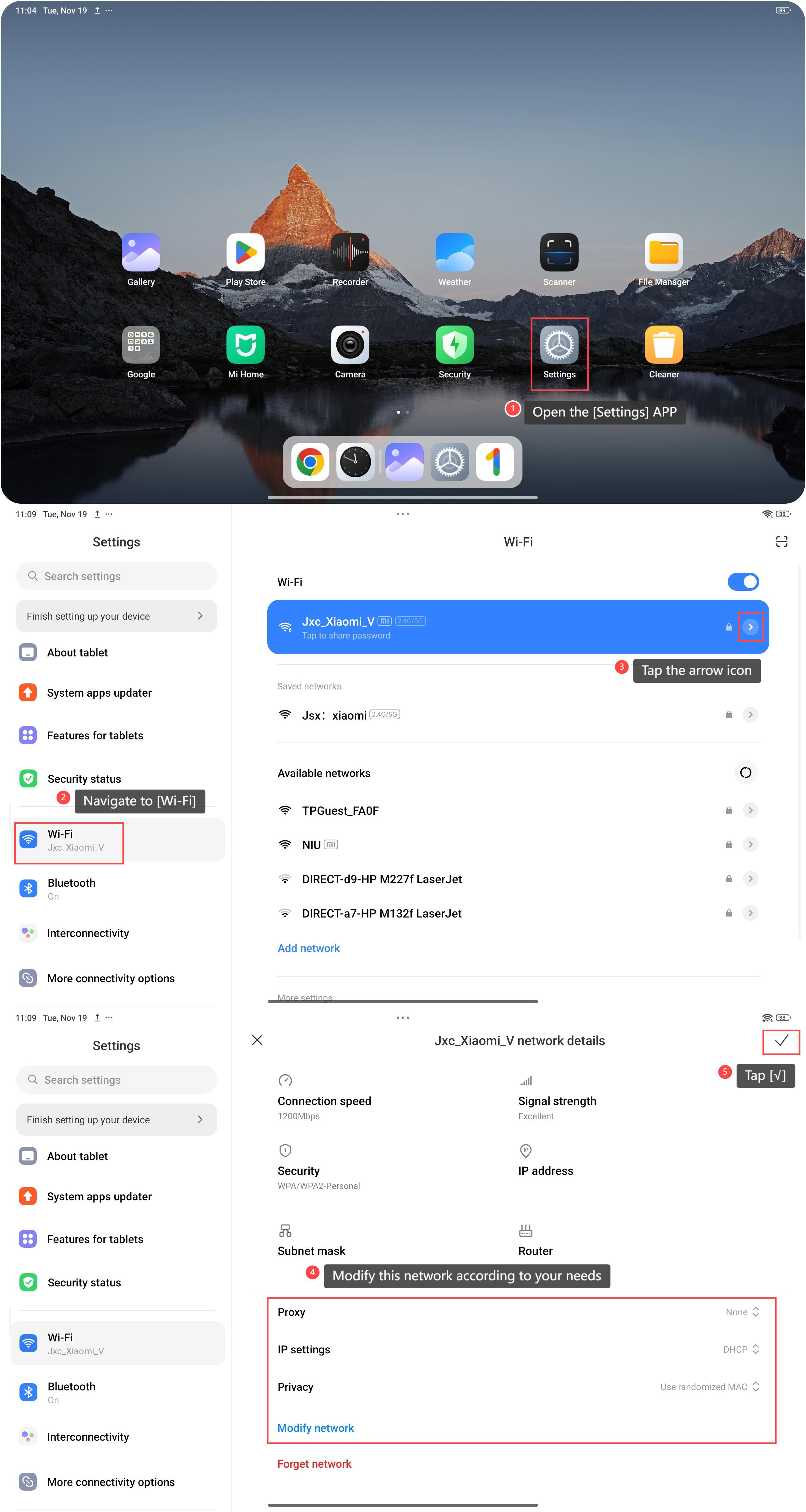
To modify the Wi-Fi network on your tablet, please refer to the following steps:
1. Open the [Settings] APP on your device. You can find the gear icon on your home screen or in your APP drawer;
2. Navigate to [Wi-Fi] and tap it;
3. Tap the arrow icon on the Wi-Fi network that you connect;
4. Swipe down and modify this network according to your needs;
5. Tap [√] to confirm.
Does it help?
Yes
No