

How to view sleep records monitored by the Xiaomi Smart Band 9 Active?
You can view the main sleep records of the day on the band. After the band is connected to the phone to synchronize data, you can also view historical sleep data in the Mi Fitness APP.
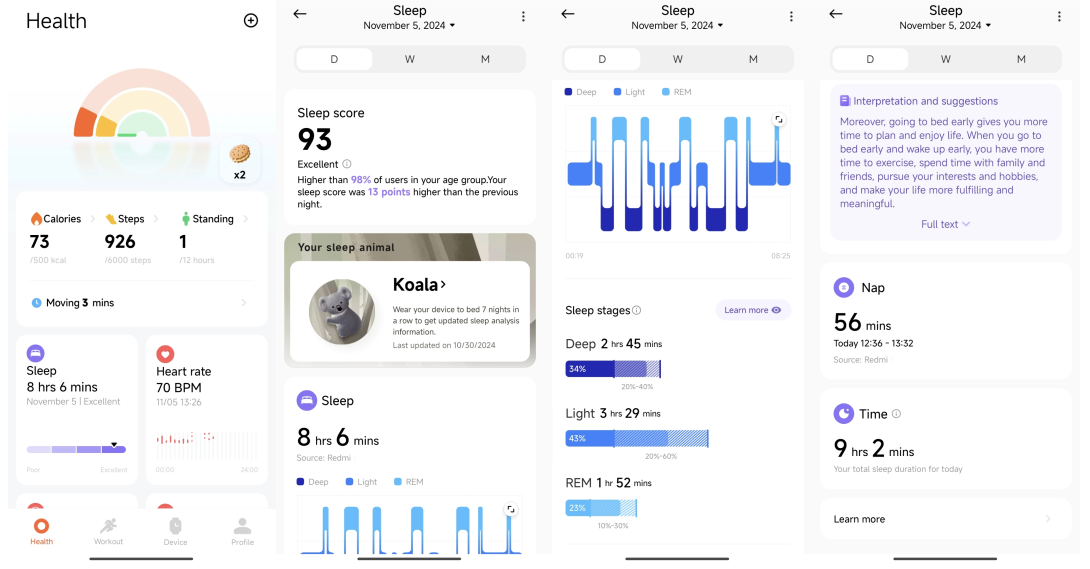
To view sleep records in the APP, please refer to the following steps:
1. Open the Mi Fitness APP;
2. Tap [Sleep] on the home interface;
3. Here you can view the historical sleep data, including day, week, month, and year;
4. You can view sleep distribution, including total sleep time, wake time, light sleep time, and deep sleep time;
5. You can also view the sleep status at each time point during the daily sleep period. Rapid eye movement (REM) state needs to be turned on for auxiliary sleep monitoring to be recorded.
Note:
If the band is in a relatively quiet state and there are movements similar to sleeping, the sensor will judge it as sleeping, resulting in errors in the sleeping time.
To view sleep records in the APP, please refer to the following steps:
1. Open the Mi Fitness APP;
2. Tap [Sleep] on the home interface;
3. Here you can view the historical sleep data, including day, week, month, and year;
4. You can view sleep distribution, including total sleep time, wake time, light sleep time, and deep sleep time;
5. You can also view the sleep status at each time point during the daily sleep period. Rapid eye movement (REM) state needs to be turned on for auxiliary sleep monitoring to be recorded.
Note:
If the band is in a relatively quiet state and there are movements similar to sleeping, the sensor will judge it as sleeping, resulting in errors in the sleeping time.
Does it help?
Yes
No