

How to perform Factory reset on the Redmi Pad Pro?
The factory reset is a process that restores the Redmi Pad Pro to its original factory settings. This means that all data, settings, APPs, and personal information stored on your tablet will be erased.
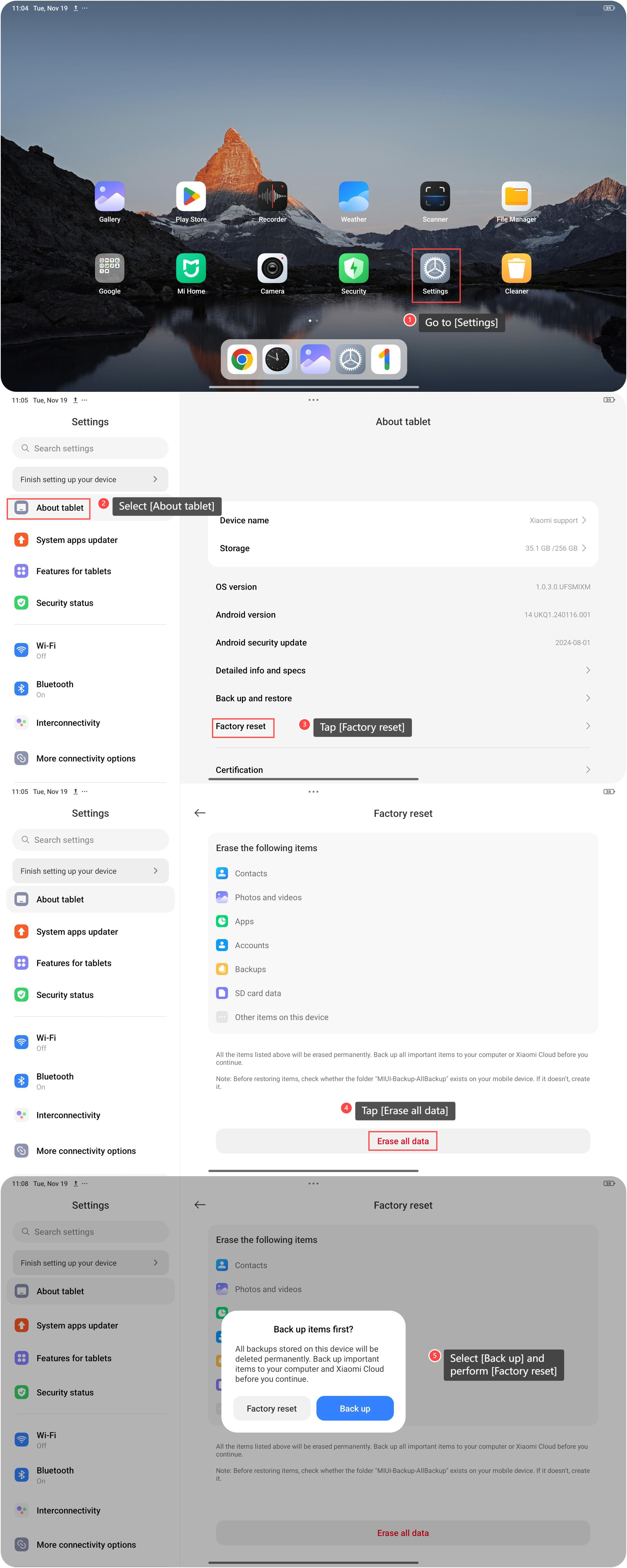
To perform Factory reset on your tablet, please refer to the following steps:
1. Go to [Settings];
2. Select [About tablet];
3. Tap [Factory reset];
4. Scroll down and tap [Erase all data];
5. Select [Back up] or not as your preference and perform [Factory reset].
Note:
1. Performing a factory reset will erase all data on your tablet. Make sure to back up any important data before proceeding with the reset;
2. Performing a factory reset does not affect the operating system version of your tablet.
To perform Factory reset on your tablet, please refer to the following steps:
1. Go to [Settings];
2. Select [About tablet];
3. Tap [Factory reset];
4. Scroll down and tap [Erase all data];
5. Select [Back up] or not as your preference and perform [Factory reset].
Note:
1. Performing a factory reset will erase all data on your tablet. Make sure to back up any important data before proceeding with the reset;
2. Performing a factory reset does not affect the operating system version of your tablet.
Does it help?
Yes
No