

What to do if the Xiaomi Smart Band 9 Active cannot access music?
Please refer to the following troubleshooting steps:
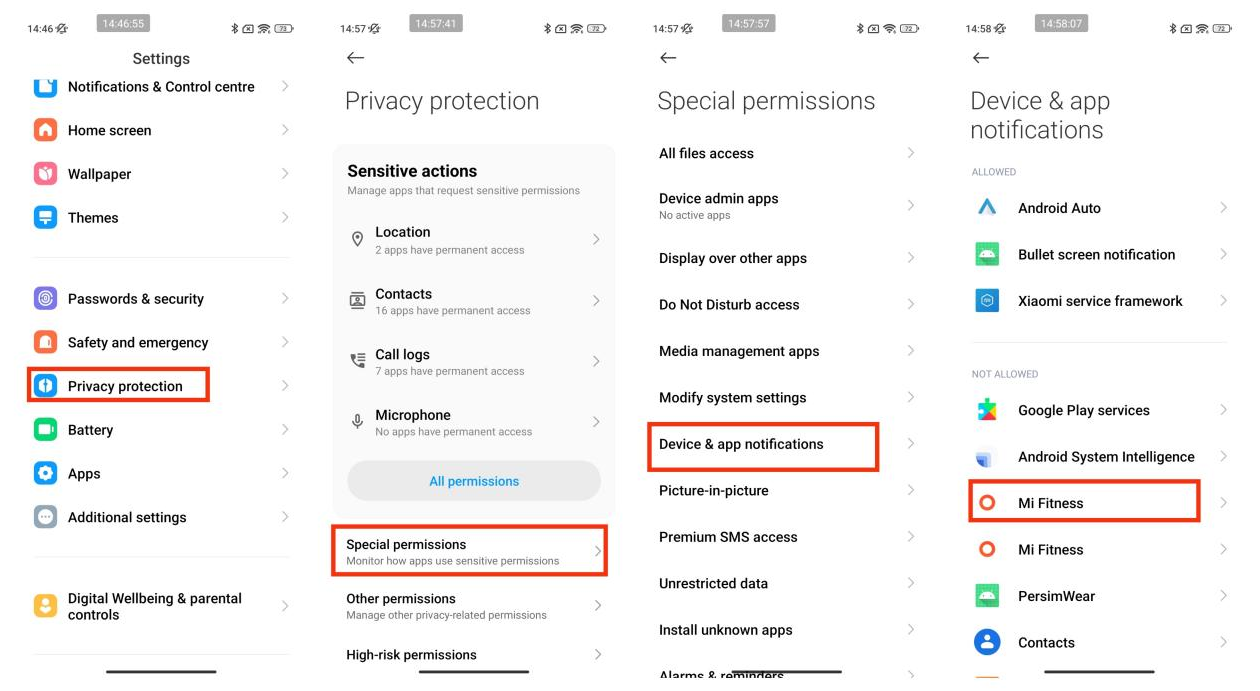
1. Check whether the Mi Fitness APP has obtained the access to use notifications and whether the APP's notification permissions are enabled. Check whether the APP has correctly enabled the permission to read notifications. If it is the latest Xiaomi phone system, you need to enable permissions: [Settings] >> [Privacy protection] >> [Special permissions] >> [Device & app notifications] >> select [Mi Fitness], try to close it and reopen it;
2. Check whether the music player on your phone is opened and whether the band is connected to the Mi Fitness APP;
3. If a certain music player cannot be controlled, however, other players in the phone can, it is recommended to uninstall and reinstall the player and try again. Currently, most music players on the market are supported. However, due to the openness of the music player and the difference in the APP version, the experience of the band music control function will be affected to a certain extent.
1. Check whether the Mi Fitness APP has obtained the access to use notifications and whether the APP's notification permissions are enabled. Check whether the APP has correctly enabled the permission to read notifications. If it is the latest Xiaomi phone system, you need to enable permissions: [Settings] >> [Privacy protection] >> [Special permissions] >> [Device & app notifications] >> select [Mi Fitness], try to close it and reopen it;
2. Check whether the music player on your phone is opened and whether the band is connected to the Mi Fitness APP;
3. If a certain music player cannot be controlled, however, other players in the phone can, it is recommended to uninstall and reinstall the player and try again. Currently, most music players on the market are supported. However, due to the openness of the music player and the difference in the APP version, the experience of the band music control function will be affected to a certain extent.
Does it help?
Yes
No