

Why can’t the Mi Fitness APP on iOS phones sync data of the Xiaomi Smart Band 9 Active with the iPhone’s Health APP?
Please follow the steps below to troubleshoot:
1. Please open the iPhone’s Health APP authorization in the Mi Fitness APP: [Profile] >> [Third-party data] >> [Health] and check the data items that need to be synchronized;
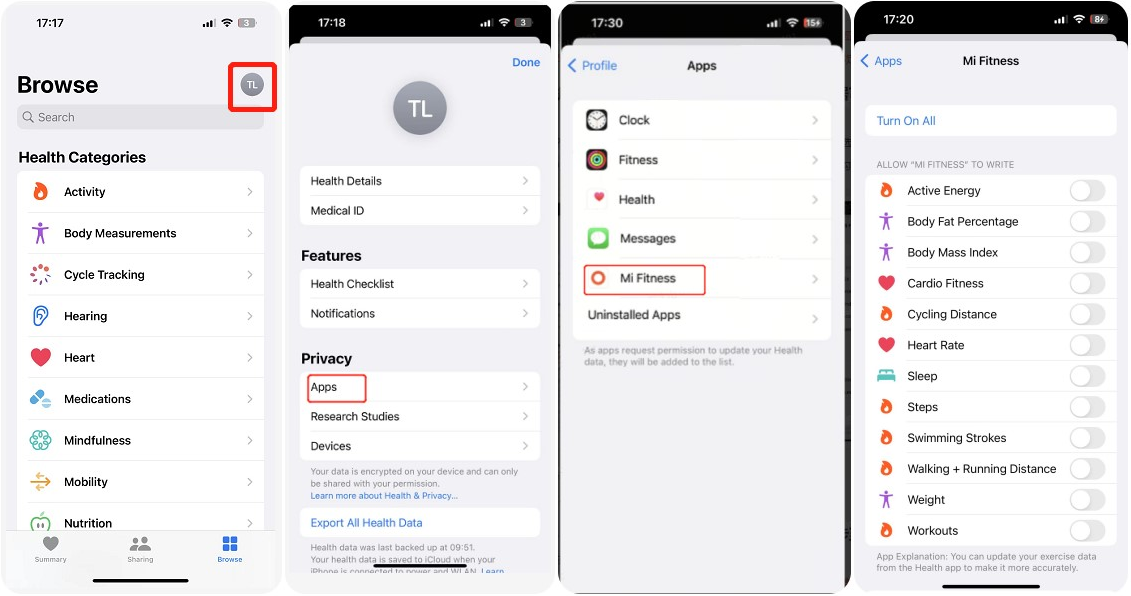
2. In the iPhone’s Health APP, tap [Browse] >> tap the small circle in the upper right corner >> [Privacy] >> [Apps] >> [Mi Fitness], and check the data items you want to synchronize;
3. After syncing the data, wait for a while for it to be displayed in the iPhone’s Health APP;
4. If it still can’t be displayed, please submit the log in the Mi Fitness APP so that the written data can be analyzed.
1. Please open the iPhone’s Health APP authorization in the Mi Fitness APP: [Profile] >> [Third-party data] >> [Health] and check the data items that need to be synchronized;
2. In the iPhone’s Health APP, tap [Browse] >> tap the small circle in the upper right corner >> [Privacy] >> [Apps] >> [Mi Fitness], and check the data items you want to synchronize;
3. After syncing the data, wait for a while for it to be displayed in the iPhone’s Health APP;
4. If it still can’t be displayed, please submit the log in the Mi Fitness APP so that the written data can be analyzed.
Does it help?
Yes
No