

How to check the model of the Redmi Pad Pro 5G?
The product model number for the Redmi Pad Pro 5G is a unique identifier used to differentiate between various versions or configurations of the product. It is crucial for checking technical specifications and software updates.
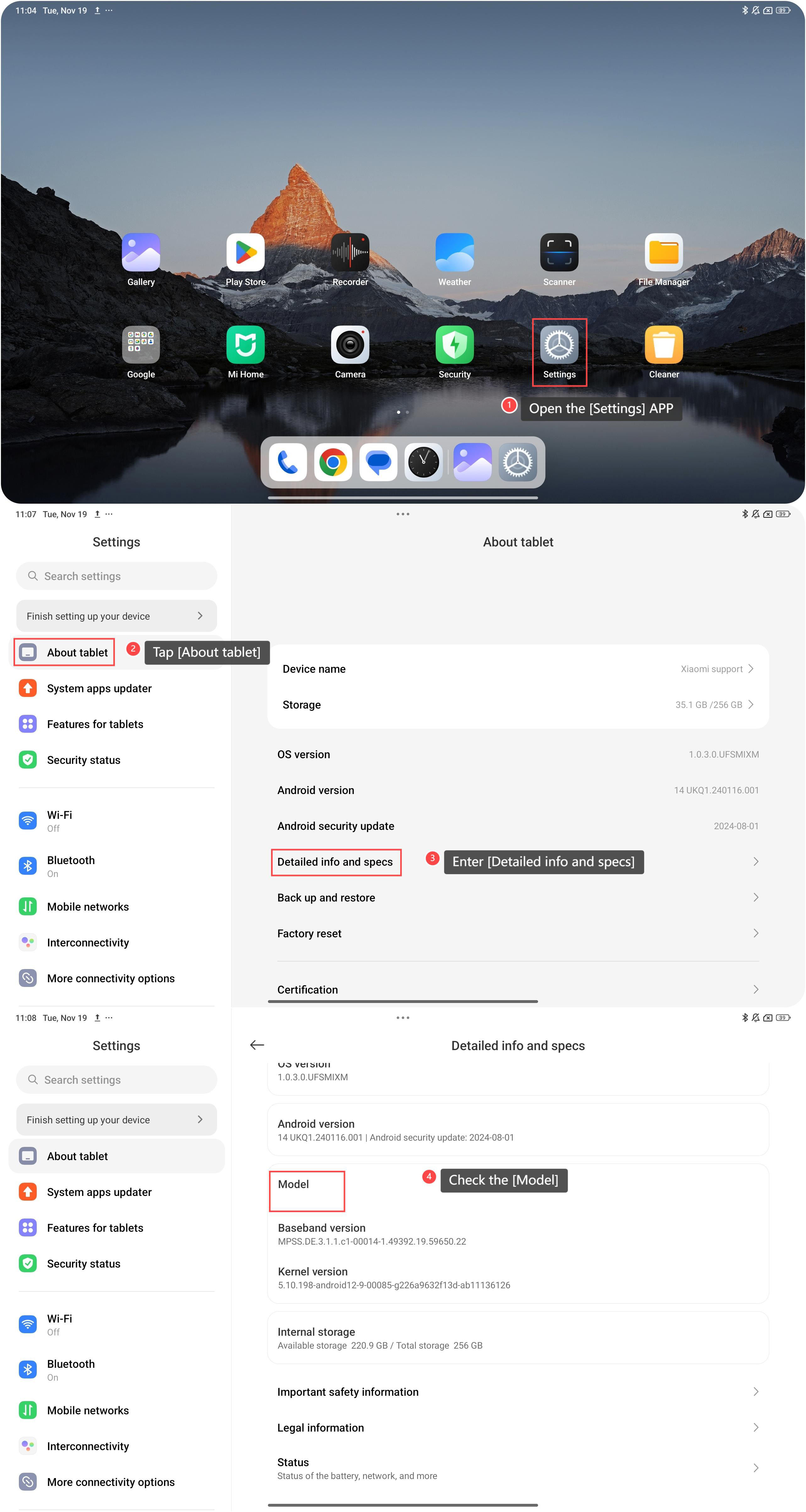
To check the model of your tablet, please refer to the following steps:
1. Open the [Settings] APP on your device. You can find the gear icon on your home screen or in your APP drawer;
2. Tap [About tablet];
3. Enter [Detailed info and specs];
4. Scroll down and you can check the [Model] of your tablet.
Note:
1. Knowing the exact model number helps avoid incorrect purchases and ensures better after-sales service;
2. Model information helps confirm the specific type of device and ensures compatibility with the correct accessories and services.
To check the model of your tablet, please refer to the following steps:
1. Open the [Settings] APP on your device. You can find the gear icon on your home screen or in your APP drawer;
2. Tap [About tablet];
3. Enter [Detailed info and specs];
4. Scroll down and you can check the [Model] of your tablet.
Note:
1. Knowing the exact model number helps avoid incorrect purchases and ensures better after-sales service;
2. Model information helps confirm the specific type of device and ensures compatibility with the correct accessories and services.
Does it help?
Yes
No