

How to enable the Do Not Disturb synchronization of the Xiaomi Smart Band 9 Active?
The Xiaomi Smart Band 9 Active and the mobile phone can synchronize the Do Not Disturb status with each other in real time. It only appears when the Android phone is paired and connected. When using it, you must turn on the Do Not Disturb permission switch in the Mi Fitness APP.
To enable the Do Not Disturb synchronization of your band, please refer to the following steps:
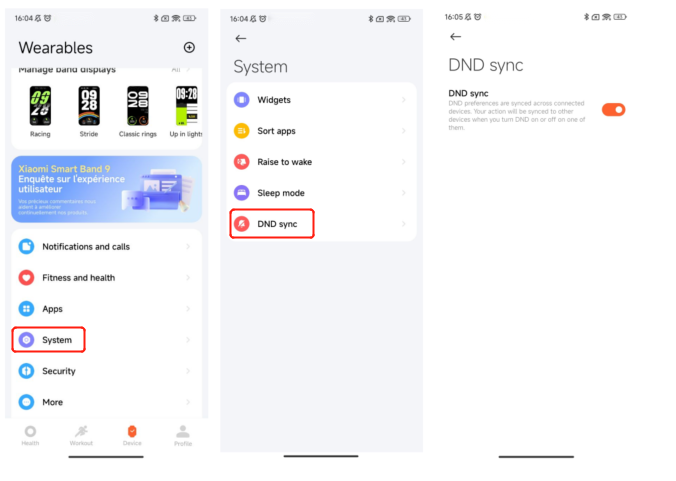
1. After binding the band to your phone, open the Mi Fitness APP;
2. Go to [Device];
3. Select [System];
4. Tap [DND sync] to enable the Do Not Disturb permission;
5. Go to [Settings] on your band;
6. Select [DND settings] and tap [DND];
7. Select [Sync with phone] and the Do Not Disturb mode will take effect on your phone.
To enable the Do Not Disturb synchronization of your band, please refer to the following steps:
1. After binding the band to your phone, open the Mi Fitness APP;
2. Go to [Device];
3. Select [System];
4. Tap [DND sync] to enable the Do Not Disturb permission;
5. Go to [Settings] on your band;
6. Select [DND settings] and tap [DND];
7. Select [Sync with phone] and the Do Not Disturb mode will take effect on your phone.
Does it help?
Yes
No