

How to check data usage on the Redmi Pad Pro 5G?
Data usage on the Redmi Pad Pro 5G refers to the amount of data consumed by your device when connected to the cellular network to browse the Internet, use social media applications, or access online services. Your tablet will track tablet data usage to help you monitor their data consumption.
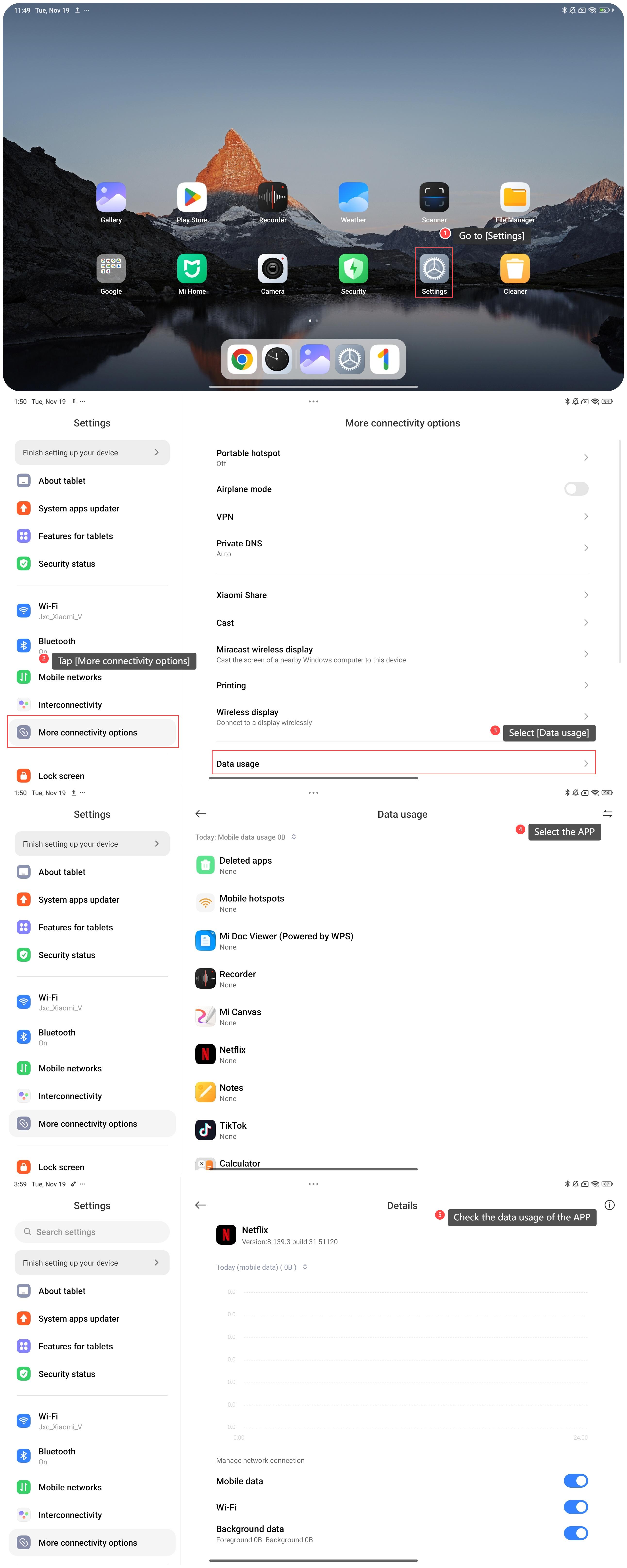
To check data usage on your tablet, please refer to the following steps:
1. Go to [Settings];
2. Tap [More connectivity options];
3. Select [Data usage];
4. Select the APP you want to check;
5. In this interface, you can check the data usage of the APP.
Note:
You can manage network connection, such as mobile data usage, Wi-Fi usage, and background data.
To check data usage on your tablet, please refer to the following steps:
1. Go to [Settings];
2. Tap [More connectivity options];
3. Select [Data usage];
4. Select the APP you want to check;
5. In this interface, you can check the data usage of the APP.
Note:
You can manage network connection, such as mobile data usage, Wi-Fi usage, and background data.
Does it help?
Yes
No