

What to do if three "×" signs appear on the Mi Fitness APP's binding interface when binding the Xiaomi Smart Band 9 Active to iOS phones?
If three "×" signs appear during the binding process, please refer to the following steps to troubleshoot:
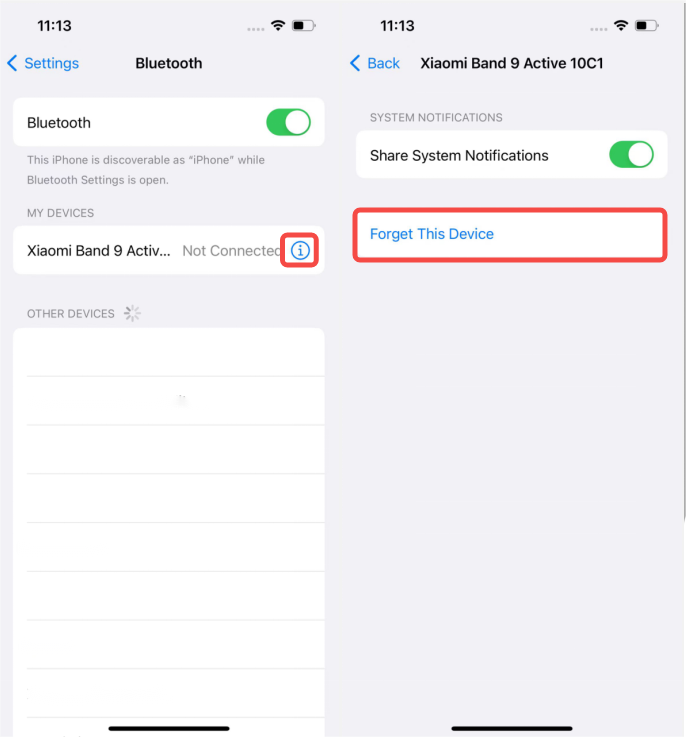
1. Open the Bluetooth settings on your phone and verify whether the band is currently connected to another device. If it is, tap the small circle next to "Connected" and select [Forget This Device] to disconnect it;
2. After disconnecting, turn off Bluetooth on your phone and then turn it back on to refresh the connection;
3. If the issue persists, restart both the Xiaomi Smart Band 9 Active and your phone. Then, try reconnecting the band to your phone via the Mi Fitness APP.
1. Open the Bluetooth settings on your phone and verify whether the band is currently connected to another device. If it is, tap the small circle next to "Connected" and select [Forget This Device] to disconnect it;
2. After disconnecting, turn off Bluetooth on your phone and then turn it back on to refresh the connection;
3. If the issue persists, restart both the Xiaomi Smart Band 9 Active and your phone. Then, try reconnecting the band to your phone via the Mi Fitness APP.
Does it help?
Yes
No