

What to do if the current phone can’t reconnect to the Xiaomi Smart Band 9 Active after logging into the same account on multiple phones?
Please refer to the following steps to troubleshoot the issue:
1. If the current phone cannot reconnect, it is because the old phone has unbound the device and the new phone has not synchronized the account. So it cannot reconnect to this device;
2. Confirm which interface the band screen is displaying. If it is on the QR code interface or language selection interface, unbind the device in the Mi Fitness APP on your phone and scan and pair again;
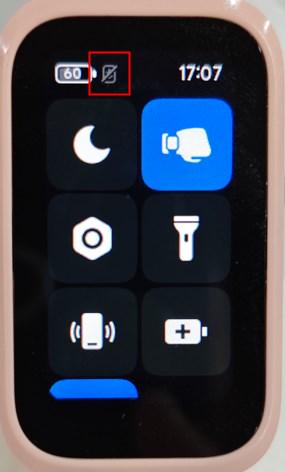
3. Check whether the Bluetooth icon on the band is always on. If so, use [Find phone] to confirm whether it is connected to the current phone. If not, unbind the device on the Mi Fitness APP and rebind the band with the current phone;
4. If there is no such device on the device management interface of the old phone's Mi Fitness APP, it means that the old phone has unbound the device. After logging in to the same account and synchronizing with the new phone, the band will not be displayed. If the band is on the QR code interface or language selection interface, re-scan and pair;
5. Connect the band to two phones with the same Xiaomi Account on the Mi Fitness APP. After the band is restored to factory settings, use the new phone to re-pair it and turn off the Bluetooth of the old phone. If the new phone cannot connect again, the new phone has not automatically pulled the new login and pairing information.
Friendly tips:
1. Please try to avoid logging into multiple mobile phones with one account;
2. If you are unable to reconnect, please turn off the Bluetooth function of other devices that have logged in to the account and try again;
3. Please keep the network in good condition, close the Mi Fitness APP and reopen it to trigger the cloud to resend login and pairing information to ensure that the band can reconnect.
1. If the current phone cannot reconnect, it is because the old phone has unbound the device and the new phone has not synchronized the account. So it cannot reconnect to this device;
2. Confirm which interface the band screen is displaying. If it is on the QR code interface or language selection interface, unbind the device in the Mi Fitness APP on your phone and scan and pair again;
3. Check whether the Bluetooth icon on the band is always on. If so, use [Find phone] to confirm whether it is connected to the current phone. If not, unbind the device on the Mi Fitness APP and rebind the band with the current phone;
4. If there is no such device on the device management interface of the old phone's Mi Fitness APP, it means that the old phone has unbound the device. After logging in to the same account and synchronizing with the new phone, the band will not be displayed. If the band is on the QR code interface or language selection interface, re-scan and pair;
5. Connect the band to two phones with the same Xiaomi Account on the Mi Fitness APP. After the band is restored to factory settings, use the new phone to re-pair it and turn off the Bluetooth of the old phone. If the new phone cannot connect again, the new phone has not automatically pulled the new login and pairing information.
Friendly tips:
1. Please try to avoid logging into multiple mobile phones with one account;
2. If you are unable to reconnect, please turn off the Bluetooth function of other devices that have logged in to the account and try again;
3. Please keep the network in good condition, close the Mi Fitness APP and reopen it to trigger the cloud to resend login and pairing information to ensure that the band can reconnect.
Does it help?
Yes
No