

What to do if the phone prompts that the Xiaomi Smart Band 9 Active has been bound to another account or APP?
When you use the Mi Fitness APP to search for the band, a prompt displays that the device has been bound. A possible situation is that the APP searches for someone else's band instead of yours. During normal binding, when the APP searches for an uninitialized band, the band will vibrate and display a prompt "Confirm on your phone".
Please refer to the following troubleshooting steps:
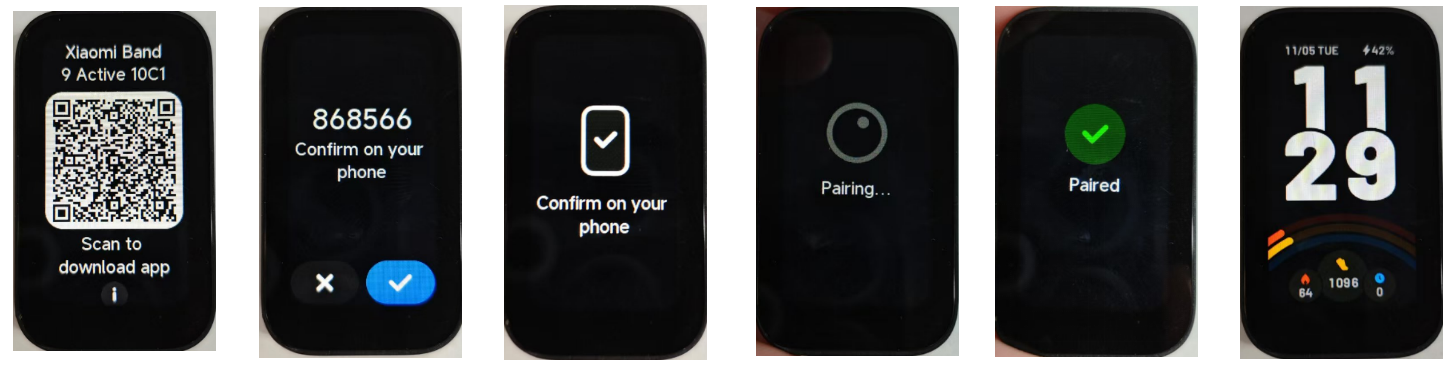
1. If you are using the band for the first time, please check whether the band is in the pending binding state. In the pending binding state, the band interface will prompt "Scan to download app";
2. During the binding process, whether the band vibrates and prompts "Confirm on your phone". If the band does not prompt, the device being connected is not your device. Please check whether there are other band devices around;
3. After the band vibrates normally and prompts, tap the check mark icon to bind. After the binding is successful, the Mi Fitness APP on the phone will show that the connection is successful, and the band will show the band display (as shown below).
Please refer to the following troubleshooting steps:
1. If you are using the band for the first time, please check whether the band is in the pending binding state. In the pending binding state, the band interface will prompt "Scan to download app";
2. During the binding process, whether the band vibrates and prompts "Confirm on your phone". If the band does not prompt, the device being connected is not your device. Please check whether there are other band devices around;
3. After the band vibrates normally and prompts, tap the check mark icon to bind. After the binding is successful, the Mi Fitness APP on the phone will show that the connection is successful, and the band will show the band display (as shown below).
Does it help?
Yes
No