

How to use Dual video on the camera of the Xiaomi 14T Pro?
The Dual Video feature on the Xiaomi 14T Pro allows you to record video simultaneously from both the front and rear cameras. This feature is useful for creating content where you want to capture both the subject (using the rear camera) and your own reactions (using the front camera) at the same time.
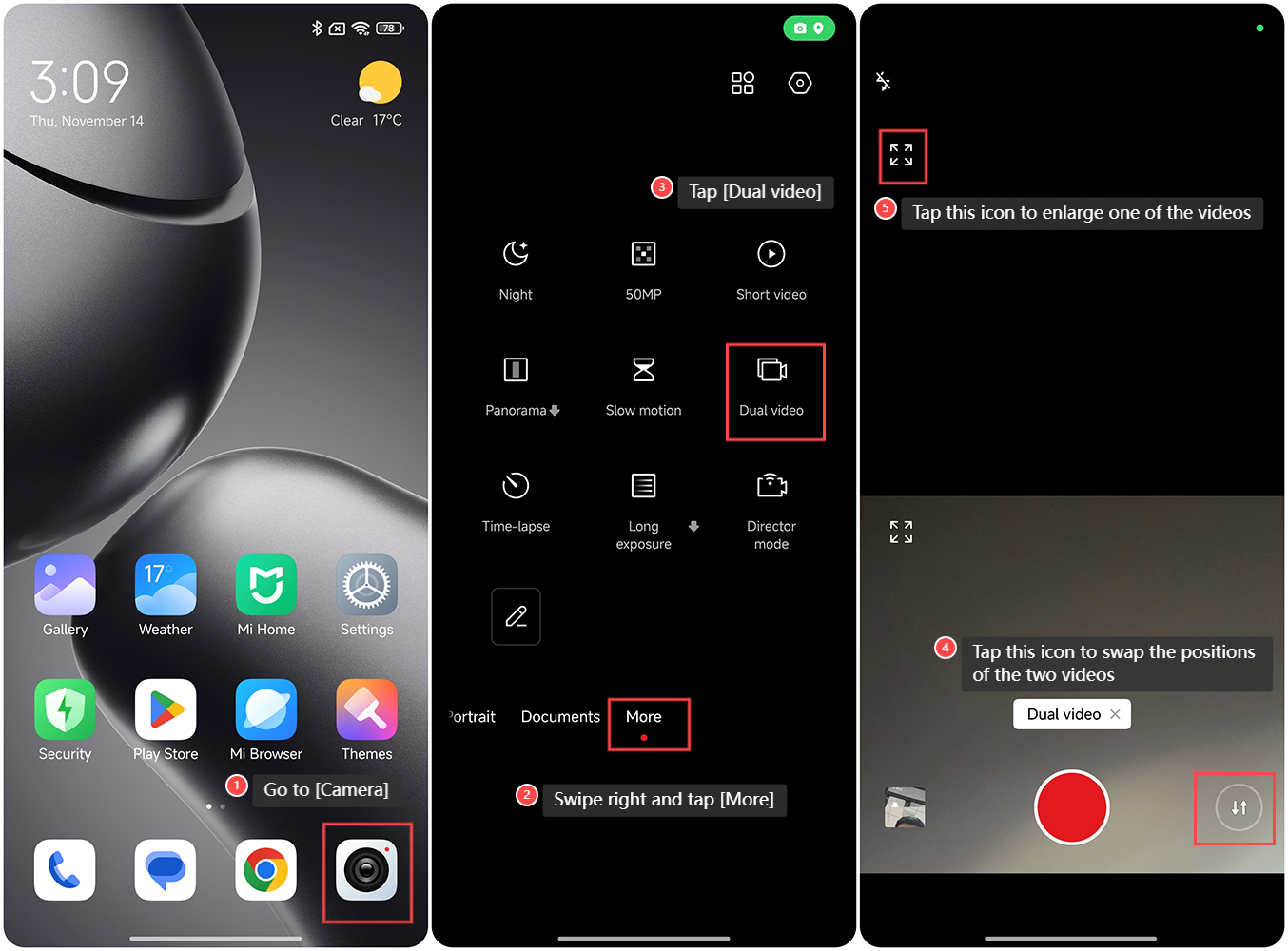
To use Dual video on the camera of the Xiaomi 14T Pro, please refer to the following steps:
1. Go to [Camera] on your phone;
2. Swipe right and tap [More];
3. Tap [Dual video];
4. You can tap this icon to swap the positions of the two videos;
5. Tap this icon to enlarge one of the videos.
Note:
After enlarging one of the videos, you can drag the small video window to change its position.
To use Dual video on the camera of the Xiaomi 14T Pro, please refer to the following steps:
1. Go to [Camera] on your phone;
2. Swipe right and tap [More];
3. Tap [Dual video];
4. You can tap this icon to swap the positions of the two videos;
5. Tap this icon to enlarge one of the videos.
Note:
After enlarging one of the videos, you can drag the small video window to change its position.
Does it help?
Yes
No