

How to change the Leica photographic styles when shooting on the Xiaomi 14T Pro?
The Xiaomi 14T Pro supports changing the Leica photographic styles when shooting. The feature allows you to choose different color styles based on your personal creative preferences and shooting scenarios to achieve the best photographic results.
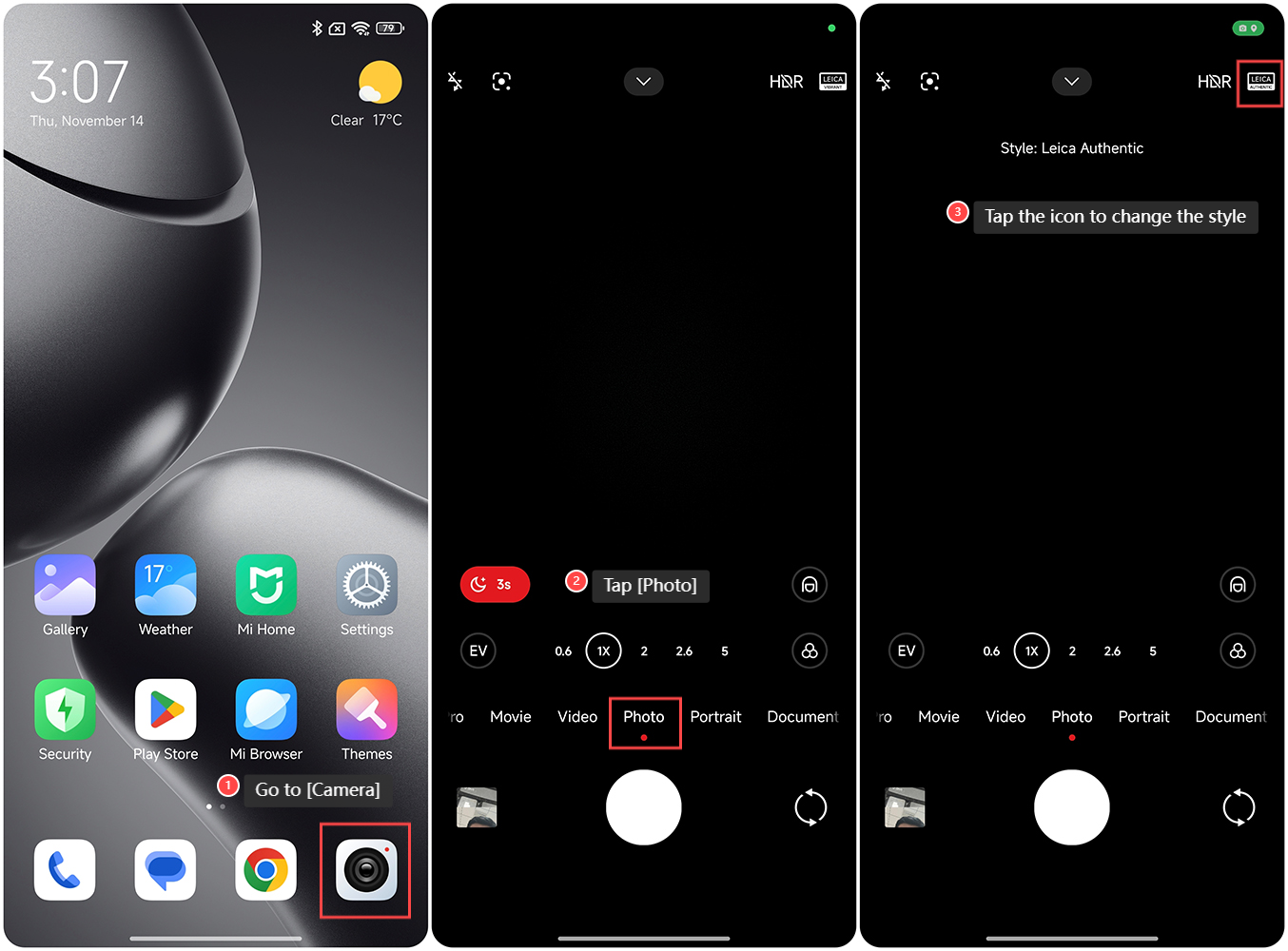
To change the Leica photographic styles when shooting on the Xiaomi 14T Pro, please refer to the following steps:
1. Go to [Camera] on your phone;
2. Tap [Photo];
3. Tap the icon at the upper right corner of the screen to select [Leica Authentic] or [Leica Vibrant].
Note:
1. The Leica Authentic style is designed to deliver natural, true-to-life color reproduction, emphasizing accuracy and subtlety. It preserves the original tones of the scene, making it ideal for capturing realistic details in portrait, landscape, and documentary photography, where color fidelity is key;
2. The Leica Vibrant style enhances color saturation and contrast, creating vivid, striking images. This mode is perfect for situations where you want to bring out bold, dynamic colors, such as in street photography, travel shots, or any scenario where a more visually impactful and energetic look is desired.
To change the Leica photographic styles when shooting on the Xiaomi 14T Pro, please refer to the following steps:
1. Go to [Camera] on your phone;
2. Tap [Photo];
3. Tap the icon at the upper right corner of the screen to select [Leica Authentic] or [Leica Vibrant].
Note:
1. The Leica Authentic style is designed to deliver natural, true-to-life color reproduction, emphasizing accuracy and subtlety. It preserves the original tones of the scene, making it ideal for capturing realistic details in portrait, landscape, and documentary photography, where color fidelity is key;
2. The Leica Vibrant style enhances color saturation and contrast, creating vivid, striking images. This mode is perfect for situations where you want to bring out bold, dynamic colors, such as in street photography, travel shots, or any scenario where a more visually impactful and energetic look is desired.
Does it help?
Yes
No