

How to add eSIM on the Xiaomi 14T?
The eSIM (embedded SIM) on the Xiaomi 14T is a digital SIM card technology that allows a device to connect to a mobile network without needing a physical SIM card. Instead, eSIM is built directly into the device and can be programmed and activated over the air by the carrier. You can switch networks or manage multiple network profiles on one device more easily.
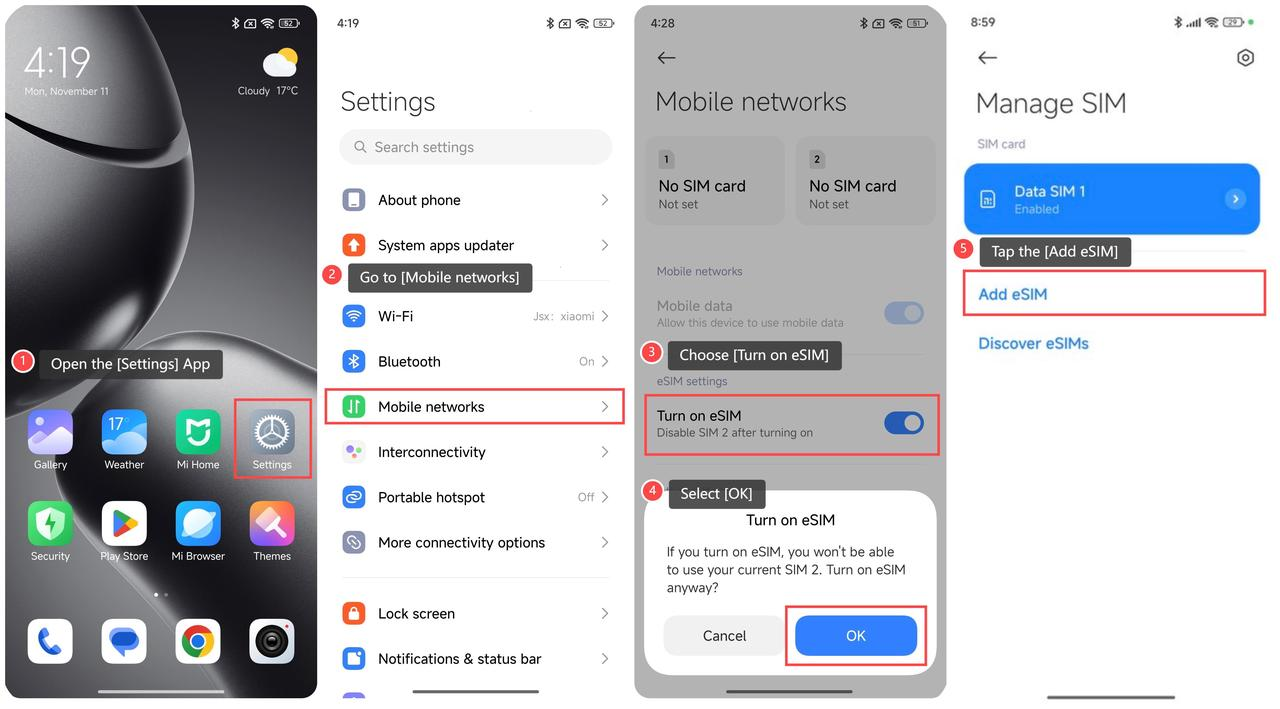
To add eSIM, please refer to the following steps:
- Open the [Settings] App;
- Go to [Mobile networks];
- Choose [Turn on eSIM], then your phone will pop up an option;
- Select [OK];
- YouTap the [Add eSIM];
- Then, scan the QR code provided by your carrier.
Note:
- The eSIM technology allows easy switching between profiles, requiring attention to privacy and security.
- Use of eSIM requires a wireless service plan. This service plan may be subject to certain restrictions of use on switching service providers and roaming (even after contract expiration). eSIM availability may vary depending on country/region and carrier. For more details, please contact your carrier for more information.
Does it help?
Yes
No