

How to use the Director mode on the Xiaomi 14T Pro camera?
The Xiaomi 14T Pro supports the Director mode. It presents a professional film camera interface with advanced parameter controls, supporting up to 4K at 60 frames per second. It supports shooting in log format and can also connect to a Pad or smartphone for monitoring, offering a comprehensive professional video shooting experience.
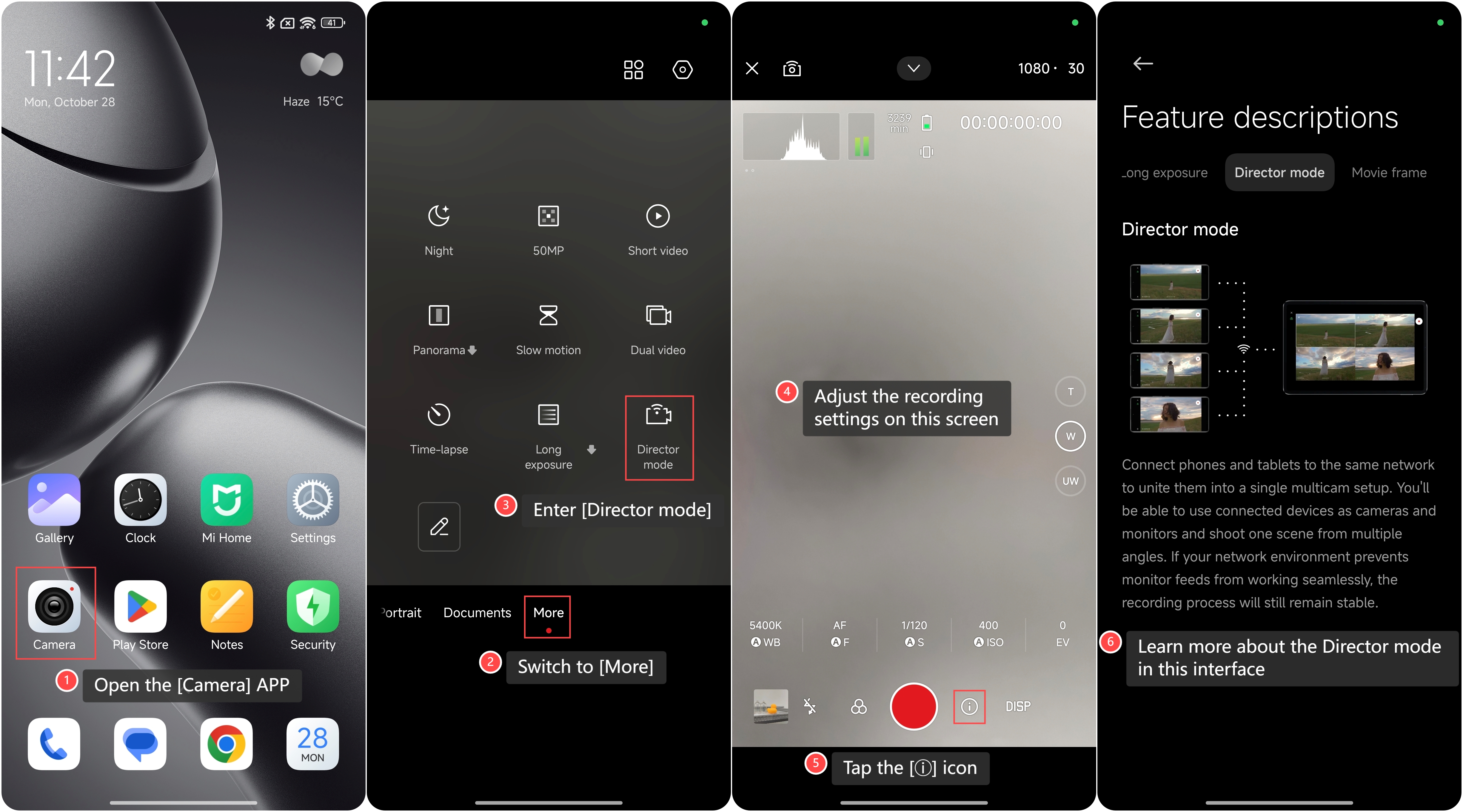
To use the Director mode on the phone, please refer to the following steps:
1. Open the [Camera] APP on your phone;
2. Switch to [More];
3. Enter [Director mode];
4. You can adjust the recording settings on this screen;
5. Additionally, you can also tap the [ⓘ] icon;
6. You can learn more about the Director mode in this interface.
To use the Director mode on the phone, please refer to the following steps:
1. Open the [Camera] APP on your phone;
2. Switch to [More];
3. Enter [Director mode];
4. You can adjust the recording settings on this screen;
5. Additionally, you can also tap the [ⓘ] icon;
6. You can learn more about the Director mode in this interface.
Does it help?
Yes
No