

How to set anti banding on the Xiaomi 14T Pro camera?
The Xiaomi 14T Pro supports the function of anti banding, which helps minimize flicker or banding effects caused by certain types of artificial lights, such as fluorescent or LED bulbs. By synchronizing the camera’s shutter speed with the frequency of the lighting, it produces clearer and more consistent images. Anti-banding can help maintain true-to-life colors in your photos, especially under mixed or artificial lighting conditions.
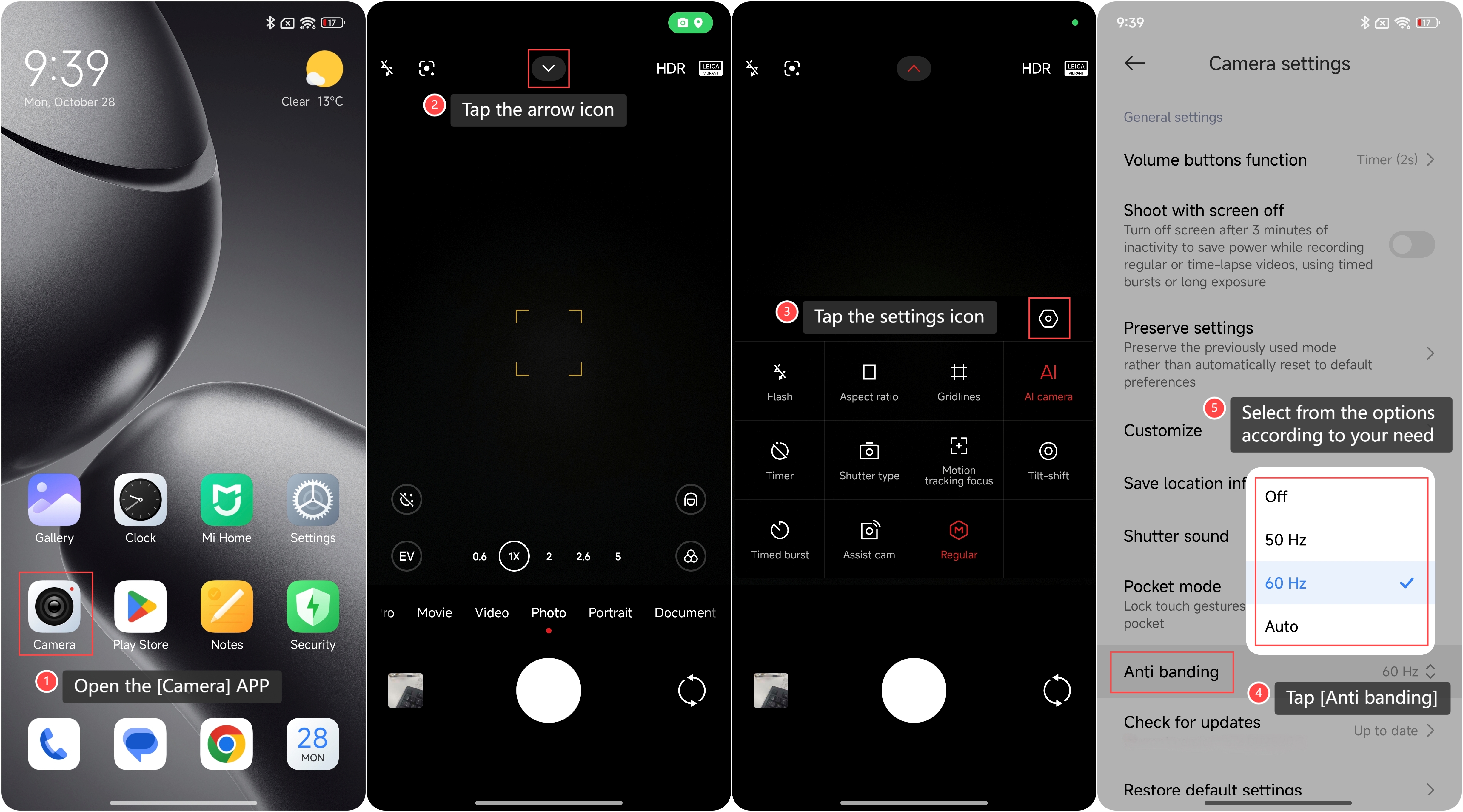
To set anti banding on your phone, please refer to the following steps:
1. Open the [Camera] APP on your phone;
2. Tap the arrow icon on the top of the screen;
3. Tap the settings icon;
4. Tap [Anti banding];
5. Select from the options according to your need.
To set anti banding on your phone, please refer to the following steps:
1. Open the [Camera] APP on your phone;
2. Tap the arrow icon on the top of the screen;
3. Tap the settings icon;
4. Tap [Anti banding];
5. Select from the options according to your need.
Does it help?
Yes
No