

How to turn on motion tracking on the Xiaomi 14T?
The Xiaomi 14T supports the Motion tracking focus function. It can allow the camera to lock onto and follow a moving subject, keeping it in focus throughout the recording. This is especially useful for capturing dynamic scenes, such as sports or pets in action, as it ensures the subject remains sharp and clear even while in motion.
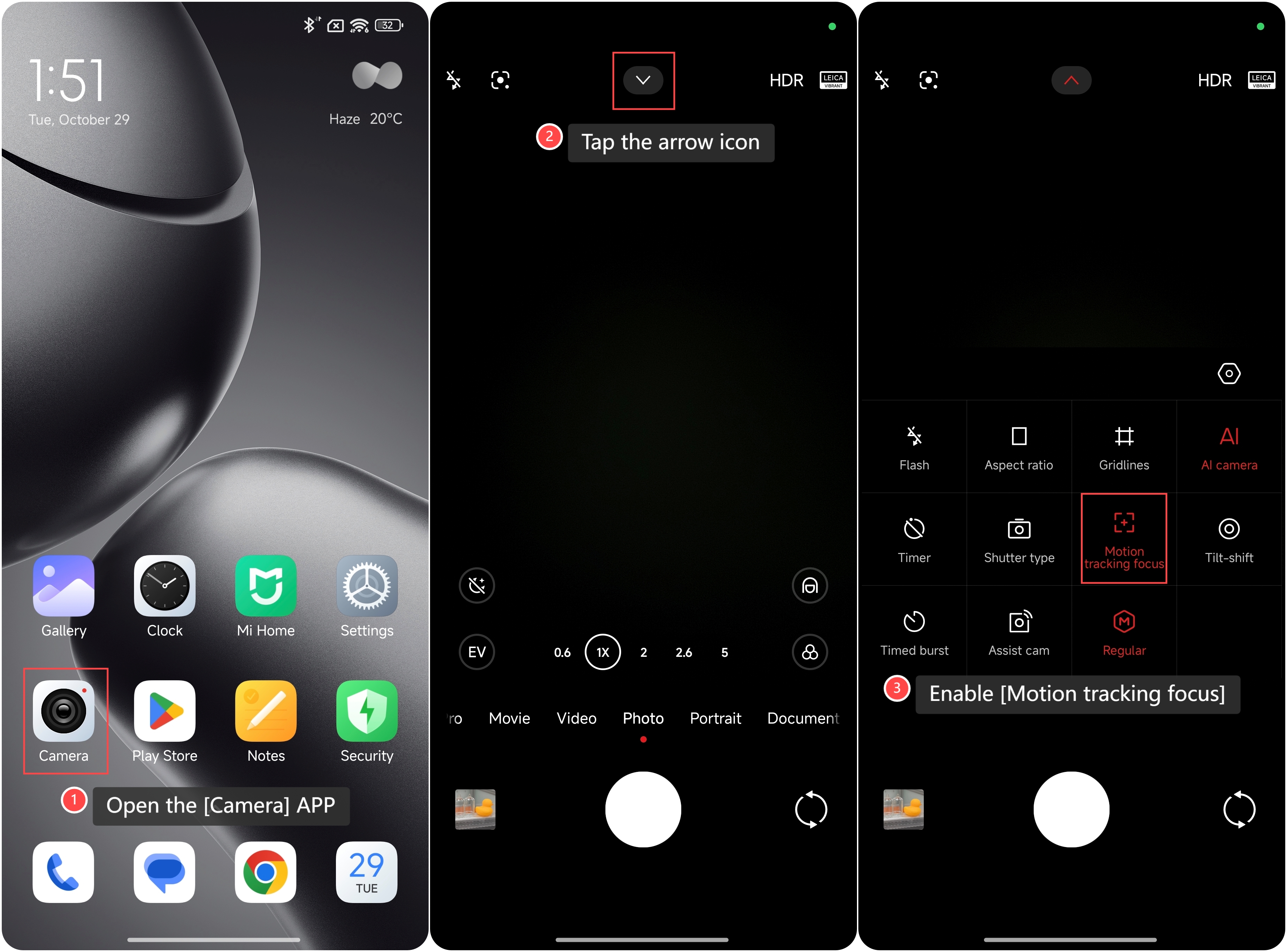
To turn on the feature on your phone, please refer to the following steps:
1. Open the [Camera] APP on your phone;
2. Tap the arrow icon on the top of the screen;
3. Enable [Motion tracking focus].
To turn on the feature on your phone, please refer to the following steps:
1. Open the [Camera] APP on your phone;
2. Tap the arrow icon on the top of the screen;
3. Enable [Motion tracking focus].
Note:
Ensure adequate lighting, as low-light conditions can reduce tracking accuracy.
Ensure adequate lighting, as low-light conditions can reduce tracking accuracy.
Does it help?
Yes
No